What is React Native and why do so many businesses choose this framework to build mobile apps? React Native is an open-source framework developed by Meta that lets you build Android and iOS apps with JavaScript or TypeScript while reusing code. In this article, TOT will help you understand how React Native works, its pros and cons, the tools you need, the development process, and when a business should choose this framework.
>>> See more articles:
- What is 2FA? How to get codes & two-factor authentication
- What is SSO? Types and how SSO single sign-on works
- What is PCI DSS? The role and 12 PCI DSS compliance requirements
Quick summary
- React Native is Meta’s open-source framework, using React together with JavaScript or TypeScript to develop cross-platform apps.
- React Native lets you share most of the codebase between Android and iOS, while also supporting native code integration when needed.
- React Native has many strengths such as code reusability, Fast Refresh and the React ecosystem, but it still has some limitations around dependencies and native integration.
- React Native suits many types of apps such as e-commerce, fintech, EdTech, booking, CRM and internal management applications.
- Businesses should assess product requirements, team capabilities and the level of native integration before choosing React Native for a project.
What is React Native?
React Native is an open-source framework developed by Meta, using React together with JavaScript or TypeScript to build cross-platform apps with native interfaces. Instead of developing a separate codebase for each operating system, React Native lets developers share most of the source code across platforms such as Android and iOS.
The framework provides React components such as View, Text, Image and TextInput, then maps them to the corresponding native UI elements of each platform. Thanks to this model, React Native combines the code reusability of cross-platform development with the ability to integrate native features when an app has specific requirements.
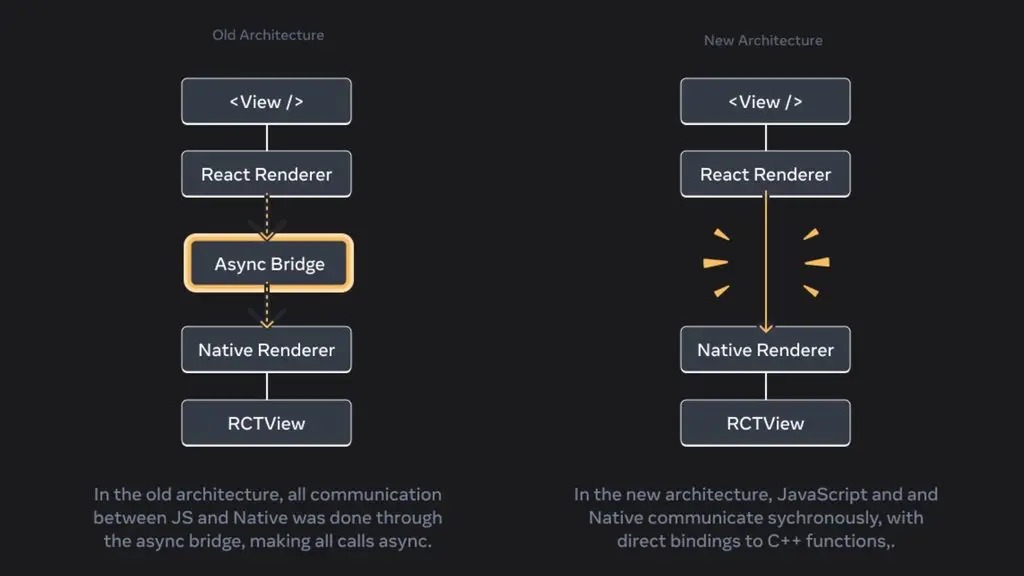
React Native originated at Facebook and was first announced in 2015. Initially, the framework focused on helping developers build mobile apps using technologies familiar from the React and JavaScript ecosystem. Across many versions, React Native has continued to be developed by Meta and the community, including important architectural changes aimed at improving the connection between JavaScript and native code.
The New Architecture, with components such as Fabric, TurboModules and JSI, is a notable step forward in this process. Together with community involvement and third-party projects, the React Native ecosystem keeps expanding beyond Android and iOS.
In terms of purpose, React Native is mainly used to develop mobile apps for Android and iOS, but the scope of its ecosystem is not limited to these two platforms. Through supporting projects, React Native can be extended to many other environments.
React Native currently has projects for Windows, macOS, visionOS, OpenHarmony and tvOS. Meanwhile, React Native Web supports using React Native APIs and components in a web environment. Therefore, depending on the specific supporting framework or project, developers can use React Native for:
- Mobile apps: Android app development and iOS.
- Android: Building apps that can integrate native APIs and features.
- iOS: Developing apps for iPhone and devices in the Apple ecosystem.
- Desktop: Through projects such as React Native Windows and React Native macOS.
- Web: Through React Native Web.
- TV and extended platforms: Through projects such as React Native tvOS, visionOS and OpenHarmony.
>>> Read more:
- What is SOC? Understanding the Security Operations Center (SOC)
- What is HTTPS? The difference between HTTP and HTTPS? Why you should use HTTPS?
- What is a vulnerability assessment? Solutions for scanning and managing security vulnerabilities
How does React Native work?
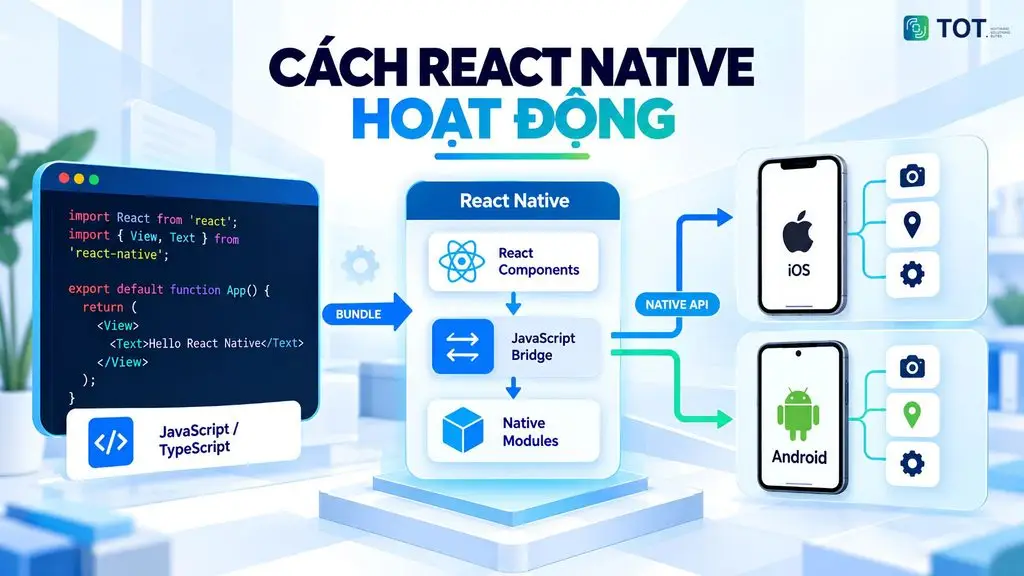
React Native works based on a combination of React, JavaScript or TypeScript, and the native components of each platform. Developers write the app’s logic and interface in JavaScript or TypeScript. React is responsible for organizing components and managing UI state.
React Native takes the UI structure from React and handles the rendering process. The React components are then connected to the corresponding native components on Android or iOS. As a result, the same codebase can be used for multiple platforms.
React Native’s working architecture
The basic flow of React Native can be pictured as follows:
JavaScript/TypeScript → React → React Native → Native Components → Android/iOS
Developers start by writing logic and UI in JavaScript or TypeScript. React manages components, state and the UI update process. React Native takes these components and converts them into elements suitable for the target platform.
On Android and iOS, the final app is displayed through native components. This approach lets developers share most of the code across platforms. At the same time, the app can still interact with native APIs when needed.
>>> See more:
- What is DNS over HTTPS? How it works and how to enable DoH
- A detailed guide on how to best secure a WordPress website
How does React Native use JavaScript and TypeScript?
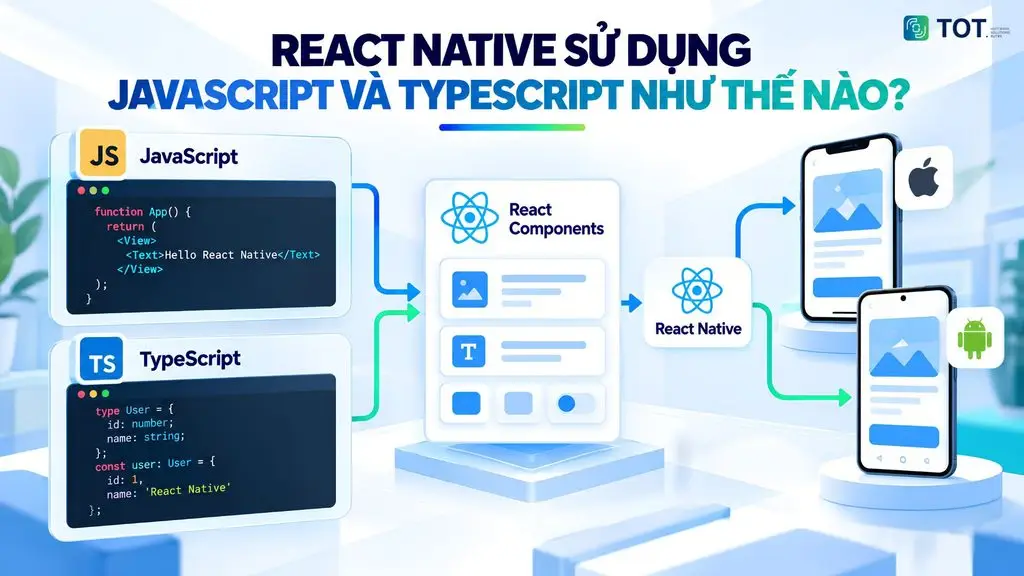
JavaScript is the common language in the React Native ecosystem. Developers can use JavaScript to write application logic and build React components. TypeScript adds a type system to JavaScript. This helps catch many errors right during development.
TypeScript also works well for projects with large codebases. Components such as state, data handling and business logic can all be written in JavaScript or TypeScript. Code that does not depend on the platform can be shared between Android and iOS.
>>> Learn more:
- What is website security? Its importance and how to keep your website safe
- Build an app for Android/iOS easily, without knowing how to code
How do React Components and Native Components work together?
In React Native, developers build the interface using React components. These components are mapped by React Native to the platform’s UI elements. As a result, developers can use React’s familiar approach. The app still uses the components appropriate for the native environment.
| React Native Component | Role |
| View | Creates containers and lays out the interface |
| Text | Displays text content |
| Image | Displays images |
| TextInput | Creates data input fields |
These components are the foundation for building React Native interfaces. When the app runs on Android or iOS, they are processed in React Native’s rendering system to create the interface on the corresponding platform.
How does JavaScript communicate with native code?
React Native needs to connect the JavaScript side with the native capabilities of Android and iOS. For features not available in JavaScript, the app can use Native Modules or the corresponding native APIs. Developers can also create their own modules to connect JavaScript code with platform features.
In the New Architecture, React Native uses JSI, Fabric and TurboModules to improve how JavaScript interacts with native code. JSI allows JavaScript and C++ code to interact more directly. TurboModules modernize the mechanism for accessing native modules. For specific requirements, developers can still write native code in Kotlin/Java on Android or Swift/Objective-C on iOS.
>>> See more:
- What is HSTS? How the HSTS security mechanism works and how to enable or disable it
- What is PKI? An overview of Public Key Infrastructure

How does React Native’s New Architecture work?
The New Architecture is React Native’s new architecture that removes the old Bridge to speed up communication between JavaScript and native code, helping apps run more smoothly and efficiently. This architecture changes how the framework handles rendering and communicates with native code. Its three key components are Fabric, TurboModules and JSI.
- Fabric is React Native’s new rendering system. Fabric handles the creation and updating of the interface. It also improves interoperability between React Native and the host platform.
- TurboModules is a new mechanism for JavaScript to access native modules. It is designed to improve integration between JavaScript and native code.
- JSI (JavaScript Interface) provides an interface for JavaScript to interact more directly with native objects. This approach helps reduce the cost of converting and serializing data between JavaScript and native.
The rendering process can be simplified as:
React Components → Render → Commit → Mount → Native UI
In React Native, this process produces the final interface on the target platform. From React Native 0.76, the New Architecture is enabled by default in React Native projects.
>>> Read more:
- What is CSP? A complete A–Z guide to the Content Security Policy
- The TLS encryption standard – what is it? Functions & how it works
What role does Hermes play in React Native?
Hermes is a JavaScript engine optimized for React Native. This engine is responsible for executing JavaScript in the app. Hermes is designed to improve factors such as startup time and resource usage.
React Native began integrating Hermes under the Bundled Hermes model from version 0.69. From React Native 0.70, Hermes is enabled by default. For typical app developers, using Hermes is mostly handled by the framework during the build and run process.
Advantages and disadvantages of React Native
React Native is widely used for cross-platform app development thanks to its ability to share code between Android and iOS. The framework also leverages the React and JavaScript/TypeScript ecosystem.
However, React Native does not completely eliminate the need for native code. The framework’s effectiveness also depends on the app’s architecture, the libraries used and the requirements of each project.
Advantages of React Native
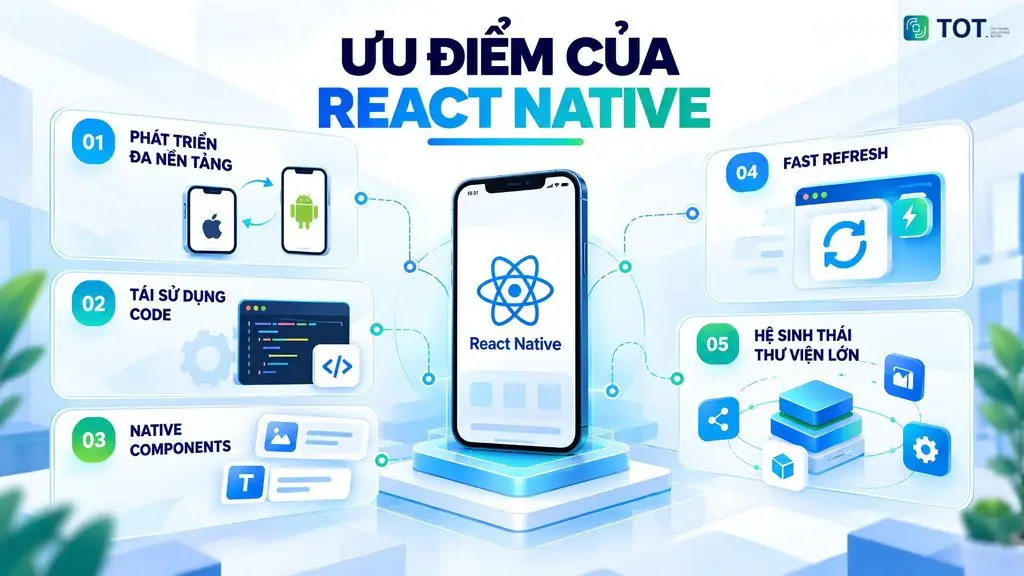
- Cross-platform app development
This is one of React Native’s standout advantages. Developers can use the same framework to build apps for Android and iOS. Most of the business logic and many UI components can be shared across platforms. This approach reduces the need to maintain two completely independent codebases. Businesses can also roll out equivalent features across multiple platforms.
- Code reusability
This capability makes React Native suitable for projects that need to be developed on multiple operating systems. Developers can share components such as business logic, data handling, state and API connections.
However, platform-dependent code can still be separated out when needed. As a result, the team can maintain a shared codebase structure while still handling the differences between Android and iOS.
- Native Components
This is an important characteristic of React Native. The framework provides components such as View, Text, Image and TextInput to build the interface. These components are processed to create an interface appropriate for the target platform. Developers can also integrate native code when the app needs to access specific Android or iOS features.
- Fast Refresh
This feature supports the process of developing and testing the interface. When developers change code, the app can update the relevant part of the UI without restarting the entire app in many cases. This shortens the loop between writing code, testing and adjusting. Fast Refresh is especially useful when developers frequently change the UI or component logic.
- A large library ecosystem
The framework has a broad developer community and many libraries that support common needs. Developers can find solutions for navigation, state management, networking, animation and many other functions. However, the quality and compatibility of each library should be checked before adding it to a project.
Finally, React Native supports JavaScript and TypeScript. JavaScript lets developers leverage their knowledge from the web and React ecosystem. TypeScript adds a type system to JavaScript. This helps control the codebase and catch some errors right during development. This is an advantage for teams that already have experience with React, JavaScript or TypeScript.
>>> Learn more:
- What is MFA? Understanding multi-factor authentication & its role in modern security
- What is CSRF? Attack techniques and how to effectively prevent CSRF
- The detailed 8-step A-to-Z mobile app design process
Disadvantages of React Native
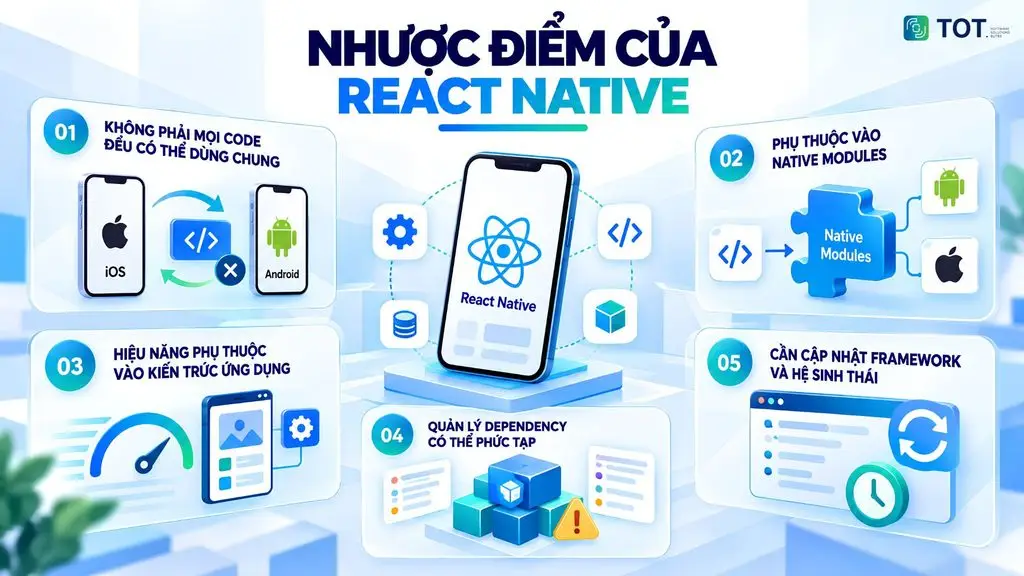
- Not all code can be shared
React Native can share code across multiple platforms, but not all code can be shared. Android and iOS have different operating systems, APIs and UI rules. Some features exist on only one platform. In those cases, developers need to use platform-specific code or implement separate logic for each operating system. Therefore, the actual level of code reuse depends on the characteristics of the app.
- Dependence on Native Modules
React Native provides many APIs and components for common needs. However, some specific features may not be directly supported by the framework. In that case, the app needs to use Native Modules or libraries capable of connecting to native code. Developers may have to work with Kotlin/Java on Android or Swift/Objective-C on iOS.
- Performance depends on the app’s architecture
React Native can serve many types of mobile apps. However, actual performance does not depend on the framework alone. How components are organized, state is managed, data is handled, animations are done and native code is called can all affect the user experience. Apps with special processing requirements should be evaluated and optimized individually rather than assuming React Native is the right fit by default.
- Dependency management can be complex
A React Native app often uses many third-party packages. Each package may have a different version, native requirements and level of compatibility. When upgrading React Native or the operating system, some dependencies may need to be updated accordingly. The team needs to check compatibility and manage versions carefully to limit errors during the build process.
- The framework and ecosystem need updating
React Native and its ecosystem need to be updated regularly. New versions may change APIs, architecture or compatibility requirements. Third-party libraries also have their own update cycles. If a project stays on a very old version for a long time, upgrading later can become more complex. Therefore, the development team needs a plan for version management, dependencies and periodic testing.
>>> See more:
- Top 20 most reputable and professional app design companies
- 8 mobile app design principles that improve user experience
- TOP 15+ highly effective, super easy AI app-building tools
Why should you choose React Native to develop apps?
React Native suits projects that need to develop apps on multiple platforms while still wanting to maintain native integration. The framework lets you share most of the source code between iOS and Android.
At the same time, developers can use JavaScript or TypeScript and leverage the React ecosystem. React Native also supports Native Components, Native Modules and platform-specific code. As a result, businesses can balance code reusability, development speed and the technical requirements of the app.
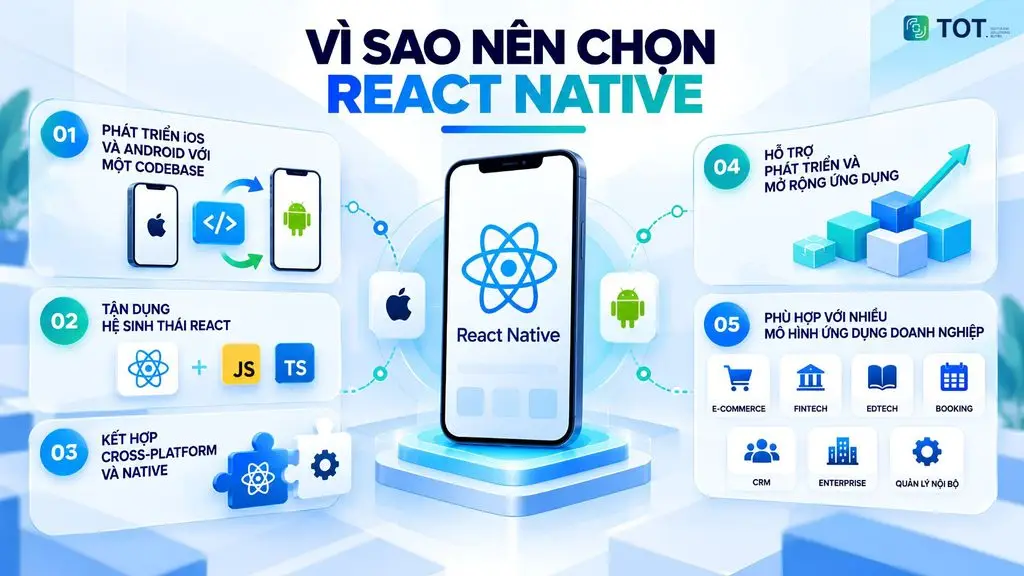
Develop iOS and Android apps with one codebase
React Native lets developers build iOS and Android apps from a single shared codebase. Most of the business logic, state and many UI components can be shared across platforms. This approach reduces the effort of developing two separate apps.
Using a shared codebase also helps with maintenance. When changing shared logic, developers can update multiple platforms within the same project. However, React Native still allows handling the differences between iOS and Android separately. Developers can use platform-specific code when a feature requires different behavior on each platform.
Leverage the React and JavaScript/TypeScript ecosystem
React Native uses React combined with JavaScript or TypeScript. This is an advantage for teams that already have experience developing apps or websites with React. Developers can apply familiar concepts such as components, state and props when building mobile apps.
The JavaScript ecosystem also provides many libraries and tools that support development. In addition, TypeScript adds a type system to JavaScript. TypeScript helps developers catch some errors during development and supports maintaining the codebase as the project grows.
Combine cross-platform and native capabilities
React Native does not limit the app to the shared code layer. The framework provides Native Components and allows integrating Native Modules when the app needs to access platform features. Developers can also write platform-specific code for iOS or Android when needed.
This approach suits apps with a lot of business logic that still need to use the platform’s native features. For example, a feature can use shared logic in React Native but call a native API to handle a specific function. As a result, businesses can share the appropriate code without giving up the ability to extend with native.
Support for app development and scaling
React Native has a diverse development ecosystem, in which Expo provides tools and services that support the app-building process. Developers can also integrate APIs, SDKs and third-party services to add functionality to the product.
As the product grows, the codebase can be expanded to meet business needs. Shared modules can continue to be reused. Platform-dependent parts can be separated out. This organization helps the app adapt to new requirements without necessarily having to rebuild the entire system.
Suitable for many enterprise application models
React Native can be used for many types of React Native app serving different business needs. Common models include e-commerce, fintech, EdTech, booking and CRM. The framework can also be used to build enterprise apps and internal management applications.
For products that need to be deployed on both iOS and Android, React Native offers an approach based on a shared codebase. For apps that need to integrate APIs, SDKs or native features, the framework still supports extending per platform.
Therefore, React Native can address many problems, from customer-facing apps to systems that serve a business’s internal operations.
>>> Read more:
- 6 rules for designing a mobile app interface with standard UI/UX
- A guide to building an app with Low-code, simple and effective
- How to build an app with AI for free, detailed and simple
Comparing React Native with other frameworks
React Native is one of many options for developing cross-platform apps. Each technology has a different approach to language, rendering, interface and native integration. React Native uses React and JavaScript or TypeScript, and renders React primitives into the platform’s native UI.
React Native vs ReactJS
React Native and ReactJS both use React as the foundation for building interfaces. However, the two technologies target different environments. ReactJS is mainly used to build web interfaces. React Native is designed to build native apps for Android, iOS and supported platforms.
| Criteria | React Native | ReactJS |
| Goal | Developing mobile apps and supported native platforms | Building web interfaces and applications |
| Language | JavaScript or TypeScript | JavaScript or TypeScript |
| UI | Uses React Native components such as View, Text, Image | Uses React components and HTML elements |
| Rendering | React components are rendered into the platform’s native UI | React components are rendered in a web environment |
| Main platform | Android, iOS and supported platforms | Web browser |
| Native API | Can access native APIs and integrate native code | Mainly interacts with Web APIs |
| Code sharing | Can share most code between mobile platforms | Can share code within web environments |
| Ecosystem | React Native, Expo and the JavaScript/React ecosystem | React and the web ecosystem |
| Best suited for | Mobile apps, cross-platform apps that need native functionality | Websites, web apps and web interfaces |
The key difference lies in the rendering environment. React Native uses native components instead of web elements. Meanwhile, ReactJS focuses on building UI in a web environment.
>>> Learn more:
- How to design a sales app effectively for beginners
- Top 19 free task-organization and personal-planning apps
React Native vs Flutter
React Native and Flutter both support cross-platform app development. However, the two frameworks use different technologies and rendering models. React Native is based on React and JavaScript/TypeScript.
Flutter uses Dart and has its own UI framework and rendering engine. Flutter currently uses Impeller as its default rendering engine and has an architecture based on a C/C++ engine.
| Criteria | React Native | Flutter |
| Language | JavaScript or TypeScript | Dart |
| UI framework | React Native uses React components and native components | Flutter provides its own widget system |
| Rendering | React components are rendered into the platform’s native UI | Flutter uses its own engine to rasterize the interface |
| Ecosystem | React, React Native, Expo and the JavaScript ecosystem | Flutter, Dart and Flutter’s package ecosystem |
| Native integration | Supports Native Modules, Native Components and native code | Supports native integration through platform channels and native integration mechanisms |
| Developer experience | Suits developers already familiar with React, JavaScript or TypeScript | Suits developers working with Dart and Flutter |
| Code sharing ability | Can share most code across platforms | Aims for a single shared codebase for multiple platforms |
| Suitable project types | Mobile apps that need to combine shared code with native functionality | Cross-platform apps that need a unified UI and rendering system |
Flutter provides its own widget system and rendering engine. According to Flutter’s documentation, Dart code is compiled into native machine code on mobile, and the engine is responsible for rendering. React Native takes a different approach, in which components are mapped to the platform’s native UI.
>>> Read more:
- A guide to writing an iOS app for people who cannot code
- Top 17 leading professional graphic design applications
React Native vs Native App
A Native App is an app developed directly on the platform. For iOS, popular options include Swift and SwiftUI. For Android, developers can use Kotlin and Jetpack Compose. The native approach lets the app work directly with each operating system’s APIs and tools.
| Criteria | React Native | Native App |
| Codebase | Can share most code between iOS and Android | Usually maintains a separate codebase for each platform |
| Language | JavaScript or TypeScript, combined with native code when needed | Swift/SwiftUI for iOS; Kotlin/Jetpack Compose for Android |
| Performance | Depends on the architecture, implementation and requirements of the app | Can directly leverage the platform’s native APIs and mechanisms |
| Native API | Can be accessed through React Native APIs, libraries or native code | Direct access to the operating system’s APIs |
| Customizability | High and can be extended with native code | High, especially for platform-specific features |
| Development time | Can reduce effort when iOS and Android need to be developed at the same time | May require separate development and testing for each platform |
| Maintenance | Part of the shared code can be maintained centrally | Each platform has its own codebase and maintenance cycle |
| Staffing requirements | Can focus on a React/JavaScript/TypeScript team and add native expertise when needed | Usually needs developers with dedicated expertise for iOS and Android |
| Best suited for | Products that need a lot of shared code across platforms | Apps that require deep control and use many platform-specific APIs |
React Native still allows integrating native code when a required feature is not available in the framework or community libraries. The official documentation also mentions the ability to connect with Objective-C, Swift, Java, Kotlin and C++.
>>> Read more:
- Top 10 best free, high-quality home design apps
- A simple guide to deploying AI in mobile apps
React Native vs Ionic
React Native and Ionic both support cross-platform app development but take different approaches. React Native uses React Native components and renders them into native UI. Ionic focuses on web technologies such as HTML, CSS and JavaScript. Ionic can be combined with React and uses Capacitor to deploy web apps to iOS and Android.
| Criteria | React Native | Ionic |
| Core technology | React Native, JavaScript/TypeScript | HTML, CSS, JavaScript/TypeScript |
| UI | React Native components | Ionic’s Web Components |
| Rendering | Renders React components into native UI | UI based on web technologies |
| Supported frameworks | Based on React Native | Supports React, Angular, Vue and JavaScript |
| Native integration | Native APIs, Native Modules and native code | Capacitor provides APIs and plugins to access native features |
| Code sharing | Shares code between mobile platforms | A single codebase can target iOS, Android and web |
| Developer experience | Suits developers with a React Native background | Suits developers with a web background |
| Web development | Not the main focus | A key part of the architecture |
| Best suited for | Mobile apps that need native UI and native integration | Apps that need to leverage web skills and deploy on mobile and web |
Ionic uses web technologies and can be combined with React. With Capacitor, an Ionic app can access native features such as camera, file system and location through a unified API.
Overall, the choice of framework should be based on the target platform, the team’s skills, UI requirements, the level of native API usage and the product development strategy. React Native suits projects that want to leverage React and JavaScript/TypeScript but still need the ability to build native interfaces and integrate native code when necessary.
>>> Learn more:
- AI in UI/UX design: The power of Generative AI
- Top 35 of the best, most effective time management apps
What types of apps can React Native build?
React Native can be used to develop many types of apps that run on iOS and Android. The framework suits products that need to share code across multiple platforms and can integrate APIs, SDKs or native features. Depending on the product requirements, React Native can be applied to e-commerce, finance, education, enterprise and internal management apps.
E-commerce apps
React Native suits e-commerce apps that need to be deployed on both iOS and Android. Functions such as the product catalog, search, cart, checkout and account management can be built with React Native.
The app can also integrate APIs from the backend system to handle products, orders and customer information. Third-party SDKs can be used for payments, maps, push notifications or data analytics.
With this model, businesses can share most of the business logic across platforms. Functions that depend on the operating system can still be handled with platform-specific code or native modules.
Finance and fintech apps
React Native can be used for finance and fintech apps such as digital banking, e-wallets or personal finance management apps. Common features include account management, transactions, payment history, notifications and user authentication.
These apps often need to integrate many APIs and SDKs from the backend system or third-party services. React Native supports this development model through JavaScript/TypeScript and the ability to connect with native code.
However, requirements for security, authentication and performance need to be designed from the outset. Sensitive functions or those that depend deeply on the platform may need their own native implementation.
Education apps
React Native can also be used to develop education apps across multiple platforms. Products can include online learning apps, courses, practice, testing or learning-progress management.
Developers can build the interface, manage state and connect data with React Native. The app can also integrate video, push notifications, payments or third-party services as required.
The shared codebase model helps the team roll out similar features on iOS and Android. Platform-specific functions can be handled separately when needed.
Enterprise apps
React Native can serve many enterprise apps for customers or employees. Some examples include CRM, sales management, customer management, scheduling and apps that support business operations.
These apps often need to connect with the backend system, internal APIs and third-party services. React Native lets developers build the interface and business logic shared across multiple platforms.
As the business expands its product, the team can keep adding modules and integrating more services. For features that need to access native APIs, React Native still supports extending through Native Modules or dedicated code for each platform.
Internal management and operations apps
React Native is also suitable for internal management and operations apps. Businesses can use apps to manage human resources, tasks, assets, inventory, approval processes or operational activities.
Internal apps often need to connect with the business’s administration systems and databases. React Native can handle the mobile interface and connect with the corresponding APIs.
Using a shared codebase also helps the team maintain a consistent experience on iOS and Android. When camera, location, notifications or other native features are needed, the app can use the appropriate APIs and modules.
When is React Native not the right choice?
React Native is not the optimal choice for every type of app. For products that depend deeply on native APIs or a platform’s specific processing capabilities, native development may be more suitable. For example, an app that needs to deeply exploit iOS- or Android-specific features may require a lot of native code.
React Native also needs to be evaluated carefully for apps with special requirements for performance, graphics or real-time processing. In these cases, the team should assess the architecture, libraries and native integration capabilities before choosing the framework.
In addition, if the product targets only a single platform and needs to maximize the use of that platform’s APIs, native development may be a more suitable approach. The choice of technology should be based on product requirements, the team’s capabilities, development time and the long-term maintenance plan.
>>> Read more:
- Top 16 free, easy-to-use mobile sales management apps
- TOP 18 largest software companies in Vietnam

What technologies and tools does React Native need?
To develop React Native apps, developers need to combine many different technologies and tools. JavaScript or TypeScript is used to write logic and the interface. React provides the component model for building the UI. Expo supports creating and developing React Native apps in a way that simplifies the process.
For projects that need deeper control, developers can use the React Native Community CLI. In addition, Android Studio and Xcode support building, running and testing the app on Android or iOS. Metro handles JavaScript bundling, while Hermes is a JavaScript engine optimized for React Native.
JavaScript and TypeScript
JavaScript is the foundational language in the React Native ecosystem. Developers can use JavaScript to write components, handle state, business logic and interact with APIs.
TypeScript extends JavaScript with a type system. New React Native projects now use TypeScript by default, but JavaScript is still supported. TypeScript helps with type checking during development and provides better support when the codebase is large.
React
React provides the component model for React Native. Developers use concepts such as JSX, components, props and state to build the app’s interface.
React Native differs from ReactJS in its runtime environment. ReactJS mainly builds web interfaces. React Native uses React components to describe the mobile interface and connects them with the native components of Android or iOS.
Expo
Expo is a framework based on React Native that simplifies the process of developing Android and iOS apps. Expo provides project-creation tools, native libraries and services that support the development process.
Developers can start a project with create-expo-app and use the Expo CLI to run a development server. Expo also provides Expo Application Services (EAS) for needs such as building, deploying and updating apps.
Expo suits teams that want to shorten the environment setup process. However, Expo does not completely eliminate the ability to use native code. Existing React Native projects can also integrate Expo’s tools and services.
React Native CLI
The React Native Community CLI is a command-line tool for React Native projects that do not use a framework such as Expo. The CLI supports creating projects and working directly with the app’s native structure.
This approach suits teams that need deeper control over Android or iOS. Developers can work directly with the native directories, build configuration and native dependencies. The React Native documentation now recommends using the Community CLI when a project does not use a framework.
Android Studio and Xcode
Android Studio is the official IDE for Android development. In a React Native project, Android Studio provides the Android SDK, emulator and the tools needed to build or test the Android part of the app.
Xcode is the development toolset for Apple’s platforms. With React Native, Xcode is used to build, test and run iOS apps on a simulator or a real device. Xcode also provides a debugger, profiler and tools for the app distribution process.
If using a framework such as Expo, developers may not need to fully set up Android Studio or Xcode from the start for some development workflows. However, the native environment is still needed when a project requires building or customizing native directly.
Metro and Hermes
Metro is the bundler used in the React Native ecosystem. Metro processes JavaScript and the app’s modules to create a bundle for running and building. React Native also uses Babel to transform JavaScript and TypeScript syntax during bundling.
Hermes is an open-source JavaScript engine optimized for React Native. In most cases, React Native uses Hermes to execute the app’s JavaScript. Developers usually do not need to manage this engine directly during normal development.
Each component handles a different part of the app’s development and runtime process. Understanding the role of each tool helps developers choose a configuration suited to the scale and requirements of the project.
>>> See more:
- What is application software? Common types of application software
- TOP 15 best AI code-writing tools

How to start programming in React Native
To start programming in React Native, developers need to prepare JavaScript or TypeScript knowledge and the basic concepts of React. Then they can choose Expo or the React Native Community CLI to create a project. The learning process should go from components, state and navigation to connecting APIs, managing data, debugging and testing. Once the app is complete, developers can build and deploy it to Android or iOS.
1. Prepare your knowledge and development environment
First, beginners should grasp the basics of JavaScript. Important topics include variables, functions, objects, arrays, modules, async/await and asynchronous handling. React Native also uses React concepts such as components, props, state and hooks. The React Native documentation recommends that learners have a JavaScript foundation before starting.
For the environment, developers need Node.js and a code editor. Depending on the development approach, they may need Android Studio for Android or Xcode for iOS. Expo currently supports macOS, Windows and Linux environments for development.
2. Choose Expo or the React Native Community CLI
There are two common approaches when creating a new project. Expo provides a framework and tools that support the React Native development process. This is a convenient choice for beginners because the project initialization and setup process is simplified.
If you need direct control over the native structure, developers can use the React Native Community CLI. React Native provides a guide to creating a project with the command:
npx @react-native-community/cli@latest init MyApp
This approach suits projects that require deep customization on Android or iOS.
3. Create your first React Native project
With Expo, developers can create a new project using create-expo-app:
npx create-expo-app@latest MyApp
cd MyApp
npx expo start
The create-expo-app command creates a project from a built-in template. The default template currently supports TypeScript and the tools needed to start developing an app. After running the development server, developers can open the app on a suitable device or emulator.
With the React Native Community CLI, developers create a project using the CLI, then start Metro and the app following React Native’s guide.
4. Build the interface with React Native Components
After creating the project, the next step is to build the interface using React Native Components. Some basic components include View, Text, Image, TextInput, Pressable and ScrollView.
Developers should start with simple screens. Then they can learn how to organize components, manage state and handle interactions. When the app has many screens, navigation can be added to manage the flow between screens.
5. Connect APIs and manage data
Real-world apps often need to fetch and send data to a backend. Developers can use HTTP APIs to connect with the server side. The data received can be stored in state or in data management mechanisms suited to the app’s scale.
At this stage, you should learn how to handle loading, error, authentication and pagination. For large projects, developers can choose dedicated libraries for server state or global state. The data organization should be designed early to avoid complex state management as the app grows.
6. Debug and test the app
During development, developers need to frequently debug and test on Android and iOS. Testing on multiple platforms helps detect differences in UI, APIs or operating-system behavior.
Developers can use the console, debugger and React Native’s development tools to identify bugs. For real-world apps, you should combine component testing, logic testing and testing of important flows such as login, payment or checkout.
Beyond emulators and simulators, the app should also be tested on real devices before release. This helps detect issues that may not appear in a simulated environment.
7. Build and deploy the app
When the app is complete, developers need to create a build for Android or iOS. For Expo projects, EAS Build can create a binary to bring the app to the Google Play Store or Apple App Store. EAS also supports build workflows for devices and testing environments.
Before release, the team needs to check the app version, environment configuration, signing credentials and each app store’s requirements. After deployment, monitoring errors, performance and user feedback helps the team keep improving the product.
8. A React Native learning path for beginners
Beginners can build a learning path in stages:
- JavaScript/TypeScript: Learn syntax, modules, async/await and type concepts.
- React: Grasp components, props, state, hooks and how to organize the UI.
- React Native: Get familiar with core components, styling, navigation and platform-specific code.
- Real-world apps: Build a small project with forms, APIs, authentication and data management.
- Debugging and testing: Learn how to find bugs and test on Android, iOS and real devices.
- Native integration: Explore Native Modules and how to integrate platform-specific features.
- Build and deploy: Get familiar with the build, signing and app release process.
Beginners should start with a small project rather than learning all the tools at once. After grasping the basics of React Native, you can continue exploring Expo, native development, performance and CI/CD workflows. This learning approach ties knowledge to a real product and makes it easier to scale when you start developing larger apps.
>>> Read more:
- What is an application? Uses & common types of applications
- TOP 20+ AI design software that support leading designers today
A guide to registering and publishing a React Native app
After completing a React Native app, businesses need to prepare a developer account, configure the release and bring the app to each app store. Android uses Google Play Console, while iOS uses the Apple Developer Program and App Store Connect. The process includes registering an account, preparing the app, creating a production build, testing and submitting the app for review.
Registering a Google Play Console account
To publish on Android, developers go to Google Play Console and sign in with a Google Account. Then developers register a developer account, choose a personal or organization account type and complete the verification information.
Google currently applies a one-time registration fee of 25 USD (about 600,000 VND) for a Play Console account. New personal accounts also have testing and device verification requirements before an app can be distributed. Developers also need to prepare a developer name, email and the required profile information.

Registering for the Apple Developer Program
To publish an iOS app, developers need to register for the Apple Developer Program using an Apple Account with two-factor authentication enabled. You can register as an individual or an organization. Apple requires providing and verifying information appropriate to the account type.
The Apple Developer Program fee is currently 99 USD per year (about 2,650,000 VND), with local pricing that may vary by region. After completing this, developers can use certificates, provisioning and App Store Connect to prepare and distribute the app.

Preparing a React Native app before publishing
Before creating a production build, you need to check the app’s important components:
- App name and app icon.
- Splash screen and startup interface.
- Bundle ID for iOS and Application ID for Android.
- Version and build number.
- Permissions such as camera, location or notifications.
- Privacy Policy and privacy information.
- Environment variables and the production API.
- Signing configuration and credentials.
- Testing on real devices.
For Android, the release must be signed with a certificate before being uploaded to Google Play. Google Play also uses Play App Signing for new apps within its scope.
Building and publishing an Android app
The Android process can be pictured as follows:
React Native project → Production build → Android App Bundle (.aab) → Google Play Console → Testing → Production
Developers create a production build and configure app signing. Then the Android App Bundle (.aab) is uploaded to Play Console. Next, the team completes the store listing and takes the app through testing tracks such as internal or closed testing. After meeting Google Play’s requirements, developers can submit a production release for official distribution.
Building and publishing an iOS app
The iOS process can be described as follows:
React Native project → Xcode → Archive → App Store Connect → TestFlight → App Store
Developers need to configure the Bundle Identifier, Signing & Capabilities and provisioning. Then the project is built and archived with Xcode. The build is uploaded to App Store Connect for testing via TestFlight. When testing is complete, the team selects the appropriate build and submits the app to App Review. After approval, the app can be released on the App Store.
Checking and updating the app after release
After the app is released, the team needs to monitor crashes, performance, reviews and user behavior. App Analytics and monitoring tools can help detect issues and assess usage levels. When there are bugs or new features, the team can release an updated version and manage the version and build number.
At the same time, you need to check compatibility with new iOS and Android versions. CI/CD, monitoring and app analytics workflows can be integrated to automate and control the release process.
>>> Learn more:
- What is RSA? How RSA works and its use in digital signatures
- End-to-end encryption End-to-end encryption (E2EE) – what is it? How does it work?
When should a business choose React Native?
React Native suits businesses that need to develop apps on multiple platforms while still wanting to maintain native integration. The framework lets you share most of the codebase between iOS and Android.
At the same time, developers can write platform-specific code or connect with native APIs when needed. Therefore, businesses should evaluate React Native based on the product’s goals, the team’s capabilities and the app’s technical requirements.
A business needs to develop iOS and Android apps
React Native suits a business that needs one app for both iOS and Android. Most of the codebase can be shared between the two platforms. This approach helps keep business logic and features in sync. When there are differences between iOS and Android, developers can still separate the corresponding code. React Native provides Platform and platform-specific files to handle these cases.
A business already has a React or JavaScript team
React Native can suit a business that already has React developers, JavaScript developers, TypeScript developers or frontend developers. The team can leverage their knowledge of React, components and JavaScript/TypeScript to move into mobile development. This approach also helps the business leverage part of its existing ecosystem and development process instead of building the entire capability from scratch.
Apps with a lot of business logic and UI
React Native can be considered for apps with a lot of business logic and UI. Some examples include e-commerce, fintech, EdTech, booking and CRM. The framework also suits customer apps and enterprise apps. Shared components can be developed once for multiple platforms. UI or logic that differs between iOS and Android can still be separated out.
Apps that need to integrate APIs and enterprise systems
React Native suits apps that need to connect with many APIs and enterprise systems. Common cases include REST APIs, GraphQL, authentication and payment gateways. The app can also integrate CRM, ERP, cloud services and push notifications through appropriate libraries or SDKs. When a native API is not yet supported by React Native or existing libraries, developers can build a Native Module to connect with native code.
A business needs to balance development speed and native capabilities
This is one of the cases worth considering React Native. The framework lets a business share a codebase across multiple platforms without being limited to JavaScript or TypeScript. Developers can call native APIs, write Native Modules, use platform-specific code and integrate native SDKs. React Native also supports connecting with Objective-C, Swift, Java, Kotlin or C++ code when needed.
This approach lets the team start with shared code. When the product has specific requirements, the corresponding functionality can be extended with native code. Businesses should assess in advance the level of native integration needed in order to choose a suitable architecture.
When should React Native not be prioritized?
React Native needs to be carefully considered when an app depends very deeply on native APIs or specific SDKs that do not yet have suitable integration. Products with requirements for graphics, 3D or a dedicated game engine may also need a different technology.
Similarly, apps that need extremely deep optimization for a single platform may be better suited to native development. React Native’s performance depends on the app’s architecture and implementation, so special performance requirements need to be evaluated in advance.
In these cases, businesses can refer to the React Native vs Native App section to compare codebase, performance, native APIs, customizability, development time and staffing requirements.
>>> See more:
- What is Cyber Security? 9 common types of Cyber Security
- What is pentest? Things you need to know about penetration testing
Notable React Native projects from TOT
Below are some real-world projects that TOT has successfully delivered with React Native. These examples clearly illustrate how React Native is applied to real apps across many industries:
Peugeot App
- Overview: The Peugeot App mobile app helps users manage their vehicle, including scheduling maintenance, tracking vehicle status and receiving alerts.
- Technology used: React Native (App), .NET Core (API), NextJS (CMS).
- Results:
- The UI/UX was completely redesigned, improving the user experience.
- Features such as scheduling, price lookup, live chat and more are integrated right in the app, increasing convenience for users.

Mazda App
- Overview: The My Mazda App provides maintenance and repair history, offers and quick service booking.
- Technology used: React Native (App), .NET Core (API), NextJS (CMS) — microservices for the backend.
- Results:
- The redesigned interface makes the experience smoother and more user-friendly.
- Synchronizes vehicle data from the DDMS system, manages appointments efficiently, and supports store search, promotions and more.

On-demand app design services at TOT
From the success of the Peugeot App and Mazda App projects built with React Native, TOT has proven its capability in building mobile apps that are performance-optimized, smooth and easy to scale.
With a professional delivery process and a team of seasoned engineers, TOT accompanies businesses in creating apps that run smoothly, look great, are secure and are always updated in line with market changes.
Whether you need to develop a sales app, an internal app or an enterprise management system, TOT delivers the right solution with standout advantages:
- In-depth native app development (iOS/Android) – outstanding performance and optimized speed.
- Cross-platform design with Flutter & React Native – cost-efficient while still ensuring smooth performance across multiple platforms.
- Progressive Web Apps (PWA) – work like a mobile app and install quickly through the browser.
- Integration of modern technologies: AI, chatbot, push notifications, location maps and more to create a smart, interactive experience.
TOT is where every idea is turned into a mobile app that is optimized, flexible and absolutely secure. With the highest security standards (OWASP Top 10, GDPR, SSL), the ability to integrate complex systems, along with continuous maintenance and improvement services, TOT commits to:
- Results beyond expectations
- On-time delivery as committed
- An outstanding customer experience
=> Contact TOT now via hotline: 0906 712 137 or email: long.bui@toponseek.com to get a quote for app design services and discover more optimized technology solutions that help your business grow effectively and sustainably!

Conclusion
What is React Native? It is an open-source framework for developing cross-platform apps with React, JavaScript or TypeScript. React Native lets you share most of the codebase between iOS and Android. The framework also supports integrating APIs and native features when needed. Therefore, React Native suits many enterprise apps, from e-commerce to internal management. Businesses should assess product requirements, team capabilities and the level of native integration before choosing it.
Frequently asked questions about React Native
What is React Native?
React Native is an open-source framework developed by Meta, using React combined with JavaScript or TypeScript to build cross-platform apps. The framework lets developers share most of the codebase between Android and iOS. React Native uses React components such as View, Text, Image and TextInput to build the interface. When running on each platform, the components are processed to create an interface suitable for the native environment. React Native also supports integrating APIs and native code when the app needs specific functionality.
Is React Native frontend or backend?
React Native is on the frontend side of a mobile app, not a backend framework. The framework is used to build the interface, handle interactions and client-side logic on Android and iOS. React Native can connect with a backend through APIs to exchange data. The backend can be built with Node.js, Java, .NET, Python or other technologies. Therefore, a React Native app usually consists of a frontend written in React Native and a separate backend system to handle data, authentication, business logic and database connections.
What is React and how is React Native related to it?
React is a JavaScript library used to build user interfaces, developed by Meta. React uses components to organize the interface and manage how the UI is updated. React Native uses React as the foundation for building the interface of mobile apps. However, React Native does not render the interface with HTML as React does on the web. Instead, the React components are processed to create a UI suitable for the native platform. Therefore, the two technologies share the same React foundation but serve different environments.
What is ReactJS? How do ReactJS and React Native differ?
ReactJS is a JavaScript library used to build web interfaces and applications. ReactJS runs in a browser environment and uses HTML elements to create the interface. Meanwhile, React Native is designed for mobile apps and uses components such as View, Text and Image. ReactJS mainly interacts with Web APIs. React Native can integrate native APIs and native code. Both use React, JavaScript or TypeScript and apply component-based development thinking.
What language does React Native use?
React Native mainly uses JavaScript and TypeScript to develop apps. JavaScript is used to write logic, components and handle data. TypeScript adds a type system to JavaScript, helping control the codebase better as the project grows. In addition, React Native allows integrating native code when the app needs specific functionality. Developers can use Kotlin or Java on Android and Swift or Objective-C on iOS. Therefore, React Native is not completely limited to JavaScript or TypeScript.
What is React Native programming?
React Native programming is the process of building mobile apps with React Native. Developers use JavaScript or TypeScript to build components, interfaces and application logic. The codebase can be shared between Android and iOS. When needed, developers can use platform-specific code or integrate native APIs. The development process usually includes building the interface, connecting APIs, managing state, testing and optimizing the app. For specific functions, a project may need additional native code on each platform.
Can a React Native app run on both Android and iOS?
Yes. React Native can be used to develop apps that run on both Android and iOS. Developers can share most of the codebase between the two platforms. React Native also provides mechanisms to handle the specific differences of Android and iOS. When needed, developers can use Platform, platform-specific files or native code. As a result, a React Native app can keep shared code while still meeting the specific requirements of each operating system.