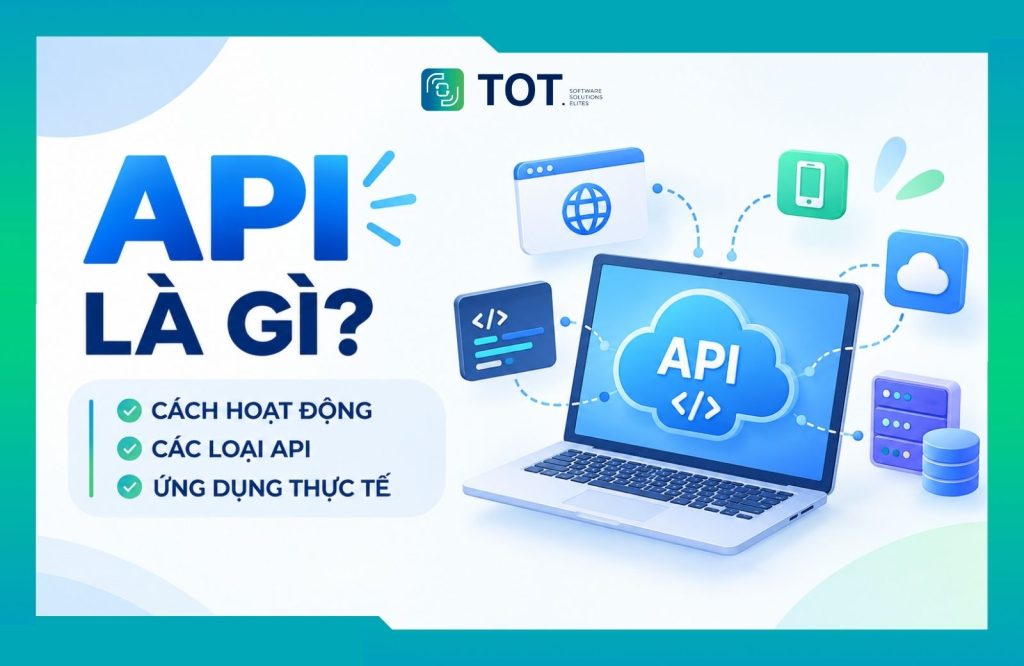
In the digital world, an API is the interface that lets applications and systems communicate and exchange data with one another. Thanks to this connectivity, the API has become an essential component in integrating and building modern software systems. In this article, TOT will help you clearly understand what an API is, how it works, the common types of API, and the real-world applications of APIs in software and web development.
>>> See more articles:
- Causes and fixes for the security error when accessing a website
- What is TLS 1.2? A trusted security protocol in the digital age
- What is DNS over HTTPS? Understanding how DoH works
- What is DDoS? Signs, prevention, and effective handling
- All-inclusive WordPress website design pricing
What is an API?
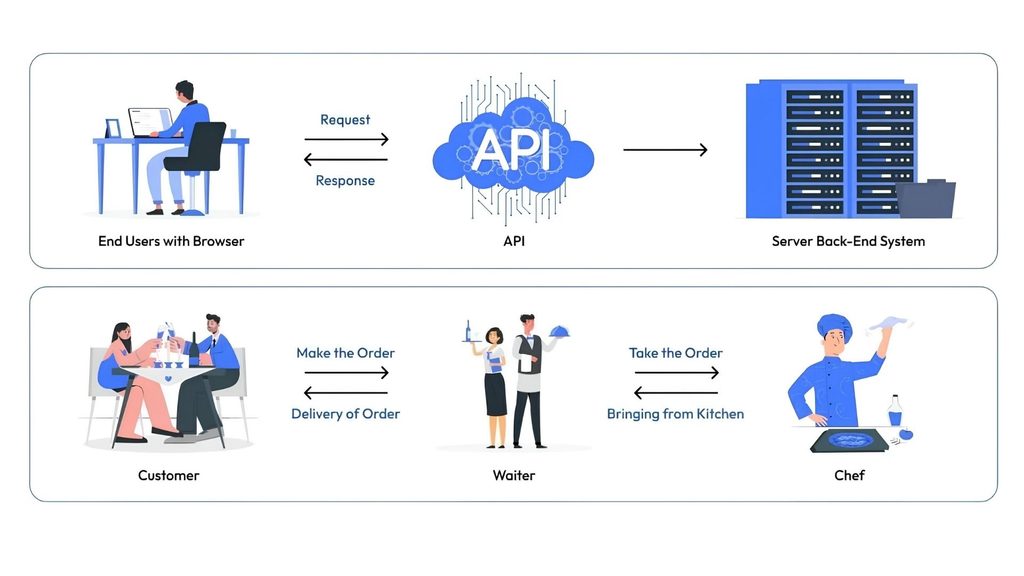
API stands for Application Programming Interface. An API is a set of rules and definitions that allows applications or software systems to communicate, exchange data, and perform functions with one another. Instead of accessing the source code or database of another system directly, an application can use an API to send requests and receive results through a predefined method, without needing to know how the system is implemented internally.
You can think of an API as a waiter in a restaurant: you order a dish (send a request), the waiter takes the order, passes it along, and brings the dish out to you (returns the data). You do not need to know how the kitchen prepares the dish, just as an application uses an API without needing to know the details of how the system processes things internally.
>>> See more:
- What is WCAG? How to improve your website’s accessibility
- What is SSO? Types of SSO and how single sign-on works
Common types of API today
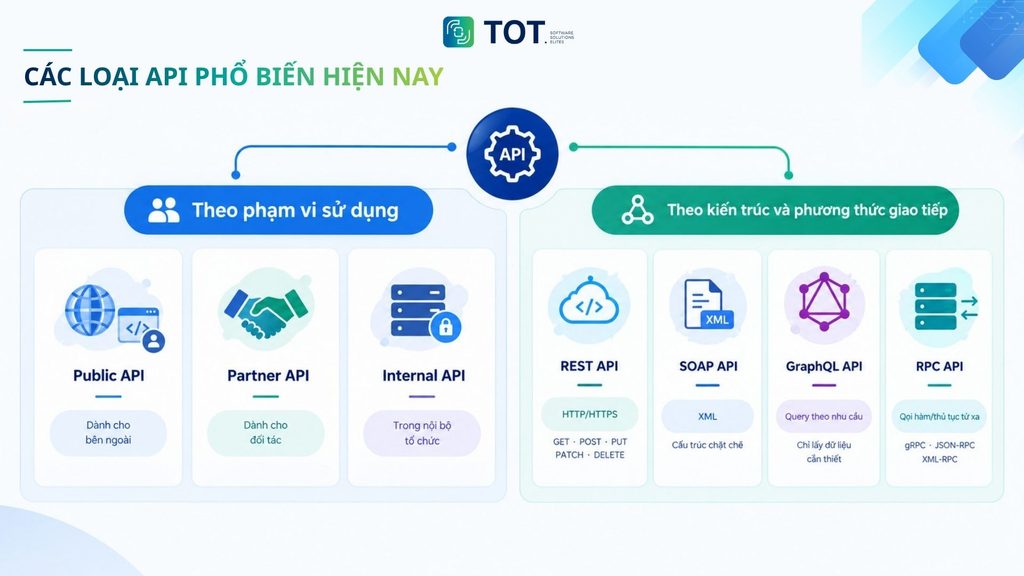
APIs can be classified according to various criteria, the most common being their scope of use and how they are designed and communicate. Each type of API has its own characteristics and is chosen depending on the connectivity needs between applications, systems, or services.
Classifying APIs by scope of use
Based on who is allowed to access them, APIs are typically divided into three main groups:
Public API
A Public API is an API made available for external developers or applications to use. Depending on the provider’s policy, users may need to register an account, use an API key, or comply with limits on the number of requests.
For example, a mapping service might provide a Public API so that websites or applications can integrate features such as displaying maps, searching for locations, or getting directions.
Partner API
A Partner API is built to connect a business’s systems with partners that have been granted access. This type of API lets the parties automatically exchange data and coordinate related processes without doing it manually.
For example, an e-commerce website might use a Partner API to send order information to a shipping provider and receive the delivery status in return.
Internal API
An Internal API is used within a single organization, allowing internal applications, services, and systems to communicate with one another. As a result, each system can use data or functions from another system without accessing its internal implementation directly.
For example, an order management system might call an Internal API to retrieve customer information from the CRM system when it needs to process an order.
Classifying APIs by architecture and communication method
Besides scope of use, APIs are also classified by how they are designed and how systems exchange data. Some common types include:
REST API
A REST API is built on the REST (Representational State Transfer) architecture and typically uses HTTP/HTTPS to communicate between client and server. HTTP methods such as GET, POST, PUT, PATCH, and DELETE are used to perform different operations on resources.
Thanks to its simple, flexible structure, the REST API is widely used to connect websites, mobile applications, and backend systems.
SOAP API
SOAP (Simple Object Access Protocol) is a protocol used to exchange information between systems. SOAP typically uses XML to format messages and applies strict rules during the data exchange process.
This approach makes SOAP well suited to enterprise systems that require a high degree of standardization, error control, and strict requirements around security or transaction integrity.
>>> See more:
- The top 15 best AI code-writing tools of 2026
- The top 50+ most popular free AI tools of 2026
GraphQL API
GraphQL is a query language for APIs that lets the client specify exactly which data it needs from the server. Instead of receiving a fixed set of data, the client can request only the fields it needs for each use case.
As a result, GraphQL can help reduce redundant data and is well suited to applications that need to run complex data queries or combine information from multiple sources.
RPC API
RPC (Remote Procedure Call) is a method that allows an application to call and execute a function or procedure on another system. This approach focuses on invoking a function remotely rather than working directly with resources as REST does.
Some common forms of RPC include JSON-RPC and XML-RPC. In addition, gRPC is an RPC framework used in many distributed systems, especially microservices architectures. gRPC uses Protocol Buffers to format data, helping services exchange information in a consistent and efficient way.
>> Learn more:
- The top 18 largest software companies in Vietnam in 2026
- The top 35 professional, reputable web design companies in Vietnam
The main components of an API
An API is usually made up of several components that define how an application sends requests and how it receives and processes data. Depending on the type of API and how it is implemented, the components may vary, but an API typically includes:
- Endpoint: The address a client uses to access a specific resource or function of the API. For example, /articles/ might be used to access data about articles.
- HTTP Method: The method that defines the type of operation the client wants to perform, commonly GET, POST, PUT, and DELETE for APIs that use HTTP.
- Parameters: Additional information that helps the API identify or process the request, which can be passed via the URL, query string, or request body.
- Request Headers: Contain additional information about the request, such as the type of data being sent or authentication information.
- Request Body: Contains the data the client sends to the server, typically used when creating or updating a resource.
- Authentication & Authorization: The mechanism that identifies the client and checks its permission to access the API’s resources or functions.
- Response: The result the API returns to the client after processing the request, typically including a status code, response headers, and a response body.
>>> See more:
- What is PKI? The role & workings of public key infrastructure
- What is SHA? Understanding the meaning of the SHA hashing algorithm
How an API works
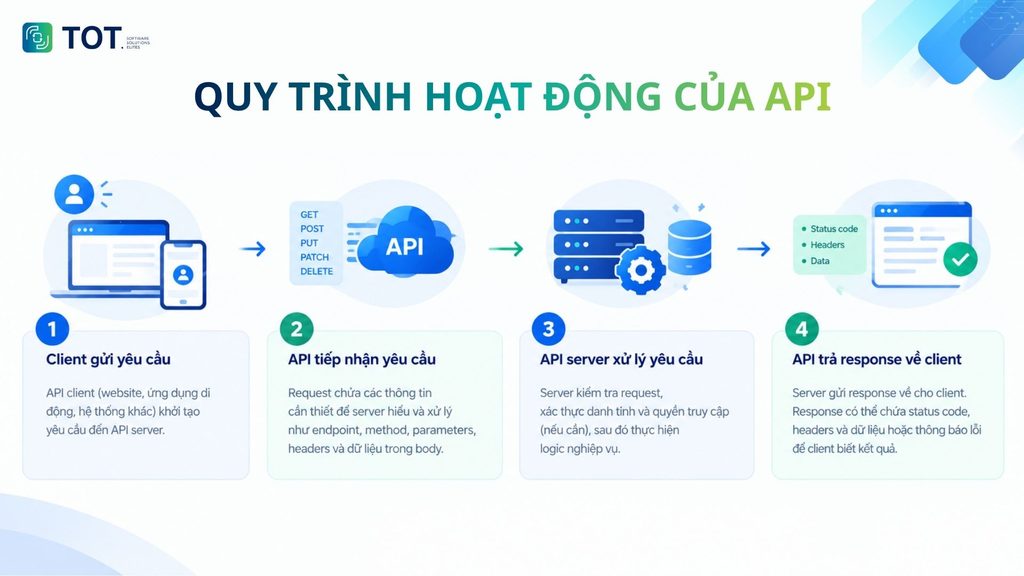
An API works based on a mechanism of exchanging requests and responses between applications or systems. When a client needs to use data or a function from another system, the client sends a request to the API. The server receives it, processes the request, and returns a corresponding response. The way an API works consists of four basic steps:
Step 1: The client sends a request
An API client, such as a website, a mobile application, or another system, initiates a request to the API server. The request can be triggered by a user action or by an automated event from the system.
Step 2: The API receives the request
The request contains the information the server needs to understand and process it, such as the endpoint, method, parameters, headers, and the data in the request body.
Step 3: The API server processes the request
The server checks the request, authenticates identity and access permissions when necessary, and then executes the corresponding business logic. This process may involve querying a database, updating data, or calling other services.
Step 4: The API returns a response to the client
Once processing is complete, the server sends a response back to the client. The response may contain a status code, headers, and data or an error message so the client knows the result of the request.
Where are APIs used?
APIs are used in many software development environments to connect components, tap into existing functionality, and exchange data between systems. Some common use cases include:
Web API
A Web API is a common type of API in websites and online applications, allowing systems to send requests and exchange data through web protocols such as HTTP/HTTPS.
For example, when you log in to a website using a Google account, the website can use the API and authentication mechanism provided by Google to verify identity and receive authorized information. Similarly, a mobile application can call a Web API to fetch product data, submit order information, or update a user account.
Operating system APIs
Operating system APIs allow software to use the functions and resources provided by the operating system.
For example, an application on Windows can use APIs to manage files, create windows, access hardware devices, or perform system-related tasks.
Library and framework APIs
Libraries and frameworks provide APIs so that developers can use built-in functionality without needing to know the details of how it is implemented internally.
For example, a PDF-processing library might provide an API to create, edit, or export PDF files, helping developers integrate these functions into an application without building them from scratch.
>>> See more:
- A detailed guide on the best way to secure a WordPress website
- The TLS encryption standard: what is it? Its functions & how it works
- What is XSS? How to test for and effectively prevent XSS attacks
Real-world applications of APIs
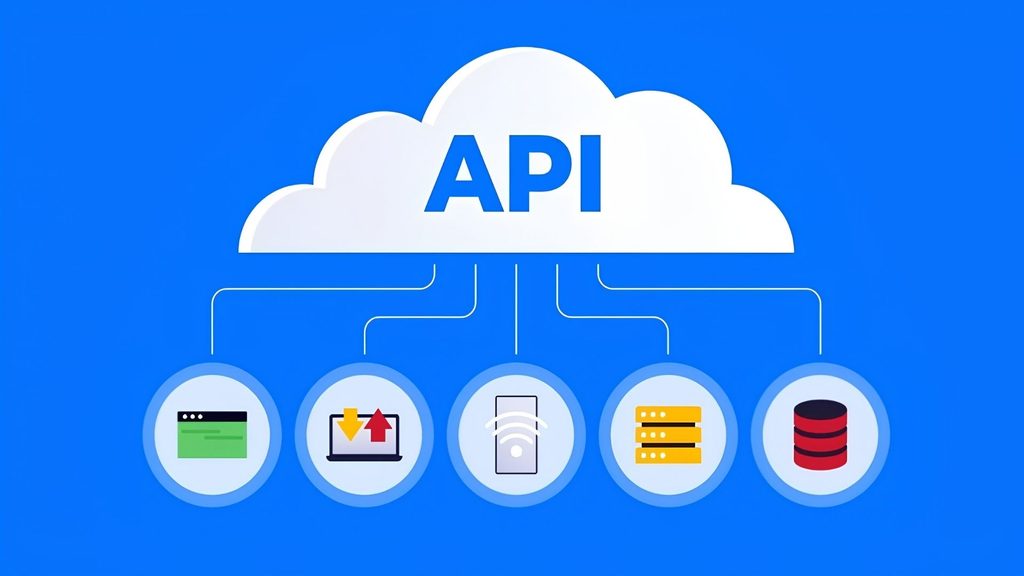
APIs are widely used to connect applications, share data, and integrate existing functionality into systems. In practice, APIs can be applied in many different situations, from automating internal processes to building online services.
Integrating data between systems
APIs help different systems exchange data without accessing one another’s databases directly. This is especially useful when a business uses multiple software applications for activities such as customer management, sales, accounting, or marketing.
For example, a CRM system can use an API to send new customer information to an email marketing platform. When a customer is added to the CRM, the data can be automatically transferred to the marketing system to run relevant campaigns.
Extending an application’s functionality
Instead of building a feature from scratch, developers can integrate a third-party API to add capabilities to an application.
For example, a food delivery app can use a mapping API to display restaurant locations, calculate routes, and support order tracking. This way, the app can take advantage of mapping functionality without building an entire mapping system itself.
Integrating online payments
APIs are commonly used in e-commerce to connect a website or application with payment services. When a customer makes a transaction, the system can send the necessary information to the payment gateway through an API and receive the transaction result in return.
This integration approach lets a business automatically handle payment status and update orders without doing it manually.
User login and authentication
APIs are also used to integrate login and authentication services. For example, a website can let users log in with a Google account instead of having to create a new one.
In this case, the website uses the API and authentication mechanism supported by the provider to verify identity and receive the information the user has authorized it to access.
Connecting IoT devices and services
In IoT (Internet of Things) systems, APIs help devices exchange data with an application or management platform. Data from smartwatches, sensors, home appliances, or other devices can be sent to a system for storage, analysis, and display.
For example, a smart home application can use APIs to receive data from sensors and send control commands to connected devices.
Connecting services in a microservices architecture
APIs play an important role in a microservices architecture, where an application is split into many small services that each handle a distinct function. These services can communicate with one another through APIs rather than depending directly on one another’s implementation.
For example, in an e-commerce system, the order management service can call the payment service’s API to check transaction status and call the inventory service’s API to update product quantities.
Thanks to this structure, each service can be developed, updated, and scaled relatively independently while still maintaining connectivity with the other components.
>>> Learn more:
- What is MFA? How to protect accounts and block 99.9% of attack risks
- What is End-to-end encryption (E2EE)? How does it work?
- What is RSA? How RSA works and its use in digital signatures
Advantages and disadvantages of APIs
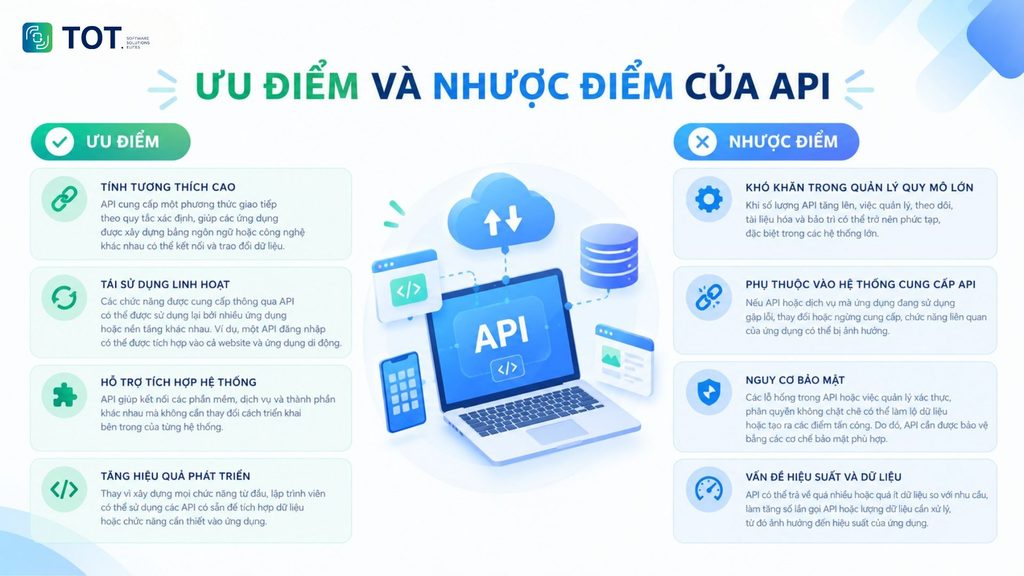
APIs deliver many benefits during system development and integration, but they also come with some limitations that need to be considered.
Advantages
- High compatibility: An API provides a communication method based on defined rules, allowing applications built with different languages or technologies to connect and exchange data.
- Flexible reuse: The functions provided through an API can be reused by many different applications or platforms. For example, a login API can be integrated into both a website and a mobile application.
- Support for system integration: APIs help connect different software, services, and components without changing the internal implementation of each system.
- Improved development efficiency: Instead of building every function from scratch, developers can use existing APIs to integrate the data or functionality they need into an application.
Disadvantages
- Difficulty managing at large scale: As the number of APIs grows, managing, monitoring, documenting, and maintaining them can become complex, especially in large systems.
- Dependence on the API provider’s system: If the API or service an application relies on encounters an error, changes, or is discontinued, the related functionality of the application may be affected.
- Security risks: Vulnerabilities in an API, or loose management of authentication and authorization, can expose data or create points of attack. For this reason, APIs need to be protected with appropriate security mechanisms.
- Performance and data issues: An API may return too much or too little data relative to what is needed, increasing the number of API calls or the amount of data to process, which in turn affects the application’s performance.
>>> See more:
- What is an SSL error? A guide to recognizing and fixing it right away for a secure connection
- What is DNS 1.1.1.1? A guide to quickly setting up and changing to DNS 1.1.1.1
- What is DNS 8.8.8.8? A guide to easily changing to DNS 8.8.8.8
Frequently asked questions
What is a Web API?
A Web API (Web Application Programming Interface) is an API that allows applications to communicate and exchange data with one another over the web, typically using the HTTP/HTTPS protocol. Web APIs are commonly used to connect websites and mobile applications with services or backend systems.
What is an API in IT?
In information technology (IT), an API can be understood as a bridge that helps applications and systems communicate, exchange data, or use one another’s functions. An API provides clearly defined rules and methods, which makes connecting and integrating systems more consistent and organized.
What is a RESTful API?
A RESTful API is a Web API designed based on the REST (Representational State Transfer) architecture, introduced by Roy Fielding in 2000. REST is not a protocol but an architectural style with principles that guide API design. RESTful APIs typically use HTTP/HTTPS along with methods such as GET, POST, PUT, PATCH, and DELETE to exchange data, with JSON being the most commonly used format.
What is a SOAP API?
A SOAP API uses the SOAP (Simple Object Access Protocol) protocol to exchange data between applications, with messages formatted in XML. SOAP has a strict structure and supports multiple transport protocols, including HTTP, so it is often used in enterprise systems with complex integration requirements.
What is an API Gateway?
An API Gateway is a component that acts as an intermediary access point between the client and the backend services. The gateway receives requests, routes them to the appropriate service, and returns responses to the client. In addition, an API Gateway can support authentication, authorization, request limiting, logging, and API monitoring.
Conclusion
As you can see, from browsing the web to using mobile applications, the API is always an indispensable component that keeps everything running smoothly in today’s digital world. It is not merely a technical tool but also a driving force for integration, innovation, and flexibility across every field of technology. Understanding APIs helps us recognize the value of smart connectivity and its importance in shaping the digital future. TOT hopes this article has helped you better understand APIs and the important role they play in connecting applications.
TOT is a pioneer on the digital transformation journey. TOT delivers website design, mobile app, and custom software development solutions with flexible services optimized to your business’s exact needs.
Inspired by the philosophy of “Technology for people,” TOT helps businesses operate more efficiently, elevate the customer experience, and create a lasting mark for their brand.
BOOK A CONSULTATION AND GET A FREE WEBSITE AUDIT PACKAGE TODAY at:
>>> See more articles:
- What is OWASP? The top 10 security vulnerabilities and risks according to OWASP
- The top 20 best free and popular chatbot software today
- What is Grok 4? How to use Elon Musk’s latest AI chatbot model
- The 35 best website security and malware scanning tools
- How much does designing a sales website cost? A detailed price quote