What is SSL, and why has this technology become such an important part of website security? SSL (Secure Sockets Layer) is a security technology developed to encrypt the data exchanged between a browser and a server, helping to reduce the risk of information being read or altered without authorization. Although SSL has been replaced by TLS in modern systems, the term “SSL certificate” is still widely used to refer to the digital security certificate for a website. In this article, TOT will help you clearly understand SSL, SSL certificates, how SSL/TLS works, and what to keep in mind when choosing and installing a certificate for your website.
>>> See more articles:
- 35 best website security and malware scanning tools
- A simple, free guide to building an e-commerce website with WordPress
- All-inclusive WordPress website design pricing
Quick summary
- SSL (Secure Sockets Layer) is a security protocol used to encrypt data between a browser and a server. SSL has been replaced by TLS, but the term “SSL certificate” is still widely used. An SSL certificate authenticates a website’s identity and binds a domain name to a public key.
- When a user accesses a website over HTTPS, the browser checks the certificate provided by the server. After validating the domain name, the CA, the validity period, and the certificate chain, the browser and server establish a session key to encrypt the data exchanged during the connection.
- SSL can be classified by validation level, such as DV, OV, and EV, or by domain coverage, such as Single-Domain, Wildcard, and Multi-Domain/SAN. The right choice depends on the number of domains and subdomains, as well as the website’s validation requirements.
- Free SSL can still provide an HTTPS connection and data encryption, while paid SSL typically adds options such as support, management, or organization validation. The basic installation process involves domain validation, installing the certificate on the server, switching from HTTP to HTTPS, checking the configuration, and renewing it periodically.
What is SSL?
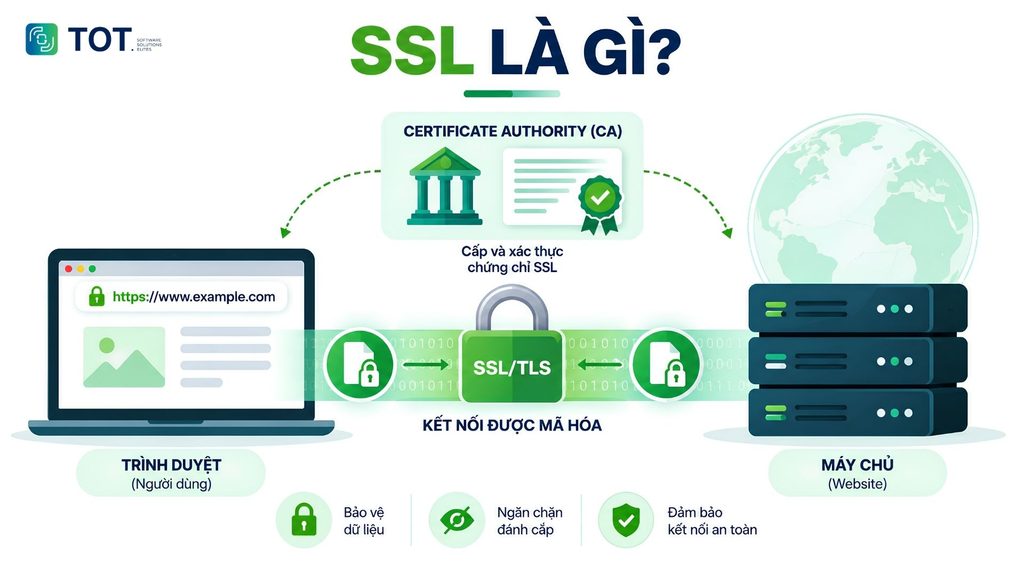
SSL (Secure Sockets Layer) is a security protocol designed to encrypt and protect the data exchanged between a browser and a server over a network. SSL helps establish a secure communication channel, reducing the risk of data being read, stolen, or altered without authorization during transmission.
However, SSL is no longer the protocol used in modern systems. SSLv3 was deprecated due to security issues, and TLS (Transport Layer Security) became its successor. Therefore, when learning what SSL is, it is important to understand that SSL is now mainly a historical term, while TLS is the security protocol widely used to protect Internet connections today.
In practice, the term “SSL certificate” is still widely used to refer to the digital certificate used to secure a website with SSL/TLS. In essence, an SSL certificate is a digital certificate used to authenticate a server’s identity and bind that identity to a public key.
SSL certificates are issued and validated by a CA (Certificate Authority) – an organization authorized to issue digital certificates. When a user accesses a website, the browser checks the information in the certificate, such as the domain name, the CA, the validity period, and the digital signature, before establishing an encrypted connection. As a result, the data exchanged between the user and the website is protected throughout the connection session.
>>> See more:
- What is 2FA? A guide to getting codes and two-factor authentication
- What is SSO? Types and how single sign-on works
- What is PCI DSS? The role and 12 requirements of PCI DSS security compliance
Why should you get an SSL certificate for your website?
You should register an SSL website security certificate for the following reasons:
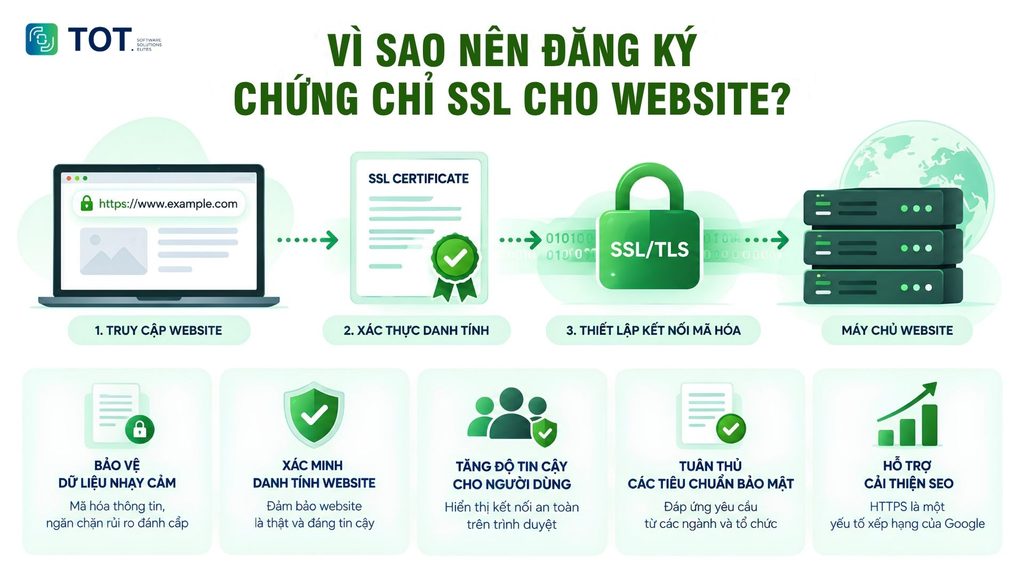
Protecting sensitive data
If you look into what SSL is, you will learn that it is a protocol that encrypts all the information exchanged between customers and a website, protecting it from being stolen by hackers. This is especially important for sensitive information such as credit card numbers, addresses, phone numbers, and other personal data.
The process of establishing an SSL encrypted connection works as follows:
- Step 1: A user visits a website that has an SSL certificate installed. For example: https://topon.tech/vi/ssl-la-gi/
- Step 2: The server receives the request and begins the SSL handshake. This is the process in which the browser and server verify each other’s identity to establish a secure connection.
- Step 3: If the certificate is valid and trusted by the browser, the two parties jointly generate a shared encryption key. From then on, all data exchanged between the browser and the server is encrypted, helping to prevent information leaks and cyberattacks.
Verifying a website’s identity
To be issued an SSL certificate, a website must go through an identity verification process carried out by trusted certificate authorities. As a result, when users visit a website with SSL, they can be confident that their information is being sent to the right place, not to a fraudulent site. SSL therefore serves an authentication role, showing that the website is genuine and trustworthy.
Building user trust
When a website is secured with SSL, the browser displays a padlock icon in the address bar, indicating a secure connection. This gives users greater peace of mind when browsing and carrying out transactions on the website, thereby increasing the business’s credibility and reputation.
Complying with security standards
In certain industries, many businesses must comply with strict information security regulations. For example, companies operating in the payment card sector must follow the PCI DSS standard to ensure that every online transaction is carried out securely. As part of this, using an SSL certificate to protect the web server is an important requirement that helps strengthen the security of the system.
Helping improve SEO
Google has confirmed that using HTTPS (that is, a website with SSL installed) is a ranking factor in its search algorithm. Therefore, installing SSL not only improves security but also helps boost a website’s ranking on search engines, increasing its ability to reach potential customers.
>>> See more:
- What is WCAG? Principles for website content accessibility
- What is SOC? Understanding the Security Operations Center (SOC)
- A detailed guide to the best ways to secure a WordPress website
What components does SSL have?
SSL is often mentioned when discussing a website’s security certificate, but technically, SSL/TLS is also a protocol that authenticates and encrypts data as it travels over a network. It is therefore important to distinguish between an SSL certificate and the SSL/TLS protocol. An SSL certificate contains information about the website, the public key, and the issuing authority.
Meanwhile, SSL/TLS uses the certificate together with encryption mechanisms to establish and protect the connection between a browser and a server. As a result, the components related to SSL can be divided into two main groups: the components of the SSL certificate and the components of the SSL/TLS protocol.
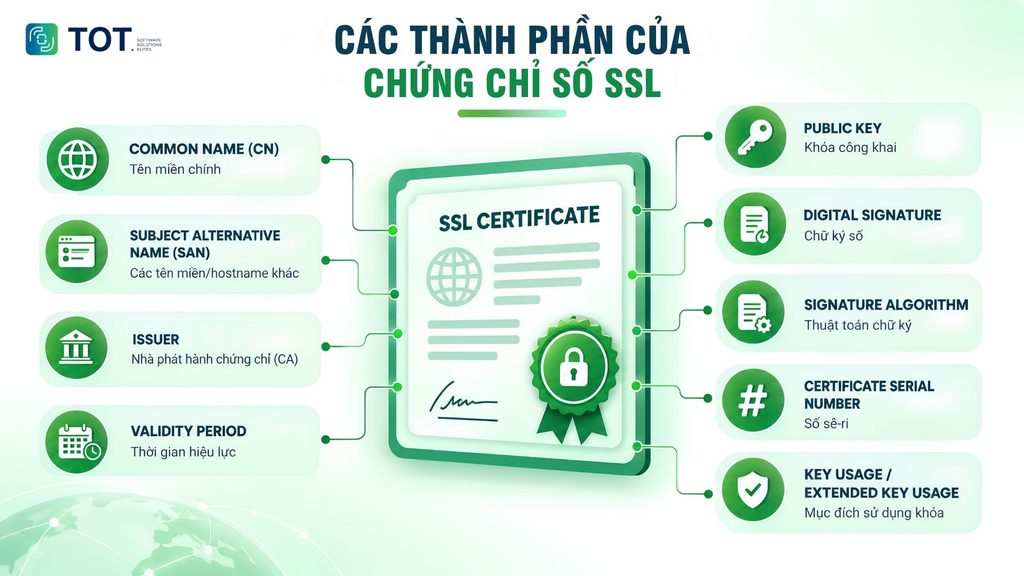
The components that make up an SSL digital certificate (SSL Certificate)
SSL certificates are built according to digital certificate standards, the most common being X.509. Each field in the certificate serves its own function, from identifying the domain name and issuer to the public key and digital signature. This information gives the browser a basis for checking the certificate before trusting a connection with the website.
Subject/Common Name (CN)
Subject is the field that identifies the entity to which the certificate is issued. In certificates for websites, this information may contain the name of the organization or entity that the certificate represents. Common Name (CN) is an attribute within Subject and was previously used to hold the website’s primary domain name, such as example.com.
However, with modern certificates, identifying the domain name must rely primarily on the Subject Alternative Name (SAN) field. Therefore, looking only at the CN is not enough to determine whether a certificate protects a specific domain name.
Subject Alternative Name (SAN)
SAN (Subject Alternative Name) is the field that contains the domain names or hostnames that the certificate is allowed to protect. A certificate can contain multiple SAN values, such as the primary domain name, the www version, or other hostnames within the certificate’s scope.
For example, a certificate may contain names such as:
- example.com
- www.example.com
- api.example.com
SAN is a particularly important field in modern SSL certificates. When the browser checks the certificate, the domain name the user is visiting is compared against the names declared in the SAN. If the domain name does not match, the browser may warn that the certificate is not valid for that website.
Issuer
Issuer indicates which organization issued the certificate. This organization is usually a CA (Certificate Authority) – the party responsible for verifying information according to the certificate type and signing the certificate for issuance.
The Issuer information also plays a role in building the certificate chain. The browser can use the certificate chain, from the website’s certificate to the intermediate CA and the root CA, to determine whether the certificate leads back to a trusted source.
Validity Period
Validity Period defines the period during which the certificate is valid, including the time the certificate becomes valid and the time it expires. When accessing a website, the browser checks whether the current time falls within the declared validity window.
If the certificate has expired or has not yet become valid, the browser may display a security warning. This is also why businesses need to monitor and renew certificates before they expire, to avoid disrupting the HTTPS connection.
Public Key
Public Key is the public key contained in the certificate and linked to the certificate’s subject. The certificate also describes the algorithm and the parameters related to this key. Depending on the cryptographic mechanism used, the key may be based on RSA, ECDSA, or other public-key algorithms.
During connection setup, the public key can be used in appropriate cryptographic mechanisms to authenticate or help establish a shared secret. The corresponding private key is not contained in the certificate and must be securely protected by the server. Exposing the private key can seriously compromise the ability to protect the connection.
Digital Signature
Digital Signature is the component that helps verify that the certificate was issued by the CA and that the certificate’s contents have not been altered after it was signed. In principle, the CA uses its own private key to create a signature over the certificate data.
When it receives the certificate, the browser can use the CA’s corresponding public key in the chain of trust to verify the signature. If the signature is valid and the other verification conditions are also met, the certificate can continue to be considered for establishing a connection.
Signature Algorithm
Signature Algorithm defines the algorithm used to create the certificate’s digital signature. This information indicates which cryptographic mechanism was used to sign the certificate and is used, together with the related parameters, to verify the signature.
This field typically represents a combination of a public-key algorithm such as RSA or ECDSA and a hash function such as SHA-256. Some common algorithms are SHA256WithRSAEncryption and ECDSA with SHA-256.
Certificate Serial Number
Certificate Serial Number is an identifier assigned by the CA to each certificate. The serial number helps the CA and related systems distinguish this certificate from other certificates issued by the same CA.
This information can also be used in certificate management mechanisms, such as when identifying a specific certificate in a revocation list or within the CA’s certificate management system.
Key Usage / Extended Key Usage
Key Usage defines the purposes for which the key in the certificate is allowed to be used, according to the declared attributes. Meanwhile, Extended Key Usage (EKU) provides more detailed information about the intended use, such as TLS Web Server Authentication to authenticate a server or TLS Web Client Authentication to authenticate a client.
These fields help systems determine whether a certificate is suitable for a specific purpose, rather than relying solely on the domain name or subject information.
The fields above describe the identity, domain name, validity period, public key, and authentication information of the certificate. However, the certificate is only one part of the security mechanism. To establish an encrypted connection between a browser and a server, SSL/TLS also uses many components at the network protocol level.
>>> Learn more:
- What is HSTS? How the HSTS security mechanism works and how to enable or disable it
- What is React Native? How to build iOS & Android apps
- What is PKI? An overview of Public Key Infrastructure
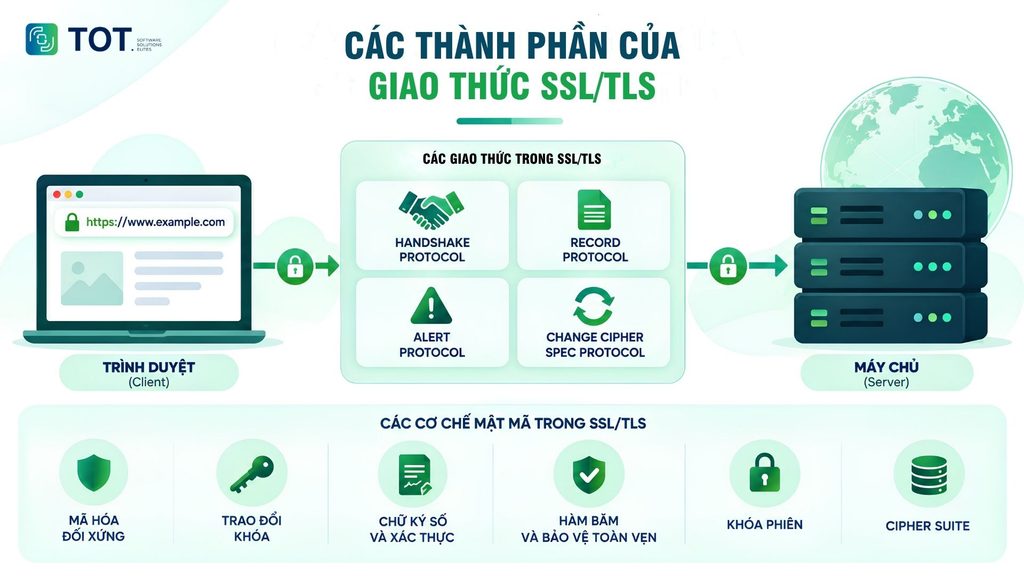
The components of the SSL/TLS protocol (the network engineering side)
At the protocol level, SSL/TLS is responsible for establishing the secure session and protecting data once the connection is formed. Modern TLS versions are organized and processed differently from older SSL, so the protocols below should not be understood as having exactly the same structure across all versions.
Handshake Protocol
Handshake Protocol is responsible for coordinating the process of establishing a secure connection. During this process, the client and server exchange information about the protocol version, cryptographic algorithms, certificates, and the parameters needed to authenticate each other and establish a shared secret.
Put simply, the handshake is the stage where the two parties “agree on how to communicate securely” before transmitting application data. Once this process is complete, the connection can move into a state that uses session keys to protect the data.
Record Protocol
Record Protocol is responsible for packaging the data transmitted over the connection into records to be processed according to the TLS security mechanism. The data may be fragmented, protected by encryption, and checked for integrity before it is sent or after it is received.
In modern TLS versions, the Record Protocol uses security mechanisms such as AEAD (Authenticated Encryption with Associated Data) to protect both the confidentiality and the integrity of the data at the same time.
Alert Protocol
Alert Protocol is used to convey messages related to the status or errors of the connection. When a problem is detected that prevents the TLS session from continuing safely, one party can send an alert to the other.
These alerts may relate to closing the connection or to errors that occur during authentication, the handshake, and data processing. This is also one of the mechanisms behind the error messages that users may encounter when an HTTPS connection runs into problems.
Change Cipher Spec Protocol
Change Cipher Spec is a component that appeared in earlier TLS versions and was used to signal the switch to the agreed-upon encryption state. However, in TLS 1.3, this role has changed significantly, and the ChangeCipherSpec message is mainly retained to support compatibility with legacy systems.
Therefore, Change Cipher Spec should not be regarded as a mandatory independent step in every modern TLS connection.
Cryptographic mechanisms in SSL/TLS
In addition to the protocols, SSL/TLS also combines many cryptographic mechanisms to protect the connection:
- Symmetric encryption: Uses a single shared key to encrypt and decrypt large volumes of data (such as AES, ChaCha20) because its processing speed is very fast.
- Key exchange: Uses asymmetric algorithms (such as RSA, Diffie-Hellman) so that both parties can automatically generate and exchange a secret key over the network without fear of it being stolen by hackers.
- Digital signatures and authentication: Ensure that the server being communicated with is truly the legitimate owner of the domain, by verifying the CA’s signature on the certificate.
- Hash functions and integrity protection: Use algorithms such as SHA-256 to generate a MAC, ensuring that the data is not altered, truncated, or injected with malicious code in transit.
- Session key: Temporary symmetric keys that exist only for a single connection session and are destroyed as soon as the browser is closed.
- Cipher Suite: A standardized code string that specifies the particular combination of the mechanisms above (for example, TLS_AES_256_GCM_SHA384), agreed upon by the client and server for use throughout the session.
>>> Reference:
- What is OWASP? The top 10 security vulnerabilities and risks according to OWASP
- How much does e-commerce website design cost? A detailed quote
- What is CSP? Everything about Content Security Policy from A to Z
- What is CSRF? Attack techniques and how to effectively prevent CSRF
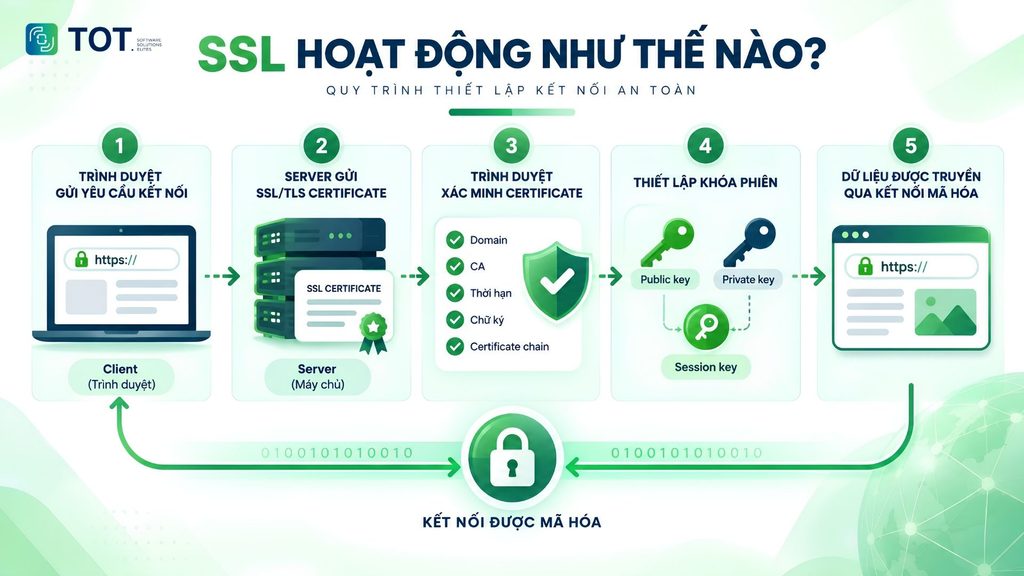
How does SSL work?
When a user visits a website that uses HTTPS, the browser and server carry out a process called the TLS Handshake to authenticate the server and establish the information needed for a secure connection. Although it is often called an “SSL connection,” modern websites actually use TLS – the successor to SSL. Once the handshake is complete, the two parties use a session key to encrypt the data during the exchange.
Step 1 – The browser sends a connection request
When a user enters a website address starting with https://, the browser requests to establish an HTTPS connection with the server. In the first step of the TLS Handshake, the browser sends the necessary information, such as the supported TLS versions and the cryptographic options it can use.
The purpose of this step is to help the browser and server determine a suitable way to communicate securely before exchanging website data.
Step 2 – The server sends the SSL/TLS Certificate
After receiving the request, the server responds and sends the website’s SSL/TLS Certificate to the browser. The certificate contains important information such as the domain name, the issuer, the validity period, and the server’s public key.
This certificate gives the browser a basis for verifying that the server it is connecting to genuinely owns the identity corresponding to the domain name the user is visiting.
Step 3 – The browser verifies the certificate
Before continuing to establish the connection, the browser checks the certificate to determine whether it is valid and trustworthy. Some of the key details checked include:
- Domain: Whether the domain name the user is visiting matches the domain name protected in the certificate.
- CA: Whether the certificate was issued by a trusted Certificate Authority (CA).
- Validity: Whether the certificate is still valid or has expired.
- Signature: Whether the CA’s digital signature is valid and whether the certificate has been altered.
- Certificate chain: Whether the website’s certificate forms a valid chain of trust up to the root CA.
If the checks meet the requirements, the browser continues the handshake. Otherwise, the browser may display a security warning and advise the user not to continue.
Step 4 – Establishing the session key
After verifying the certificate, the browser and server need to create a session key to encrypt the data during the connection session. This is an important step because the actual data is not encrypted with the public key for the entire session.
It can be understood simply as follows:
- Public key: The public key, contained in the certificate and able to be shared.
- Private key: The corresponding secret key, protected by the server and never sent to the browser.
- Asymmetric encryption: Uses a pair consisting of a public key and a private key, mainly for authentication and secret-establishment mechanisms.
- Session key: The secret key established by both parties to protect the data during the connection session.
- Symmetric encryption: Uses the same secret key to encrypt and decrypt data; it is fast and suitable for transmitting large volumes of data.
In simple terms, the handshake process can be pictured as:
The browser requests a connection → The server sends the certificate → The browser verifies the certificate → Both parties establish a shared secret → A session key is created → Encrypted data exchange begins.
The specific way the key is established depends on the TLS version and the key exchange mechanism used. With modern TLS, this process is designed so that the session key never needs to be transmitted directly over the network.
Step 5 – Data is transmitted over the encrypted connection
Once the handshake is complete, the browser and server use the session key together with the TLS security mechanisms to protect the exchanged data. At this point, information such as login credentials, form contents, or session cookies is transmitted over the HTTPS connection instead of being sent in plain text.
Thanks to encryption, a third party would find it difficult to read the data contents even if it intercepted the traffic. At the same time, integrity protection mechanisms help detect data that has been altered during transmission.
Therefore, when looking into what an SSL connection is, it can simply be understood as the process of using SSL/TLS to authenticate and create a protected communication channel between a browser and a server.
>>> See more:
- What is MFA? Understanding multi-factor authentication & its role in modern security
- What is XSS? XSS attack techniques and how to test for and prevent them effectively
- What is GDPR? The EU’s data protection law
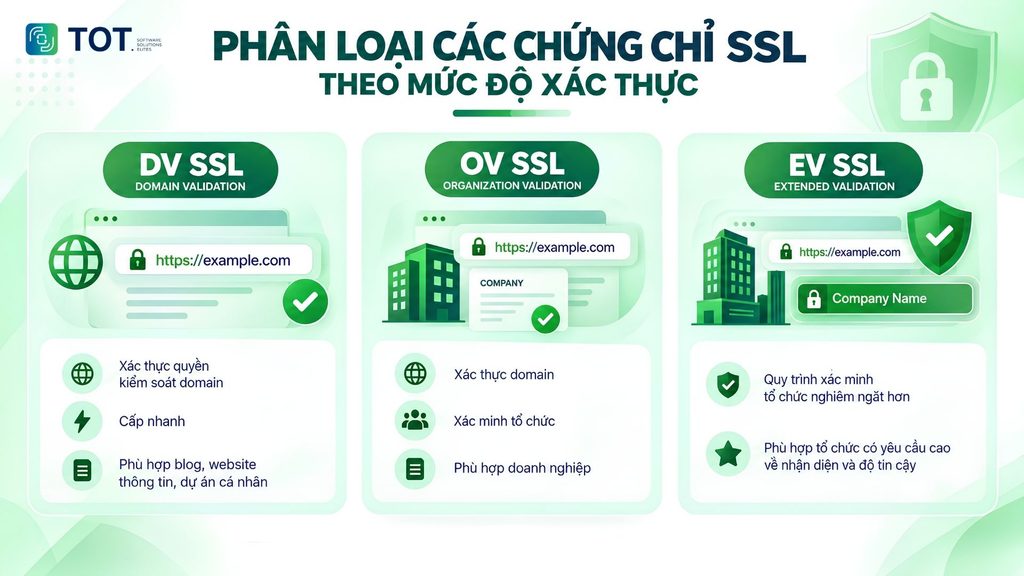
The common types of SSL certificates today
SSL certificates can be classified by validation level and by the number of domain names protected. Each type serves a different need, from personal websites to enterprise systems with many domains or subdomains. This classification helps businesses more easily determine the type of security certificate that fits their website structure and management requirements.
Classification by validation level
DV SSL – Domain Validation
DV SSL is a basic-level validation certificate that primarily checks control over the domain name. Because the verification process is simple, the certificate is usually issued quickly. DV SSL is suitable for blogs, informational websites, landing pages, or personal projects that do not require organization information to be verified.
OV SSL – Organization Validation
OV SSL validates both control over the domain name and the information of the organization behind the website. As a result, the certificate issuance process requires an additional step to verify the business or organization. OV SSL is typically suitable for corporate websites, company profile websites, and systems that need to clearly demonstrate the identity of the owning organization.
EV SSL – Extended Validation
EV SSL has a stricter organization verification process, including checking the existence, identity, and domain control of the organization. This type of certificate is suitable for organizations with high requirements for verifying their legal identity. However, EV does not mean the connection is more strongly encrypted than DV or OV; the main difference lies in the level of organization information verification.
Comparison table: DV SSL, OV SSL, EV SSL:
| Criteria | DV SSL | OV SSL | EV SSL |
| Domain validation | Yes | Yes | Yes |
| Organization validation | No | Yes | Yes, stricter |
| Issuance time | Fast | Slower than DV | Usually slower |
| Best suited for | Blogs, personal websites | Corporate websites | Organizations needing high-level identity verification |
>>> Further reading:
- The causes of and ways to prevent security errors when accessing websites
- 25 effective ways to fix website errors that make a site inaccessible
- A guide to 16 ways to secure a WordPress website from A to Z
Classification by the number of domains protected
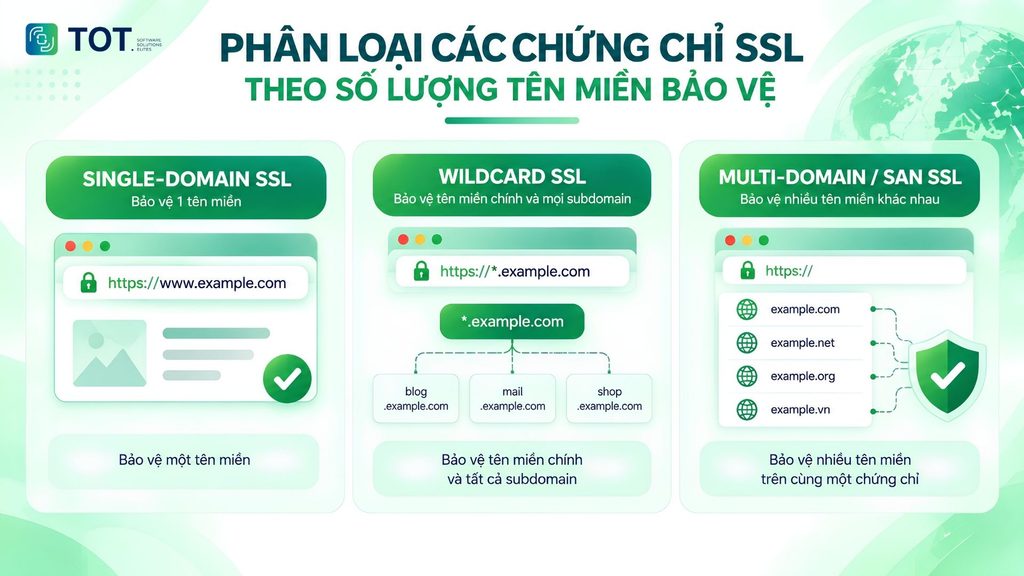
Wildcard SSL
Wildcard SSL allows you to protect one primary domain and many first-level subdomains with the same certificate. For example, a *.example.com certificate can protect www.example.com, shop.example.com, and mail.example.com. This is a suitable choice when a website has many subdomains and frequently adds new ones.
Multi-Domain/SAN SSL
Multi-Domain SSL, also called SAN SSL, allows a single certificate to protect multiple different domain names or hostnames. This type is suitable for businesses that manage multiple websites, domains, or systems with many hostnames but want to centralize certificate management.
Single-Domain SSL
Single-Domain SSL is issued to protect one specific domain name. This is a simple choice for a website that uses only one domain and has no need to protect multiple domains or subdomains with the same certificate.
Comparison table: Single-Domain, Wildcard, Multi-Domain/SAN:
| SSL type | Coverage | Best suited for |
| Single-Domain | One domain name | Websites with a simple structure |
| Wildcard | One domain and many first-level subdomains | Websites with many subdomains |
| Multi-Domain/SAN | Multiple domains/hostnames | Businesses with many websites or hostnames |
Note: DV, OV, and EV describe the validation level, while Single-Domain, Wildcard, and Multi-Domain describe the scope of domains protected. These two classifications can be combined when choosing an SSL certificate for a website.
>>> Learn more:
- What Is DNS Over HTTPS? How it works and how to enable DoH
- What is a Brute Force attack? How to prevent it effectively
How to choose the right SSL for your website
Not every website needs the same type of SSL certificate. To make the right choice, you should consider your domain structure and the validation level required. Getting this right from the start helps you avoid buying a certificate with the wrong coverage or having to manage more certificates than necessary.
Choosing SSL by domain structure
First, determine whether your website uses one or more domains and how many subdomains need protecting.
- Single-Domain SSL: Suitable when a website has only one domain, such as example.com. This is a simple choice if you do not need to protect any other domains.
- Wildcard SSL: Suitable when a website has many subdomains, such as shop.example.com, blog.example.com, or mail.example.com. A single Wildcard certificate can protect the primary domain and its first-level subdomains.
- Multi-Domain/SAN SSL: Worth considering when a business needs to protect multiple different domains or hostnames with a single certificate, such as example.com, example.net, and related hostnames.
If your system has many domains and subdomains, it is best to make a list of the hostnames that need protecting before registering, so you can precisely define the certificate’s scope.
Choosing SSL by validation level
After determining the domain scope, the next step is to choose the validation level that suits the website’s purpose.
- DV SSL: Verifies control over the domain name. This type is suitable for blogs, personal websites, landing pages, or informational websites that do not require organization identity verification.
- OV SSL: In addition to verifying the domain name, the CA also verifies the organization’s information. This can be a suitable choice for corporate websites that want to prove the identity of the organization behind the website.
- EV SSL: Has a stricter organization verification process. This type is suitable for organizations with high requirements for verifying their legal identity.
It is worth noting that a higher validation level does not mean stronger encryption. DV, OV, and EV can all be used to establish a secure HTTPS connection when configured correctly. The main difference lies in the information the CA verifies before issuing the certificate.
How do free SSL and paid SSL differ?
Both free SSL and paid SSL can enable a website to use HTTPS and encrypt the connection. The difference is not that “free means no encryption” but rather lies mainly in the certificate type, validation level, support services, and how certificates are managed. Therefore, which type to choose should be based on the website’s actual needs rather than price alone.
What is free SSL? Should you use free SSL?
Free SSL is a TLS certificate provided without the user paying directly for its issuance. A common example is Let’s Encrypt, a Certificate Authority that provides free DV certificates and automates the issuance and renewal process.
Free SSL is suitable for blogs, personal websites, landing pages, informational websites, or projects that need HTTPS but do not require organization verification. Let’s Encrypt currently provides DV certificates with a default validity of 90 days, so automatic renewal plays an important role in the management process.
Therefore, you can use free SSL if the certificate type meets your needs. Being free does not mean it is less secure in terms of encrypting the connection; the points to consider are the scope of validation and how the certificate is managed.
What is paid SSL? When should you choose paid SSL?
Paid SSL is a certificate provided with a cost for the certificate and may come with additional services depending on the provider, such as technical support, centralized management, and certificate reissuance or replacement.
Paid SSL can be suitable for businesses that need OV/EV, that manage many certificates, that require technical support, or that need a professional certificate management process. Some providers also offer a certificate lifecycle management platform that helps businesses track and handle the issuance, renewal, and replacement of certificates.
| Criteria | Free SSL | Paid SSL |
| Certificate cost | Free | Paid |
| HTTPS & encryption | Yes | Yes |
| DV SSL | Common | Yes |
| OV/EV | Depends on the provider; Let’s Encrypt does not offer it | May be available |
| Technical support | Usually relies on documentation/community | Usually available depending on the plan |
| Managing multiple certificates | Depends on the tooling | Usually includes additional management tools |
| Best suited for | Blogs, personal websites, informational websites | Businesses and systems needing professional management |
In short, a website does not necessarily have to buy paid SSL to have a secure HTTPS connection. If you only need domain validation and connection protection, free SSL can serve well. Conversely, when a website needs organization validation, technical support, or certificate management at scale, paid SSL may be a better fit.
>>> Further reading:
- What is a Scrubbing Center? Its functions and how it works
- What is the W3C standard? Why should you design a W3C-compliant website?
How to install SSL on your website
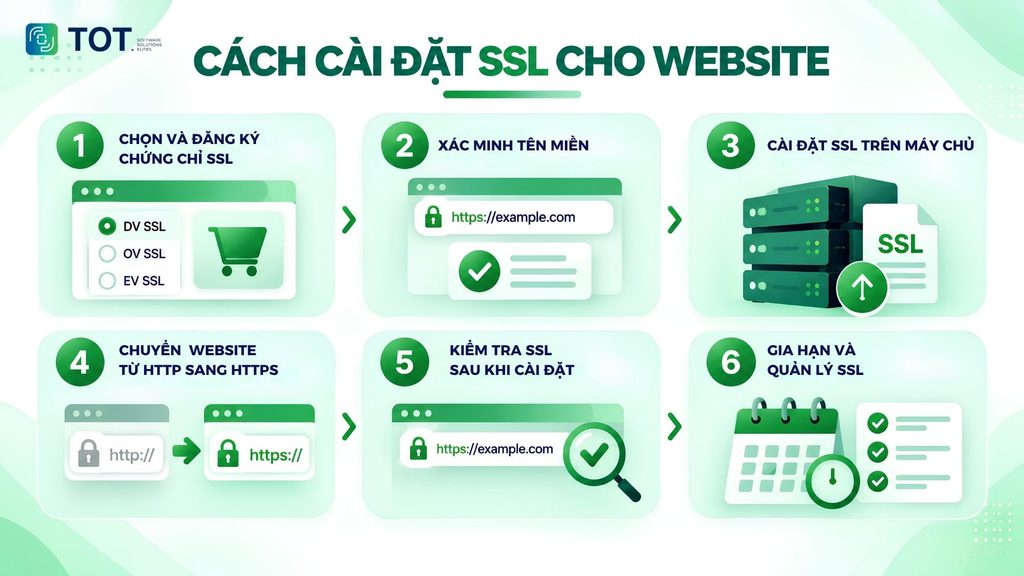
Installing SSL helps a website switch from an HTTP connection to HTTPS, thereby protecting the data exchanged between the browser and the server. The actual process may vary depending on the certificate type, provider, and web server, but it usually involves the following 6 basic steps:
Step 1: Choose and register an SSL certificate
First, determine whether the website needs to protect one or more domains and subdomains, and the desired validation level. You can choose Single-Domain, Wildcard, or Multi-Domain SSL, while also considering DV, OV, or EV. After choosing the right type, register the certificate with a CA or SSL provider.
Step 2: Verify the domain name
After registering, you need to prove control over the domain name. Common methods include adding a DNS record, uploading a verification file to the website, or confirming via email, depending on the CA. For OV and EV, the verification process may require additional information about the organization.
Once verification is successful, the CA will issue the certificate for the registered domain name.
Step 3: Install SSL on the server
After receiving the certificate, install it along with the private key and any necessary intermediate certificates on the server. How you do this depends on the environment, such as Apache, Nginx, IIS, a hosting control panel, or a cloud platform.
The private key must be carefully protected and never shared publicly.
Step 4: Switch the website from HTTP to HTTPS
Once SSL is working, configure the website to use HTTPS instead of HTTP. You should set up a 301 redirect from HTTP to HTTPS to redirect users and ensure that old URLs are handled correctly.
At the same time, update internal resources such as images, CSS, JavaScript, and API calls to HTTPS to avoid mixed content errors.
Step 5: Test SSL after installation
Access the website using https:// and check the security icon in the browser. You should also check:
- Whether the certificate has the correct domain name.
- Whether the certificate is still valid.
- Whether the certificate chain is complete.
- Whether the website has any mixed content errors.
- Whether HTTP is redirected to HTTPS.
You can use online SSL checking tools to detect configuration errors or certificate issues.
Step 6: Renew and manage SSL
SSL has a validity period, so you need to track the expiration date and renew it before the certificate expires. For automatically issued certificates, you should set up an automatic renewal mechanism and check it periodically to reduce the risk of HTTPS errors on the website.
For businesses with many websites or certificates, centralized management makes it easier to track validity periods, statuses, and the renewal process.
>>> See more:
- What is PGP encryption? How Pretty Good Privacy works
- What is End-to-end encryption (E2EE)? How does it work?
How to check whether a website has SSL
Checking SSL helps determine whether a website has established an HTTPS connection and whether the SSL/TLS certificate is working properly. Users can check directly in the browser or use dedicated tools. The methods below are suitable for quickly checking a website’s SSL while also detecting expired certificates or misconfigurations.
Checking HTTPS in the browser
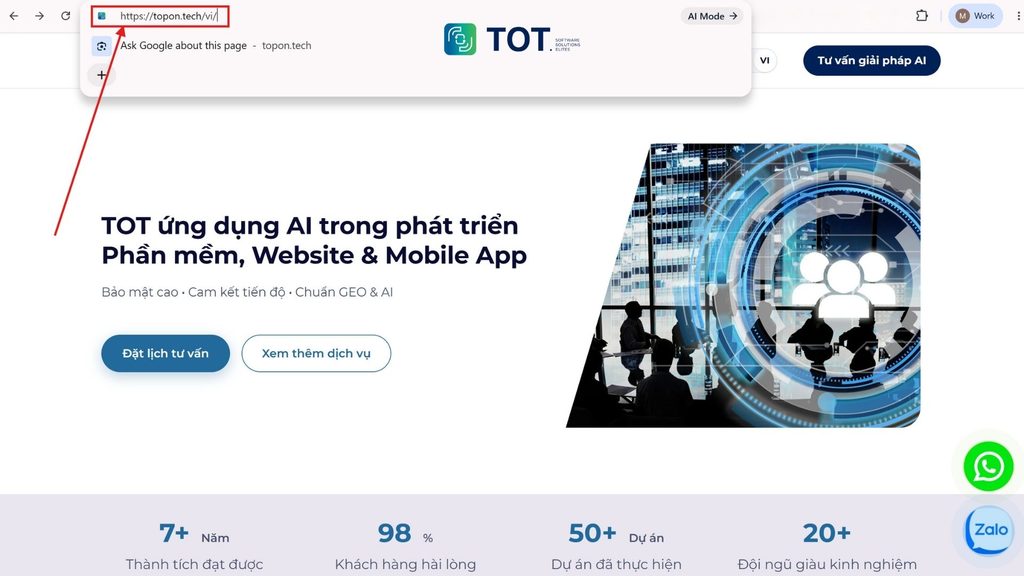
The simplest way to check whether a website has SSL is to look at the URL in the browser.
- A website using https:// instead of http:// indicates that the connection is using HTTPS.
- The padlock icon next to the URL usually indicates that the browser has established a valid HTTPS connection.
- When accessed via http://, the website may automatically redirect to https:// if HTTP-to-HTTPS redirection has been configured.
However, simply seeing HTTPS is not enough to assess the entire SSL/TLS configuration. The certificate may have issues with its validity period, domain name, or certificate chain.
>>> Further reading:
- What is SAML SSO? The single sign-on authentication mechanism
- How do SSL and TLS differ? Which protocol is more secure
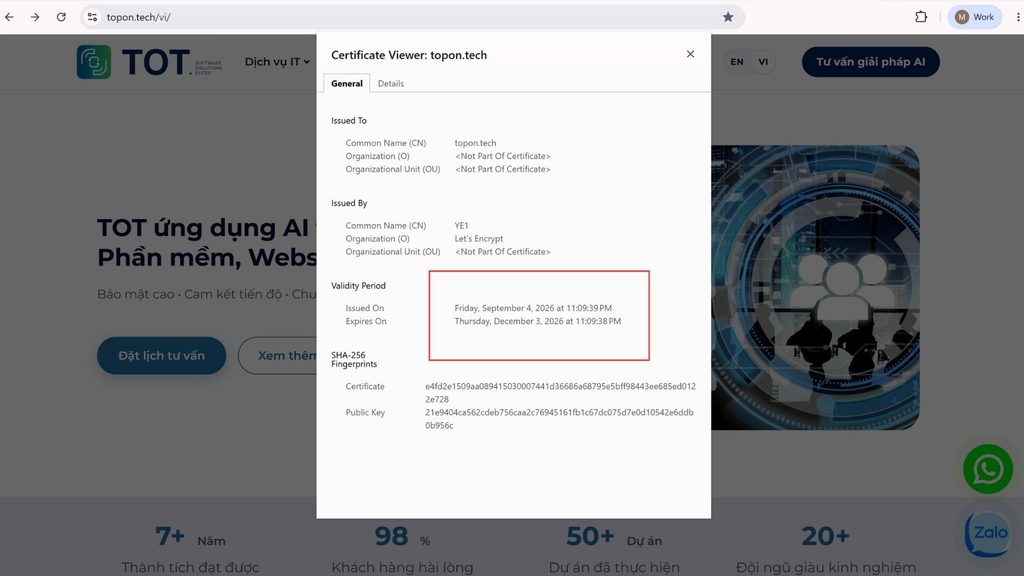
Checking SSL certificate details in the browser
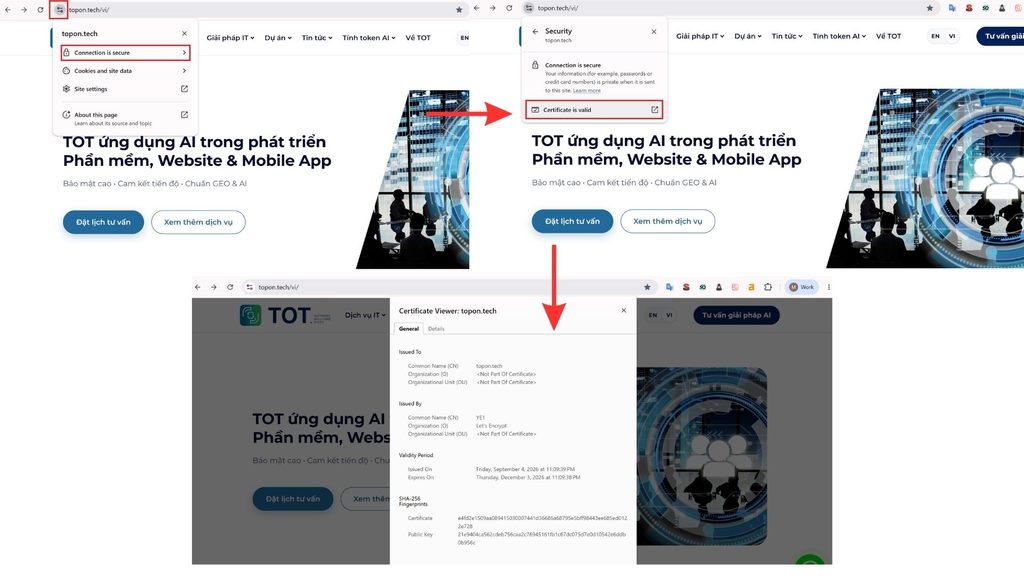
Users can view certificate details directly in the browser to determine which certificate a website is using.
In Chrome or Chromium-based browsers, click the icon on the left side of the address bar, then open the connection and certificate information. Depending on the browser version, where this is displayed may differ.
The information typically includes:
- The domain name protected by the certificate.
- The issuing authority (Certificate Authority – CA).
- The certificate’s validity period.
- Information about the public key and digital signature.
- The related certificate chain.
If the domain name on the certificate does not match the website, or if the certificate is not trusted by the browser, the browser may display a security warning.
>>> Learn more:
- A roundup of the best and fastest DNS list today
- What is Cyber Security Hygiene? Why does cyber hygiene matter?
Checking the SSL validity period
SSL/TLS certificates have a defined validity period. Therefore, you need to check the certificate’s start date and expiration date.
If the certificate has expired, the browser may warn that the connection is not secure and affect the ability to access the website. Businesses should monitor the validity period to renew or replace the certificate before it expires.
In addition to manual checks, administrators can use a monitoring system to receive alerts before the certificate expires.
>>> Further reading:
- How to create an SSH Key and authenticate connections using a Public/Private Key pair
- What is CSP (Content Security Policy)? When should you apply it
Checking with SSL tools
Online SSL checking tools can analyze a website’s HTTPS configuration in greater depth. Users simply enter a domain name to check the certificate, the TLS protocol, the certificate chain, and some security settings.
Some popular tools include:
| Tool | Main purpose | Link |
| Qualys SSL Labs | In-depth analysis of SSL/TLS configuration, certificates, protocols, and ciphers | SSL Labs Server Test |
| DigiCert SSL Checker | Checks certificates, SSL configuration, and errors during deployment | DigiCert SSL Checker |
| GlobalSign SSL Configuration Checker | Checks a website’s certificate and SSL/TLS configuration | GlobalSign SSL Checker |
| SSL Shopper SSL Checker | Checks certificate details, the expiration date, and the certificate chain | SSL Shopper SSL Checker |
| Why No Padlock? | Detects Mixed Content errors that keep a website from being fully secure | Why No Padlock? |
| Hardenize | Checks SSL/TLS along with many other security aspects of a domain | Hardenize |
The check results help detect issues such as expired certificates, certificates that do not match the domain name, missing intermediate certificates, or improper TLS configuration. This is a useful method when you need to comprehensively assess a website’s SSL rather than simply confirming that the website has HTTPS.
Conclusion
SSL is an important security layer that encrypts data and protects the connection between a browser and a server. Clearly understanding what SSL is, along with its structure, how it works, and how to check it, helps businesses proactively protect their website, their users’ data, and the trust visitors place in the site. Choosing the right SSL certificate, installing it correctly, and regularly checking its validity period help maintain a stable HTTPS connection, reduce security warnings, and support safer website operation.
What is SSL?
SSL (Secure Sockets Layer) is a security protocol designed to encrypt data transmitted between a browser and a server. SSL helps protect information from being read or altered as it travels over the Internet. Today, SSL has been replaced by TLS (Transport Layer Security), but the term “SSL” is still widely used to refer to HTTPS security technology and SSL/TLS certificates on websites.
What is an SSL certificate?
An SSL certificate is a digital certificate used to authenticate a website’s identity and help establish an encrypted HTTPS connection. An SSL certificate for a website helps protect the data exchanged between users and the server. What SSL Certificates are is also commonly understood as the digital certificates issued by a Certificate Authority (CA), containing information about the domain name, the public key, and the issuing authority.
What is an SSL protocol error?
An SSL protocol error is an error that occurs when the browser and server cannot establish a secure HTTPS connection. The cause may relate to an expired SSL certificate, an invalid certificate, a domain name mismatch, an incompatible TLS configuration, or a missing certificate chain. Depending on the cause, the browser may display warnings such as “SSL protocol error,” “Your connection is not private,” or be unable to connect to the website.
What is SSL VPN?
SSL VPN is a VPN technology that uses the SSL/TLS protocol to create an encrypted connection between a user’s device and an internal network or resources. SSL VPN is often used to support remote access to applications, servers, or enterprise resources over the Internet. Unlike a website’s SSL certificate, SSL VPN focuses on securing remote access connections rather than only protecting the connection between a browser and a website.
What is SSL on iPhone?
SSL on iPhone usually refers to the SSL/TLS encryption mechanism used when an iPhone connects to a website, email server, or online services. When accessing a website over HTTPS, the iPhone uses TLS to encrypt the data exchanged with the server. Because SSL has been replaced by TLS, the term “SSL on iPhone” is commonly used to describe connections protected by SSL/TLS.
How is TLS different from SSL?
SSL and TLS are both security protocols used to encrypt data as it travels over a network. However, TLS is the successor to SSL, designed with many improvements in security and performance. SSL 2.0 and SSL 3.0 are outdated and no longer recommended for use. Modern systems primarily use TLS 1.2 or TLS 1.3. Therefore, when people say “SSL” today, in many cases they are actually referring to TLS technology.