CRM software is a solution that helps businesses centralize customer data, manage interactions, optimize the sales process and improve the quality of customer care. Instead of storing scattered information across many tools, a business can use a CRM to track the entire customer journey from lead to sales opportunity, conversion and after-sales. Join TOT to learn what CRM software is, its key features and the Top 15 best CRM platforms available today so you can choose the right solution.
>>> See more articles:
- TOP 18 largest software companies in Vietnam
- What is application software? Common types of application software
- 9+ easiest-to-use, free mobile app design tools
Quick summary:
Quick summary of the key points:
- CRM software is a customer relationship management tool that centralizes data and interaction history in a single system.
- A CRM helps businesses manage leads, the sales pipeline, marketing, customer care and reporting more effectively.
- Key benefits include higher sales productivity, better conversion rates, process automation and an improved customer experience.
- Important features: customer management, leads, sales opportunities, automation, customer care, reporting, integration and AI.
- Popular CRM types include Cloud CRM, On-premise CRM, Operational CRM, Analytical CRM, Collaborative CRM and AI CRM.
- The Top 15 standout CRM platforms include MISA AMIS CRM, Base CRM, Getfly CRM, CRMOnline, CRMVIET, NextX CRM, FastWork CRM, HubSpot CRM, Salesforce, Zoho CRM, Microsoft Dynamics 365, Pipedrive, Bitrix24, SuiteCRM and SugarCRM.
What is CRM software?
CRM (Customer Relationship Management) software is customer relationship management software that helps businesses store information, track interaction history and automate the sales, marketing and customer care processes. According to IBM, CRM is a set of integrated technologies used to record, track and manage an organization’s relationships and interactions with existing and potential customers. As a result, CRM software is not merely a place to store contact information; it also helps businesses manage leads, the sales pipeline, marketing activities and customer care on a single centralized platform.
In practice, CRM management software connects data from many touchpoints such as the website, email, phone, social media and sales channels to build a unified customer profile. Microsoft notes that a modern CRM can centralize data, automate processes, analyze behavior and support collaboration among the Sales, Marketing and Customer Service departments. The system helps businesses manage interactions with customers and prospects, thereby improving relationships, streamlining processes and driving growth. The market size reflects the growing role of this technology: Gartner estimates the global CRM market reached 128 billion USD in 2024, up 13.4% year over year.
>>> Related reading:
- Top 20 free warehouse management software options that work well for businesses
- Top 20+ best free AI image design software
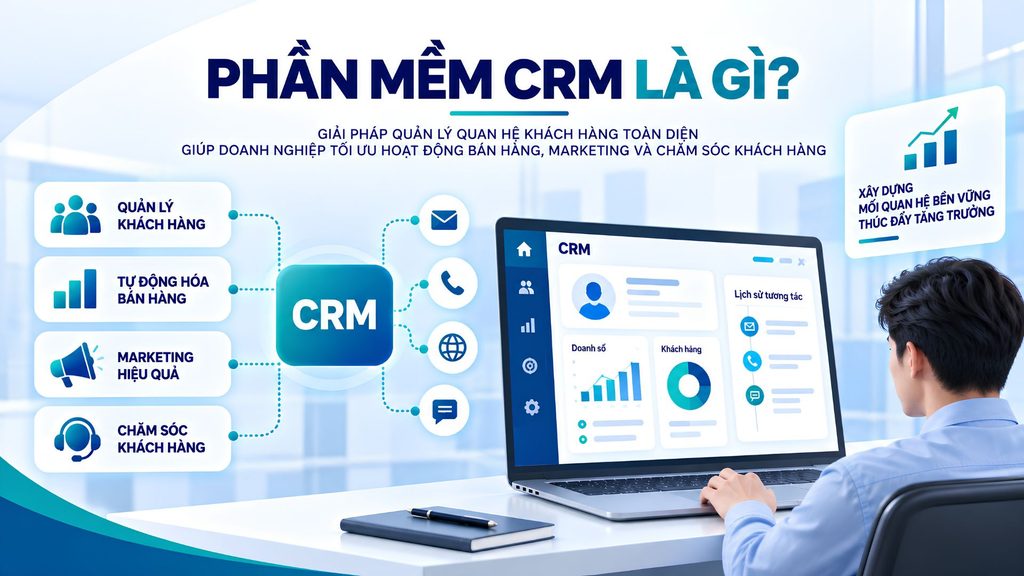
Who should use a CRM for their business?
Almost every business with recurring sales and customer care activities benefits from a CRM, but the challenges and priorities differ by size and business model. Below are five typical groups, described in terms of the audience, the problem and how a CRM solves it.
CRM for small businesses and startups
Small businesses and startups should adopt a CRM as soon as the number of customers exceeds what can be tracked from memory. A common problem is that data is scattered across messages and loose files and depends on the founder’s memory; when staff change, information is easily lost. A CRM solves this by centrally storing contacts, communication history and sales stages, so even a small team can stay on top of every opportunity. This group prioritizes solutions that are easy to use, quick to deploy and offer an affordable starter plan or a free version.
CRM for B2B businesses
B2B businesses need a CRM because sales cycles are long, many people are involved in the decision and contract values are high. The challenge is that a single opportunity can stretch over many months, go through multiple quotes and involve several points of contact, which is very hard to track manually. A CRM lets you manage the pipeline stage by stage, record every touchpoint and prompt the next step, while forecasting revenue based on the probability of closing. For industries with specialized processes such as construction, where the data model needs deep customization, businesses can look at how to implement a CRM for construction companies.
CRM for B2C businesses
B2C businesses benefit from a CRM when they need to handle a large customer base and multichannel interactions. The challenge is that a high volume of leads arrives from the website, social media, ads and stores, but they are easily missed or answered too slowly. A CRM automatically captures leads, assigns them to the right staff and triggers care scenarios such as email, SMS or Zalo. High-value retail models, such as car showrooms, also need to tie the CRM to test-drive and maintenance workflows. See more in the article on CRM for car showrooms.
CRM for large enterprises
Large enterprises need a CRM to unify data across thousands of customers and many departments. The characteristic problem is data fragmented across branches, disconnected systems and a lack of process standardization, which leads to inconsistent reporting. A CRM centralizes data, applies granular role-based permissions and standardizes workflows across the whole organization, while integrating with ERP, accounting and other core systems. This group typically prioritizes scalability, enterprise-grade security and the ability to customize for their specific operations.
CRM for businesses with multiple branches or sales teams
Businesses with multiple branches or large sales teams need a CRM to control performance and avoid overlap. The problem is that teams easily duplicate data, dispute customer ownership or lack transparency about results. A CRM helps partition data by region, assign clear ownership of opportunities and provide performance dashboards for each employee, team and branch. This lets managers see who is handling which opportunity, what the conversion rates are and where the bottlenecks lie, so they can allocate resources in time.
>>> Learn more:
- Top 15 free, effective production warehouse management software
- TOP 8 effective location-based warehouse management software
- Top 10 best car maintenance scheduling systems
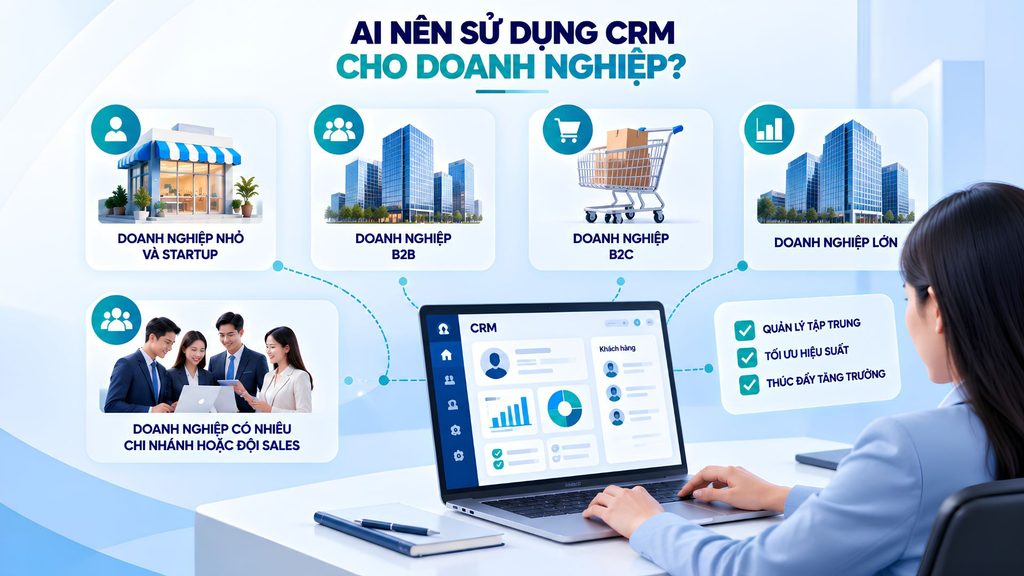
How does CRM software work?
CRM software operates on a closed customer-data lifecycle, from the moment information is received to the point of analysis for decision-making. You can picture the workflow as seven continuous steps.
- Data collection: The CRM captures customer information from the website, forms, email, phone, social media, stores or sales channels. The data can include contact details, needs, the lead source and transaction history.
- Storage: All data is centralized in a single system, creating a unified customer profile. Staff with access can quickly view information and interaction history instead of searching across many different sources.
- Segmentation: The CRM groups customers and leads by criteria such as source, needs, behavior, transaction value, potential or stage in the sales pipeline. This is the basis for allocating resources appropriately.
- Engagement: The system supports Sales and Marketing in activities such as calling, sending email, SMS or scripted messages. Some platforms also automatically remind teams of follow-up schedules and trigger a workflow based on customer behavior.
- Conversion: When a lead qualifies, the CRM helps convert it into a sales opportunity, tracks each deal stage, assigns Sales and updates the probability of closing. Managers can monitor the pipeline to control progress and forecast revenue.
- Care: After a transaction, the CRM continues to store purchase history, support requests, feedback and complaints. Businesses can set up care schedules, retention programs or upsell campaigns based on customer data.
- Analysis: Data is consolidated into dashboards and reports on revenue, conversion rates, sales performance, lead sources and customer behavior. From there, businesses identify bottlenecks in the process and make data-driven decisions.
The key point is that data at each step is recorded and reused in the next, forming the foundation for automation and applying AI across the entire process.
>>> Reference:
- 15+ free, easy-to-use Android app design software
- Top 17 leading professional graphic design apps
- Top 19 free task organization apps for personal planning
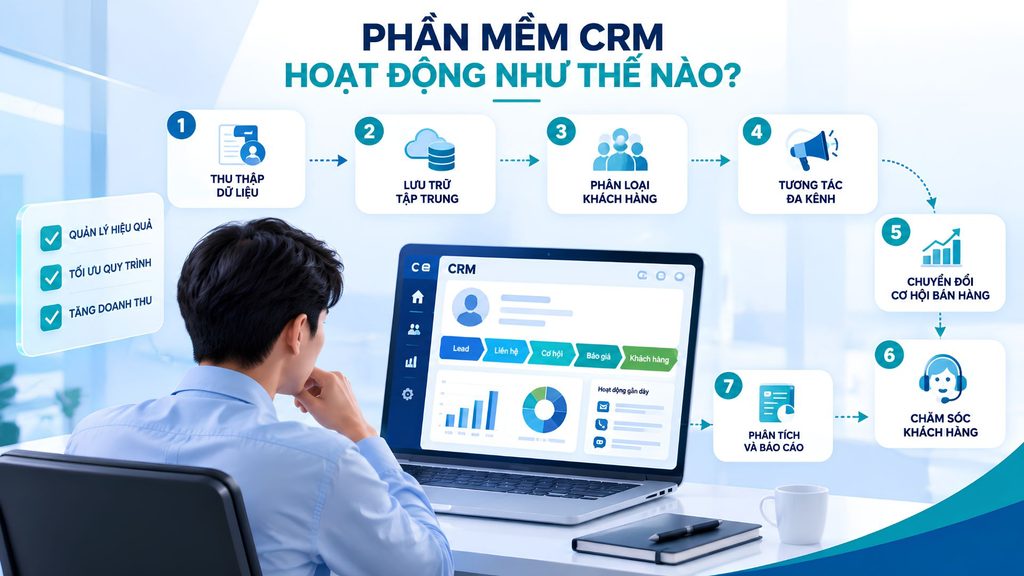
What benefits does CRM software bring to businesses?
The biggest benefit of CRM software is turning scattered customer data into an organized asset that supports revenue growth and customer retention.
Centralizing customer data
A CRM gathers all customer information in one place, eliminating fragmentation across individuals and tools. Each customer profile contains complete contact details, purchase history, notes and every interaction across channels. As a result, any employee who takes over immediately understands the context, avoids asking for information again and reduces the risk of losing data when staff change. This is the foundation for all subsequent sales and care activities.
Managing the entire sales process
A CRM digitizes the sales pipeline, allowing you to track each opportunity as it moves through the stages from first contact to close. Managers can clearly see how many opportunities are at each stage, their expected value and the next action step. Standardizing the process ensures no opportunity is forgotten while shortening response time. Combined with automatic reminders, the sales team works to a unified rhythm rather than depending on each person’s habits.
Automating marketing and customer care
A CRM lets you set up automated scenarios such as welcome emails, cart reminders, post-purchase care or behavior-based lead nurturing. Thanks to automation, businesses maintain consistent communication without spending more manpower on repetitive tasks. Scenarios are triggered by events and segments, helping deliver the right message to the right person at the right time, thereby improving open rates, response rates and the effectiveness of the entire funnel.
Tracking sales team performance
A CRM provides objective data on the activities and results of each salesperson. Managers can track the number of calls, opportunities in progress, conversion rates and sales almost in real time instead of waiting for manual reports. This helps identify early which employees need support, replicate effective approaches and set targets based on data. Transparency also promotes individual accountability and creates a fair basis for evaluation and rewards.
Improving the customer experience and retention rate
A CRM helps personalize the experience by clearly understanding each customer’s history and needs. The support team can quickly access the full context to handle requests accurately, reduce wait times and avoid repeating questions. Proactively reminding customers of maintenance schedules, renewals or timely thank-yous increases satisfaction and loyalty. Retaining existing customers is often far more effective than constantly finding new ones, and a CRM is a tool that directly serves this goal.
Analyzing data and forecasting revenue
A CRM turns operational data into reports and forecasts that support decision-making. Businesses learn which lead sources are most effective, the conversion rate at each stage, customer lifetime value and expected revenue in the coming period. These analytics help allocate the marketing budget sensibly, plan resources and detect early signs of decline. When AI is added, forecasting is further enhanced by recognizing behavioral patterns that manual analysis struggles to detect.
>>> Related reading:
- 17 free 3D home design software options for phone and computer
- Top 35 best, most effective time management apps
- TOP 15 best AI code-writing tools
The key features of CRM software
A complete CRM revolves around eight core feature groups, from customer data management to AI applications. When evaluating a solution, businesses should check how well each group meets their real-world processes.
Customer information management
This is the foundational feature, covering customer profiles, contact information, segmentation and interaction history. Each customer is stored as a unified profile that aggregates every transaction, note and touchpoint across channels. Flexible segmentation by criteria such as industry, region, value or behavior helps businesses target the right group for each campaign and personalize their approach.
Lead and sales opportunity management
This feature group covers lead management, lead scoring, lead assignment and opportunity management. The CRM automatically captures leads from many sources, evaluates their potential and distributes them to the right staff according to predefined rules. Scoring helps the team prioritize opportunities with a high chance of closing, avoid spreading resources too thin and shorten response times with interested customers.
Sales pipeline management
Pipeline management lets you model the sales process into visual stages, complete with forecasts, conversion rates and activity logs. Staff drag and drop opportunities through each stage, while managers see the overall picture of the value and status of the entire funnel. This is the central tool for controlling deal progress and detecting bottlenecks in the sales process.
Marketing Automation
Marketing automation automates campaigns via email, SMS, Zalo and many other channels based on customer behavior and segments. Businesses set up lead nurturing flows along with event-triggered scenarios, helping maintain continuous engagement without manual effort. When tied to sales data, marketing and sales collaborate more closely on the same data source and can measure the contribution of each campaign.
Customer care
Customer care features include ticket management, complaints, support history and after-sales service. Every customer request is recorded, categorized and tracked until resolved, so nothing is missed. Support staff have the full context immediately thanks to tickets being linked to customer profiles, allowing faster and more consistent responses. This is also a valuable source of data for improving products and services.
Reporting and analytics
This group provides sales dashboards, revenue reports, team performance and customer analytics. Users customize the metrics they want to track and view reports updated in real time. Analytics help answer important operational questions such as which channel brings the most quality customers, which stage loses the most opportunities and how revenue is trending, thereby supporting data-driven decisions.
Integration and API
Integration capability determines how well a CRM fits into a business’s existing systems. A good CRM connects with the website, ERP, accounting software, e-commerce platforms, the call center, email and social media channels through an API. Thanks to integration, data flows smoothly between departments instead of being siloed, reducing duplicate data entry and creating a 360-degree customer view across the organization.
AI in CRM
AI is becoming a new capability layer for CRM, supporting lead scoring, predicting the likelihood of conversion and analyzing customer behavior. Many platforms add the ability to summarize calls, draft emails or sales scripts, chatbots and an AI Agent to support sales and customer care teams. The scope and naming of AI features vary by vendor and service plan, so businesses should verify them in practice rather than relying solely on marketing claims.
>>> See more:
- Free computer vision software: easy-to-use platforms
- Top 10 best, high-quality free home design apps
Common types of CRM software today
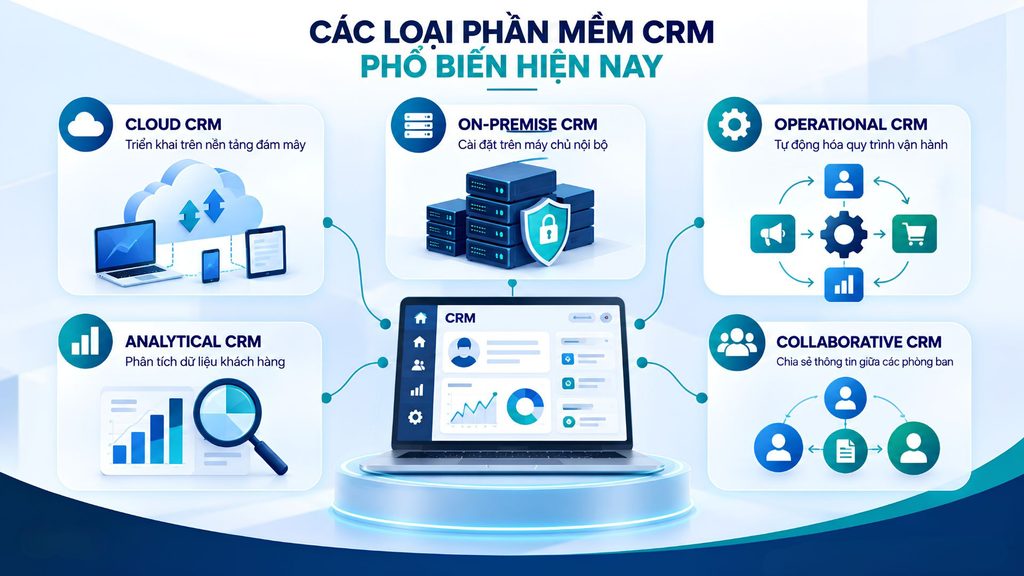
CRM software is classified by deployment method and by purpose of use. Understanding these groups helps businesses narrow their choices before comparing specific products.
Cloud CRM
Cloud CRM is a CRM system deployed on a cloud platform, with data stored and run on the vendor’s infrastructure. Users can access it over the Internet from a computer or mobile device without having to manage servers themselves. The advantages of this model are fast deployment, easy scalability and typically a low initial investment cost. Cloud CRM suits startups, small and medium-sized businesses as well as distributed sales teams.
On-premise CRM
On-premise CRM is installed and run on the business’s internal servers. This model offers the highest level of control over data and deep customization, suiting organizations with specialized security or compliance requirements. In return, the business must invest in its own infrastructure and operations team and take responsibility for maintenance and upgrades. On-premise is typically considered by large organizations or specialized industries.
Operational CRM
Operational CRM focuses on automating day-to-day operational processes across three areas: sales, marketing and service. This is the most familiar group, helping standardize and speed up tasks such as lead management, customer care and request handling. The main goal is to improve operational efficiency and ensure a consistent customer experience at every touchpoint.
Analytical CRM
Analytical CRM emphasizes collecting, aggregating and analyzing customer data to draw out insights that serve strategy. This group is strong in reporting, advanced segmentation and forecasting, helping businesses deeply understand customer behavior, lifetime value and trends. Analytical CRM typically complements operational CRM, turning operational data into the basis for marketing and business decisions.
Collaborative CRM
Collaborative CRM focuses on sharing customer information among departments such as sales, marketing and service. The goal is to ensure every department works on the same data source and coordinates smoothly throughout the entire customer journey. This group is especially useful for businesses with multiple teams or branches that need a unified approach and want to avoid a fragmented experience.
AI CRM
AI CRM is the generation of CRM that integrates artificial intelligence into core operations. Instead of merely storing and displaying data, the system proactively scores leads, forecasts conversion, suggests the next action and automates tasks such as drafting content or summarizing interactions. AI CRM is a prominent trend, but its effectiveness depends on the quality of the input data and how well the features fit specific processes.
>>> Related reading:
- How to create an app with AI for free, detailed and simple
- TOP 15+ effective, super-easy AI app-building tools
- How is AI applied in software development?
Top 15 best CRM software today
Below is a summary table of 15 popular CRM platforms, helping businesses quickly compare who each is suited for, its strengths and its price before reviewing each solution in detail.
| No. | CRM software | Best for | Highlights | Reference price |
|---|---|---|---|---|
| 1 | MISA AMIS CRM | SMEs, large enterprises | CRM + DMS, AI, sales management | Contact for quote |
| 2 | Base CRM | SMEs, growing businesses | Customer 360°, Sales, Marketing, customer care | Contact for quote |
| 3 | Getfly CRM | SMEs, Sales & Marketing | CRM, Marketing Automation, KPI | From 521,000 VND/month |
| 4 | CRMOnline | Small and medium-sized businesses | Leads, Sales, orders, receivables | From 35,000 VND/month |
| 5 | CRMVIET | SMEs | CRM, Marketing Automation, customer care | From 12.5 million VND/5 users |
| 6 | NextX CRM | SMEs to large enterprises | CRM, AI, Marketing, multichannel | From 2.25 million VND/3 users/year |
| 7 | FastWork CRM | B2B, trade, services | CRM + operations management | From 60,000 VND/user/month |
| 8 | HubSpot CRM | Startups, SMEs | Free CRM, Marketing, Sales, AI | Free / from 15 USD/user/month |
| 9 | Salesforce | Medium and large enterprises | Comprehensive CRM, AI, Automation | From 25 USD/user/month |
| 10 | Zoho CRM | Startups, SMEs | Sales Automation, AI Zia | Free / from 14 USD/user/month |
| 11 | Microsoft Dynamics 365 | Medium and large enterprises | CRM, AI, Microsoft 365 | From 65 USD/user/month |
| 12 | Pipedrive | Startups, SMEs, Sales | Sales Pipeline, Automation | From 14 USD/user/month |
| 13 | Bitrix24 | Startups, SMEs | CRM + task management | Free / from 69 USD/month |
| 14 | SuiteCRM | Businesses with an IT team | Open source, highly customizable | No license fee |
| 15 | SugarCRM | B2B businesses | Sales Automation, AI, Analytics | Contact for quote |
1. MISA AMIS CRM
MISA AMIS CRM is CRM software combined with DMS that helps businesses comprehensively manage pre-sales, in-sales and after-sales activities. The platform centralizes customer data and manages the sales pipeline, the sales team, orders, distribution and after-sales care. MISA AMIS CRM currently has more than 300 features and is trusted by more than 12,000 businesses.
Standout features:
- Customer data management and 360° customer care.
- Sales pipeline, KPI and sales team management.
- Order, distribution and DMS management.
- Multidimensional reporting and an AI Agent to support business operations.
| Pros | Cons |
|---|---|
| End-to-end management across pre-, in- and after-sales | Many features, so it takes time to get familiar |
| Integrates CRM and DMS | Cost depends on the number of users and usage needs |
| Includes an AI Agent for analysis and automation | Better suited to businesses that need comprehensive sales management |
| Data connectivity with the MISA ecosystem | Requires standardizing data and processes when deploying |
Integration capability: Syncs with the MISA AMIS ecosystem, including AMIS Workflow, AMIS Accounting, AMIS Inventory and AMIS Manufacturing. MISA AMIS CRM also provides an API to connect with other customer-care systems.
Pricing: MISA AMIS CRM has multiple feature packages and charges by the number of users. Businesses need to contact MISA for a quote based on their needs. The product page currently offers a 15-day free trial.
Best for: B2B businesses, distribution companies and manufacturing–trade companies, especially those that need to manage Sales and DMS and connect data with accounting and inventory.
>>> Learn more:
- 18 highly effective ways to apply AI for ecommerce
- What is construction ERP? Features & Top 10 construction ERP software
2. Base CRM
Base CRM is a customer management and business operations platform that provides more than 30 specialized apps for product, sales, marketing and service management. Base CRM connects data from Sales, Services and Operations, helping businesses manage their entire business process on a single platform.
Standout features:
- Product, sales pipeline, quote and contract management.
- Lead management and marketing activities.
- Multichannel customer care, support and case handling.
- 360° customer data management and potential assessment.
| Pros | Cons |
|---|---|
| More than 30 apps supporting the entire business process | A system with many apps, so it takes time to get familiar |
| Connects Sales, Services and Operations | Cost depends on the app suite and scale of use |
| 360° customer data management | Requires standardized data to exploit effectively |
| Supports unifying customer touchpoints | Better suited to businesses that need cross-department management |
Integration capability: Base CRM connects with the apps in the Base ecosystem and supports integration with Google Analytics, PostHog and Segment, helping centralize customer interaction data.
Pricing: Base CRM currently does not publish specific prices; instead, it offers a trial/demo registration option so businesses can choose the right solution.
Best for: Businesses that want to unify management of marketing, sales, customer care and operations, especially organizations that need to manage many processes and customer touchpoints on the same platform.
>>> Learn more:
- Top 10 free online poster design software for the computer
- TOP 50+ most popular free AI tools today
3. Getfly CRM
Getfly CRM is CRM software focused on customer management and care, with more than 14 years of development in the Vietnamese market. The platform offers feature groups such as customer management, Marketing Automation, KPI, order management, contracts and customer care support on both web and mobile.
Standout features:
- Customer management and centralized data.
- Marketing Automation with Email, SMS, ZNS.
- Management of KPIs, orders, contracts and tasks.
- Mobile App and an AI Agent to support businesses.
| Pros | Cons |
|---|---|
| Intuitive interface, supports both PC and Mobile | Cost increases with scale and number of users |
| Many CRM and Marketing Automation features | Some extended features require additional subscriptions |
| Supports an API to connect with other software | The Enterprise plan requires contacting for a quote |
| Has an AI Agent and a KPI system | Businesses need time to get familiar with the many features |
Integration capability: Getfly supports an API to connect with other software and can connect with channels such as Facebook, Zalo and e-commerce marketplaces.
Pricing: The Startup plan starts at 521,000 VND/month for 3 users; the Professional plan starts at 1,568,000 VND/month, supporting 10–50 users; the Enterprise plan requires contacting for a quote.
Best for: SMEs and businesses that want to centrally manage customers, Sales, Marketing and customer care on a single platform.
4. CRMOnline
CRMOnline is CRM software aimed at small and medium-sized businesses, focused on customer management, the sales process and business operations. The platform offers many affordable usage plans while supporting the management of leads, contacts, opportunities, quotes, contracts, orders and receivables.
Standout features:
- Management of Leads, Accounts, Contacts and Opportunities.
- Sales process management using LeadCard.
- Management of quotes, contracts and orders.
- Management of receivables, profit and Sales commissions.
| Pros | Cons |
|---|---|
| Pricing suitable for small businesses | Advanced features depend on the plan |
| Focused on Sales and customer management | The basic plan has storage limits |
| Includes quote, contract and order management | Scalability should be considered against your needs |
| Supports a Mobile App and Zalo OA on higher plans | Better suited to SMEs with relatively simple CRM processes |
Integration capability: The Recommended plan supports Zalo OA integration to send ZNS and provides a Mobile App on the App Store and Google Play.
Pricing: The Basic plan starts at 35,000 VND/month; the Recommended plan starts at 160,000 VND/month. Higher plans are designed with more management features and support for expansion.
Best for: Small and medium-sized businesses that need an affordable CRM to manage customers, Sales, quotes, orders and receivables.
>>> Related reading:
- TOP 20+ leading AI design tools that support designers today
- What is Low Code? Characteristics & the future software development solution
5. CRMVIET
CRMVIET is customer management and care software developed in Vietnam, aimed at the SME segment. The platform provides a 360° view of the customer, combining Sales, Marketing and Support activities while supporting Marketing Automation and sales process management.
Standout features:
- Customer management and data segmentation.
- Marketing Automation and lead scoring.
- Management of opportunities, quotes, contracts and orders.
- Tickets, surveys and customer care.
| Pros | Cons |
|---|---|
| Has a full set of core CRM features | The interface and system may take time to get familiar with |
| Supports Marketing Automation and Lead Scoring | Cost increases with the number of users and features |
| Can customize data for the business | Some advanced features are in the Professional plan |
| Supports a Mobile App and multichannel integration | The public price list is mainly for the On-Premise edition |
Integration capability: CRMVIET supports multichannel integration and syncing data from sources such as Facebook and Zalo; it also provides a Mobile App for managing customers and transactions.
Pricing: The On-Premise Standard edition starts at 12.5 million VND/5 users, and the Professional edition starts at 16.5 million VND/10 users. The annual maintenance fee is stated at 15% of the contract value. CRMVIET also offers a 15-day free trial.
Best for: SMEs that need a CRM system capable of managing customers, Sales, Marketing Automation and customer care, especially when the business needs to deploy the CRM on its own server.
>>> See more:
- Top 20 most reputable No. 1 app design companies in Vietnam
- Top 10+ best free sales management apps for mobile
6. NextX CRM
NextX CRM is CRM software that manages customers from lead to loyal customer, focused on managing data, the sales pipeline and interaction history. The platform supports lead scoring, opportunity management, quotes, contracts, tickets and AI Agent integration, and it can connect data across many modules.
Standout features:
- 360° customer management and interaction history.
- Management of Leads, Pipeline, Deals and quotes.
- Management of contracts, appointments and tickets.
- Marketing Automation, multichannel chat and an AI Agent.
| Pros | Cons |
|---|---|
| Intuitive Pipeline interface, easy to track opportunities | Many modules, so it takes time to get familiar |
| Supports lead scoring and classification | Cost increases with the number of users |
| Integrates multichannel chat and Marketing Automation | Some AI features require a higher plan |
| Has an AI Agent and API connectivity | Businesses need to clearly define the deployment scope |
Integration capability: NextX supports multichannel chat with Facebook, Instagram, Zalo OA, TikTok and WhatsApp; it also connects data across modules through a Universal Contact ID and API.
Pricing: NextX CRM has plans from 2.25 million VND/3 users/year; Standard at 7.5 million VND/10 users/year; Professional at 15 million VND/20 users/year and higher plans for large enterprises. Prices exclude VAT.
Best for: SMEs to large enterprises that need centralized management of customers, the sales pipeline, marketing and customer care on a single platform.
7. FastWork CRM
FastWork CRM is a CRM solution aimed at B2B businesses, focused on managing customers, data, Sales, Marketing and customer care. FastWork CRM+ supports tracking the sales process, quotes, contracts, sales opportunities and real-time reporting on revenue, orders and receivables.
Standout features:
- Management of customers, Leads and Contacts.
- Management of sales opportunities, quotes and contracts.
- Email Marketing, Landing Pages and customer care.
- Reporting on Sales, revenue, orders and receivables.
| Pros | Cons |
|---|---|
| Focused on the CRM needs of B2B businesses | Focuses heavily on the trade and services segment |
| End-to-end customer and Sales management | Needs time to set up the initial process |
| Real-time data reporting | Cost depends on the plan and number of users |
| Has an API to connect with other systems | Some specialized needs may require customization |
Integration capability: FastWork CRM supports an API to connect with other software and combines with the modules in the FastWork ecosystem to manage work, human resources and business operations.
Pricing: The CRM+ plan starts at 60,000 VND/user/month when purchased as a combo. FastWork also offers the SME+ plan from 100,000 VND/user/month, which includes CRM+ along with other management modules.
Best for: B2B, trade and services businesses that need to combine customer management with Sales, Marketing and operational activities.
>>> See more:
- A guide to building an iOS app for people who cannot code
- How to build a sales website on your phone, detailed & easy to do
8. HubSpot CRM
HubSpot CRM is an international CRM platform that provides tools for managing contacts, the deal pipeline, sales activities and reporting. HubSpot has a free version and paid plans, and it connects the CRM with Marketing Hub, Sales Hub, Service Hub and other products in the same ecosystem.
Standout features:
- Management of Contacts, Companies and interaction history.
- Deal pipeline and sales activity management.
- Reports, dashboards and performance tracking.
- AI to support Sales, Marketing and customer care.
| Pros | Cons |
|---|---|
| Has a free CRM plan to get started | Advanced features require paid plans |
| Intuitive interface, easy to deploy | Cost can rise as you scale up |
| A comprehensive Marketing, Sales and Service ecosystem | Takes time to get familiar with the large ecosystem |
| Supports many AI and automation tools | Some features are limited by plan |
Integration capability: HubSpot CRM connects with the products in the Customer Platform such as Marketing Hub, Sales Hub, Service Hub, Content Hub and Data Hub. The platform also has the HubSpot Marketplace to connect with third-party apps.
Pricing: HubSpot offers a free CRM with basic features. Paid CRM plans currently start at 15 USD/user/month for Starter, 50 USD/user/month for Professional and 75 USD/user/month for Enterprise.
Best for: Startups, SMEs and international businesses that need a CRM platform that can scale from basic customer management to Marketing, Sales, Service and AI.
9. Salesforce
Salesforce is an international CRM platform that provides tools for managing Leads, Accounts, Contacts, Opportunities and the sales pipeline. Salesforce combines CRM with AI, automation, Marketing, Service and Commerce, helping businesses manage the entire customer journey on a single platform.
Standout features:
- Management of Leads, Accounts, Contacts and Opportunities.
- Pipeline management, quotes and sales forecasting.
- Marketing, Service and Commerce on the same platform.
- AI Agentforce to support automation and sales.
| Pros | Cons |
|---|---|
| A comprehensive, highly scalable CRM ecosystem | Relatively high cost |
| Strong customization and automation capabilities | Can be complex for businesses new to it |
| Integrates AI and many analytics tools | Requires time to deploy and train |
| Suitable for large-scale businesses | Cost can rise when using additional features |
Integration capability: Salesforce provides an ecosystem of apps and integration tools, and it connects the Sales, Service, Marketing, Commerce, Slack and Tableau products.
Pricing: The Starter Suite starts at 25 USD/user/month, Pro Suite at 100 USD/user/month and Core at 195 USD/user/month. Higher plans include Advanced from 395 USD and Max from 550 USD/user/month.
Best for: Medium and large enterprises, corporations or organizations with complex sales processes that need a CRM with strong customization and scalability.
>>> Learn more:
- A simple guide to deploying AI in mobile apps
- A guide on how to use Google AI Studio effectively and quickly
10. Zoho CRM
Zoho CRM is CRM software that supports managing Sales, Marketing and customer interactions across many channels. The platform provides Sales Automation, workflows, sales forecasting, reporting and AI Zia, helping businesses automate tasks and exploit customer data more effectively.
Standout features:
- Management of Leads, Contacts, Accounts and Deals.
- Sales Automation and workflows.
- Sales forecasting, reporting and analytics.
- AI Zia to support prediction and automation.
| Pros | Cons |
|---|---|
| Has many CRM and automation features | The many features can make it hard to get familiar |
| Has a free version for up to 3 users | Some advanced features require a higher plan |
| AI Zia supports analysis and forecasting | Cost increases with the number of users |
| Good customization and scalability | Needs configuration to fit the business’s processes |
Integration capability: Zoho CRM can connect with the Zoho ecosystem and third-party apps through webhooks, an API and Zoho Flow. Zoho Flow supports integration with more than 1,000 apps.
Pricing: Zoho CRM has a free version for 3 users. Paid plans include Standard from 14 USD/user/month, Professional from 23 USD, Enterprise from 40 USD and Ultimate from 52 USD/user/month when billed annually.
Best for: Startups, SMEs and growing businesses that need a CRM with flexible pricing, many automation features and scalability.
11. Microsoft Dynamics 365
Microsoft Dynamics 365 is Microsoft’s suite of CRM and ERP solutions, in which Dynamics 365 Sales focuses on managing customers, leads, opportunities and sales activities. The platform integrates Microsoft 365, reporting, AI Copilot and agents that support Sales from prospecting for leads to closing deals.
Standout features:
- Management of Leads, Accounts, Contacts and Opportunities.
- Sales Automation, Pipeline and revenue forecasting.
- Reports, dashboards and performance analysis.
- Copilot and an AI Agent to support Sales.
| Pros | Cons |
|---|---|
| Deep integration with the Microsoft ecosystem | Higher cost than mainstream CRMs |
| Strong customization and scalability | Deployment can be complex |
| Has AI Copilot and a Sales Agent | Requires a skilled team to administer |
| Suitable for large-scale businesses | Many features may exceed SME needs |
Integration capability: Dynamics 365 Sales integrates with Microsoft 365 and other Microsoft products. The platform also supports Power Automate, Power Apps and extension apps from the Microsoft ecosystem.
Pricing: Dynamics 365 Sales Professional from 65 USD/user/month, Enterprise from 105 USD/user/month and Premium from 150 USD/user/month, applied when billed annually.
Best for: Medium and large enterprises, especially organizations already using the Microsoft ecosystem that need to combine CRM with Sales, data, AI and operational activities.
>>> See more:
- AI Data Labeling: a guide to labeling AI data
- Top 7 best open-source object tracking tools
12. Pipedrive
Pipedrive is CRM software focused on managing the sales pipeline and sales activities. The platform provides an intuitive interface to manage leads, deals, contacts, the work calendar and sales activities, and it integrates AI and more than 500 third-party apps.
Standout features:
- Management of Leads, Deals, Contacts and the sales pipeline.
- Tracking of activities, calendar and sales progress.
- Reports, dashboards and AI-generated reports.
- Automation, Email Marketing and contract management.
| Pros | Cons |
|---|---|
| Intuitive sales pipeline interface | Focuses more strongly on Sales than other CRM functions |
| Supports more than 500 integrations | Some advanced features require a higher plan |
| Has AI and automation tools | Cost increases with the number of users |
| Easy to scale to business needs | Some Marketing features are separate add-ons |
Integration capability: Pipedrive provides a Marketplace with more than 500 integration apps, along with an API and Webhooks to connect with other systems.
Pricing: The Lite plan starts at 14 USD/user/month, Growth at 39 USD/user/month, Premium at 59 USD/user/month and Ultimate at 79 USD/user/month when billed annually. Pipedrive offers a 14-day free trial.
Best for: Startups, SMEs and sales teams that need an intuitive CRM to manage the pipeline, leads and sales activities.
13. Bitrix24
Bitrix24 is a business management platform that integrates CRM, task and project management, internal communication and many operational tools. Bitrix24’s CRM supports managing Deals, Contacts, Leads, the sales pipeline, Marketing and sales automation.
Standout features:
- Management of Contacts, Leads, Deals and the sales pipeline.
- Marketing, quotes and invoices.
- Automation of Sales and workflows.
- Analytics, reporting and AI to support work.
| Pros | Cons |
|---|---|
| Combines CRM with many management tools | The many features can make the interface complex |
| Does not charge per user | Plans have a limit on the number of users |
| Has Sales Automation and Marketing | Cost increases when large scale is needed |
| Supports both Cloud and On-premise | Takes time to exploit the entire system |
Integration capability: Bitrix24 supports integration with Email, WhatsApp, phone systems, a REST API and many third-party apps. The On-premise version provides access to the source code and API.
Pricing: Bitrix24 has a Free plan for 1–2 users. The Basic plan starts at 69 USD/organization/month, Standard at 144 USD and Professional at 289 USD/month when billed monthly. Annual billing costs 49, 99 and 199 USD/organization/month respectively.
Best for: Startups, SMEs and businesses that want to combine CRM with task, project, communication and operations management on a single platform.
>>> Learn more:
- Create a sales website with AI for free, SEO-friendly and effective
- How to build an AI app with vibe coding on Google AI Studio, made simple
14. SuiteCRM
SuiteCRM is open-source CRM software that lets businesses deploy and customize it themselves as needed. The platform supports managing Accounts, Contacts, Leads, Opportunities, the sales pipeline, Marketing, reporting and business processes. SuiteCRM does not charge licensing fees by the number of users.
Standout features:
- Management of Accounts, Contacts, Leads and Opportunities.
- Sales pipeline management and sales forecasting.
- Marketing, reporting and activity management.
- Customization of workflows and CRM data.
| Pros | Cons |
|---|---|
| Open source, no license/user fees | Requires a technical team to deploy and administer |
| High customization capability | Hosting and deployment costs arise |
| Can self-manage data and infrastructure | Requires proactive system maintenance |
| Suitable for specialized CRM needs | Not suitable for businesses that want fast deployment |
Integration capability: SuiteCRM supports an API, connects with external systems and can be customized to fit a business’s existing infrastructure and processes.
Pricing: The SuiteCRM software charges no licensing fees; businesses pay for hosting, deployment and support as needed. The Standard Support package currently starts at 1,200 GBP/10 hours of support, while the SuiteASSURED service starts at 3,350 GBP/year.
Best for: Businesses with a technical team that need to control their data and want to deeply customize the CRM to their own processes.
15. SugarCRM
SugarCRM is a CRM platform aimed at B2B businesses, focused on Sales Automation, customer management and data analytics. Sugar Sell supports managing Leads, the pipeline, Opportunities and Accounts and uses AI to prioritize opportunities, forecast and provide recommendations for the sales team.
Standout features:
- Management of Accounts, Contacts, Leads and Opportunities.
- Sales pipeline, forecasting and quote management.
- AI data analysis and action recommendations.
- Workflows, dashboards and 360° customer management.
| Pros | Cons |
|---|---|
| Strong focus on CRM for B2B | Higher cost than many mainstream CRMs |
| AI supports Sales and data analysis | Requires time to deploy and configure |
| Good workflow customization capability | Better suited to businesses with complex processes |
| Supports ERP and other system integration | Prices are not fully published on the website |
Integration capability: SugarCRM supports integration with ERP, Outlook, Gmail and third-party apps; the platform also provides a Marketplace to extend CRM functionality.
Pricing: SugarCRM currently requires businesses to contact them for a quote based on the product, scale and deployment needs. The website does not publish a fixed price for Sugar Sell.
Best for: Medium and large B2B businesses, especially in manufacturing, wholesale and distribution, that need to manage complex customer relationships.
>>> Reference:
- Will AI replace web development? How to adapt effectively
- TOP 20 best free AI tools that support online selling
Criteria for choosing the right CRM software
Not every CRM software suits every business. A good system needs to match your scale, current operational processes and future scalability. Before choosing, businesses should evaluate the criteria below to avoid investing in a CRM that has many features but does not fit their real needs.
Determine scale and number of users
First, businesses need to estimate the number of users now and over the next few years, since most CRMs charge per person. Scale also determines the level of complexity required: small teams prioritize a lightweight, easy-to-use solution, while large organizations need granular permissions and centralized administration. Determining this clearly from the start helps avoid choosing a tool that is too simple and must be replaced early or too cumbersome for the actual need.
Define your Sales and customer care processes
A CRM is only effective when it accurately reflects the business’s sales and customer care processes. You need to clearly describe the pipeline stages, how leads are assigned, approval rules and the request-handling flow. From there, evaluate whether the software allows you to configure these steps correctly or forces the business to change the way it works. A solution that matches the process will be adopted quickly by the team and reduces the risk of failed deployment.
Check customization capability
Customization capability determines how well a CRM adapts to a business’s specifics. You need to check whether adding data fields, customizing the interface, setting up automation rules and adjusting reports is easy. Businesses with specialized processes should prioritize a platform that allows flexible configuration without writing complex code. Conversely, over-customization also increases cost and maintenance difficulty, so a sensible balance is needed.
Evaluate integration capability
A CRM isolated from other systems creates a data island. Therefore, you need to check its ability to connect with the website, ERP, accounting software, the call center, email, e-commerce and the channels the business is using. An open API along with available standard connectors is a good sign. Seamless integration lets data flow automatically between departments, reduces duplicate data entry and creates a unified customer view across the organization.
Check Automation and AI features
Automation and AI are increasingly becoming differentiators. Businesses should evaluate the ability to set up automated flows for marketing, lead assignment, reminders and care, as well as AI features such as lead scoring, forecasting or content-drafting support. What matters is verifying real-world effectiveness rather than just trusting marketing, while identifying which features truly serve current operations rather than chasing trends.
Evaluate security and permissions
Customer data is a sensitive asset, so security and permissions must be mandatory criteria. You need to consider the role-based permission mechanism, data encryption, access logs, backups and the vendor’s security certifications and commitments. For businesses with specialized compliance requirements, the ability to control where data is stored and who can access it is even more important. This is a factor that should be checked carefully before putting real data into the system.
Calculate total cost of ownership – TCO
The real cost of a CRM is not only the subscription fee. Total cost of ownership (TCO) also includes deployment, customization, integration, training, data migration and ongoing operating costs. A solution with a low subscription fee but requiring a lot of customization and maintenance can be more expensive in the long run. Businesses should estimate TCO over several years to compare options fairly and avoid hidden costs that emerge later.
Future scalability
A CRM is a long-term investment, so scalability needs to be considered from the outset. You need to evaluate whether the platform can keep up as the number of users, data volume and process complexity grow, as well as its ability to add modules or integrate new systems. Choosing a solution with a clear development roadmap and a stable community and partner support helps businesses avoid a costly system replacement as they grow.
The CRM deployment process for businesses
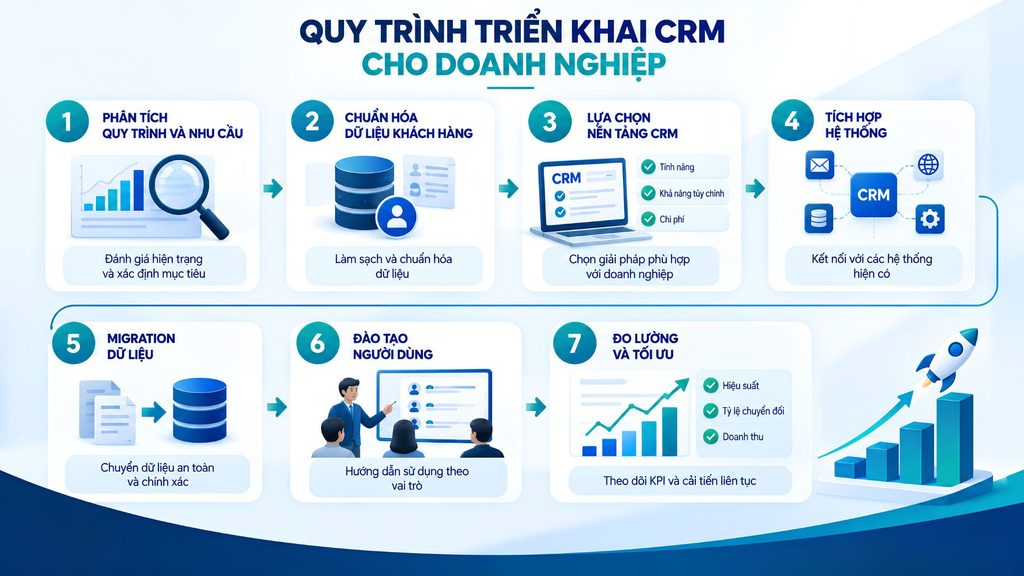
Deploying CRM software is not just about installing a new tool; it is a process of standardizing data, processes and the way the team works. A methodical CRM deployment process helps businesses limit data errors, increase real adoption and create a foundation for scaling the system in the future. Businesses can follow these 7 steps:
Step 1: Analyze processes and needs
First, businesses need to define the goals of the CRM deployment and the problems to solve. Analyze the current processes from Marketing and Sales to customer care to identify bottlenecks, manual steps and the data that needs managing. At the same time, identify the user groups, KPIs and important business requirements.
Step 2: Standardize customer data
Check and clean the data before bringing it into the CRM. Businesses need to remove duplicate data, standardize the format of phone numbers, emails and customer names and unify the information fields. This is also the time to build rules for classifying leads, customers, product lines or regions.
Step 3: Choose a CRM platform
Based on the defined requirements, businesses choose CRM management software that fits in terms of features, customization, integration, security and cost. For specialized processes, businesses can consider custom CRM software instead of only using a packaged solution.
Step 4: Integrate systems
Connect the CRM with the systems in use such as the website, email, the call center, ERP, accounting, e-commerce or marketing platforms. Integration keeps data synchronized and reduces manual data entry across multiple systems.
Step 5: Migrate data
Once the data is standardized and the system is ready, migrate data from Excel, the old CRM or other sources to the new CRM. You should run a test migration first, checking the number of records, data fields, relationships between objects and data integrity.
Step 6: Train users
Train by role instead of only teaching general features. Sales needs to know how to manage leads and the pipeline, Marketing needs to manage campaigns, and customer care needs to track interaction history and support requests. Businesses should also build guidance documents and a unified usage process.
Step 7: Measure and optimize
After deployment, track KPIs such as the CRM adoption rate, lead conversion rate, opportunity handling time, revenue by salesperson and customer retention rate. Based on real data, businesses continue to optimize processes, automation, reporting and access rights so the CRM increasingly fits their business operations.
>>> Learn more:
- A quick guide to creating a landing page with AI for free and effectively
- AI Agents for startups: benefits & real-world applications
When should a business use an off-the-shelf CRM and when should it build a custom CRM?
The answer depends on how specialized the process is and the role of the CRM in the operating system. An off-the-shelf CRM is suitable when needs are relatively standard, while a custom CRM delivers value when the business needs a system tightly bound to its own specifics.
When should you use an off-the-shelf CRM?
An off-the-shelf CRM suits businesses with relatively standard Sales, Marketing and customer care processes, such as managing leads, contacts, opportunities, the sales pipeline, customer care and sales reporting.
Businesses should prioritize a packaged solution when:
- The process is relatively standard: There are not many specialized operations that need to be built from scratch.
- You want fast deployment: You can immediately use the modules and workflows the vendor has already built.
- You do not need deep customization: The default features already meet most customer management needs.
- The budget is limited: Subscription or license costs are usually easier to budget for than developing a custom system.
For startups, SMEs or businesses just beginning to digitize their customer management processes, an off-the-shelf CRM is often the sensible choice for validating needs before investing heavily in a custom system.
When should you build a custom CRM?
A custom CRM is suitable when a business needs not just a customer management tool but also a platform tightly bound to its operational processes. Some signs that a business should consider developing its own CRM include:
- Specialized processes: The sales, approval, distribution or customer care process differs significantly from the common CRM model.
- You have legacy systems: The CRM needs to connect with or partially replace old systems in operation.
- You need ERP/website/app/API integration: Customer data must be synchronized two-way with ERP, the website, a mobile app, accounting or internal systems.
- You need custom workflows: The business requires its own automated flows, approval conditions, permissions or handling rules.
- You require high data control: You need more control over the architecture, access rights, storage and data security.
- The CRM is part of the operating system: The CRM does not operate independently but must connect with Sales, Marketing, customer care, ERP, inventory, orders or internal operations.
Build custom CRM software with TOT
When off-the-shelf CRMs no longer meet your operational process, building custom CRM software lets businesses proactively design a system that matches exactly how they sell, care for customers and operate. Instead of having to change processes to fit the software, businesses can build a CRM around their business goals and real operations.
With custom CRM development services, TOT helps businesses:
- Increase sales productivity: Automate data entry, lead assignment, reminders and opportunity updates, so the team can focus more on selling.
- Shorten the sales cycle: Design workflows and a sales pipeline based on reality, limiting leads that are forgotten or handled slowly.
- Increase conversion rates: Focus on customer data and interaction history so Sales has complete information when advising and caring for customers.
- Reduce operating costs: Connect the CRM with ERP, the website, apps and existing systems, limiting manual data entry and processing information across multiple platforms.
- Control data better: Take proactive control of permissions, data flows and how the system stores information, especially for businesses with high security requirements.
- Scale easily: The CRM is designed with an architecture that can add features, integrate more systems and meet the number of users as the business grows.
TOT accompanies you from business analysis, architecture design, CRM development and system integration to deployment and optimization, helping businesses build a CRM platform that not only manages customers but also directly supports revenue, team productivity and operational efficiency.
>>> See more services:
- Professional custom software development in Hanoi
- Get professional, well-priced custom software development in HCMC
Conclusion
CRM software not only helps businesses manage customer information but also supports optimizing Sales, automating processes, improving the customer experience and controlling business performance. Depending on scale, budget and how specialized the process is, businesses can choose an off-the-shelf CRM or build a custom CRM. Most important is choosing a solution that can meet current needs and scale in line with future development plans.
Frequently asked questions about CRM software
What is CRM software?
CRM software is a customer relationship management system that helps businesses centrally store data, record every interaction and coordinate the sales, marketing and care processes on a single platform. Instead of leaving information scattered in many places, a CRM creates a shared data source with permissions and a complete history. As a result, teams understand the customer context, respond faster and make decisions based on data rather than intuition.
What is a CRM used for?
A CRM is used to manage the entire lifecycle of the customer relationship, from collecting leads and tracking sales opportunities to automating marketing, after-sales care and data analysis. This tool helps businesses avoid missing opportunities, standardize processes, measure team performance and forecast revenue. The result is higher conversion rates, an improved experience and a higher customer retention rate, while creating a data foundation for business decisions.
How much does it cost to deploy CRM software?
The cost of deploying a CRM varies greatly by scale, number of users, level of customization and the solution chosen, so there is no universal figure. In addition to the subscription fee, businesses need to factor in the cost of integration, data migration, training and operations, that is, the total cost of ownership. Some platforms have a free version or a starter plan for trials, while custom solutions are quoted based on the specific scope. A sensible approach is to estimate the TCO over several years.
What is AI CRM software?
AI CRM software is a CRM that integrates artificial intelligence into core operations rather than just storing data. The system can score leads, forecast the likelihood of conversion, analyze customer behavior, summarize calls, suggest actions and support drafting emails or sales scripts. Some platforms also have chatbots and an AI Agent to support Sales and customer care. The effectiveness of these features depends on data quality and how well they fit real-world processes.
Are there any free CRM apps?
Yes. Some international platforms offer a free CRM version with basic features, suitable for small teams or the startup stage; there are also open-source solutions that let you self-host without licensing fees. However, the free version usually limits the number of users, data storage or advanced features, while open-source solutions require technical capability to install and maintain. Businesses should treat the free version as a trial step before committing to a long-term investment.