Choosing the right manufacturing warehouse management software is a crucial step that helps businesses accurately control raw materials, work-in-progress and finished goods, reduce losses and optimize inventory capital. From free tools such as Excel, Odoo and ERPNext to professional platforms like MISA AMIS, Oracle NetSuite and Fishbowl, each solution has its own strengths suited to a particular scale. In this article, TOT rounds up the Top 15 manufacturing warehouse management software platforms worth using in 2026, analyzing the pros, cons and ideal users of each, along with selection criteria and AI application trends so you can make the right decision.
>>> See more articles:
- Top 15 production management software for businesses
- Professional custom software development in Hanoi
- Professional, competitively priced custom software development in HCMC
Quick summary table of 15 manufacturing warehouse management software
Below is a summary of 15 leading manufacturing warehouse management software platforms, making it easy for businesses to compare features and choose the solution that fits their needs.
| Software name | Key features | Suitable for |
|---|---|---|
| Excel | Manage stock in/out/on-hand via spreadsheets; easy to customize, low cost | Household businesses, small workshops and newly established companies |
| MISA AMIS | Real-time inventory management, integrated accounting and purchasing | Small and medium-sized manufacturers (SMEs) |
| Odoo | Supports BOM, MRP and Work Order, multi-warehouse management and full ERP | Medium and large businesses that need an ERP system |
| ERPNext | Open-source ERP; warehouse, manufacturing and accounting on one platform | Medium-sized businesses and companies with an IT team |
| Pancake | Warehouse management combined with omnichannel sales, inventory synchronization | Small workshops that also sell |
| Sapo POS | Stock in/out/on-hand management, barcode stocktaking, multi-branch management | Small businesses, stores and simple production workshops |
| Fishbowl Manufacturing | BOM, MRP and Work Order management, QuickBooks integration | Medium and large manufacturers |
| Oracle NetSuite | Cloud ERP; warehouse, manufacturing and supply chain management | Large enterprises and multi-branch corporations |
| Sortly | Warehouse management via QR codes/barcodes, stocktaking on mobile devices | Small and medium-sized businesses |
| inFlow Inventory | Real-time inventory, order and purchasing management | Small and medium-sized manufacturing and distribution businesses |
| Ecount ERP | Warehouse, BOM, MRP, accounting and manufacturing on one system | Small and medium-sized manufacturers |
| Vzsoft | Stock in/out/on-hand management, multiple warehouses, inventory reports | Small and medium-sized Vietnamese businesses |
| StockPile | Free online inventory management, tracking multiple storage locations | Household businesses and small companies |
| Zoho Inventory | Warehouse and order management, Zoho CRM and e-commerce integration | Distribution, retail and simple manufacturing businesses |
| KiotViet | Inventory management combined with sales, multi-branch support | Small businesses and workshops that also sell |
What is manufacturing warehouse management software?
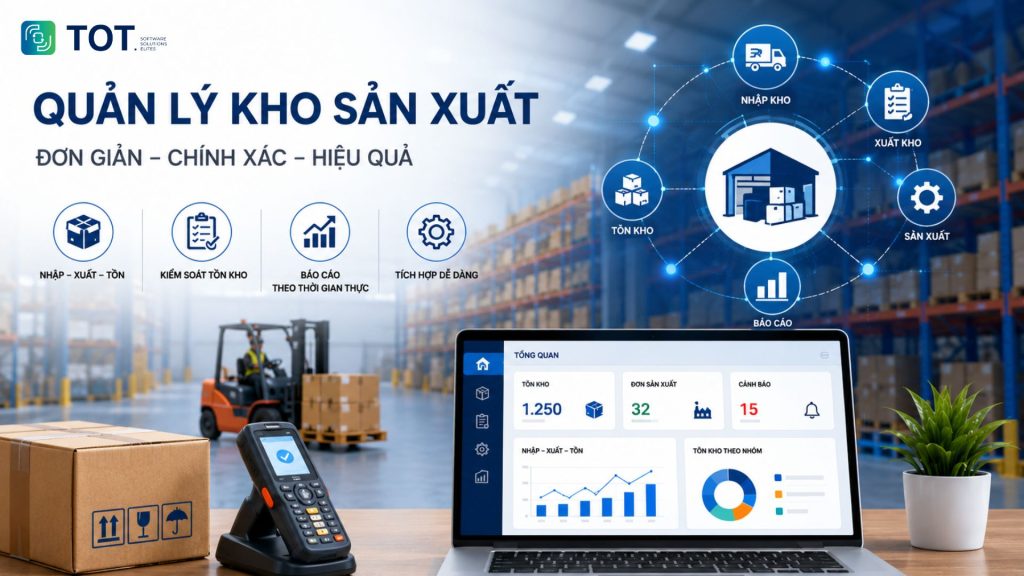
Manufacturing warehouse management software is a solution that helps businesses track and control goods in the warehouse for production. The system manages all raw materials, work-in-progress (WIP) and finished goods from receipt into the warehouse through to dispatch. Unlike ordinary warehouse management software, this solution is designed to link with the bill of materials (BOM) and production orders.
The software keeps inventory data updated in real time and automatically issues alerts when supplies fall below the safety level, so businesses can plan purchasing and production more accurately. As a result, they reduce material shortages and excess inventory that drive up costs and tie up working capital.
Common features include stock in/out/on-hand management, stocktaking with barcodes or QR codes, and batch management. The software also supports cost-of-goods calculation, user permissions and inventory report generation. In addition, the system can integrate with accounting software, ERP or MES. It is a foundation that helps businesses control costs and optimize the efficiency of production operations.
>>> See more:
- TOP 15+ major, reputable software companies in Vietnam
- What is application software? Common types of application software
Top 15 effective manufacturing warehouse management software for businesses
The list of software below is compiled based on criteria such as warehouse management features, scalability, system integration, popularity and the type of business each suits. This makes it easy for businesses to compare and choose a solution that meets their manufacturing warehouse management needs.
1. Free Excel-based warehouse management software
Free Excel-based warehouse management software suits small businesses with simple management needs. With ready-made templates, businesses can track stock in, stock out and on-hand, build a materials catalog and calculate figures with formulas. It is a cost-saving, easy-to-deploy solution that requires no dedicated software installation. However, as the volume of data grows or more people use it at once, Excel shows its limitations in performance and control.
Key features:
- Manage stock in/out/on-hand for raw materials and finished goods.
- Track inventory quantities with spreadsheets.
- Automatic calculations using Excel functions.
- Create inventory reports by day, week or month.
- Customize templates to management needs.
- No license fees when using free templates.
Pros:
- Free or low implementation cost.
- Easy to use and familiar to many businesses.
- Flexible for editing templates.
- Suitable for small-scale warehouse management.
Cons:
- No real-time data updates.
- Hard to control when many people edit at once.
- Prone to errors from manual data entry.
- No support for BOM, MRP or production order management.
- Difficult to scale as the business grows.
Best for: Household businesses, small workshops or newly established companies with simple warehouse management processes.
>>> See more:
- 9+ easiest-to-use free mobile app design tools
- TOP 15+ effective, super-easy AI app builder tools

2. MISA AMIS manufacturing warehouse management software
MISA AMIS is business management software that integrates many modules, including warehouse and production management. The system helps businesses track raw materials, work-in-progress and finished goods in real time. It also connects data across warehouse, accounting, purchasing and production on one platform. As a result, businesses reduce data discrepancies and improve inventory management efficiency.
Key features
- Manage stock in/out/on-hand across multiple warehouses.
- Track raw materials, work-in-progress and finished goods.
- Manage by batch, expiry date and item code.
- Alerts when stock falls below the set level.
- Integrates with accounting, purchasing and sales.
- Supports inventory reporting and real-time data analysis.
Pros
- Intuitive, easy-to-use interface.
- Synchronizes data across departments.
- Diverse reports that support decision-making.
- An ecosystem well suited to many Vietnamese businesses.
- Backed by a support team and comprehensive documentation.
Cons
- Some advanced features require purchasing additional modules.
- Process customization is limited compared to custom-developed software.
- Costs can rise as the number of users or features grows.
Best for: Small and medium-sized manufacturers (SMEs) that need to manage warehouse, accounting and production on one unified system.
>>> See more:
- Top 20+ best free AI image design software
- 15+ free, easy-to-use Android app design software
3. Odoo manufacturing warehouse management software
Odoo is open-source ERP software that fully integrates warehouse and production management operations. It helps businesses track raw materials, work-in-progress and finished goods on one system. Beyond warehouse management, Odoo also supports production planning, purchasing, sales and accounting. The Community edition can be used for free, while the Enterprise edition offers many advanced features.
Key features:
- Manage stock in/out/on-hand in real time.
- Manage multiple warehouses and storage locations.
- Supports BOM, Work Order and MRP.
- Track batches, serial numbers and expiry dates.
- Barcode management and stocktaking.
- Integrates with purchasing, sales and accounting.
Pros:
- The Community edition is free and open source.
- A comprehensive ERP ecosystem.
- Easy to scale to business needs.
- A large user community and rich documentation.
Cons:
- Requires a technical team to deploy and customize.
- Implementation costs can be high for large businesses.
- Some features are only available in the Enterprise edition.
Best for: Medium and large manufacturers that need a scalable, customizable ERP system.
4. Free ERPNext manufacturing warehouse management software
ERPNext is open-source ERP software that helps businesses manage warehouse, production and finance on one platform. The system supports raw material control, production planning and real-time inventory tracking. Thanks to its high customizability, ERPNext is chosen by many businesses to replace fragmented management systems.
Key features:
- Manage stock in/out/on-hand across multiple warehouses.
- Supports BOM, MRP and Work Order.
- Track raw materials by batch and serial number.
- Barcode stocktaking.
- Reports on inventory and production costs.
- Integrates accounting, purchasing and CRM.
Pros:
- Open source with low licensing costs.
- Full manufacturing management features.
- Easy to scale and customize to your needs.
- A large global developer community.
Cons:
- Requires technical knowledge to deploy.
- The interface is not very beginner-friendly.
- Some features need configuration before use.
Best for: Medium-sized manufacturers and companies with an IT team that want to deploy an open-source ERP.
>>> See more:
- What is CRM for car showrooms? A comprehensive customer management solution
- Top 15 most popular car garage management software
5. Pancake manufacturing warehouse management software
Pancake is an omnichannel sales management platform that also provides basic warehouse management features. It helps businesses track goods, control inventory and synchronize data across stores, websites and e-commerce platforms. Although it was not built specifically for manufacturing, Pancake still meets the warehouse management needs of small workshops that also sell.
Key features:
- Manage stock in/out/on-hand for goods.
- Synchronize inventory across multiple sales channels.
- Track stock-in and stock-out history.
- Manage product codes and inventory by branch.
- Real-time inventory quantity reports.
- Connects with shipping providers and e-commerce platforms.
Pros:
- Simple, easy-to-use interface.
- Synchronizes sales and warehouse data on one system.
- Quick deployment at a reasonable cost.
- Suitable for omnichannel businesses.
Cons:
- No support for BOM, MRP or Work Order.
- Does not handle complex production processes well.
- Customization is limited compared to ERP.
Best for: Small workshops, businesses that both manufacture and sell, or companies that prioritize warehouse management combined with omnichannel sales.

6. Sapo POS manufacturing warehouse management software
Sapo POS is sales management software with built-in warehouse management features, suited to businesses with simple production processes. The system helps track goods, control stock in/out/on-hand and synchronize data between the warehouse and sales activities. Thanks to its intuitive, easy-to-use interface, Sapo POS is chosen by many small and medium-sized businesses.
Key features:
- Manage stock in/out/on-hand in real time.
- Track inventory across multiple branches.
- Barcode stocktaking.
- Alerts for low stock or high inventory.
- Synchronize warehouse data with sales.
- Reports on inventory and transaction history.
Pros:
- Friendly interface that is easy to learn.
- Quick deployment and reasonable cost.
- Warehouse management combined with sales on one system.
- Works on multiple devices.
Cons:
- No support for BOM or MRP.
- Not suited to complex production processes.
- Customization is limited.
Best for: Small businesses, workshops that also sell retail, or omnichannel operations.
>>> See more:
- Top 10 best car maintenance scheduling systems
- Top 10 best CRM software for construction companies
7. Fishbowl Manufacturing warehouse management software
Fishbowl Manufacturing is warehouse and production management software built for manufacturers. The system supports management of raw materials, production orders and inventory on one unified platform. Fishbowl also integrates with QuickBooks and many ERP systems, helping businesses synchronize data and control the entire production process.
Key features:
- Manage stock in/out/on-hand in real time.
- Supports BOM, Work Order and MRP.
- Manage batches, serial numbers and storage locations.
- Stocktaking with barcodes.
- Track production progress.
- Integrates with QuickBooks and ERP systems.
Pros:
- Full features for manufacturers.
- Warehouse and production management on one system.
- Good scalability.
- Visual, detailed reports.
Cons:
- Relatively high implementation cost.
- The interface is mainly in English.
- Requires training time to use effectively.
Best for: Medium and large manufacturers that need warehouse, production and accounting on one system.

8. Oracle NetSuite manufacturing warehouse management software
Oracle NetSuite is a cloud-based ERP platform that provides full warehouse and production management functionality. It helps businesses control raw materials, plan production and track inventory in real time. With high scalability, Oracle NetSuite is chosen by many large enterprises and multinational corporations.
Key features:
- Manage stock in/out/on-hand across multiple warehouses.
- Supports BOM, MRP and Work Order.
- Manage batches, serial numbers and storage locations.
- Demand forecasting and inventory planning.
- Real-time reporting and data analysis.
- Integrates with finance, CRM and supply chain.
Pros:
- A comprehensive ERP system.
- High scalability and customization.
- Centralized data management on the cloud.
- Suitable for businesses with many branches.
Cons:
- High implementation and maintenance costs.
- Relatively long implementation time.
- Requires a specialized team to operate and customize.
Best for: Large enterprises, corporations or manufacturers with complex management processes and future expansion needs.
9. Sortly manufacturing warehouse management software
Sortly is cloud-based warehouse management software known for its intuitive, easy-to-use interface. It helps businesses track inventory, raw materials and equipment in real time. With QR code and barcode management, Sortly simplifies the stocktaking process and reduces errors in warehouse management.
Key features:
- Manage stock in/out/on-hand in real time.
- Track goods with QR codes and barcodes.
- Manage multiple warehouses and storage locations.
- Stocktaking on mobile devices.
- Reports on inventory and transaction history.
- Synchronize data on the cloud.
Pros:
- Modern, easy-to-use interface.
- Quick to deploy with no complex infrastructure.
- Works on multiple devices.
- Suitable for businesses that need flexible warehouse management.
Cons:
- No support for BOM or MRP.
- Manufacturing features are limited.
- Costs rise as the number of users grows.
Best for: Small and medium-sized businesses and workshops with simple warehouse processes or that need to manage equipment and supplies.

10. inFlow Inventory manufacturing warehouse management software
inFlow Inventory is warehouse management software that helps businesses control inventory, orders and the purchasing process on one unified system. It supports tracking of raw materials and finished goods with real-time data updates. Thanks to its intuitive interface and many warehouse management features, inFlow Inventory is chosen by many manufacturing and distribution businesses.
Key features:
- Manage stock in/out/on-hand in real time.
- Track raw materials and finished goods.
- Barcode management and stocktaking.
- Manage purchase and sales orders.
- Reports on inventory, revenue and costs.
- Synchronize data on the cloud.
Pros:
- Easy to use and quick to deploy.
- Visual reports that support decision-making.
- Warehouse and order management on one system.
- Supports multiple deployment options.
Cons:
- Does not fully support MRP or Work Order.
- Customization is limited.
- Usage costs increase with the number of users.
Best for: Small and medium-sized businesses in manufacturing, wholesale or distribution that need efficient warehouse and order management.

11. Ecount ERP manufacturing warehouse management software
Ecount ERP is ERP software that integrates warehouse, production, accounting and purchasing modules on one platform. The system helps businesses control raw materials, track production progress and manage inventory in real time. With reasonable cost and full features, Ecount ERP is a good fit for many small and medium-sized manufacturers.
Key features:
- Manage stock in/out/on-hand across multiple warehouses.
- Supports BOM, MRP and production orders.
- Manage raw materials by batch and serial number.
- Track production progress in real time.
- Reports on inventory and production costs.
- Integrates with accounting, purchasing and sales.
Pros:
- Integrates many operations on one system.
- Reasonable implementation cost.
- Data synchronized across departments.
- Supports cloud-based management.
Cons:
- The interface is not very modern.
- Requires time to get familiar with the system.
- Some features need configuration before use.
Best for: Small and medium-sized manufacturers that need an ERP system to manage warehouse, production and finance on one unified platform.
12. Vzsoft manufacturing warehouse management software
Vzsoft is warehouse management software built for Vietnamese businesses, supporting control of goods and raw materials during production. It helps businesses track stock in/out/on-hand, manage multiple warehouses and take stock quickly. Vzsoft also supports connections with accounting and sales modules to synchronize data.
Key features:
- Manage stock in/out/on-hand in real time.
- Manage multiple warehouses and product groups.
- Track supplies, raw materials and finished goods.
- Stocktaking with barcodes.
- Reports on inventory and transaction history.
- Integrates with accounting and sales.
Pros:
- Vietnamese-language interface that is easy to use.
- Suited to the management processes of Vietnamese businesses.
- Reasonable implementation cost.
- Local technical support.
Cons:
- Does not fully support BOM and MRP.
- Scalability is limited.
- Few integrations with international systems.
Best for: Small and medium-sized businesses that need to manage warehouse, raw materials and goods on one simple system.
13. StockPile warehouse management software
StockPile is free cloud-based warehouse management software suited to businesses with basic inventory management needs. The system helps track goods quantities, stock-in/stock-out history and storage locations. Thanks to its simple interface, StockPile can be deployed quickly without much investment.
Key features:
- Manage stock in/out/on-hand for goods.
- Track inventory across multiple locations.
- Manage suppliers and customers.
- Record transaction history.
- Inventory quantity reports.
- Online management on the cloud.
Pros:
- Has a free version.
- Easy to use and deploy.
- No server infrastructure investment needed.
- Suitable for basic management needs.
Cons:
- No support for BOM or MRP.
- Lacks many features for manufacturers.
- Customization is limited.
Best for: Household businesses, small companies or workshops with simple warehouse management processes.
14. Zoho Inventory warehouse management software
Zoho Inventory is cloud-based warehouse management software that helps businesses control inventory and orders efficiently. It supports data synchronization across warehouse, sales and shipping. In addition, Zoho Inventory connects with the Zoho ecosystem and many e-commerce platforms.
Key features:
- Manage stock in/out/on-hand in real time.
- Track multiple warehouses and branches.
- Manage barcodes and serial numbers.
- Manage orders and shipping.
- Visual inventory reports.
- Integrates with Zoho Books, Zoho CRM and e-commerce platforms.
Pros:
- Modern, easy-to-use interface.
- Ability to integrate with many systems.
- Easy to scale as the business grows.
- Supports remote management on the cloud.
Cons:
- Not focused on production management.
- Does not fully support BOM and MRP.
- Some advanced features are only in paid plans.
Best for: Small and medium-sized businesses that need warehouse management combined with sales, e-commerce or distribution.

15. KiotViet inventory management software
KiotViet is sales management software with built-in inventory management, used by many Vietnamese businesses. It helps track stock in/out/on-hand, manage multiple warehouses and synchronize data between stores and sales activities. It is a good choice for businesses whose warehouse management processes are not too complex.
Key features:
- Manage stock in/out/on-hand in real time.
- Track inventory across multiple branches.
- Manage goods with barcodes.
- Stocktaking and inventory adjustment.
- Reports on inventory, revenue and profit.
- Synchronize data with sales and accounting.
Pros:
- Friendly, easy-to-use interface.
- Quick deployment and reasonable cost.
- Full Vietnamese-language support.
- A wide customer support network.
Cons:
- No support for BOM or MRP.
- Not suited to complex production processes.
- Customization is limited compared to ERP systems.
Best for: Small businesses, workshops that also sell, or companies that need warehouse and sales management on one system.

Criteria for choosing manufacturing warehouse management software
Choosing the right manufacturing warehouse management software helps businesses optimize costs and improve operational efficiency. Every business has different production processes, scale and budget. Therefore, before deployment, businesses should carefully evaluate criteria such as features, scalability, investment cost and level of security.
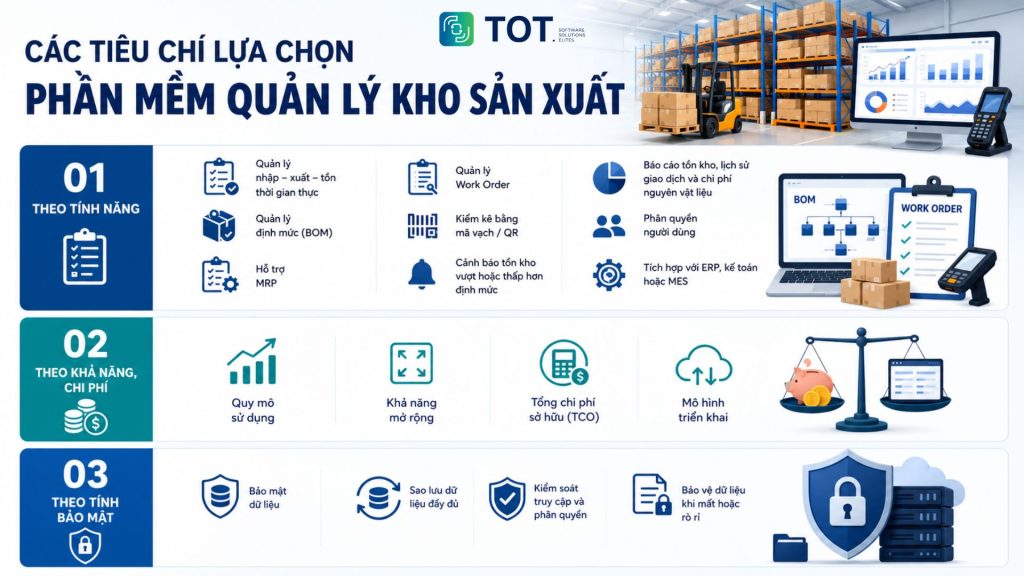
Choosing manufacturing warehouse management software by features
Features are the most important criterion when choosing manufacturing warehouse management software. A suitable solution must fully cover warehouse management operations and support control of the production process.
Businesses should prioritize software with features such as:
- Manage stock in, stock out and on-hand in real time.
- Manage the bill of materials (BOM) for each product.
- Support MRP (Material Requirements Planning) to calculate raw material needs.
- Manage Work Orders and track production progress.
- Stocktaking with barcodes or QR codes to reduce data-entry errors.
- Alerts when inventory exceeds or falls below the set level.
- Reports on inventory, transaction history and raw material costs.
- User permissions by department.
- Integration with ERP, accounting software or MES to synchronize data.
In addition, businesses should assess how well the software can customize processes and integrate with the systems already in use. This helps reduce implementation costs and limit disruption when migrating to a new system.
Choosing warehouse management software by capability and cost
Businesses should choose software that fits their scale, budget and growth direction. A solution with too many features increases investment costs and is harder to deploy. Conversely, software that is too simple may not meet needs as the business expands. Therefore, businesses should evaluate the total cost of ownership (TCO) rather than only comparing the initial purchase price.
When choosing software, businesses should consider the following criteria:
- Usage scale: Meets the current number of warehouses, users and transaction volume.
- Scalability: Easy to add modules, users or branches as the business grows.
- Total cost of ownership: Includes licensing or subscription, implementation, training, maintenance and system upgrade costs.
- Deployment model: Choose between Cloud to save on upfront investment and gain flexible access, or On-premise if the business needs control over its data and internal infrastructure.
Choosing manufacturing warehouse management software by security
Security is an important factor when choosing manufacturing warehouse management software. The system typically stores data on raw materials, inventory and production plans. If data is lost or leaked, business operations can be significantly affected. Therefore, businesses should prioritize solutions with robust security and full data backup mechanisms.
Some criteria to evaluate include:
- Access control: Manage usage rights by role and record an activity history (Audit Log).
- Data backup and recovery: Supports automatic backups and fast recovery when incidents occur.
- Data security: Applies data encryption and secures connections, especially for Cloud solutions.
- Security standards: Prioritize vendors that hold certifications such as ISO 27001, SOC 2 or provide a clear SLA on system stability and safety.
Benefits of using warehouse management software for production workshops
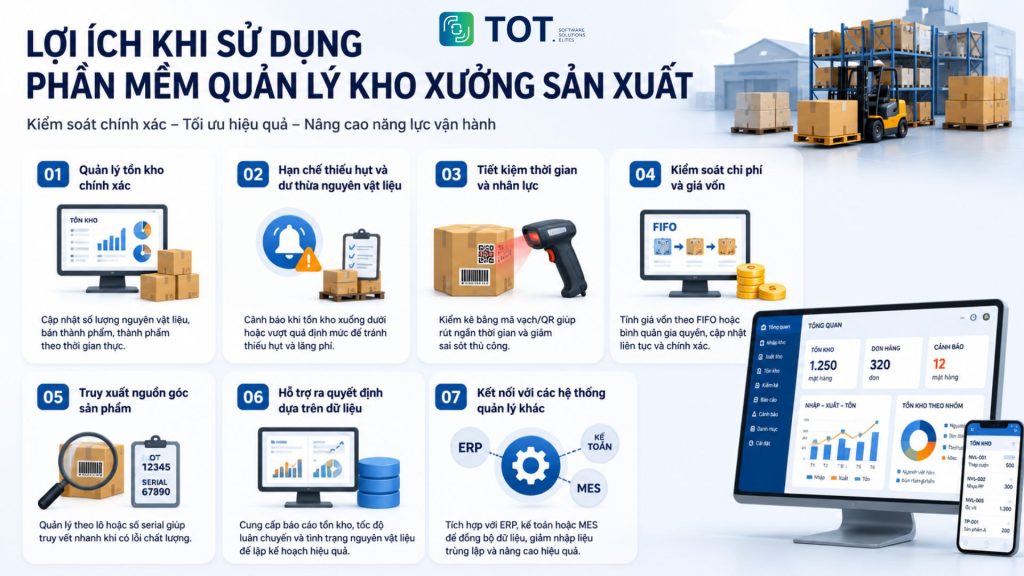
Warehouse management software for production workshops helps businesses control goods accurately and optimize operational efficiency. Instead of managing with ledgers or Excel, businesses can track all warehouse data in real time.
- Accurate inventory management:
The software updates quantities of raw materials, work-in-progress and finished goods in real time. Businesses always know their stock levels so they can proactively plan production. For example, a garment workshop can check its fabric inventory before accepting a new order.
- Reduce shortages and surpluses of raw materials:
The system automatically issues alerts when inventory falls below or exceeds the set level. As a result, businesses can purchase at the right time, avoid production disruptions and reduce storage costs.
- Save time and labor:
Stocktaking with barcodes or QR codes shortens counting time and reduces errors compared with manual methods. Staff also no longer have to enter the same data repeatedly.
- Control costs and cost of goods:
The software supports cost-of-goods calculation using methods such as FIFO or weighted average. Data is updated continuously, helping businesses track production costs and determine profit more accurately.
- Product traceability:
Managing by batch or serial number enables fast tracing when quality issues arise. This is an important requirement for industries such as food, pharmaceuticals and electronics.
- Support data-driven decision-making:
The system provides reports on inventory, goods turnover rate and raw material usage. Managers can rely on this data to plan purchasing and production more effectively.
- Connect with other management systems:
The software can integrate with accounting, ERP or MES to synchronize data across departments. This helps reduce duplicate data entry, limit data discrepancies and improve coordination within the business.
Applying AI in manufacturing warehouse management software
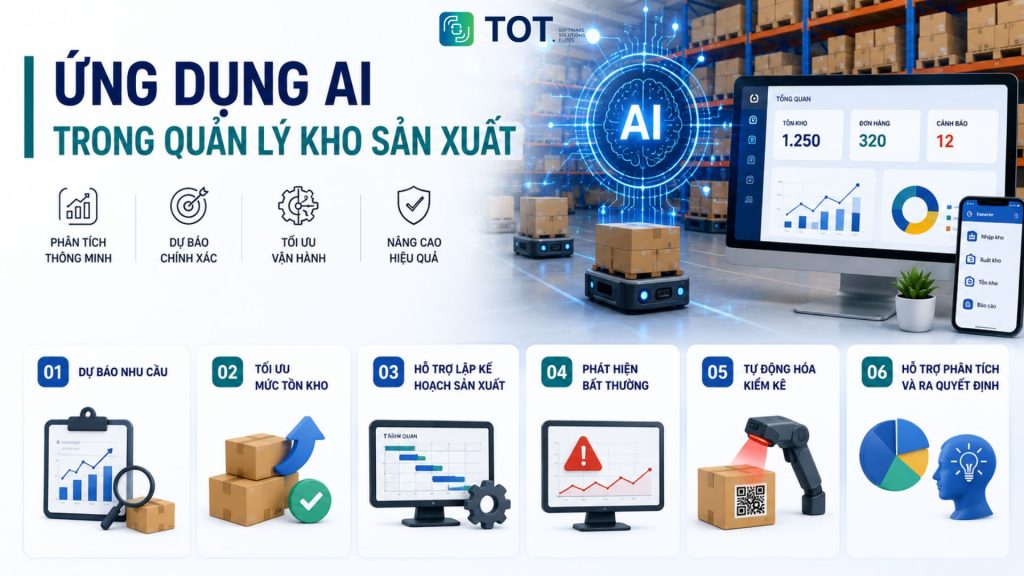
AI is becoming an important trend in modern manufacturing warehouse management software. Instead of only tracking stock in, stock out and on-hand, many systems today can analyze data, forecast demand and automatically make optimization recommendations. As a result, businesses can reduce operating costs, minimize errors and improve warehouse management efficiency. This is also why more and more businesses are investing in AI-powered warehouse management software to boost competitiveness and drive digital transformation.
Forecasting raw material demand
AI can analyze sales data, production plans and consumption history to forecast future raw material demand. This analysis helps businesses purchase at the right time and limit stock shortages or surpluses.
Example: A furniture manufacturer can forecast demand for wood and accessories during peak season to proactively stock up and avoid production disruptions.
Optimizing inventory levels
AI continuously analyzes consumption rate, lead time and stock levels to recommend an appropriate inventory level. The system can also alert when raw materials are running low or inventory exceeds the safe threshold.
Example: A food factory uses AI to adjust ingredient quantities to actual demand, reducing inventory and limiting expired materials.
Supporting production planning
Many AI-powered warehouse management platforms can combine data from BOM, MRP and orders to recommend an optimal production plan. AI helps balance raw materials, machine capacity and delivery schedules, thereby reducing wait times and improving operational performance.
Example: When a large order comes in, the system can automatically calculate the additional raw materials needed and suggest a suitable production schedule.
Detecting warehouse anomalies
AI can analyze data in real time to detect abnormal signs such as loss of goods, inventory discrepancies or unusual transactions. The system sends alerts so businesses can promptly check and resolve them.
Example: If stock-out volume spikes compared with normal levels, AI automatically issues an alert so managers can verify the cause.
Automating stocktaking and goods recognition
AI combined with cameras, QR codes, barcodes or computer vision (Computer Vision) technology enables automatic recognition and stocktaking of goods. This solution significantly reduces counting time and limits errors from manual data entry.
Example: An AI camera can automatically recognize pallets or packages as they pass through the warehouse gate and update the data into the system without manual intervention.
Supporting analysis and decision-making
AI not only aggregates data but also analyzes inventory trends, turnover performance and storage costs. Based on these analyses, the system can make recommendations that help businesses optimize production and warehouse operations.
Example: AI can suggest lowering stock levels for slow-moving raw materials or increasing reserves for items that are frequently short during peak season.
In the future, AI will not only support warehouse management but also help businesses forecast and optimize the entire production chain. As a result, investing in AI-powered warehouse management software is becoming a trend that many businesses prioritize to enhance competitiveness and build a smart manufacturing model.
>>> See more:
- Free computer vision software: Easy-to-use platforms
- How to Deploy Computer Vision: A Guide to Putting AI into Practice
Should you choose free or paid warehouse management software?
Free and paid warehouse management software each have their own advantages. Businesses should choose based on scale, budget and management needs. If you only need basic stock in/out/on-hand management, free software can serve well. Conversely, businesses with complex production processes should prioritize paid solutions or custom-developed software.
| Criteria | Free software | Paid software |
|---|---|---|
| Cost | Low or free | License or subscription fees |
| Features | Basic warehouse management | Full warehouse and production management features |
| Scalability | Limited | Easy to scale as needed |
| Customization | Little customization | Can be customized to your processes |
| Support | Mainly from the community | A professional support team |
| Suitable for | Household businesses and small companies | Medium and large businesses |
As a business grows, off-the-shelf software may no longer fully meet its requirements. At this point, custom manufacturing warehouse management software is the more suitable choice. This solution allows customization to actual processes, easy integration with ERP, accounting or AI, and meets future expansion needs.
Custom manufacturing warehouse management software solutions from TOT
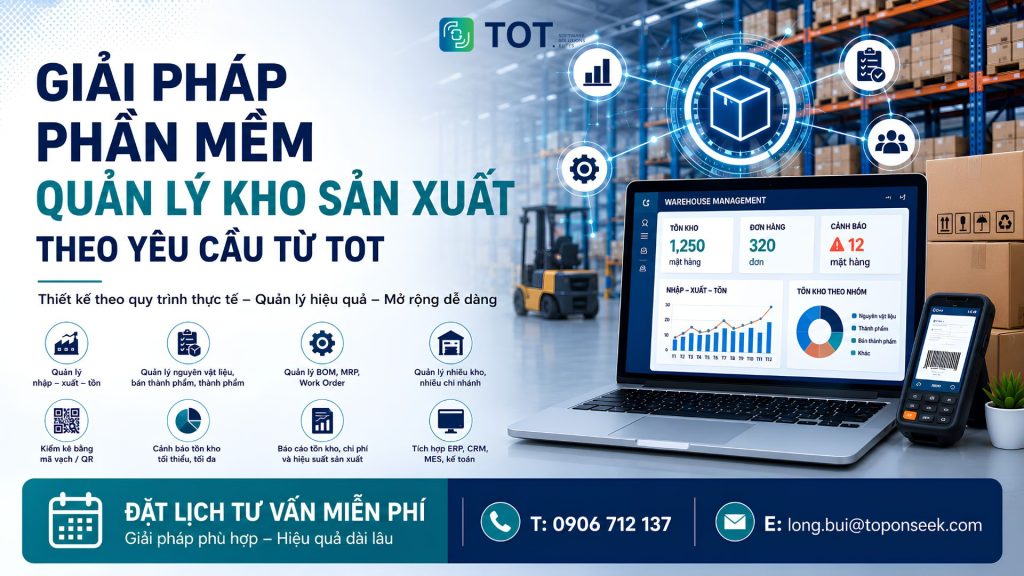
Not every business is a good fit for off-the-shelf warehouse management software. When production processes have many specific characteristics or need to integrate with multiple systems, custom software is the optimal choice. This solution is designed around actual operating processes, helping businesses manage their warehouse effectively and expand easily in the future.
TOT provides custom manufacturing warehouse management software development that meets the needs of businesses across many sectors such as manufacturing, construction, retail, logistics and distribution. Instead of changing processes to fit off-the-shelf software, businesses can build a system that matches exactly how they operate today.
Some features that can be custom-developed include:
- Manage stock in/out/on-hand in real time.
- Manage raw materials, work-in-progress and finished goods.
- Manage BOM, MRP and Work Order.
- Manage multiple warehouses and branches.
- Stocktaking with barcodes or QR codes.
- Minimum and maximum stock alerts.
- Reports on inventory, costs and production performance.
- Integration with ERP, accounting, CRM, MES or internal systems.
- Applying AI to forecast demand, optimize inventory and automate processes.
Beyond software development, TOT supports businesses throughout requirements gathering, solution consulting, implementation and system maintenance. This process helps businesses shorten deployment time while ensuring the software meets long-term usage needs.
Reference pricing for software development services at TOT
| Service package | Suitable for | Reference cost |
|---|---|---|
| Standard | Businesses that need software with basic features | From 60 million VND |
| Professional | Businesses that need to integrate multiple modules and processes | From 100 million VND |
| Enterprise | Large enterprises requiring deep customization and integration | Contact for a quote |
Note: The actual cost will depend on the number of features, the degree of customization, integration requirements and the scale of deployment.
With experience delivering many digital transformation projects, TOT not only builds custom software but also advises on a roadmap suited to each business. This is the foundation that helps businesses digitize warehouse management processes, optimize operations and be ready to apply AI in the future.
Conclusion
Choosing the right manufacturing warehouse management software has a direct impact on a business’s operational efficiency, costs and competitiveness. From free tools such as Excel, Odoo and ERPNext to professional platforms like MISA AMIS, NetSuite and Fishbowl, each solution has its own advantages depending on scale and needs. Most important is to correctly evaluate features, cost, security and the direction for applying AI in the future. If a business has specialized processes, a custom manufacturing warehouse management software solution from a reputable partner like TOT will be an investment that delivers lasting value.
Frequently asked questions about manufacturing warehouse management software
What features should manufacturing warehouse management software have?
Manufacturing warehouse management software should have features such as stock in/out/on-hand management, BOM, MRP, Work Order, barcode/QR and inventory reports. In addition, the software should support management by batch or serial number, inventory alerts, user permissions and integration with accounting, ERP or MES. These features help businesses control raw materials, optimize production and reduce operational errors.
Should you choose free or paid manufacturing warehouse management software?
Small businesses can choose free software, while medium and large businesses should prioritize paid or custom-developed software. Free solutions suit basic management needs and limited budgets. Conversely, paid software offers more features, is easier to scale and integrates with other systems as the business grows.
Can manufacturing warehouse management software integrate with accounting software or ERP?
Yes. Most modern warehouse management software supports integration with accounting and ERP via API or built-in connections. Data synchronization automatically updates cost of goods, receivables and payables, and purchase and sales orders, while avoiding duplicate data entry. Common systems that can be connected include MISA, SAP, Oracle, Odoo, QuickBooks and Xero. With a custom solution, businesses can tailor the integration to fit their existing infrastructure.
Should you use free Excel-based warehouse management software for a production warehouse?
Yes, but Excel is only suitable for small businesses with simple management processes. As the volume of goods and transactions grows, Excel is prone to errors, hard to update in real time and does not support features like BOM or MRP. Therefore, businesses should switch to dedicated warehouse management software as management needs become more complex.
TOT is a trusted partner on your digital transformation journey, providing website design, mobile app, custom software and artificial intelligence software solutions tailored to each business need.
With practical consulting and implementation experience, we help businesses build a digital transformation roadmap, apply AI and automate processes to optimize operations and create a sustainable competitive advantage.
TOT contact information:
🌐 Website: topon.tech
📞 Hotline/WhatsApp/Zalo: 0906 712 137
✉️ Email: long.bui@toponseek.com
🏢 Address: 31 Hoang Dieu Street, Xom Chieu Ward, Ho Chi Minh City, Vietnam