As a business scales, the data and processes shared across departments become increasingly hard to manage with disconnected tools or Excel files. This easily leads to inconsistent information, manual work, and limited operational control. So what is ERP, what modules does the system include, and how should a business choose the right solution? This article from TOT will help you clearly understand ERP, how the system works, and the most popular solutions in 2026.
>>> See also:
- Top 15 most popular auto garage management software tools
- Top 15 production management software tools for businesses
- Top 20+ best free AI image design software tools
What is ERP?
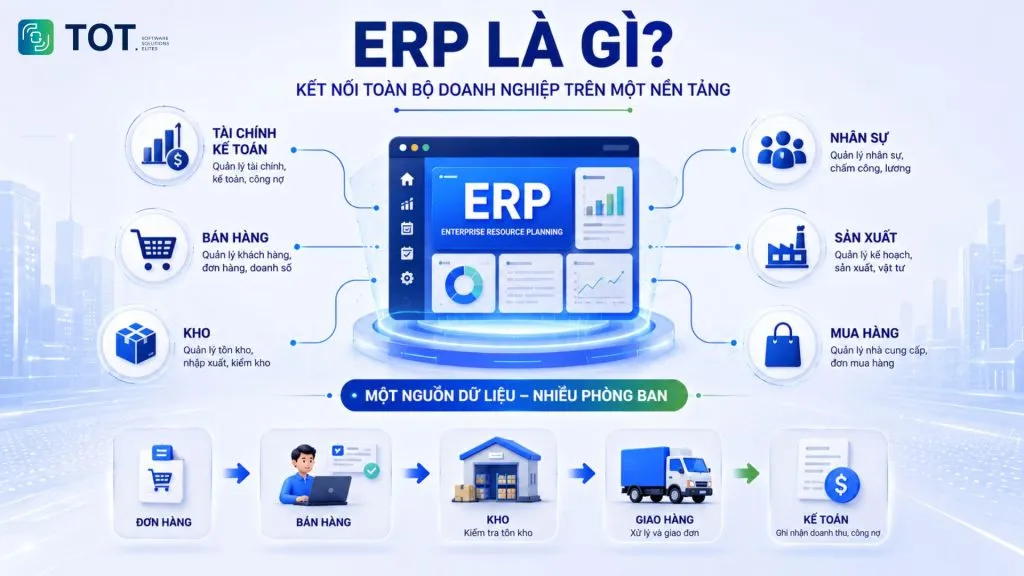
ERP stands for Enterprise Resource Planning. It refers to an integrated software system used to plan and manage a business’s core resources and processes on a shared platform.
An ERP system can connect data from finance and accounting, sales, purchasing, warehouse, HR, production, and other functions, depending on how each solution is designed. The goal is not simply to pack many features into one piece of software, but to create a single, unified source of data that departments can share.
For example, when a sales representative creates an order, the information can flow to the warehouse to check stock, to the delivery team to fulfill the order, and to accounting to record revenue and receivables. Staff do not have to re-enter the same data across multiple systems if the process has been configured to work end to end.
So if you are wondering what ERP software is, think of it simply as a platform that helps a business connect its operations instead of managing each department with separate tools.
>>> See also: What is construction ERP? Features & the Top 10 construction ERP software
What does an ERP system include?
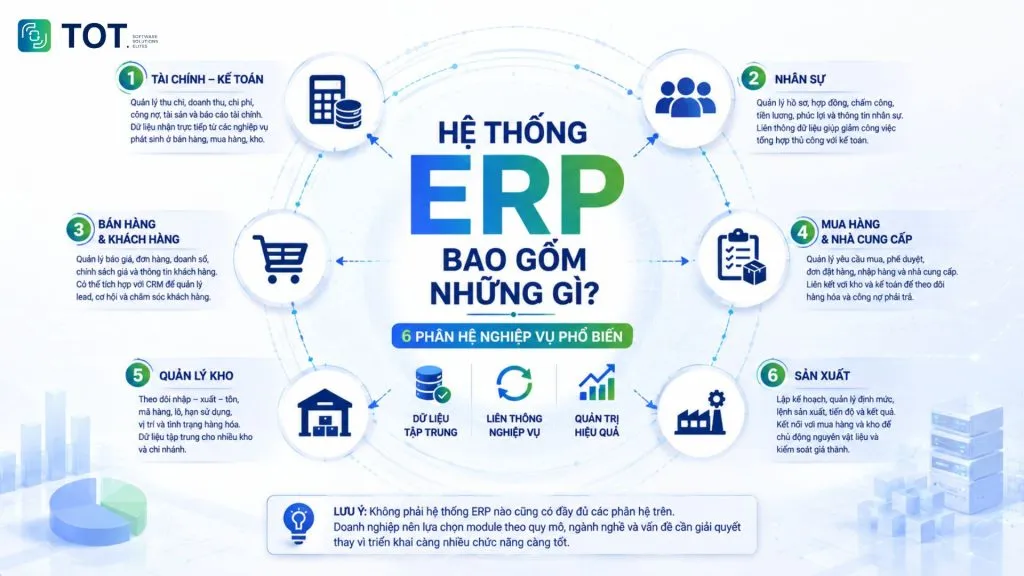
An ERP system is typically made up of several business modules that can share and inherit data. The six most common modules are as follows:
ERP in finance and accounting management
The finance and accounting module manages functions such as cash flow, revenue, expenses, accounts receivable, accounts payable, assets, and financial reporting.
The key point is that accounting data can be fed directly from transactions arising in sales, purchasing, or the warehouse. For instance, once a sales transaction is completed, it can generate data related to revenue, inventory, and receivables without manual re-entry.
ERP in HR management
The HR module centralizes employee records, contracts, timekeeping, payroll, benefits, and related information. Some systems also extend to recruitment, performance evaluation, training, and work history management.
When timekeeping, payroll, and HR cost data are linked, a business can significantly reduce the manual reconciliation steps between the HR and accounting teams.
ERP in sales and customer management
The sales module typically manages quotes, orders, revenue, pricing policies, customer information, and order processing.
ERP can also integrate with a CRM. In this model, the CRM focuses on leads, sales opportunities, interactions, and customer care, while the ERP handles the back-office functions such as orders, inventory, delivery, receivables, and accounting.
ERP in warehouse management
The warehouse module tracks goods received, issued, and on hand, along with item codes, lots, expiry dates, locations, and stock status, depending on the capabilities of each system.
For businesses with multiple warehouses or branches, centralized data lets managers know how much stock is available at each location and avoids having every warehouse keep its own separate tracking sheet.
>>> See also:
- Top 15 free, effective production warehouse management software tools for 2026
- Top 8 effective location-based warehouse management software tools for 2026
ERP in purchasing and supplier management
The purchasing module manages purchase requests, approvals, quotes, purchase orders, goods receipt, and supplier information.
Purchasing data can be linked to the warehouse to update incoming stock and to accounting to record accounts payable. This makes it easy for a business to track the entire process, from the moment a purchasing need arises to the payment made to the supplier.
ERP in production management
The production module supports planning and manages material consumption standards, production orders, schedules, stages, and production output.
When connected to purchasing and the warehouse, an ERP system in production can determine material requirements based on the production plan. This helps a business be more proactive in purchasing raw materials, controlling inventory, and monitoring costs.
Note: Not every ERP system includes all of the modules above. A business should select modules based on its size, industry, and the problems it needs to solve, rather than deploying as many features as possible.
>>> See also:
- Top 5 best contractor management software tools for construction in 2026
- Top 10 free and paid AI website design tools that work
Benefits of ERP software for businesses
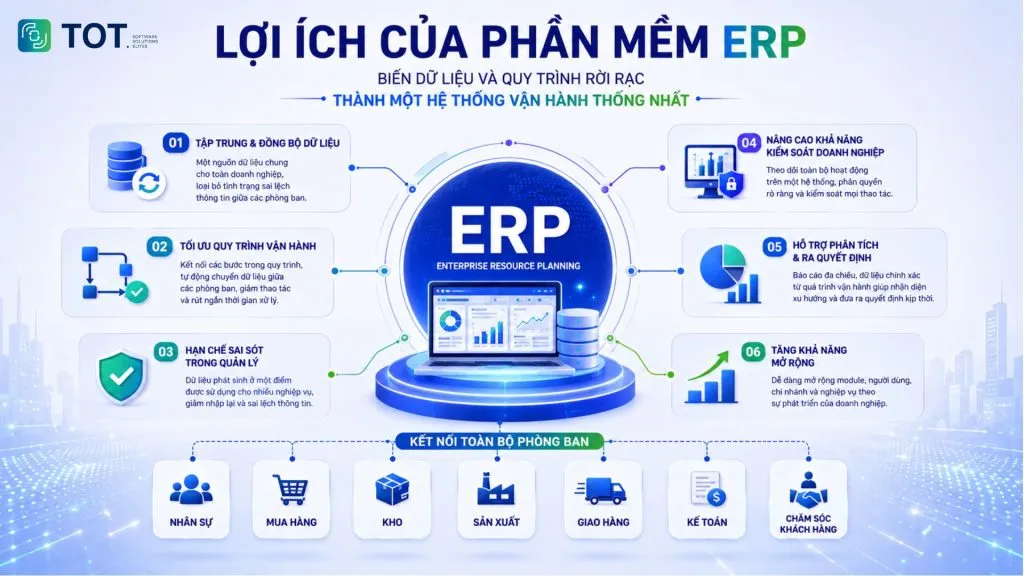
The greatest benefit of today’s ERP software lies not in the number of features but in its ability to turn scattered data and processes into a single, unified operating system.
Centralized and synchronized data
ERP creates a shared source of data for many departments. When customer information, orders, inventory, or receivables are managed in the same system, a business reduces the risk of each department working from a different version of the data.
This is especially important when a business has multiple branches or a high transaction volume. Managers can draw on the same source of data instead of asking each department to send reports and then reconciling them manually.
Optimized operational processes
ERP helps connect the steps within a process. For example, an approved purchase request can become a purchase order; when the goods are received, the warehouse updates the quantities and accounting picks up the data related to payables.
Automatically passing data between steps helps reduce re-entry and shortens the waiting time between departments.
Fewer management errors
When the same data has to be entered repeatedly into different files or software, the risk of discrepancies rises. ERP reduces this problem by allowing data created at one point to be used across many related functions.
However, ERP does not automatically eliminate every error. The quality of the results still depends on the process that has been designed, the input data, and how users operate the system.
Stronger business control
Managers can monitor sales, orders, inventory, receivables, production progress, and other operational metrics within the same system.
Access rights and activity logs also help a business control who can view, create, or approve data. For businesses with many branches, centralized data makes managing the entire system more convenient.
Support for analysis and decision-making
ERP provides data to build reports by product, customer, branch, time period, or department. From there, managers can identify revenue trends, slow-moving stock, overdue receivables, or anomalies in operations.
The value of ERP reporting lies in the fact that the data is drawn from the operations themselves rather than being compiled manually from many sources.
Greater scalability
As a business increases its number of users, branches, or functions, an ERP platform with the right architecture can add more modules, processes, and access rights.
However, scalability needs to be assessed right from the selection stage. A system may meet current needs well but become a bottleneck if it does not support the operating model the business expects to grow into in the future.
>>> Learn more:
- How to integrate a chatbot into your website for free and sell effectively
- The 13 best open-source chatbot platforms
How does the ERP model work?
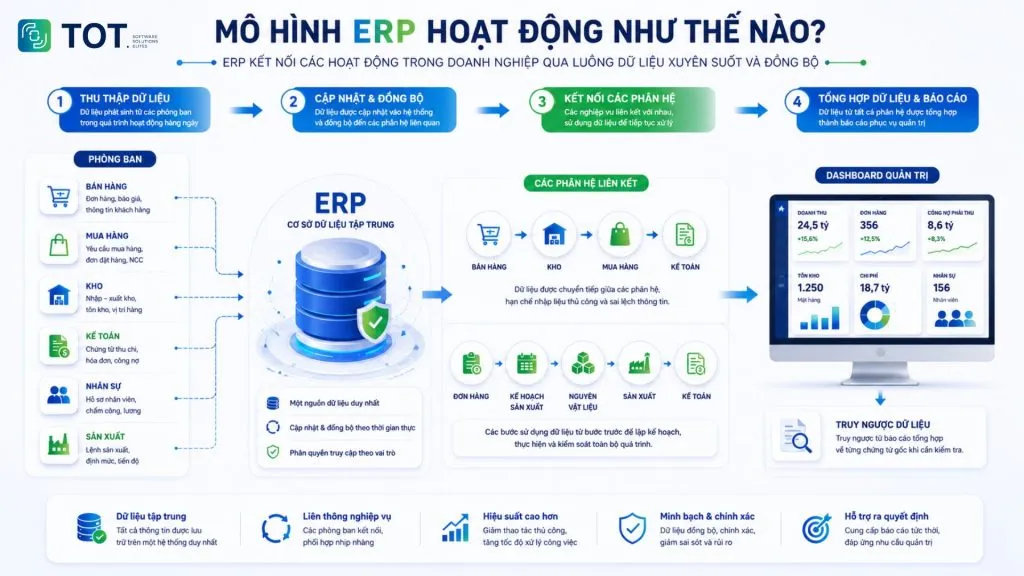
To better understand how ERP connects a business’s activities, it helps to look at the flow of data between departments and modules. Specifically:
Collecting data from departments
Data arises from day-to-day activities such as orders from the sales team, purchase requests, warehouse receipt and issue slips, accounting documents, HR information, or production orders. Each department is responsible for creating and controlling the data within its own function.
Updating and synchronizing data
Once recorded, data is updated into the system and made available to the relevant modules according to access rights.
For example, when an order is confirmed, the sales team can see the order status; the warehouse receives the information it needs to process; and accounting has the data related to revenue and receivables.
Connecting the modules
The value of ERP is most evident in its ability to link business functions together.
A trading company may operate along this flow: Sales → Warehouse → Purchasing → Accounting
Meanwhile, a manufacturing company may have this flow: Orders → Production Planning → Raw Materials → Warehouse → Production → Accounting
The steps do not exist in isolation; each uses data from the preceding steps to continue processing.
Consolidating data into reports
Data from all modules is consolidated into financial reports, sales reports, inventory reports, and operational metrics. Managers monitor a real-time dashboard and can also drill back from a summary figure down to each source document when they need to verify it.
>>> Learn more:
- The top 7 best open-source object tracking tools
- Free computer vision software: easy-to-use platforms
Which businesses should use ERP software?
ERP is a good fit when a business has many interconnected processes, scattered data, or a level of operations complex enough that disconnected tools begin to create bottlenecks.
Manufacturing businesses
Manufacturing businesses often have to manage raw materials, material standards, production plans, the warehouse, purchasing, schedules, and costs all at once. ERP helps connect these activities so the business can track the relationships between orders, raw materials, production, and costs.
Trading and distribution businesses
Businesses with many product codes, multiple warehouses, or a distribution network often need tight control over goods received, issued, and on hand, as well as purchasing, sales, pricing policies, and receivables. ERP helps create a unified data flow from purchasing to sales while helping managers track goods status and business performance.
Businesses with multiple branches
When each branch uses its own file or software, consolidating company-wide data can take a lot of time.
An ERP system lets the units work on the same platform while still setting appropriate access rights and data scopes. Leadership can monitor consolidated figures without waiting for each branch to send its report.
Businesses that are scaling up
As the number of transactions, staff, customers, and data grows, disconnected tools may start to show their limits.
Some common signs are staff spending a lot of time compiling reports, data being inconsistent between departments, or managers struggling to get figures in time.
Businesses with data and process problems
Some easy-to-spot signs: heavy reliance on Excel for critical functions, data scattered across disconnected systems, departments struggling to coordinate because they do not share the same figures, and leadership being unable to grasp the operational situation without requesting manual reports.
>>> See also: The top 20 most reputable, highest-quality app design companies in Vietnam
Criteria for choosing the right ERP software
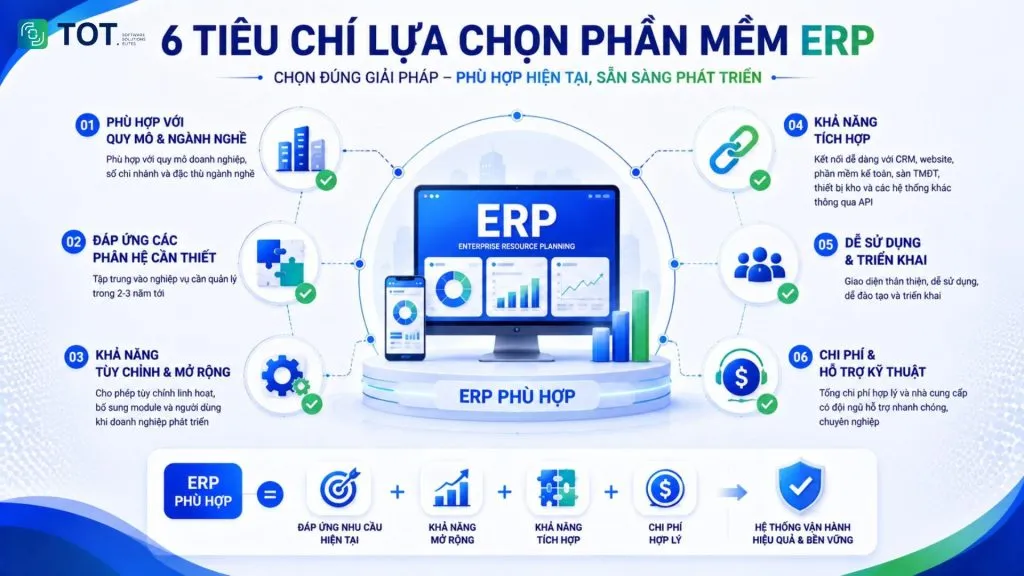
The right ERP system is not necessarily the one with the most features, but the solution that meets your current business needs and can grow with your company.
Fit with your size and industry
A business needs to assess its number of users, number of branches, industry, and the complexity of its processes. A system built for a large corporation may be overkill for a small business. Conversely, a simple solution may fail to meet needs such as production, cost management, or consolidating multiple legal entities.
Coverage of the modules you need
You should start from the list of functions your business truly needs to manage over the next 2–3 years, rather than comparing which software lists more features. Unused modules create no value but still add cost and complexity during deployment.
Customization and scalability
An ERP should allow a business to adjust processes, forms, reports, and access rights within an appropriate scope. At the same time, you need to assess its ability to add modules or users as the business grows. Deep customization should also be weighed carefully, as it can increase maintenance and upgrade costs.
Integration capability
An ERP system rarely stands alone. A business needs to consider its ability to connect with the website, the CRM system, the accounting software already in use, e-commerce marketplaces, warehouse devices, and internal software through an API. This is often the deciding factor in whether the system is truly synchronized or just another place to enter data.
Ease of use and deployment
A feature-rich system that is hard to use can push staff back to Excel or their old tools. A business should evaluate the interface, the training available, the documentation, the support process, and how well it fits actual working habits.
Cost and technical support
You need to calculate the total cost of ownership, including licenses or subscriptions, deployment, customization, integration, training, infrastructure, and annual maintenance. Alongside this is the vendor’s support capability: whether they have a team in Vietnam, their response time when incidents occur, and their version-upgrade policy.
>>> See also:
- How much does the latest 2026 mobile app design cost, plus app maintenance?
- Top 20+ best free AI image design software tools
- Build an app for Android/iOS easily, no coding required
Top 10 popular, trusted ERP software in 2026
The list below is compiled to give readers a further basis for comparing popular solutions in Vietnam and internationally, based on functional scope, deployment capability, scalability, and the type of business each is suited to.
| Software | Highlights | Deployment | Best-fit businesses |
| Odoo | Broad, flexible module ecosystem with open-source availability | Cloud or self-hosted | SMEs to large enterprises |
| SAP Business One | Integrated ERP for SMEs and subsidiaries | Cloud or on-premise | Midsize businesses |
| Microsoft Dynamics 365 | Deep integration with the Microsoft ecosystem | Cloud | Midsize and large enterprises |
| Oracle NetSuite | Cloud ERP, strong in finance and multi-entity management | Cloud | Growing, multi-branch businesses |
| ERPNext | Open-source ERP with many integrated modules | Cloud or self-managed | SMEs with technical capability |
| BRAVO 10 ERP | Vietnamese ERP solution with industry-specific customization | Cloud or on-premise | Midsize and large enterprises |
| FAST Business Online | Comprehensive ERP with many business modules | Web-based platform | Midsize and large enterprises |
| MISA AMIS | Modular business management ecosystem | Cloud | SMEs to large enterprises |
| SAP S/4HANA | Large-scale ERP, strong in finance and supply chain | Cloud and suitable deployment models | Large enterprises and corporations |
| FastWork | Work, HR, CRM, and operations management on a SaaS platform | Cloud | SMEs, especially service businesses |
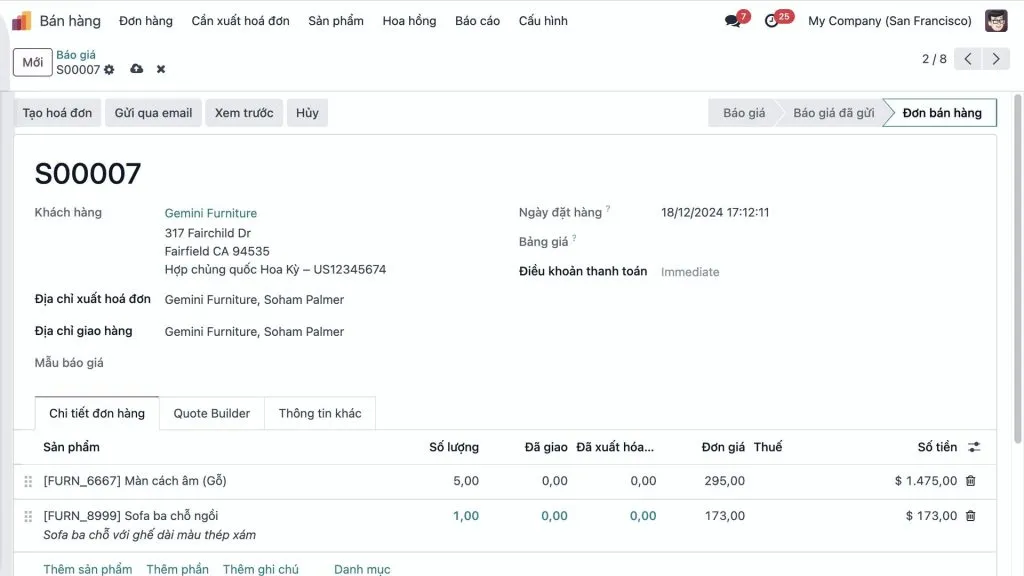
1. Odoo ERP software
Odoo is a suite of business management applications built on a modular architecture, covering many functions such as CRM, sales, accounting, purchasing, inventory, production, HR, projects, and e-commerce. Odoo now offers a broad ecosystem of integrated apps, letting a business choose the apps it needs instead of deploying everything at once.
- Key features: CRM, sales, accounting, purchasing, inventory, production, HR, POS, project management, and website.
- Strengths: A flexible modular architecture, a large ecosystem, and high customizability. Odoo comes in both Community and Enterprise editions and supports different deployment options.
- Limitations: Cost and complexity can rise significantly if a business customizes deeply or needs many apps.
- Deployment: Cloud or self-hosted/on-premise, depending on the edition and usage model.
- Best-fit businesses: SMEs and growing businesses that want to start with a few modules and expand gradually.
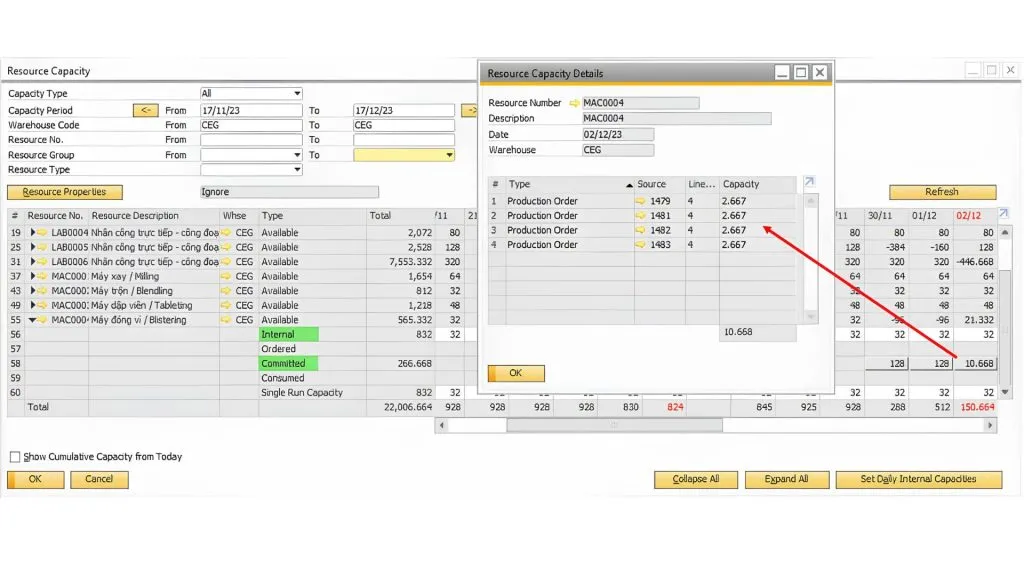
2. SAP Business One software
SAP Business One is an ERP solution for small and midsize businesses as well as subsidiaries of large corporations. SAP describes the system as a solution that integrates many business modules and delivers real-time business data on a single system.
- Key features: Finance, sales, purchasing, inventory, production, customer relationship management, and analytics.
- Strengths: Relatively well-structured business processes, scalability, and integration with the SAP ecosystem.
- Limitations: Deployment costs and consulting requirements can be higher than simpler SME solutions; a business should carefully assess the scope of customization.
- Deployment: SAP Business One supports both cloud and on-premise.
- Best-fit businesses: Midsize businesses, subsidiaries of corporations, and organizations that need to standardize finance, sales, purchasing, warehouse, or production operations.
3. Microsoft Dynamics 365 software
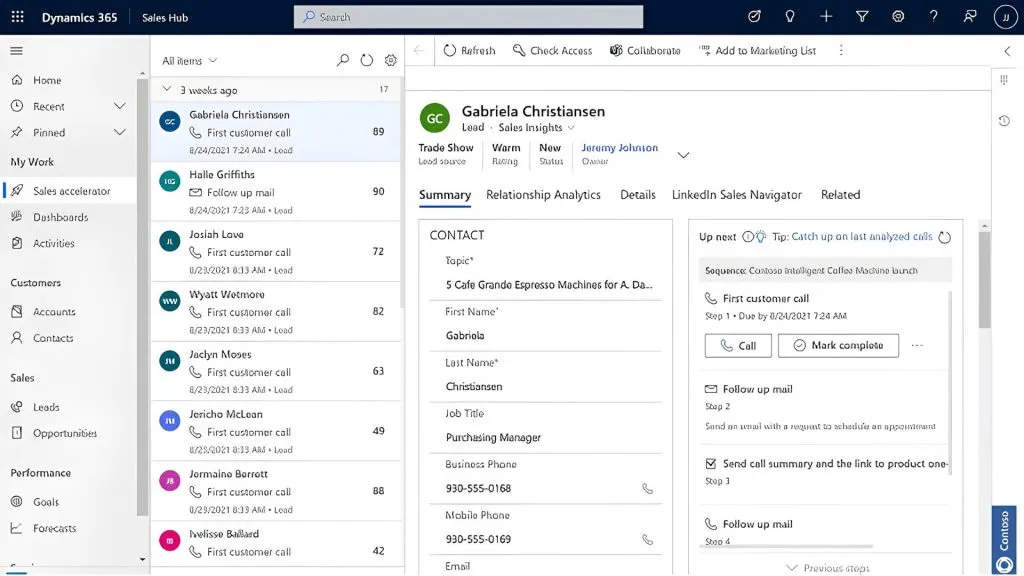
Dynamics 365 comprises many business applications; within the ERP group, Business Central supports functions such as finance, sales, production, warehouse, projects, and services. Microsoft also allows the system to be extended with the Power Platform and extensions.
- Key features: Finance, supply chain, production, sales, projects, services, analytics, and Power Platform connectivity.
- Strengths: Integrates well with Microsoft 365, Excel, Outlook, Teams, and the Power Platform. The 2026 release continues to expand the AI and automation capabilities in Business Central.
- Limitations: An ecosystem of many products can make choosing the architecture and deployment complex; costs need to be calculated by the scope of apps and number of users.
- Deployment: Primarily cloud, with options to extend and migrate from on-premise depending on the product.
- Best-fit businesses: Midsize and large businesses already using the Microsoft ecosystem or needing to connect ERP with CRM, BI, and automation tools.
>>> See also:
- A guide to creating an online sales website for free, the professional way
- A guide to using Google AI Studio effectively and quickly
4. Oracle NetSuite software
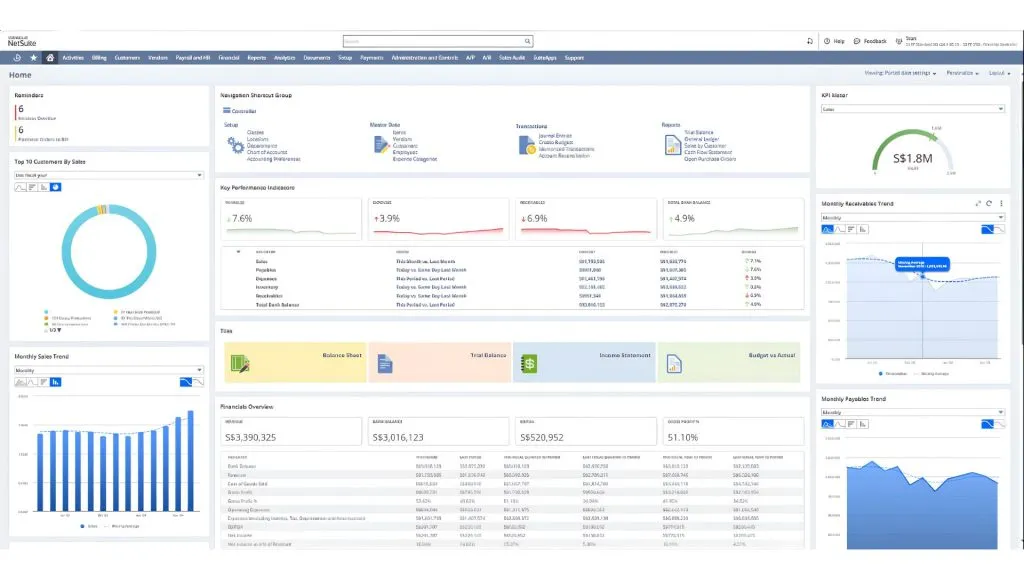
NetSuite provides ERP functions related to accounting, inventory, order management, projects, and HR. Oracle’s documentation describes the ERP within NetSuite as covering many business areas and connecting data on a shared platform.
- Key features: Finance, accounting, order management, inventory, assets, revenue, and multi-entity operations.
- Strengths: A cloud model suited to businesses that need centralized access and the ability to scale with the business.
- Limitations: Costs can be high for small businesses; specific requirements of each market may need additional configuration or integration.
- Deployment: Cloud.
- Best-fit businesses: Fast-growing businesses with many branches/legal entities or operations across multiple markets.
5. ERPNext software
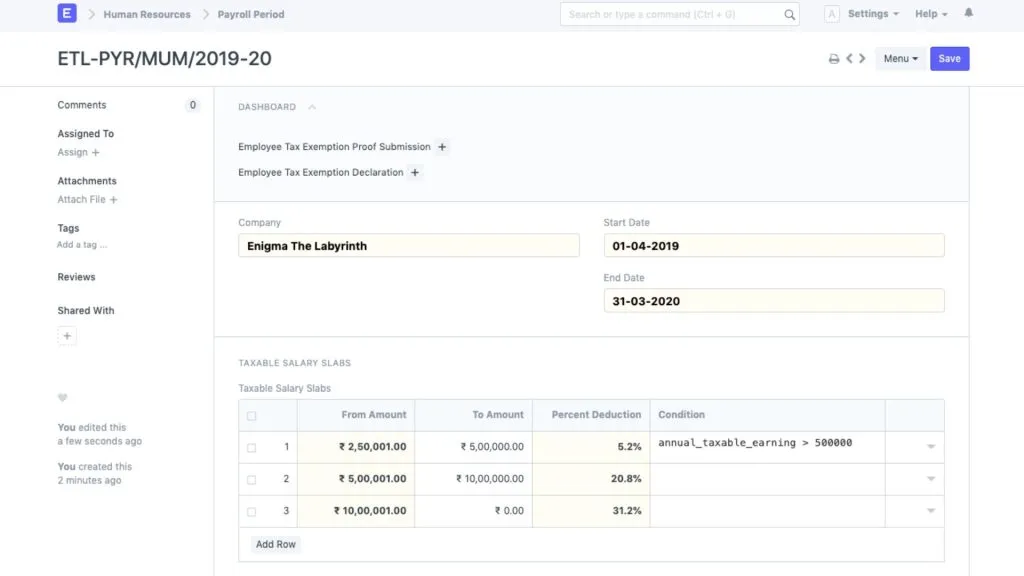
ERPNext is an open-source ERP platform that includes accounting, purchasing, sales, CRM, warehouse, production, projects, POS, HR, and payroll.
- Key features: Finance management, warehouse, purchasing, sales, production, MRP, CRM, HR, and project management. ERPNext also supports APIs, workflows, permissions, and customization.
- Strengths: Open source, customizable, and avoids full dependence on a single proprietary software model.
- Limitations: A business needs in-house technical capability or a capable partner to deploy, maintain, and upgrade the system.
- Deployment: Cloud or self-managed.
- Best-fit businesses: SMEs and businesses with a technology team or implementation partner able to administer an open-source system.
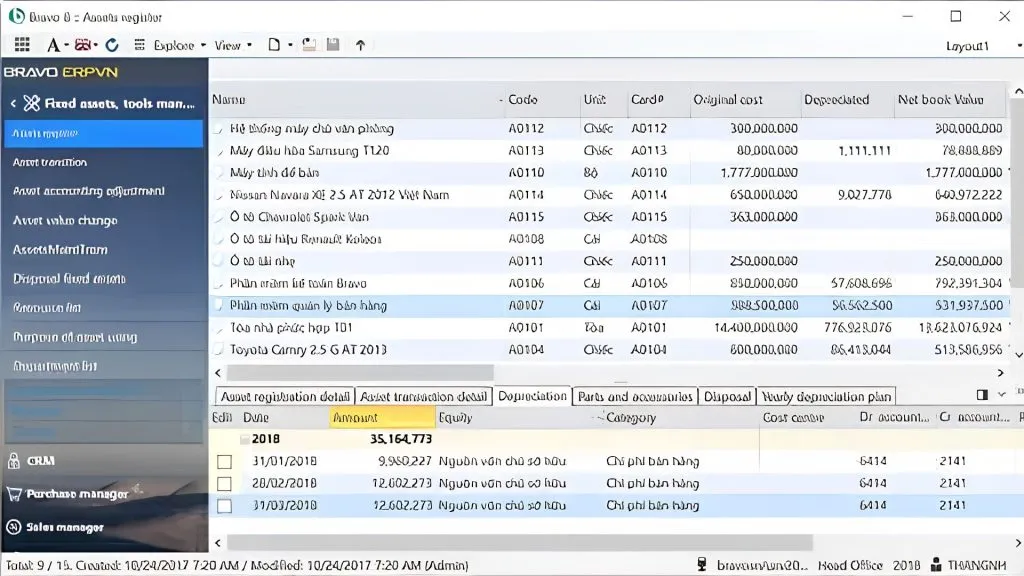
6. BRAVO software
BRAVO develops an ERP solution aimed at end-to-end management, with modules that are interconnected and able to inherit data. The system is designed for many sectors such as manufacturing, construction, real estate, textiles, packaging, transportation, and other specialized industries.
- Key features: Finance management, accounting, purchasing, sales, warehouse, production, CRM, and industry-specific functions.
- Strengths: High customizability, close alignment with Vietnamese business practices, and support for specialized management needs. BRAVO 10 ERP also supports a Cloud model.
- Limitations: For small businesses with simple processes, the system’s functional scope and level of customization may exceed their needs.
- Deployment: Cloud or on-premise.
- Best-fit businesses: Midsize and large businesses, especially manufacturing and trading units or those with specialized business processes.
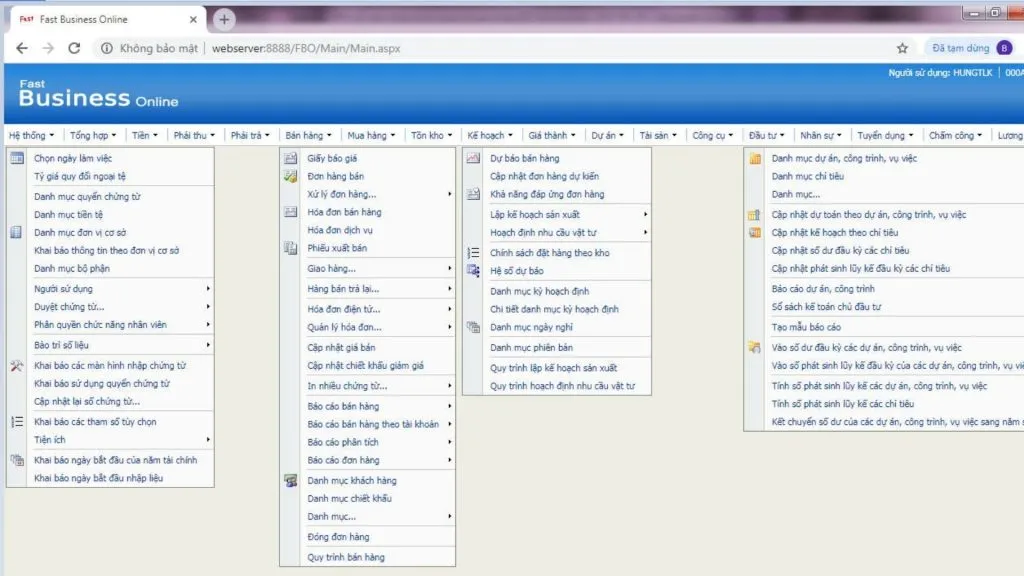
7. FAST Business software
FAST positions Fast Business Online as a comprehensive ERP management solution with function groups such as finance, sales, purchasing, warehouse, HR, CRM, DMS, and reporting.
- Key features: Accounting, purchasing, sales, warehouse, production, HR, CRM, DMS, and management reporting.
- Strengths: Many modules to choose from, customizability to fit your needs, and support for the specialized functions of many industries in Vietnam. FAST also provides survey, requirements analysis, deployment, and custom development services.
- Limitations: The system’s scope is relatively broad, so a business needs to clearly define the modules and processes to deploy in order to control cost and complexity.
- Deployment: Web-based platform, with product and infrastructure options to suit your needs.
- Best-fit businesses: Midsize and large businesses in Vietnam, especially those with finance, distribution, production, or multi-process management functions.
>>> See also: What is Claude AI? A guide to creating a free Claude AI account
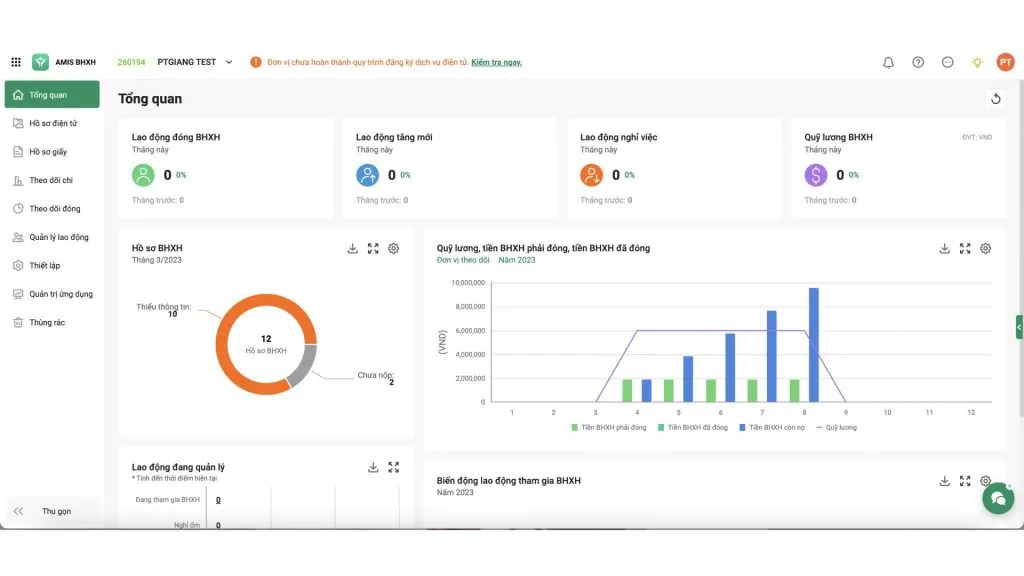
8. MISA AMIS software
MISA AMIS is a unified business management platform comprising many applications for finance and accounting, marketing, sales, HR, the digital office, and production and supply.
- Key features: Accounting, purchasing, warehouse, CRM, sales, HR, timekeeping, payroll, tasks, processes, and production.
- Strengths: You can choose applications based on your needs; it runs on the cloud and supports connecting to external systems via API.
- Limitations: Because it is organized as an ecosystem of many applications, a business needs to clearly define the module scope to avoid confusing a unified management platform with a traditional ERP suite.
- Deployment: Cloud.
- Best-fit businesses: Small, midsize, and large businesses in Vietnam that want to digitize each function group and expand gradually.
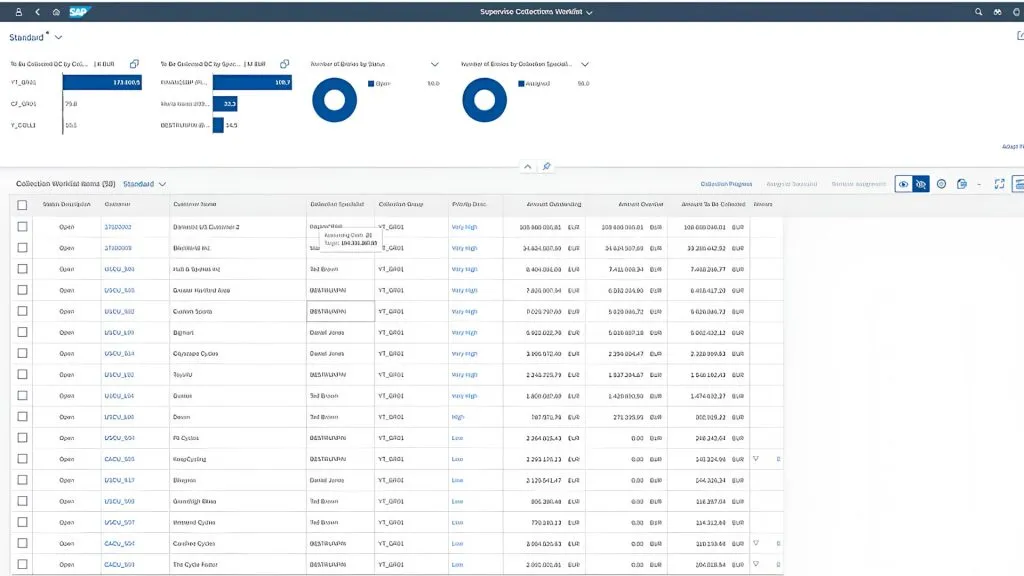
9. SAP S/4HANA software
SAP S/4HANA Cloud is an ERP platform with function groups such as finance, supply chain, production, sales, and core business processes. SAP now integrates AI into many of the system’s processes.
- Key features: Finance, supply chain, inventory management, production, planning, and data analytics.
- Strengths: The ability to serve large-enterprise models, complex processes, and multi-entity management needs. SAP is also expanding its AI and real-time analytics capabilities in Cloud ERP.
- Limitations: Projects typically require substantial implementation resources, specialized teams, and a significant budget; it is not suited to businesses that only need a simple management system.
- Deployment: Cloud and deployment models suited to each product, architecture, and business requirement.
- Best-fit businesses: Large enterprises, multi-industry corporations, or businesses with supply chains and multinational operations.
10. FastWork software
FastWork is a Vietnamese digital business management platform focused on digitizing workflows and managing tasks, HR, and customers in the cloud.
- Key features: Task and project management, electronic approval workflows, timekeeping and HR, customer management, and department activity reporting.
- Strengths: Fast deployment and a low initial cost, well suited to businesses that want to start their digital transformation with processes and people before investing in a system heavy on finance and production.
- Limitations: It is not a full ERP solution in the traditional sense; in-depth accounting and production functions still require dedicated accompanying software.
- Deployment: Cloud/SaaS
- Best-fit businesses: Small and midsize businesses that need to digitize processes quickly.
>>> See also:
- The 2026 AI customer recognition at showrooms solution
- What is application software? Common types of application software
The ERP implementation process and things to keep in mind
Implementing an ERP is a project that changes how a business operates, not just an exercise in buying and installing software.
Step 1: Survey your needs and current state
A business needs to identify the problems it is facing, its current processes, the systems in use, and the goals it wants to achieve.
Rather than setting a general goal like “manage better,” it is better to turn it into a specific requirement such as reducing report-compilation time, synchronizing inventory, or automating an approval process.
Step 2: Choose an ERP solution
Based on the requirements you have identified, compare solutions by modules, integration capability, customization, cost, deployment, and scalability.
One practical way to evaluate is to ask the vendor to directly simulate your business processes rather than just watching a generic demo.
Step 3: Standardize data and configure the system
A business needs to clean its customer, supplier, product, chart-of-accounts, and related master data before migrating to the new system.
After that, proceed to configure the processes, permissions, forms, reports, and the modules you need.
Step 4: Train and run a pilot
Users need to be trained according to their actual roles. The system should be piloted with data and scenarios close to real operations to detect process errors.
This is also a critical time to gather feedback from users before the system goes live.
Step 5: Operate and optimize
After go-live, a business needs to monitor usage levels, data quality, process effectiveness, and feedback from departments.
ERP should be seen as a system that requires continuous improvement. When a business changes its processes or expands its operations, the system also needs to be adjusted accordingly.
>>> Learn more:
- How to create a multichannel AI sales chatbot effectively, in detail
- What is optimizing your website with AI? How to do SEO optimization and the AI tools to use
How do ERP and CRM differ?
ERP is oriented toward managing resources and internal operations, while CRM is oriented toward customers and revenue-generating activities. These are two complementary systems, not replacements for each other.
| Criteria | ERP | CRM |
| Objective | Manage and optimize resources and internal operational processes | Manage customer relationships, grow revenue, and retain customers |
| Primary focus | Internal departments: accounting, warehouse, purchasing, production, HR | Customers, prospects, and customer-facing teams |
| Managed data | Documents, inventory, receivables/payables, costs, HR, production plans | Customer profiles, interaction history, sales opportunities, campaigns |
| Scope | The entire operational chain from purchasing to production and finance | The prospecting, sales, and after-sales care stages |
| Integration | Can receive order data from CRM to handle warehouse, receivables, and accounting | Can pass opportunities or orders to ERP for further processing |
In practice, many businesses start with a CRM because the need to grow revenue is more urgent, then implement an ERP once operations become complex. Whichever order you take, factoring in integration capability from the start will help you avoid having to redo work later.
>>> See also: What is a CRM for auto showrooms? A comprehensive customer management solution
AI applications in ERP systems
AI in ERP can support a business in four main areas: data analysis, forecasting, business automation, and decision support.
AI for data analysis and management support
AI can analyze data from many ERP modules to identify trends and anomalies. Instead of waiting for managers to read each report, AI can help surface the signals that need attention.
For example, the system can detect that sales of a product group are steadily declining, that production costs are rising abnormally, or that a supplier frequently delivers late.
AI for demand forecasting and planning
Historical sales, inventory, seasonality, and order data can be used to support demand forecasting.
In production, AI can help forecast raw materials and production capacity needs. For trading and distribution, this technology can help forecast the volume of goods to purchase and limit excess inventory.
AI for automating functions and processes
Many repetitive tasks in ERP can be automated: extracting information from invoices and documents, reconciling data between modules, classifying documents by cost category, and generating periodic reports. The role of AI here is to help staff handle manual work, while business decisions and approval responsibility still rest with people.
AI for decision support and operational optimization
By combining ERP data with AI, a business can build alerts and recommendations such as the inventory level to maintain, when to reorder, the risk of overdue receivables, or cash-flow forecasts. The key point is that AI only creates value when the input data is of sufficient quality and the ERP processes have been standardized.
For businesses with distinctive operational processes or a need to connect many systems already in use, a packaged ERP solution may not fully meet their requirements. In that case, developing custom ERP software is an option that helps a business build a system better suited to its actual processes, from data management and business automation to integration with existing platforms. TOT provides custom software development services, helping businesses analyze their needs and build solutions aligned with their long-term growth strategy.
>>> Learn more:
- How is AI in software development applied?
- 18 highly effective ways to apply AI for e-commerce
- 7 ways to apply AI to optimize customer experience: 2026 trends
Custom ERP software development solutions from TOT
Beyond packaged solutions, businesses with distinctive processes can choose to develop a custom management system that closely follows how they actually operate, instead of adjusting their operations to fit the software.
When should you develop a custom ERP?
A business should consider developing a custom ERP when:
- Distinctive business processes: Off-the-shelf ERP software cannot meet the company’s specific way of operating or management requirements.
- Many systems that need connecting: The CRM, accounting, warehouse, website, internal apps, or other software are operating separately and their data is not yet synchronized.
- Complex management and permission requirements: Approval workflows, user permissions, or reporting systems exceed the configuration capabilities of packaged software.
- A need to stay in control of data and the development roadmap: The business wants to control the architecture, data, and ability to add features rather than depend on the vendor’s roadmap.
- Still having to handle functions outside the ERP: Staff regularly use Excel or their own tools to handle functions the current system does not yet support.
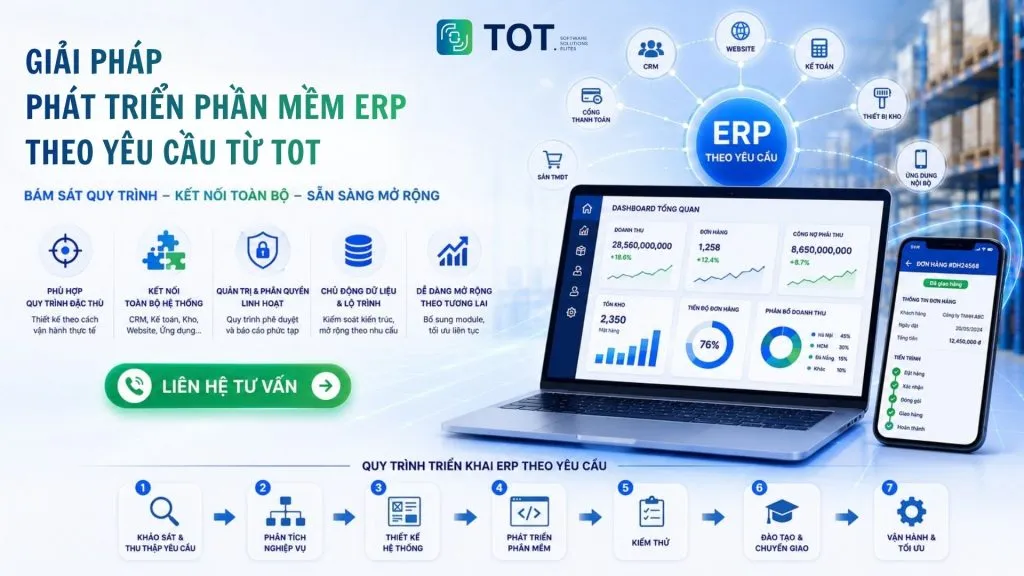
TOT’s process for delivering custom ERP software
TOT delivers custom ERP in phases, from business analysis to development, testing, and system operation.
Step 1: Survey and gather requirements
TOT studies the business model, current processes, the problems the business is facing, and the management needs of each department. The survey results are used to define the scope and goals of the system.
Step 2: Business analysis
The processes are modeled into specific business flows, defining the input and output data, user roles, approval processes, and the links between modules. This is the basis for determining what functions the ERP needs to build and how the modules interact with one another.
Step 3: System design
TOT designs the software architecture, database, interface, and permission mechanism based on the agreed requirements. The architecture takes integration and scalability into account so the system can meet needs that arise in the future.
Step 4: Software development
The system is developed module by module or phase by phase rather than built all at once. Delivering each part helps the business test early, provide feedback, and adjust requirements before the system is finalized.
Step 5: Testing
The system is tested by each function and business process, then checked for its ability to operate on real data. Any bugs or unsuitable points are recorded and resolved before it goes into official use.
Step 6: Training and handover
Users are guided on how to use the system according to their roles and functions. TOT also hands over the necessary documentation so the business can operate the system independently after deployment is complete.
Step 7: Operation and optimization
After the ERP goes live, the system continues to be monitored, maintained, and optimized based on real-world feedback. The business can add modules, adjust processes, or integrate additional systems as its business needs change.
ERP system integration and scalability
A custom-developed ERP can connect with CRM, the website, mobile apps, accounting software, warehouse devices, payment gateways, and internal systems through APIs. As a result, data can be synchronized across functions instead of being re-entered in multiple pieces of software.
The system architecture can also be designed in a modular way, allowing a business to start with its most important functions and then add new modules as its scale and management needs grow. This helps avoid having to replace the entire system when the business expands.
Develop custom ERP software with TOT
When packaged ERP cannot meet distinctive processes, a business can build its own system with modules, approval workflows, permission mechanisms, and reports designed around its actual needs. The system can also integrate with the software and platforms the business already uses, while adding more modules as its scale of operations changes.
TOT provides custom software development services, supporting you from business analysis, system design, development, and integration through to operation and upgrades. Contact TOT to discuss building an ERP system that fits your business’s processes and growth plans.
>>> See also:
- Professional custom software development in Hanoi
- Get professional custom software development in HCMC at a great price
Conclusion
Understanding what ERP is means understanding not just a management tool, but how this system connects data and processes across a business’s departments. The right ERP solution can help a business synchronize information, control operations, and support decision-making from a single source of data.
However, the effectiveness of an ERP depends heavily on choosing a solution that fits your size, industry, and actual processes. For businesses with distinctive functions, a need to integrate many systems, or frequent handling of data outside the software, developing a custom ERP can be the right choice to stay in control of features, integration capability, and the system’s expansion roadmap.
Frequently asked questions about ERP systems
Should small businesses implement an ERP?
Small businesses do not necessarily need to implement an ERP right from the start. The decision should be based on the complexity of the processes, the volume of data, and the need to connect departments. If a business starts to experience scattered data, manual processing, or difficulty controlling operations, it can implement an ERP starting with a few core modules and expand gradually.
How long does an ERP implementation take?
ERP implementation time depends on the number of modules, the size of the business, the number of branches, the data quality, and the level of system customization. The more functions and complex integration requirements a project has, the longer the implementation takes. Standardizing data and aligning processes early can help limit surprises and shorten the timeline.
What does the cost of an ERP implementation include?
ERP costs include not only license fees or subscription fees but also the cost of consulting, deployment, customization, integration, and user training. If deployed on-premise, a business may incur additional costs for servers, infrastructure, and maintenance. Therefore, you should calculate the total cost of ownership rather than just comparing the initial software price.
Can ERP integrate with CRM?
Yes. ERP can integrate with CRM through an API or a middleware platform to synchronize data between the two systems. CRM focuses on customers, sales opportunities, and care, while ERP handles orders, inventory, receivables, and accounting. Connecting them helps reduce duplicate data entry and limit data discrepancies.
Can an ERP be customized to fit a business’s processes?
Yes. ERP can be configured or customized to fit each business’s processes, permissions, and reporting. For distinctive functions that off-the-shelf software cannot meet, a business can develop additional modules or custom features. However, the deeper the customization, the more you need to weigh the cost, maintenance, and future upgrade capability.
TOT is your companion on the digital transformation journey, providing website design, mobile app, custom software, and artificial intelligence software solutions tailored to each business need.
With real-world consulting and implementation experience, TOT helps businesses build a digital transformation roadmap, apply AI, and automate processes to optimize operations and create a sustainable competitive advantage.
TOT contact information:
🌐 TOT Website
📞 Hotline/WhatsApp/Zalo: 0906 712 137
✉️ Email: long.bui@toponseek.com
🏢 Address: 31 Hoang Dieu Street, Xom Chieu Ward, Ho Chi Minh City, Vietnam