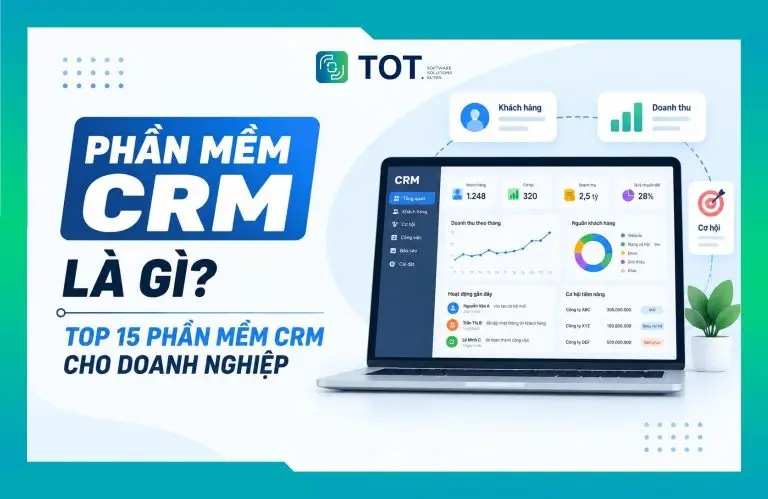
As a company’s customer base grows, its information often ends up scattered across many places such as Excel, email, social media, or standalone tools. This makes it hard for a business to track conversation history, manage sales opportunities, and care for customers consistently. That is why more and more businesses are turning to CRM as a way to support customer management and business operations. In this article, join TOT for a detailed look at what CRM is, along with its roles, functions, and benefits, how the system works, and five popular CRM platforms.
>>> See also:
- Top 20+ best free AI image design software
- Solutions for AI customer recognition at showrooms in 2026
- How to build AI apps with vibe coding on Google AI Studio, made simple
What Is CRM?
CRM (Customer Relationship Management) is both a methodology and a system that helps businesses manage information, interactions, and relationships with current and prospective customers. It covers every customer-related activity across the entire journey, from first contact and selling through to post-purchase care.
Put simply, CRM is how a business centralizes and manages customer information in a single, unified system, instead of letting data sit scattered across places such as Excel, email, notebooks, or standalone tools. The information managed can include customer profiles, conversation history, transactions, and other details related to how the business works with each customer.
CRM tools can consolidate customer and business data from multiple sources and apply artificial intelligence (AI) to support customer relationship management across the full lifecycle, from marketing, sales, and e-commerce to customer service.
>>> Reference: What is CRM for car showrooms? A complete customer management solution
The Role of a CRM System in Your Business
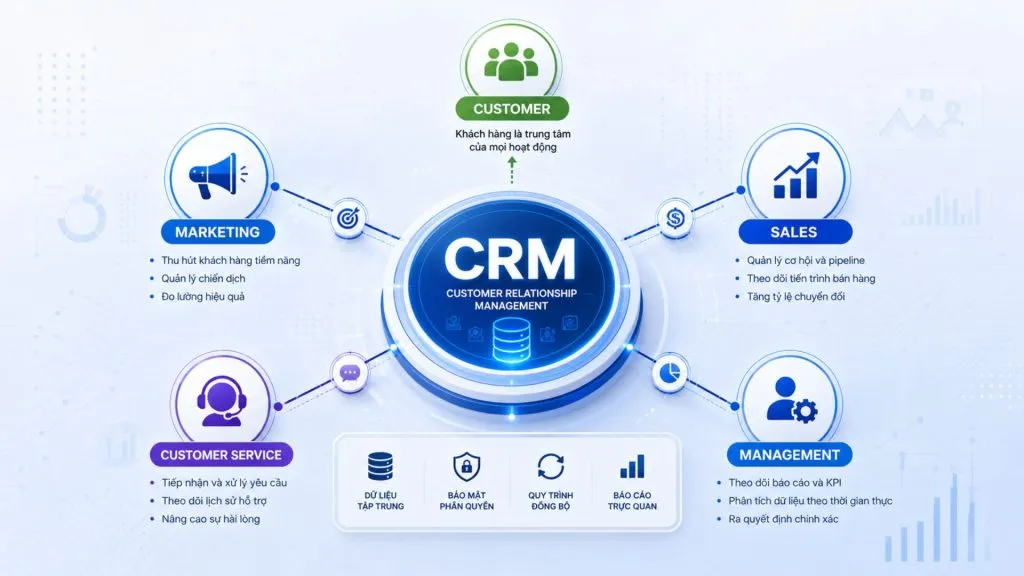
CRM serves as the platform that connects the data, people, and processes related to customers across a business. It gives every department a single source of information so they can collaborate and manage operations more effectively. This role shows up in several ways:
A platform for centralized customer data management
CRM acts as the authoritative source of customer data for the entire organization. Instead of each employee keeping a separate list, all contact information, transaction history, advisory notes, and current status are stored in one place, with clear access controls. This also means customer data becomes a company asset that is not lost when staff change.
Connecting the customer journey across multiple touchpoints
A customer might discover a business through an ad, leave their details on the website, ask questions via the call center, and then close the deal with a sales rep. CRM stitches these separate touchpoints into a single, seamless timeline, so every department knows what the customer has already experienced before interacting with them.
Supporting data-driven business management
With data captured to a consistent standard, managers can track the number of leads by source, conversion rates at each stage, pipeline value, and each employee’s level of activity. This forms the basis for adjusting targets, allocating resources, and spotting bottlenecks in the sales process early.
Laying the groundwork for automation and personalization
Automation and personalization only work well when a business has data that is complete and well organized. CRM provides the data foundation to set up rules such as automatically assigning leads, sending behavior-based emails, scheduling follow-up reminders, or triggering workflows when a customer moves into a new status.
>>> Learn more:
- What is website optimization with AI? How to optimize SEO and the AI tools to use
- 13 best open-source chatbot platforms
8 Standout Features of a CRM System
A CRM system can help a business manage many customer-related activities, from capturing a lead through to selling and post-purchase care. Its common features can be grouped into eight main categories:
1. Managing customer information and data
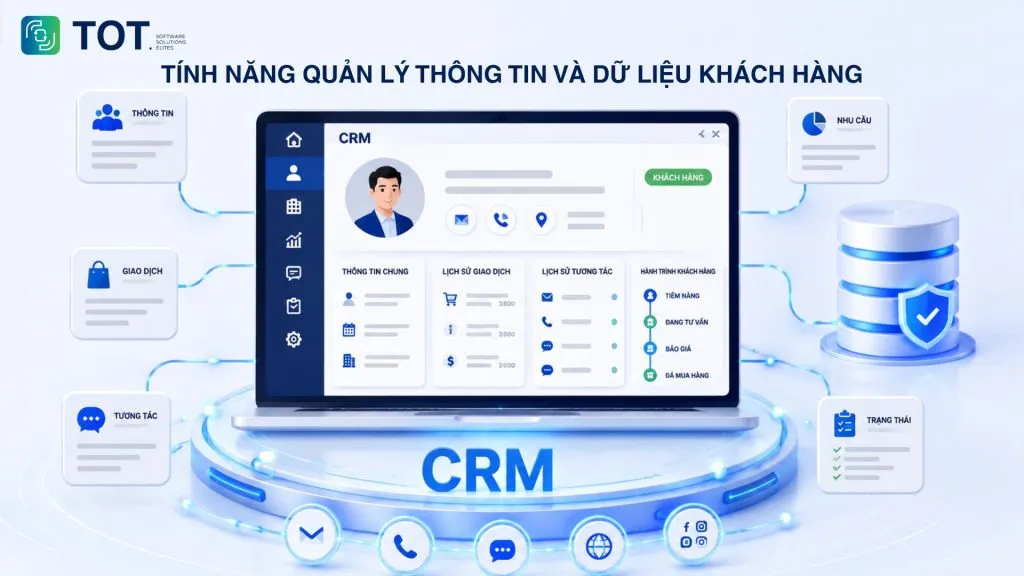
CRM helps a business consolidate all customer information into a single, unified profile. The software stores a customer’s personal or company details, contacts, transaction history, interaction history across channels, recorded needs, and current status in the buying journey. The customer profile is updated continuously rather than being a static row of data, so anyone who picks it up has the full context.
2. Managing leads and sales opportunities
CRM helps a business track a lead from the moment it appears until it becomes a customer or is deemed no longer viable. Leads can come from the website, forms, ads, events, phone calls, or referrals. The system records the source, the owner, the status, and the activities already carried out.
A business can also segment leads by industry, needs, level of interest, or lead score. This lets the sales team prioritize the opportunities that need attention first, instead of tracking customers manually.
3. Managing the sales process and activities
CRM digitizes the pipeline so that staff and managers can track each sales opportunity by stage. A pipeline may include steps such as capturing the lead, identifying needs, advising, quoting, negotiating, and closing the deal.
Beyond opportunity status, CRM can also manage tasks, appointments, quotes, notes, and contact history. Employees know what to do next, while managers can see the total value of open opportunities and which deals are at risk of stalling.
4. Managing customer care and service
CRM helps a business manage care before, during, and after the sale based on each customer’s history. Support requests, feedback, complaints, or post-sale issues can be logged in the system, along with the person responsible and the resolution status.
When a customer gets back in touch, staff can review the earlier history instead of asking the customer to explain the whole issue again. This creates a more consistent experience across interactions.
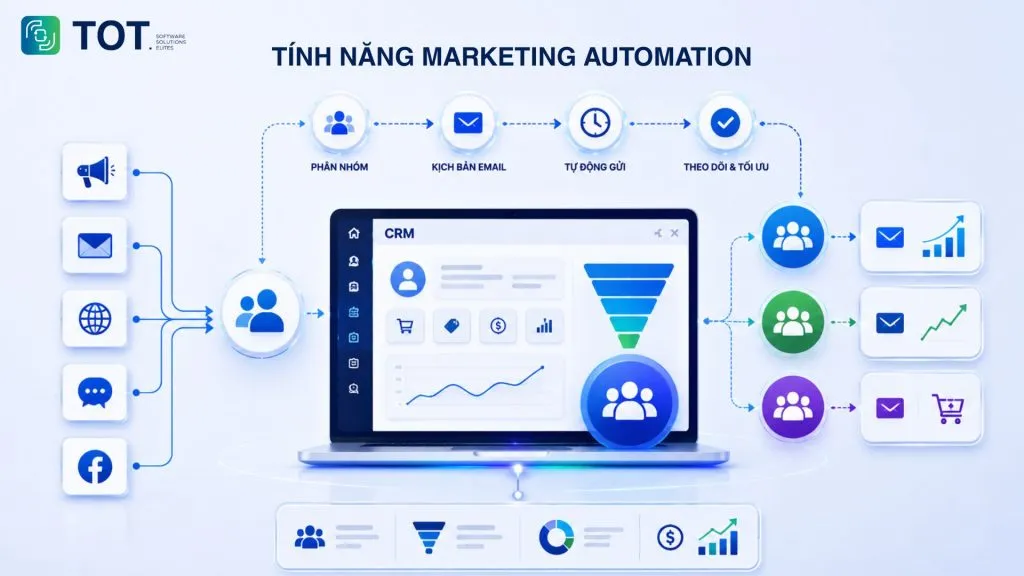
5. Marketing Automation
CRM helps segment customers by behavior, industry, or order value, then send scripted email sequences, nurture leads that aren’t ready to buy, and measure the performance of each campaign.
So what can CRM do for marketing campaigns? Its greatest value lies in connecting marketing data with business results. Instead of only knowing how many clicks a campaign generated, a business can track the leads it produced, the conversion rate, and the associated revenue.
6. Reporting and data analytics
CRM turns customer and sales data into reports for management. Dashboards can track revenue, lead volume, conversion rates, pipeline value, employee performance, or customer behavior. Reports are generated automatically from the data produced each day, significantly reducing the time spent compiling them manually at period-end.
7. Managing the sales team
CRM lets managers assign work, monitor activity, and evaluate the performance of the sales team within a single system. A business can distribute leads by region, industry, or customer group; set targets; and track activities such as calls, appointments, opportunities, or sales.
Activity data also helps managers spot anomalies. For example, an employee with many leads but a low conversion rate may be struggling at the advisory or quoting stage.
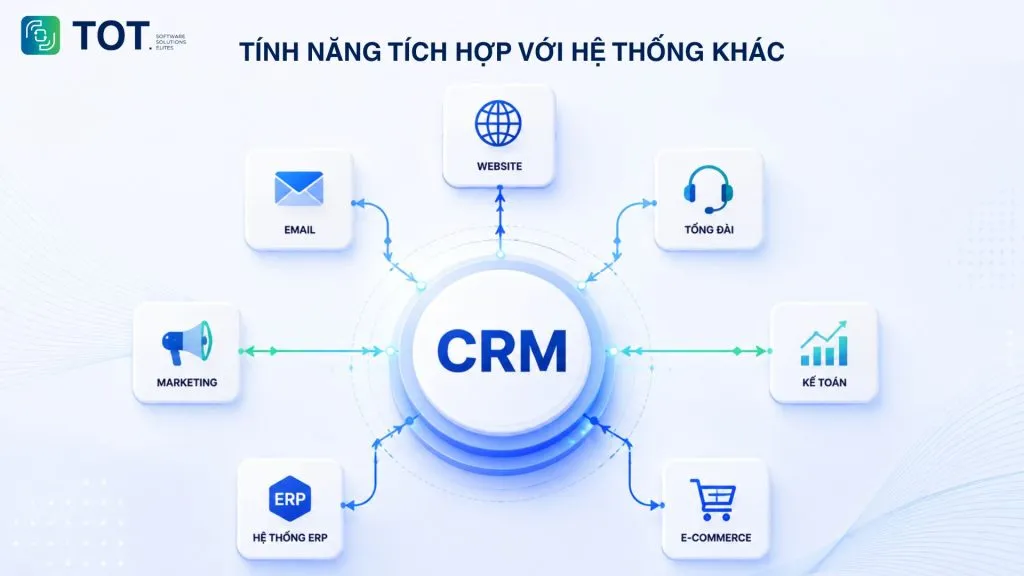
8. Integrating with other systems
CRM delivers greater value when it can exchange data with the systems a business already uses. It is typically connected to the website, email, call center, accounting software, ERP systems, marketing tools, and e-commerce platforms. Integration capability determines whether data truly flows seamlessly or whether staff still have to enter it by hand in multiple places.
>>> See also:
- What is Claude AI? A guide to registering a free Claude AI account
- How to integrate a chatbot into your website for free and sell more effectively
- Build an app for Android/iOS easily, with no coding required
The Benefits of CRM for Your Business
CRM creates value for a business through improvements in how it manages customers, sells, and coordinates between departments. Its standout benefits include the following:
Improving the efficiency of customer management
When data is centralized, employees can look up a customer’s history in seconds instead of asking colleagues or opening multiple files. Status updates happen in the course of the work itself, so the data reflects reality and managers don’t have to wait for manual reports.
Optimizing the sales and customer-care process
CRM reduces manual work such as tracking appointments, creating tasks, and sending emails through automation and ready-made templates. At the same time, the system makes it easy for the sales team to track each lead and opportunity, reducing the risk of overlooking a customer or forgetting to follow up with those who haven’t yet decided. As a result, the sales and customer-care process is organized more consistently and effectively.
Strengthening collaboration between departments
Marketing sees how the leads it brings in are handled, sales knows which content a customer has engaged with, and the service team understands the purchase history before taking on a complaint. Working from one shared dataset sharply reduces disputes over lead quality or who is to blame when a customer is lost.
Supporting analysis and decision-making
A CRM system provides the data for managers to make decisions based on the actual situation rather than gut feeling alone.
For example, if the data shows that a customer segment has a high repeat-purchase rate, the business can build a dedicated care program for it. If a lead source produces high volume but a low conversion rate, marketing and sales can jointly review the lead quality or the outreach messaging.
Building long-term customer relationships
CRM records each customer’s buying cycle, preferences, and key milestones, making it possible to deliver care that is timely and personal. Retaining existing customers usually costs far less than acquiring new ones, so this is a benefit with a clear impact on long-term profitability.
>>> See also:
- What is AI image recognition? Algorithms & applications
- What is Character AI? How to download the Vietnamese AI to your phone or PC
How a CRM System Works
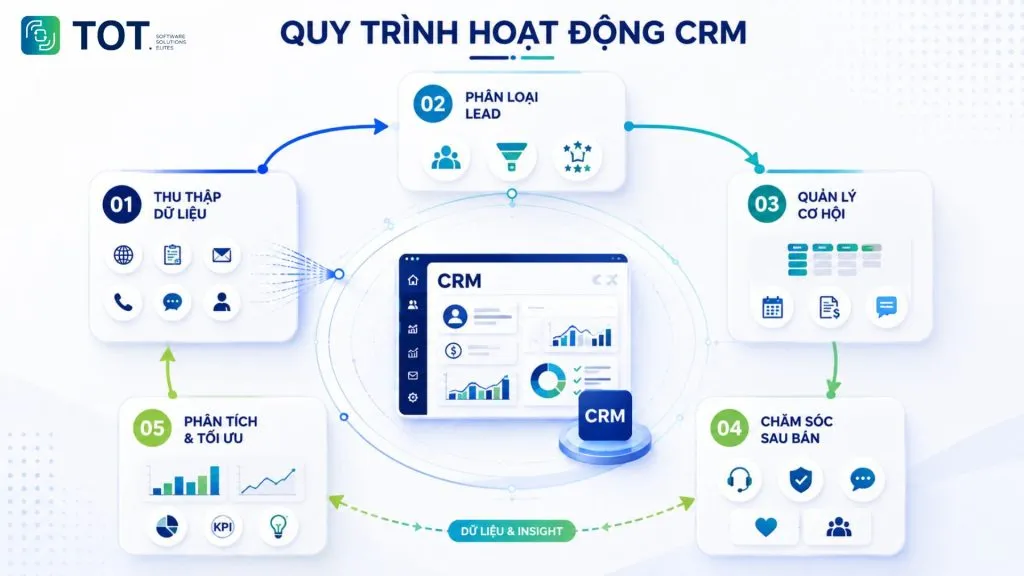
CRM runs as an end-to-end process, starting when a business collects customer information and continuing through sales, care, and data analysis. This process can be pictured as five main steps, from collecting data to evaluating and optimizing operations.
Step 1: Collecting and syncing data
CRM begins by bringing customer data from many sources into a single unified system. Those sources can include the website, sign-up forms, email, phone calls, social media, events, stores, or transactions.
At this step, a business needs to standardize the data so that the same customer doesn’t end up under several different profiles.
Step 2: Segmenting and scoring leads
Once the data is collected, CRM helps segment leads by source, needs, behavior, or potential.
Some systems can support lead scoring so that sales prioritizes the group most likely to convert. Leads that aren’t ready to buy can be placed into a nurturing workflow instead of being handed straight to sales.
Step 3: Managing opportunities and interactions
When a lead becomes a sales opportunity, CRM tracks the entire process from advising to closing. Staff can update the status, log calls, schedule appointments, send quotes, and create the next tasks. Every activity is saved to the record, helping managers monitor the pipeline and allowing other employees to take over when needed.
Step 4: Post-sale customer care
After a deal is completed, CRM data continues to support care and relationship-building. A business can manage support requests, warranty schedules, feedback, care schedules, or programs for existing customers.
Step 5: Analyzing data and optimizing operations
Data from the entire journey is compiled into reports so the business can evaluate and adjust its operations. Managers can see which customer sources are effective, conversion rates, reasons for lost opportunities, sales performance, or repeat-purchase behavior. The analysis then feeds back into the earlier steps to refine lead segmentation, the sales process, and the care strategy.
>>> Reference:
- 18 high-impact ways to apply AI to e-commerce
- Designing a professional e-commerce website with 7 key details
Which Businesses Is CRM Right For?
CRM suits any business that needs to manage customers and sales systematically, from small companies to large corporations. That said, the feature requirements and the scale of implementation will vary by business model.
CRM for B2B and B2C businesses
In the B2B model, sales cycles are long and each customer involves several decision-makers, so the CRM needs to be strong at managing opportunities, interaction history, and the hierarchy of contacts within a single organization.
In the B2C model, the number of customers is far larger but each transaction is smaller, so the focus shifts to automated segmentation, scripted care, and integration with retail and e-commerce channels.
CRM for small and medium-sized businesses
With limited resources, small and medium-sized businesses should start with three core needs: centralizing customer data, managing the sales pipeline, and scheduling care reminders. A lightweight system that is easy to use and quick to deploy often delivers better results than a feature-heavy platform the team never has time to learn.
CRM for large-scale businesses
Large enterprises need more: integration with ERP, accounting systems, and internal software; granular permissions by department and branch; handling of large data volumes; and support for multiple sales processes running in parallel. At this scale, scalability and the ability to customize to specific business needs become more important than the list of out-of-the-box features.
>>> Reference:
- A guide to building apps with Low Code, simple and highly effective
- A guide to using Google AI Studio effectively and quickly
Criteria for Choosing the Right CRM Software
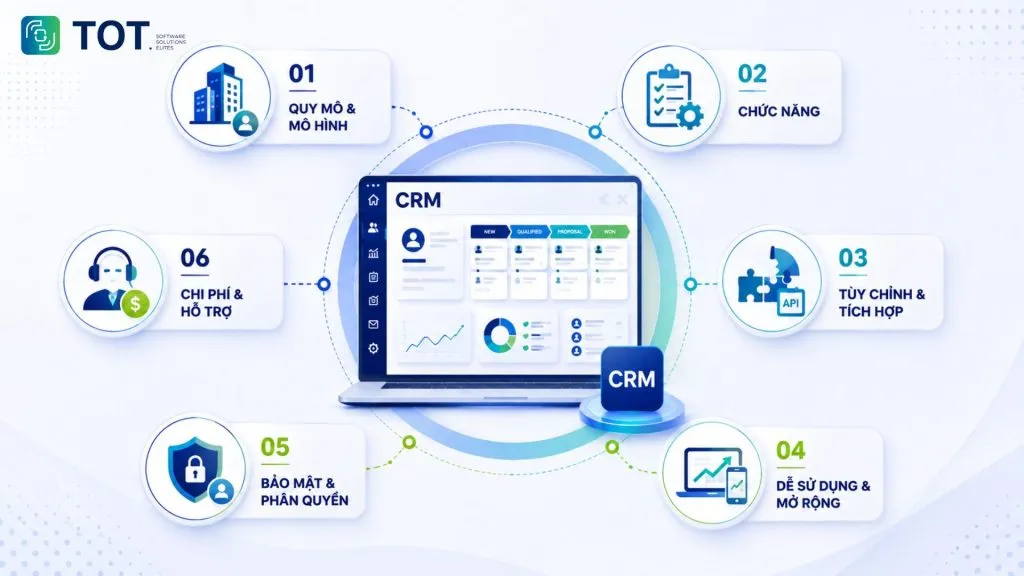
When choosing CRM software, a business should weigh the key criteria below to ensure the system meets its current needs and can grow with the company.
Fit with your company’s size and model
The CRM needs to match the number of users, the volume of data, and how the business actually operates. A distribution company with thousands of dealers has very different needs from a B2B services firm with a few dozen large clients.
So before choosing, a business should define its number of users, number of customers, sales cycle, number of branches, and the processes it needs to bring into the system.
Covers the features you actually need
The CRM with the most features isn’t necessarily the best fit. A business should list its most important functions, such as lead management, pipeline, care, reporting, or marketing automation, and then compare them against each platform.
A system with a simple interface that meets 90% of real-world needs may be a better fit than a very powerful platform that is hard to use.
Customization and integration capabilities
A business should assess how well it can adjust data fields, pipeline stages, and approval workflows to match its own operations, as well as how the system connects to the website, ERP, accounting software, email, and call center. If the platform offers an open API, expanding it later will be far easier.
Ease of use and scalability
A CRM only creates value when employees actually use it in their daily work. A complex interface can lead to low adoption even when the system is feature-rich. A business should evaluate training time, mobile usability, speed of operation, and how well the system scales as the number of users or the volume of data grows.
Data security and access control
Customer data needs to be protected with appropriate permissions and access controls. A business should look at mechanisms such as role-based permissions, limits on who can view or edit data, activity logs, backups, and the vendor’s security policy. For businesses handling large volumes of personal data, regulatory compliance should also be part of the evaluation.
Cost and support policy
The cost of a CRM includes not only subscription fees but potentially implementation, customization, integration, training, and maintenance. A business should calculate the total cost over at least one usage cycle rather than looking only at the price per user per month. It should also assess the quality of support, the documentation, response times, and the availability of technical help when the system runs into problems.
>>> Learn more: How much does mobile app design and app maintenance cost in 2026?
Top 5 CRM Software Worth Considering Today
The five platforms below were selected for reference based on their popularity, ecosystem, features, customization, and fit with different groups of businesses:
| Software | Highlights | Deployment | Best suited for |
| MISA AMIS CRM | A business management ecosystem connecting sales and accounting, with AI integration | Cloud | Vietnamese businesses, SMEs, and distribution companies |
| Salesforce CRM | Strong customization and scalability | Cloud | Large enterprises with complex processes |
| HubSpot CRM | Easy to use, strong in marketing and inbound | Cloud | Startups, SMEs, and marketing-focused businesses |
| Zoho CRM | Broad ecosystem, flexible customization | Cloud | SMEs that need many interconnected functions |
| Microsoft Dynamics 365 | Deep integration with the Microsoft ecosystem | Cloud | Medium and large businesses that use Microsoft |
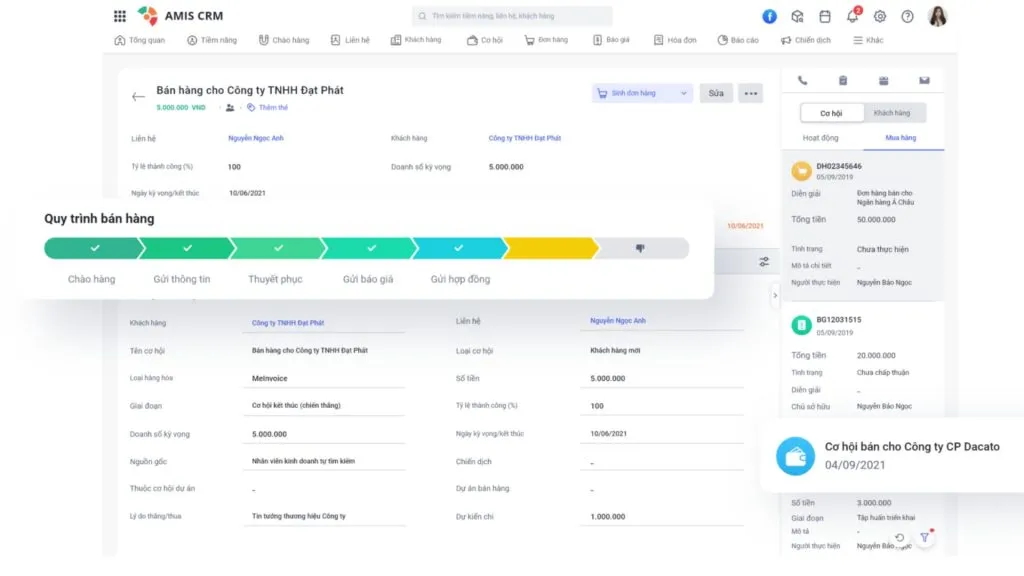
1. MISA AMIS CRM Software
MISA AMIS CRM is a customer and business management platform within the MISA AMIS ecosystem, well suited to many Vietnamese businesses.
The platform focuses on managing customer data, sales, distribution, reporting, and connecting data across functions. MISA has also announced a range of AI capabilities in AMIS CRM, such as business analytics, lead analysis, call summarization, report generation, and sales-content assistance.
Key features:
- Centralized customer data management.
- Lead and pipeline management.
- Management of targets, KPIs, and sales activities.
- Business reporting.
- Data connection with accounting and other modules.
- AI applied to analysis and sales support.
Strengths: A good match for how Vietnamese businesses operate, with a broad product ecosystem and clear advantages for companies already using other MISA products.
Limitations: Businesses with especially complex processes or international technology stacks should carefully assess its customization and integration capabilities before deploying.
Best suited for: SMEs, distribution and retail companies, and Vietnamese businesses that need to connect CRM with other management functions.
2. Salesforce CRM Software
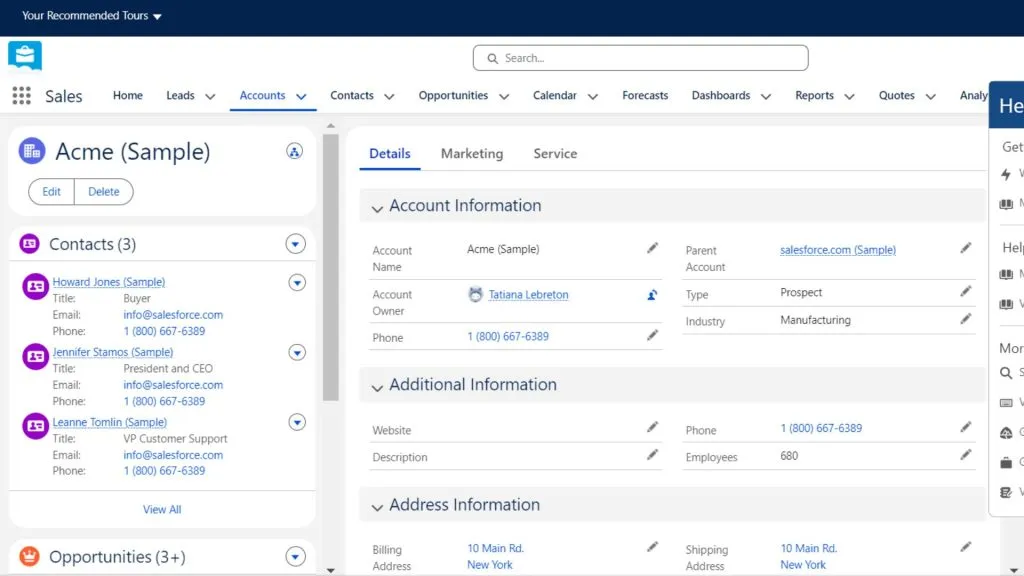
Salesforce is a CRM platform built for managing customer relationships at large scale, with a high degree of customization and scalability.
The platform suits businesses with multi-tier sales processes, many user groups, and complex system-integration needs.
Key features:
- Customer and opportunity management.
- Sales pipeline.
- Process automation.
- Reporting and analytics.
- Scalability through an app ecosystem.
- Customization to your business processes.
Strengths: Powerful customization, well suited to businesses with complex operations and long-term expansion needs.
Limitations: Deployment and administration can be complex; a business should carefully assess the cost and the operating resources required.
Best suited for: Medium and large businesses, corporations, or organizations with complex sales processes.
>>> See also: A guide to creating an online sales website for free and professionally
3. HubSpot CRM Software
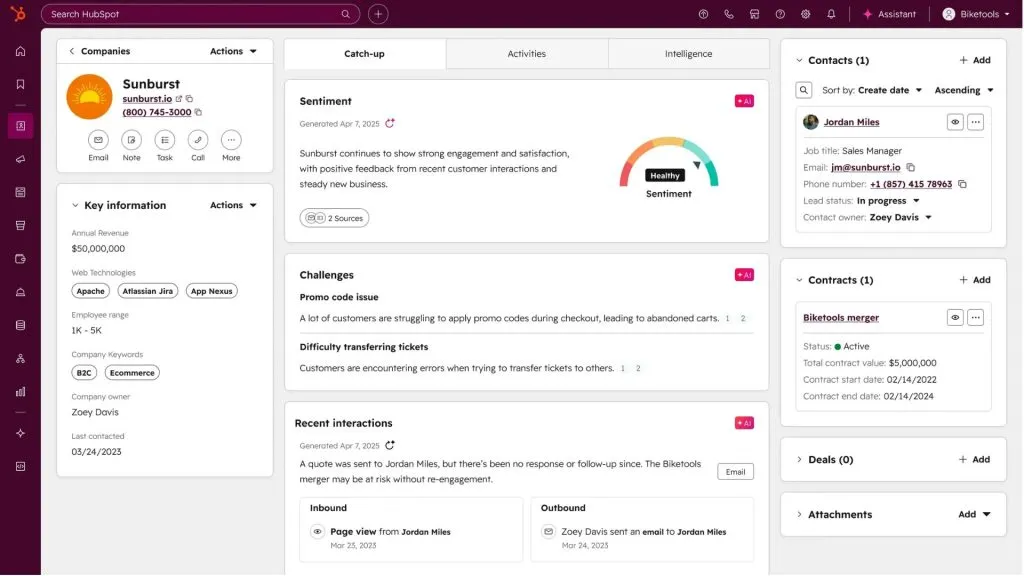
HubSpot CRM is a CRM platform that stands out for combining customer management with marketing, sales, and customer service.
HubSpot’s strength is its relatively intuitive approach, well suited to businesses that want to link customer acquisition, lead nurturing, and sales in one place.
Key features:
- Contact and company management.
- Pipeline and deal management.
- Email and marketing activities.
- Lead nurturing.
- Reporting.
- Connecting marketing, sales, and service.
Strengths: Approachable, with an intuitive interface, and well suited to businesses with an inbound marketing strategy.
Limitations: Costs can rise as the number of users or contacts grows, or as a business needs more advanced features.
Best suited for: Startups, SMEs, and B2B businesses with strong digital marketing.
>>> See also: Top 15+ large, reputable software companies in Vietnam
4. Zoho CRM Software
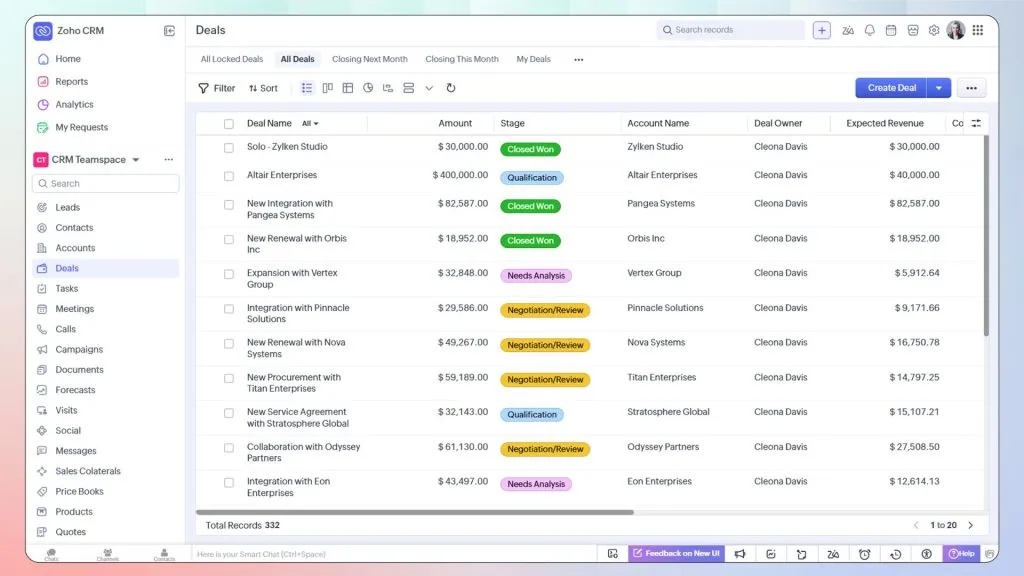
Zoho CRM is a customer management platform within the Zoho ecosystem, suited to businesses that want to connect many functions in one software ecosystem.
Beyond CRM, Zoho also offers many applications for other areas such as finance, HR, projects, and customer service.
Key features:
- Lead and opportunity management.
- Process automation.
- Multi-channel interaction management.
- Reporting and analytics.
- Module customization.
- Integration with apps in the Zoho ecosystem.
Strengths: A broad ecosystem, relatively flexible customization, and a good fit for businesses that want to keep costs under control.
Limitations: The many configuration options can mean a business needs time to set things up and train users.
Best suited for: SMEs and businesses looking for a relatively comprehensive software ecosystem.
5. Microsoft Dynamics 365 Software
Microsoft Dynamics 365 is a suite of enterprise solutions that combines CRM and ERP capabilities while integrating with the Microsoft ecosystem.
Dynamics 365 Sales supports managing accounts, contacts, leads, opportunities, quotes, and sales forecasting; Microsoft also provides AI capabilities such as predictive scoring, relationship analytics, and Copilot within the system.
Key features:
- Sales and customer relationship management.
- Lead and opportunity management.
- Forecasting.
- Dashboards and reporting.
- Integration with Microsoft 365, Teams, and Power Platform.
- AI support for analysis and sales.
Strengths: A good fit for businesses already using the Microsoft ecosystem that need to connect CRM with management, collaboration, and data-analysis tools.
Limitations: The system is highly complex and usually needs a technical team or an experienced partner to deploy effectively.
Best suited for: Medium and large businesses, especially organizations already using Microsoft 365 and Power Platform.
>>> See also:
- Top 15 popular auto garage management software
- Free computer vision software: easy-to-use platforms
- What is application software? Common types of application software
AI Applications in a CRM System
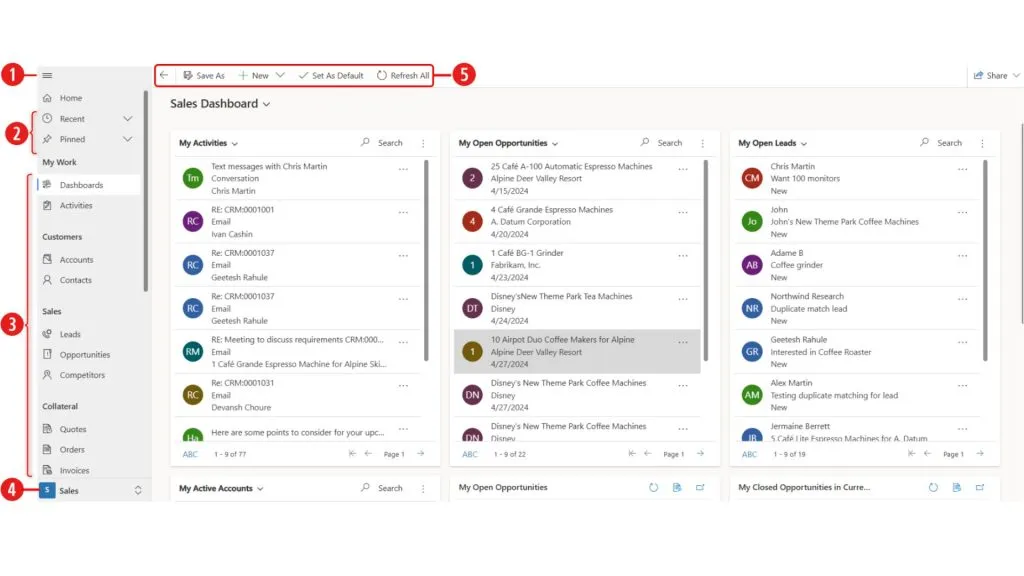
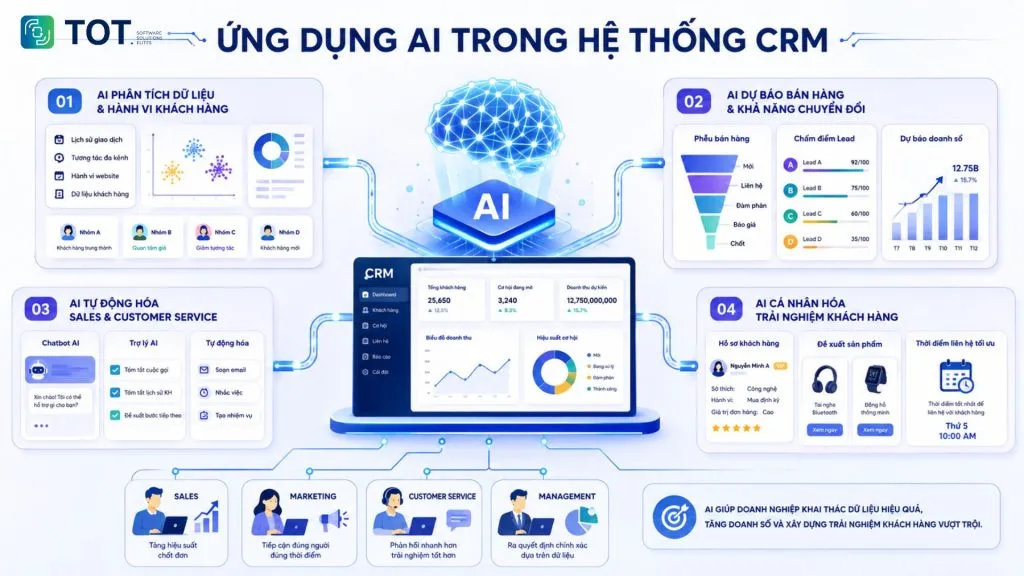
AI is adding a new layer of capability to CRM by analyzing data, predicting the likelihood of conversion, automating tasks, and personalizing customer interactions. In this sense, AI CRM software can be understood as a CRM with AI capabilities built in to help users process and use data more effectively.
AI for analyzing customer data and behavior
AI processes large volumes of data from transaction history, interactions, and on-site behavior to identify trends and segment customers by real characteristics rather than by manual classification.
The results are often more detailed than traditional segmentation. For example, the system can detect a group of customers who tend to buy again after a certain period, or identify customers showing signs of declining engagement.
>>> Further reading: Build a sales website with AI for free, SEO-ready, and most effective in 2026
AI for sales forecasting and conversion prediction
Based on historical data, a model can estimate the probability of closing each opportunity, score leads by potential, and forecast sales by period. This helps the sales team prioritize the opportunities worth pursuing, while leadership gains a firmer basis for resource planning.
AI for automating sales and customer care
AI can take on or assist with many repetitive tasks in sales and customer service. Chatbots can handle common questions, an AI assistant can summarize calls or customer history, and the system can help draft emails and suggest next steps. This frees employees to spend more time on work that requires thinking and direct interaction.
>> See also: How to build a sales AI chatbot across channels, effective and detailed
AI for personalizing the customer experience
On a foundation of centralized data, AI recommends the right products, content, or contact timing for each customer. This level of personalization is hard to achieve manually when customer numbers are large, and it is the clearest differentiator between businesses that use their data well and the rest.
That said, AI performs better when CRM data is complete, accurate, and consistently updated. If the data is duplicated, incomplete, or scattered, the analysis and recommendations AI produces can suffer as well.
A business doesn’t necessarily have to replace its entire existing CRM system to adopt AI. AI can be integrated into the system already in use through APIs or add-on solutions, depending on the infrastructure, data, and actual needs.
TOT can support your business at every stage, from assessing your current system and identifying AI opportunities to building an integration plan that fits. Contact TOT for advice on an AI adoption roadmap aligned with your systems and business goals.
>>> Related articles:
- 7 ways to apply AI to optimize the customer experience: 2026 trends
- Top 10 AI website design tools, free, paid, and effective
When Should a Business Build Custom CRM Software?
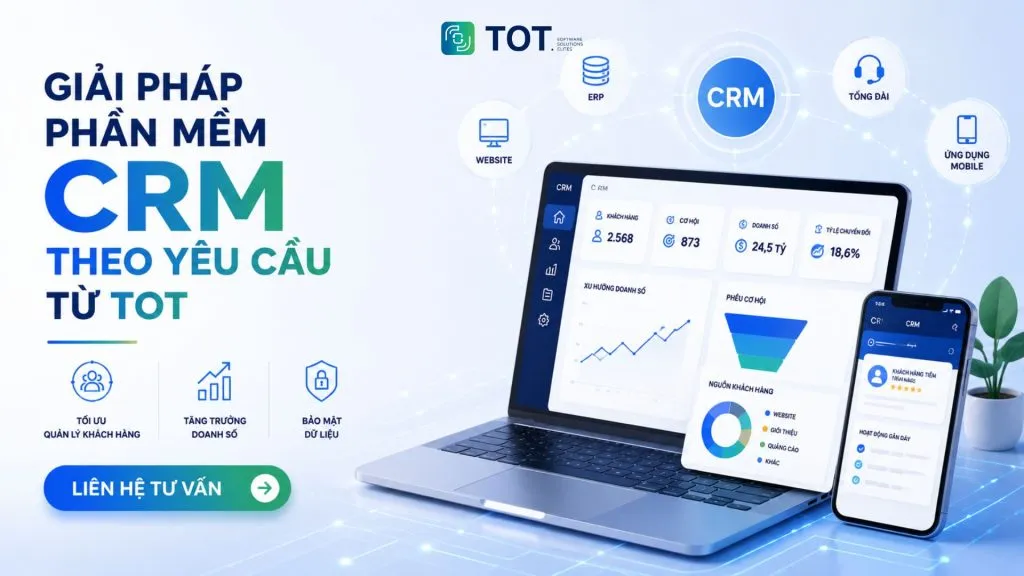
A business should consider building a custom CRM when its processes have specifics that off-the-shelf platforms can’t meet, when it needs to integrate many internal systems, or when its data governance and security requirements exceed what a packaged solution can be customized to do.
When should you build custom?
The clearest sign is when a business constantly has to reshape its processes to fit the software, instead of the software being designed around its processes.
Some cases where building custom is worth considering include:
- A distinctive sales process that doesn’t fit packaged CRMs.
- Multiple approval levels or complex pricing policies.
- A need to connect with many internal systems.
- Special data management or permission requirements.
- A current CRM that has to be used alongside Excel or other software.
- A need to build additional custom modules.
- A long-term system development strategy that requires control over the architecture.
How does TOT deliver its solutions?
TOT’s custom software development process follows a series of steps: surveying the current state and gathering requirements, analyzing the business to model the sales process, designing the system and interface, developing in phases with intermediate handovers, testing with real users, training and handover, and then providing support once the system is live. Working in phases lets a business see the product early and make adjustments before everything is finalized.
Integration and scalability
A custom-built system can connect directly to the website, mobile apps, accounting software, ERP systems, the call center, and AI services through APIs. This means customer data is no longer fragmented across separate tools, and the business can add new modules on its own as its business model changes.
Real-world implementation experience
TOT’s system development and integration capabilities are demonstrated across many delivered projects, notably an AI computer vision project for image-data processing, along with digital platform projects such as the Unicons website, the Coteccons Global website, and the Sinh Nam website. Together, these software and digital-platform projects demonstrate TOT’s capability in business analysis, development, and system integration. Interested businesses can explore TOT’s custom software development service.
>>> See also:
- Professional custom software development in Hanoi services
- Custom software development in HCMC at great prices, professionally delivered
Conclusion
By understanding what CRM is, a business can more clearly define its customer-management needs and choose a solution that fits how it operates. Rather than chasing feature counts, a business should prioritize a system that meets its actual needs today and can scale later. For distinctive processes or deep integration requirements, building custom CRM software can be the right choice for a more flexible system.
Frequently Asked Questions About CRM
What does CRM stand for?
CRM stands for Customer Relationship Management. The term refers to how a business manages information, interactions, and relationships with customers, usually supported by a CRM system or software.
What is a CRM system?
A CRM system is a technology platform that centralizes all customer-related data and activities in a single place. It typically includes modules for managing customer information, leads and sales opportunities, the sales process, post-sale care, marketing automation, and analytics reporting.
What can CRM do for marketing campaigns?
CRM helps a business manage and use customer data more effectively in marketing campaigns. Teams can segment customers, automate lead nurturing, and track campaign performance from first outreach through to generated revenue.
Should small businesses use a CRM?
Yes. Small businesses should use a CRM when they need to manage customers, track sales opportunities, and avoid missing information. They can start with a simple solution focused on the essential features and expand as the business grows.
How is CRM different from ERP?
CRM focuses on customers and sales activities, while ERP manages internal resources and operations such as finance, inventory, purchasing, and production. The two systems can integrate with each other to connect data from sales through to business operations.
>>> See also:
- What is an ERP system in manufacturing? Benefits, features, and how to use it
- Top 5 construction contractor management software for 2026
TOT is a partner for your digital transformation journey, providing website design, mobile app, custom software, and artificial intelligence software solutions tailored to each business need.
Drawing on real-world consulting and implementation experience, TOT helps businesses build a digital transformation roadmap, adopt AI, and automate processes to optimize operations and create a sustainable competitive advantage.
TOT contact information:
🌐 Website: topon.tech
📞 Hotline/WhatsApp/Zalo: 0906 712 137
✉️ Email: long.bui@toponseek.com
🏢 Address: 31 Hoang Dieu Street, Xom Chieu Ward, Ho Chi Minh City, Vietnam