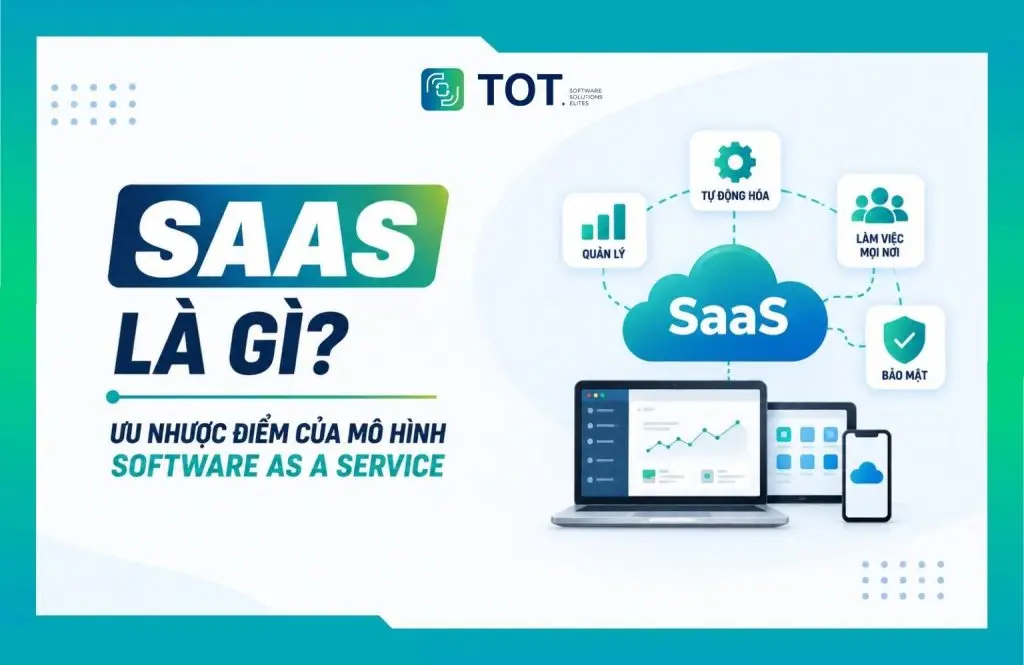
What is SaaS? SaaS (Software as a Service) is a cloud-based software delivery model in which the provider hosts and runs the application and lets users access it over the Internet, instead of installing and managing the entire infrastructure themselves. It is one of the three most common cloud computing models today, alongside IaaS and PaaS, and it is quickly becoming the way most businesses adopt software. In this article, TOT explains in detail what SaaS really is, how a SaaS system works, its characteristics, pros and cons, the main types of SaaS, and what a business needs to prepare if it wants to build its own SaaS product.
>>> See more articles:
- TOP 18 largest software companies in Vietnam
- Get professional, high-quality custom software development in HCMC
- Professional custom software development in Hanoi service
Quick summary
- What is SaaS? SaaS (Software as a Service) is a model that delivers software over the Internet, in which the provider is responsible for operating, maintaining, and updating the system.
- How does SaaS work? Users sign up for an account and access the software through a browser or an app, while the provider manages the infrastructure and software behind the scenes.
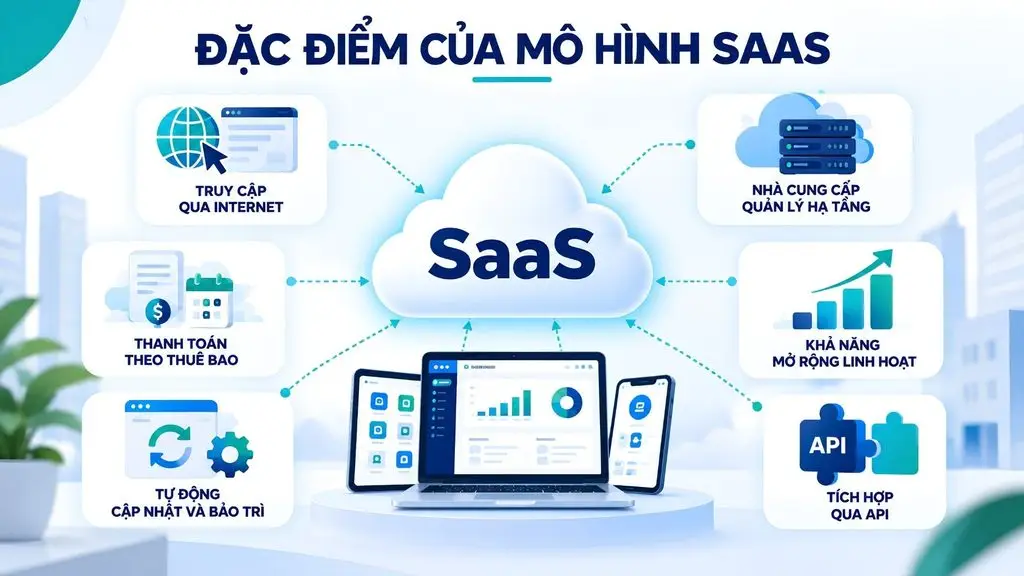
- Characteristics of SaaS: Access over the Internet, subscription-based billing, automatic updates, centralized infrastructure management, easy scalability, and support for API integration.
- Advantages of SaaS: Lower upfront investment, fast deployment, easy scaling, support for multi-location work, and reduced IT operations burden.
- Disadvantages of SaaS: Dependence on the Internet and the provider, security and privacy risks, potentially limited customization, and long-term subscription costs.
- Common types of SaaS: These include business management SaaS, Marketing & Sales, collaboration and productivity, and data storage and management.
- SaaS vs IaaS vs PaaS vs On-premise: SaaS provides complete software, PaaS provides a development environment, IaaS provides cloud infrastructure, and On-premise lets the business deploy and control the system itself.
- When should you use SaaS? It is a good fit when a business needs fast deployment, flexible scaling, has a limited IT team, or does not want to manage infrastructure itself.
- Building SaaS: A business needs to define the problem, build an MVP, design a Cloud & Multi-tenant architecture, integrate APIs, ensure security, and design a pricing & subscription model.
- The trend of SaaS combined with AI: AI, AI Agents, and Automation are helping SaaS shift from a supporting tool into a platform capable of analyzing, automating, and executing processes.
What is SaaS?
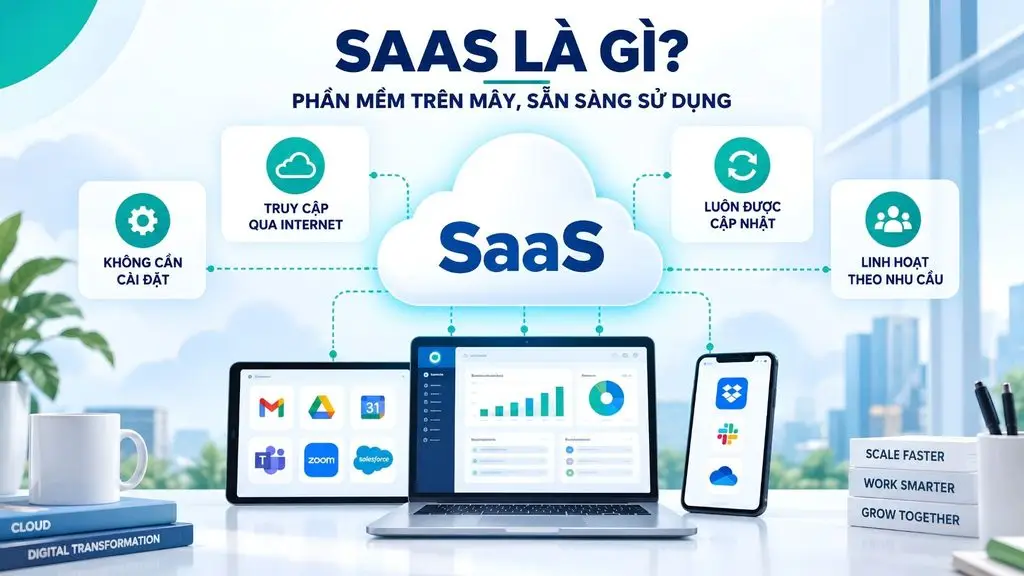
SaaS (Software as a Service) is a model for delivering software over the Internet, in which the provider hosts, runs, and maintains the application on cloud infrastructure, while users access the software without having to install it or manage the underlying infrastructure themselves. SaaS is understood as software delivered as a service. Instead of buying a license and installing the software on each computer or internal server, users simply sign up for an account, choose a service plan, and access the application through a web browser or app. The provider is responsible for running the servers, security, updates, maintenance, and all the infrastructure components needed for the software to run reliably.
SaaS differs from traditional software in how it is deployed and managed. With on-premise software, the business has to prepare its own infrastructure, handle installation, and perform maintenance. In contrast, SaaS is operated by the provider on the cloud; users only need an Internet-connected device to access it. SaaS is typically billed monthly or annually, allows flexible changes to the service plan, and supports a multi-tenant architecture in which each customer’s data is separated.
Within the Cloud Computing ecosystem, SaaS is the model that provides complete software for end users, alongside IaaS and PaaS. If IaaS provides infrastructure and PaaS provides a development environment, then SaaS requires customers to manage the least amount of infrastructure. Common examples include Google Workspace, Microsoft 365, Zoom, Salesforce, and Dropbox. According to IBM, businesses with more than 5,000 employees used an average of 131 SaaS applications in 2024; the global SaaS market reached about USD 399.1 billion in 2024 and is projected to grow to USD 819.23 billion by 2030.
>>> See also:
- What is Low Code? Characteristics & the future of software development
- What is a Framework? Applications and common types of Frameworks
How does SaaS work?
SaaS works by having the provider deploy the software centrally on the cloud and let many customers access it over the Internet under a subscription model. The entire process of development, hosting, updates, and maintenance is handled by the provider, while customers only interact with the user-facing interface.
How the SaaS model operates
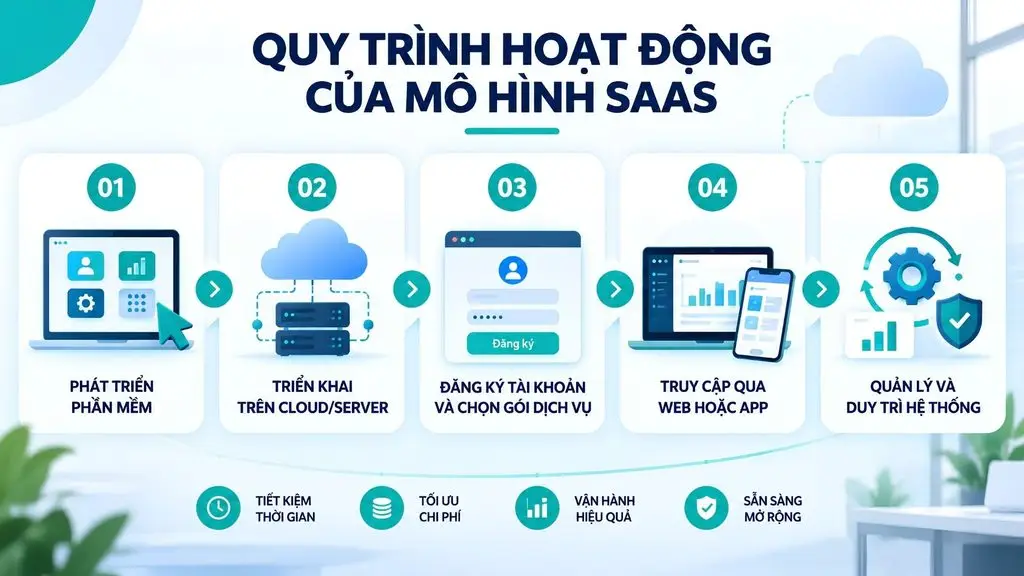
The operation of a SaaS service typically goes through five basic steps, from when the software is built to when users start using it and it is continuously maintained.
- Step 1: The provider develops the software
The development team builds the application based on the needs of the target customer group. The software can be designed for a specific business function such as CRM, accounting, or project management, or it can offer a wide range of features for the enterprise.
- Step 2: Deploy the software on the cloud/server
After development, the application is deployed on server or cloud infrastructure. The provider is responsible for configuring the system, the database, security, backup capabilities, and all the components needed for the service to run reliably.
- Step 3: Users register an account and a service plan
Customers create an account, choose a suitable plan, and pay according to the provider’s policy. Depending on the product, users may get a free trial or choose between several feature tiers.
- Step 4: Access the software via web or app
After signing up, users log in through a browser or an app on their device. Most of the data and processing takes place on the provider’s system rather than on the user’s personal computer.
- Step 5: The provider manages and maintains the system
The provider continues to be responsible for updating features, fixing bugs, performing maintenance, monitoring performance, and managing infrastructure. As a result, users do not have to install each new version themselves or maintain their own servers.
>>> Learn more:
- What is Flutter? Should you use Flutter for app development?
- What is vibe coding? A new programming trend in Vietnam
What is the Multi-tenant model in SaaS?
Multi-tenant is an architecture that allows a single SaaS system to serve many customers at once, where each customer is called a tenant. Instead of setting up a separate copy of the software for each customer, the provider runs one shared system while keeping each tenant’s data and configuration separated.
In this architecture, data between tenants is isolated through partitioning and access control, ensuring that one customer cannot access another customer’s data even though they share the same infrastructure. Because everyone uses the same platform, the provider can manage, update, and optimize costs in a centralized way. This is exactly what enables SaaS to reach large scale with reasonable operating costs, while also allowing new features to be rolled out to all customers at once in a single update.
How does SaaS charge fees?
SaaS is usually billed on a subscription or usage-based model rather than selling a one-time perpetual license. Below are the common pricing methods that SaaS providers use.
- Subscription: Users pay a fixed monthly or annual fee to keep access to the software. This is the most common model and makes costs predictable for both sides.
- Pay-as-you-go: The cost is calculated based on the actual resources or features the customer consumes, which suits fluctuating needs and helps avoid paying for what you do not use.
- Freemium: The provider offers a free version with basic features to attract users, then charges for advanced plans with more features and higher limits.
- Tiered pricing: The product is divided into several plans by feature level and scale, such as a basic plan, a business plan, and a premium plan, to suit each customer group.
- Per-user: The cost depends on the number of accounts or staff using the software, commonly seen in collaboration and business management tools.
- Add-ons and extra features: In addition to the main plan, customers can pay extra for modules, storage capacity, or additional integrations as new needs arise.
Characteristics of the SaaS model
The SaaS model has distinctive characteristics compared with traditional software, mainly in how users access it, how they pay, and how the provider operates the system. These characteristics make SaaS a suitable choice for businesses that need to deploy software quickly, flexibly, and with easy scalability.
Access the software over the Internet
Users can access SaaS over the Internet through a web browser or an app on their computer or phone. The software and data run on the provider’s system, so users do not need to install the entire application on their device. With just an account and an Internet connection, employees can use the software from many different locations and devices.
Subscription-based billing
SaaS typically uses a recurring subscription, in which the customer pays monthly or annually to keep using the service. Some platforms may combine several pricing methods, such as by number of users, by feature, or by usage. This model helps businesses reduce upfront investment and easily adjust costs as their needs change.
The provider manages the infrastructure
With SaaS, the provider is responsible for most of the work related to infrastructure and operations, such as servers, operating systems, databases, security, and system performance. The business does not have to invest in or maintain its own servers for the application. As a result, the IT team can spend less time on infrastructure administration and focus on higher-value technology work.
Automatic updates and maintenance
Updates, bug fixes, and feature upgrades are usually performed centrally by the provider on the SaaS platform. Users do not need to download and install each new version themselves. This way of operating keeps the software on a relatively consistent version across customers, while also allowing the provider to roll out security patches and system improvements faster.
Flexible scalability
SaaS allows businesses to easily adjust their usage scale as needed. When the number of employees grows, the business can add accounts or upgrade the service plan instead of re-deploying the entire system. Conversely, the business can also scale down when usage needs change. This is an important advantage of SaaS for fast-growing businesses.
Integration through APIs
Many SaaS products provide APIs to connect with other software and systems such as CRM, ERP, accounting, payments, or data platforms. APIs help businesses automatically exchange data between applications, reduce manual data entry, and build connected workflows. This integration capability also makes it easy for SaaS to become a component within a business’s existing technology ecosystem.
>>> See also:
- Top 15 free, effective production warehouse management software
- 15+ free, easy-to-use Android app design software
Pros and cons of SaaS
SaaS offers many advantages in cost, deployment speed, and scalability, especially for businesses that do not want to manage their entire software infrastructure. However, this model also comes with a number of limitations related to Internet connectivity, security, control, and long-term usage costs.
Advantages of SaaS
The biggest advantage of SaaS lies in its ability to put software into use quickly, with low upfront costs and little technical burden.
- Lower upfront investment
SaaS lets businesses skip most of the upfront investment in servers, licenses, and deployment. Instead of spending a large sum at the outset, the business pays a subscription fee based on its needs, which makes cash flow more flexible and lowers the barrier to getting started with the software.
- Fast deployment
SaaS can be put into use in a short time because the software is already ready on the cloud. The business does not have to set up servers or configure complex infrastructure; it only needs to create an account and do some basic setup before the team can start working, which significantly shortens the time from decision to operation.
- Easy to scale
SaaS allows usage to scale almost instantly with the pace of the business’s growth. Adding users or upgrading the service plan is done flexibly and does not require purchasing additional hardware, so the software always keeps up with real needs.
- Access anytime, anywhere
Because it runs on the cloud, SaaS can be accessed from any device with an Internet connection. Staff can work at the office, at home, or on the go while still using the same system and data, which is a great fit for flexible work models and teams distributed across many locations.
- Automatic updates and maintenance
With SaaS, updates and maintenance are performed centrally by the provider. The business always uses the latest version with up-to-date features and security patches, without having to assign staff to routine maintenance or worry about the software becoming outdated.
- Easy to integrate with other systems
Thanks to APIs and ready-made connectors, SaaS integrates easily with the software the business is already using. Data is synchronized between systems, processes are automated, and the business can build a seamless workflow instead of switching manually between many disconnected tools.
Disadvantages of SaaS
Alongside its benefits, SaaS also has limitations related to dependence on the provider, network connectivity, and control. The notable disadvantages are presented below.
- Dependence on the Internet
SaaS depends directly on an Internet connection to work. When the connection fails or the network speed is unstable, access and the user experience are affected. For operations that require continuous uptime, the business should prepare a backup plan for connectivity to reduce the risk of disruption.
- Security and privacy risks
Because data is stored on the provider’s infrastructure, the business must trust the security capabilities of a third party. Issues such as data leaks, access control, and compliance with data protection regulations need to be carefully evaluated. The business should review the provider’s security policy, encryption, and commitments before storing important data.
- Dependence on the provider
Using SaaS means depending on the stability and development direction of the provider. If the service is disrupted, changes its pricing policy, or shuts down, the business can be affected. The difficulty of switching providers, also known as vendor lock-in, is another risk to factor in from the start.
- Customization may be limited
SaaS is designed to serve the majority, so deep customization is often limited. A business with specific requirements for its processes or unique features may not be fully served within the framework of a shared product. This is why some organizations consider custom-built software solutions instead of relying entirely on SaaS.
- Long-term subscription costs
Although the upfront cost is low, the total accumulated subscription cost over time can become significant. As the number of users and services grows, the recurring fees added up over many years can sometimes exceed the cost of an owned solution. Businesses should calculate long-term costs to make a fair comparison between the options.
>>> Further reading:
- What is application software? Common types of application software
- Top 10 best free, high-quality home design apps
Common types of SaaS today
SaaS is present in almost every business function, from enterprise management to marketing, collaboration, and data storage. Below are the common groups of SaaS along with illustrative examples.
Common types of SaaS today
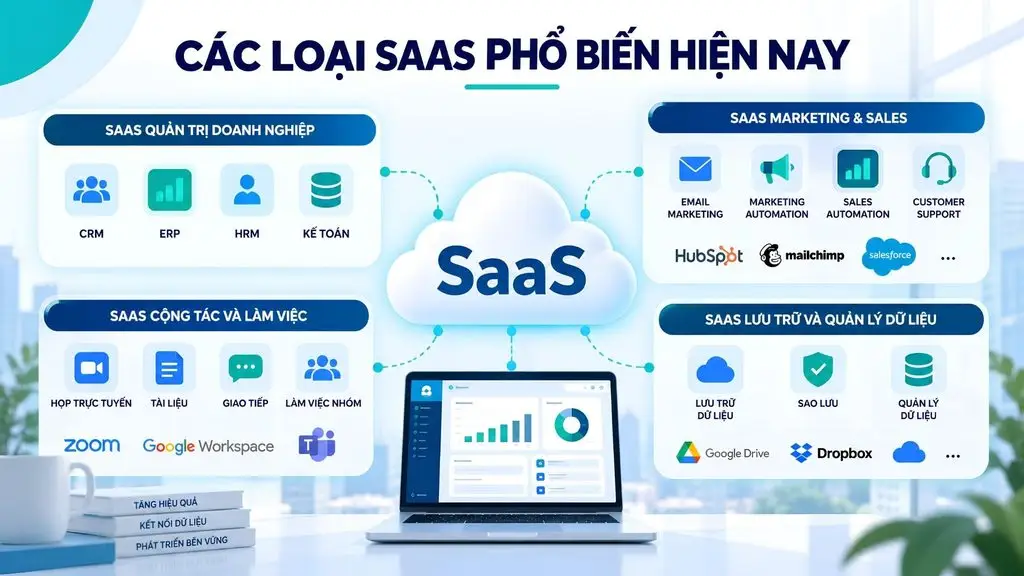
SaaS is used across many different business functions, from enterprise management, marketing, and sales to collaboration and data management. Based on their purpose, common types of SaaS can be divided into 4 main groups.
Business management SaaS
This group of SaaS helps businesses manage their core operations and business functions. CRM helps manage customer information and track sales opportunities. ERP connects important processes such as finance, inventory management, and operations. HRM supports personnel management, time tracking, and recruitment. Meanwhile, Accounting software handles accounting tasks, invoicing, and financial reporting.
For example, Salesforce is a popular CRM SaaS that helps businesses manage customer data and sales processes on a cloud platform. ERP, HRM, and accounting SaaS platforms also allow businesses to deploy quickly without having to build their own software infrastructure.
Marketing & Sales SaaS
SaaS in Marketing & Sales focuses on attracting customers, automating marketing activities, and supporting the sales team. Common products include Email Marketing, Marketing Automation, Sales Automation, and Customer Support. They can help send scripted email sequences, nurture leads, manage the pipeline, and handle support requests.
For example, HubSpot provides many SaaS tools for marketing, sales, and customer service on a single platform. Using these tools helps businesses automate repetitive tasks and track the customer journey in a more centralized way.
Collaboration and productivity SaaS
This is the group of SaaS that serves teamwork and communication within a business. The products can include project management software, video conferencing, communication, and document collaboration. Users can track work, hold meetings, communicate internally, and co-edit documents online.
For example, Zoom supports online meetings and communication, while Google Workspace provides tools such as Docs, Sheets, and Drive for collaborating on documents. These solutions are especially useful for businesses with remote teams or teams distributed across many locations.
Data storage and management SaaS
This group focuses on Cloud Storage, Backup, and Data Management, helping businesses store, synchronize, back up, and manage data on the cloud. Users can access data from many devices without having to maintain their own physical storage system.
Dropbox is a familiar example of file storage and synchronization SaaS. For businesses with large data needs, SaaS solutions specialized in backup and data management also support automatic backups, access control, and maintaining data recoverability when incidents occur.
>>> Further reading:
- Top 15 popular car garage management software
- Top 10 car showroom management software for businesses
How is SaaS different from IaaS, PaaS, and On-premise software?
The core difference between SaaS, IaaS, PaaS, and on-premise software lies in how much the provider manages and how much the business handles itself. SaaS hands almost all operational responsibility to the provider, while on-premise puts almost everything in the hands of the business.
SaaS vs IaaS
SaaS targets end users, providing a complete application ready to use immediately without having to manage servers or operating systems. In contrast, IaaS (Infrastructure as a Service) provides resources such as virtual servers, storage, and networking so that a business or IT team can build and run applications themselves. As a result, IaaS offers greater control over the infrastructure but also requires more technical administration capability. Put simply: SaaS is about using software, while IaaS is about renting infrastructure to build and run software.
SaaS vs PaaS
SaaS is for end users, while PaaS is for developers building applications. PaaS (Platform as a Service) provides a platform including a development environment, tools, and services for the technical team to write, test, and deploy software without managing the underlying infrastructure. Meanwhile, SaaS is the final product that users simply use. You can think of PaaS as the toolkit for creating software, while SaaS is the finished software delivered as a service.
SaaS vs On-premise
SaaS and on-premise differ most clearly in deployment, control, cost, and maintenance. On-premise software is installed and operated on the business’s own infrastructure, offering maximum control but requiring a large upfront investment and an in-house team for maintenance. SaaS, on the other hand, is deployed on the provider’s cloud, is paid for by subscription, and has all maintenance handled by the provider. Businesses that need absolute control and deep customization tend to lean toward on-premise, while businesses that prioritize speed and flexibility usually choose SaaS.
The table below summarizes the differences between the 4 models across key criteria.
| Criteria | SaaS | PaaS | IaaS | On-premise |
|---|---|---|---|---|
| Deployment method | Application ready on the cloud, used over the Internet | Development platform on the cloud | Virtualized infrastructure on the cloud | Installed and operated on-site |
| Level of management by the business | Lowest, only manages users and data | Manages the application and data | Manages the operating system, software, and data | Manages everything from infrastructure to application |
| Cost | Recurring subscription, low upfront investment | Pay based on platform resources and services | Pay based on infrastructure resources used | Large upfront investment, internal maintenance costs |
| Customization | Limited to the product’s framework | High at the application layer | Very high at the system layer | Maximum, customized to specific needs |
| Best suited for | End users and businesses that need to start using it right away | Developers building applications | Technical teams that need infrastructure control | Organizations with specific control and security requirements |
Overall, SaaS is a good fit when a business wants fast deployment and less operational burden. PaaS suits development teams that need to build applications, while IaaS is a good fit when more control over cloud infrastructure is needed. On-premise is worth considering when the business has specific requirements for security, control, or system customization.
>>> See also:
- Top 35 best, most effective time management apps
- TOP 8 effective location-based warehouse management software
Examples of popular SaaS software
Many widely used software products today are classic examples of the SaaS model. Each of the products below serves a different set of needs, but they all share the trait of running on the cloud and being delivered as a service.
Google Workspace
Google Workspace is a suite of productivity and collaboration tools including Gmail, Google Drive, Docs, Sheets, Slides, Meet, and many other apps. The platform suits individuals, businesses, schools, and teams that need to work online. Google Workspace is considered SaaS because users sign up for an account to use the apps over the Internet, while Google is responsible for running the platform, updating it, and managing the infrastructure behind the scenes.
Microsoft 365
Microsoft 365 provides productivity apps such as Word, Excel, PowerPoint, Outlook, Teams, and OneDrive, serving both individuals and businesses. Users can create documents, collaborate, store data, and work across many devices. Microsoft 365 is a SaaS model because it is offered as a subscription package that combines applications, cloud services, and continuous updates, instead of requiring the business to deploy the entire system itself.
Zoom
Zoom is a platform that supports video conferencing, online meetings, chat, and many other forms of collaboration. The software is widely used by businesses, schools, organizations, and remote teams to communicate and hold meetings. Zoom is considered SaaS because its features are delivered through an online platform, and users only need to sign up and access the service without having to build or operate the conferencing system behind the scenes.
Salesforce
Salesforce is a customer relationship management platform that helps businesses track leads, manage sales, and take care of customers. Its main users are sales, marketing, and customer service teams. Salesforce is one of the classic SaaS examples because the entire system runs on the cloud, serves many customers under a multi-tenant architecture, and is delivered on a subscription model with multiple feature plans.
Dropbox
Dropbox is a cloud file storage and synchronization service that lets users save, share, and access documents from many devices. Its users include individuals, teams, and businesses that need to store and collaborate on documents. Dropbox is SaaS because data is stored on the provider’s infrastructure, users access it through the web or an app, and they pay based on the storage and features of each plan.
Should your business use SaaS?
A business should use SaaS when it prioritizes deployment speed, flexible costs, and does not want to operate its own infrastructure, but it should think carefully for systems with specific security or customization requirements. The right decision depends on the specific context of each organization.
When should a business use SaaS?
A business should use SaaS in cases where it needs to put software into operation quickly and with minimal overhead. Typical situations include:
- Wanting to deploy quickly without spending a lot of time setting up infrastructure.
- Not wanting to manage servers and the technical systems behind the scenes.
- Needing to scale quickly with the pace of growth.
- Having a limited IT team and wanting to reduce the operational burden.
- Needing to work across multiple locations and support distributed teams.
When should a business consider other solutions?
A business should consider an alternative to SaaS when it has control and customization requirements that go beyond the framework of a shared product. Situations that call for caution include:
- Having specific security requirements or legal constraints on where data is stored.
- Needing absolute control over the infrastructure.
- Having very deep customization needs for processes and features.
- Operating complex legacy systems that are hard to integrate.
What should a business evaluate before choosing SaaS?
Before choosing a SaaS platform, a business needs to carefully evaluate many criteria to avoid risks later on. The important factors to consider include:
- Security: Check encryption, access control, authentication, security certifications, and incident handling processes.
- SLA: Review commitments on uptime, performance, response time, and responsibility when the service is disrupted.
- Data ownership: Determine the rights to own, store, export, and delete data when the contract ends.
- Integration/API: Check the API, connectors, and the ability to integrate with CRM, ERP, or internal systems.
- Scalability: Assess the ability to keep up as the number of users and volume of data grow.
- Vendor lock-in: Consider the degree of dependence on the provider and the ability to switch to another platform.
- Pricing: Do not just compare subscription fees; also calculate the total cost of usage over time.
- Support: Check the support channels, response time, scope of support, and incident handling policy.
What does a business need to prepare to build SaaS?
A business that wants to build a SaaS product needs to prepare everything from the business problem and technical architecture to the pricing model, rather than only thinking about programming an ordinary piece of software. Unlike using an existing SaaS, building SaaS requires product thinking and a well-structured development process. Below are 6 foundational steps along with the technical points to keep in mind.
- Step 1: Define the problem and the target customer
Before writing code, the business needs to clearly define what problem the SaaS solves, who it is for, and what value makes customers willing to pay. It should identify the target customer group, their current processes, pain points, usage needs, and the success criteria for the product.
At this stage, the business also needs to define the scope of the MVP and the features that are truly necessary for the first version. Prioritizing the right problem helps reduce development costs and creates a basis for validating product-market fit before making a large investment.
- Step 2: Build the SaaS MVP
The MVP is the first version containing the core functions needed to bring the product to real users and gather feedback. Instead of building the entire system from the start, the business should focus on the group of features that directly create value.
A SaaS MVP can include registration and login, account management, a dashboard, the main business function, basic access control, payments, and tenant administration. Once there is real usage data, the business can continue to improve the UX, add features, and optimize performance.
- Step 3: Design the Cloud and Multi-tenant architecture
This is one of the most important parts of building SaaS. The architecture needs to be designed so that a single platform can serve many customers while still ensuring that each tenant’s data and access are separated.
The business needs to choose a suitable multi-tenant model, such as a shared database, a separate schema, or a dedicated database for each tenant, depending on the requirements for security, performance, and cost. At the same time, the cloud architecture needs to account for autoscaling, load balancing, backup, monitoring, disaster recovery, and the ability to scale as the number of tenants grows.
- Step 4: Integrate APIs and enterprise systems
A SaaS product usually does not operate in isolation but needs to connect with the business’s existing systems and third-party services. Therefore, the API architecture needs to be planned right from the design stage rather than added after the product is finished.
Common integrations can include CRM, ERP, accounting systems, payment gateways, email, cloud storage, identity providers, or data analytics platforms. The business also needs to define mechanisms for authentication, rate limiting, webhooks, API versioning, and logging to ensure stable integration as the system grows.
- Step 5: Security, access control, and data management
With SaaS, a single access control error can affect the data of many customers. Therefore, security needs to be designed into the architecture from the start, rather than only being checked before deployment.
The system needs clear authentication and authorization mechanisms, encryption of data in transit and at rest, secret management, audit logs, backups, and monitoring for abnormal activity. For multi-tenant, it is especially important to control tenant isolation to ensure that users can only access data within the scope they are authorized for.
The business should also build policies for data ownership, storage, backup, recovery, and data deletion when a customer stops using the service.
- Step 6: Design the pricing and subscription model
Pricing should not be treated as something to work on after the product is finished. The revenue model needs to be designed alongside the product so that the system architecture can support the billing method from the start.
The business can choose monthly/annual subscription, per-user pricing, tiered pricing, usage-based pricing, or freemium depending on the product’s characteristics. The subscription system should be able to manage plans, trials, upgrades, downgrades, renewals, payments, invoices, and account status.
For businesses that want to bring a SaaS idea to life but do not yet have a dedicated team, partnering with a provider of custom software development services can shorten the path from idea to product, while ensuring the architecture and security are designed correctly from the start. TOT works alongside businesses to analyze requirements, build the MVP, and develop AI-integrated SaaS platforms at many scales.
The trend of SaaS combined with AI
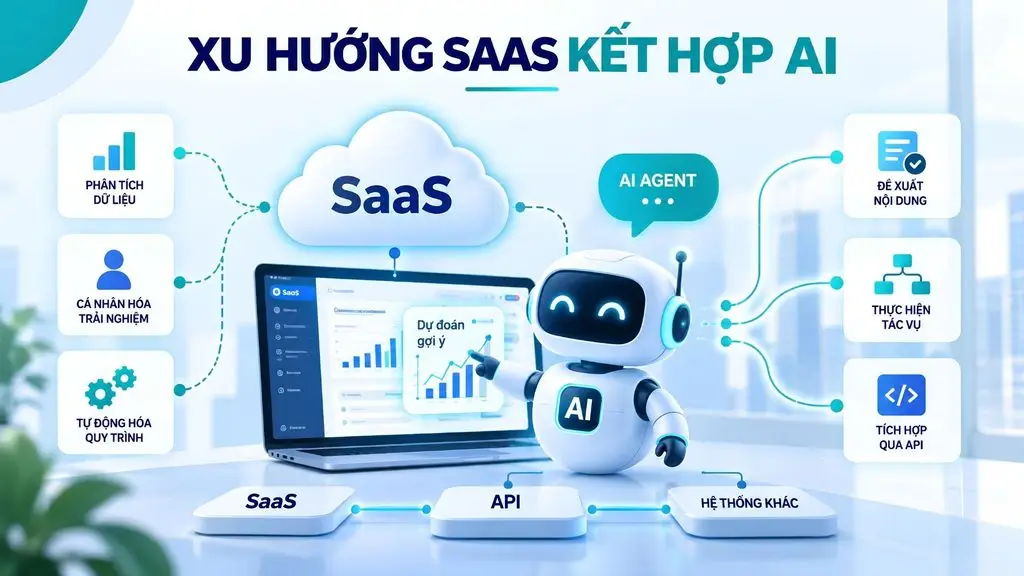
A prominent trend in SaaS today is integrating artificial intelligence inside the product, turning software from a tool for manual operations into a platform capable of suggesting, predicting, and automating. AI is gradually becoming a default layer of capability in many SaaS platforms rather than a secondary feature.
How is AI changing SaaS?
AI is changing SaaS by adding the ability to analyze data, personalize the experience, and suggest actions right within the software. Instead of only storing and processing data according to user actions, AI-integrated SaaS platforms can detect trends, recommend relevant content, and support decision-making. As a result, the same SaaS product can deliver higher value without users having to change their familiar way of working.
AI SaaS and AI Agents
A notable direction of development is combining SaaS with AI Agents capable of carrying out chains of tasks on behalf of users. In this model, the software not only responds to actions but can also proactively handle repetitive tasks, aggregate information, and coordinate across multiple systems. The combination of SaaS platforms and AI Agents opens up deeper automation, helping businesses reduce manual work and speed up operations.
SaaS and Automation
SaaS combined with automation allows businesses to set up workflows that run automatically across many applications. When integrated through APIs and enhanced with AI, SaaS platforms can automatically trigger actions based on data and events, such as creating tasks, sending notifications, or updating information between systems. This trend helps businesses build seamless operational processes, reduce manual errors, and optimize productivity at large scale.
>>> Further reading:
- TOP 15 best AI code-writing tools
- How to build an app with AI for free, in detail and simply
- How does AI-assisted programming affect coding skills?
Conclusion
Through this article, it is clear that what SaaS is is no longer an unfamiliar concept but has become the way most businesses access software today. SaaS offers advantages in deployment speed, low upfront costs, flexible scalability, and access anytime, anywhere, while freeing businesses from the burden of operating infrastructure. At the same time, this model also requires careful consideration of security, dependence on the provider, and long-term subscription costs. Clearly understanding the characteristics, pros and cons, as well as the differences between SaaS, IaaS, PaaS, and on-premise will help businesses choose the right solution for each need. For organizations that not only want to use SaaS but also want to build their own SaaS product, thorough preparation of the problem, architecture, security, and pricing model is the decisive factor for long-term success.
If your business has an idea for developing its own SaaS product, TOT can accompany you from consulting and building the MVP to developing a SaaS platform integrated with AI and enterprise systems.
Frequently asked questions
What does SaaS stand for?
SaaS stands for Software as a Service, meaning software delivered as a service. It is a software distribution model in which the provider hosts and runs the application on cloud infrastructure and lets users access it over the Internet on a subscription basis. Users do not need to install or manage infrastructure; they only pay to use the software. SaaS is one of the three common cloud service models, alongside IaaS and PaaS.
What are IaaS, PaaS, and SaaS?
IaaS, PaaS, and SaaS are three cloud computing service models, distinguished by how much the provider manages. IaaS (Infrastructure as a Service) provides infrastructure such as servers and storage so the business can deploy its own system. PaaS (Platform as a Service) provides a platform for developers to build applications. SaaS (Software as a Service) provides complete software for end users. Going from IaaS to SaaS, the amount of work the business has to manage itself gradually decreases.
Can you give examples of SaaS?
Some familiar SaaS examples include Google Workspace for email and documents, Microsoft 365 for office tools, Zoom for online meetings, Salesforce for customer relationship management, and Dropbox for cloud file storage. What these services have in common is that the software runs on the provider’s infrastructure, users access it through a browser or app, and they pay on a subscription model without having to install or manage their own servers.
Is SaaS the same as Cloud Computing?
SaaS is a part of cloud computing but is not synonymous with the entire concept. Cloud computing is a broad concept that includes many service models such as IaaS, PaaS, and SaaS. SaaS is the top layer, providing complete software as a service for end users. In other words, every SaaS is based on the cloud, but cloud computing also encompasses infrastructure and platform services beyond software.
How are SaaS and PaaS different?
SaaS and PaaS differ in their users and purpose. SaaS provides finished software for end users, who simply log in and use it for their work. PaaS provides a platform including a development environment and tools for developers to build, test, and deploy their own applications. You can think of PaaS as the toolkit for creating software, while SaaS is the finished software delivered as a ready-to-use service.