What is Vibe Coding? Vibe Coding is a style of programming with AI in which the user describes an idea in natural language and an AI model generates the source code to build software. Instead of typing out every line of code, the developer focuses on the goal, describes the requirements and continuously refines the result together with the AI in a loop. The term was coined by Andrej Karpathy in February 2025 and quickly became a notable trend in the software industry. In the article below, TOT explains what vibe coding really is, how it works, the tools involved, and its benefits as well as its risks, so that businesses get a complete picture.
>>>> See more articles:
- How to build an app with AI for free: a simple, detailed guide
- TOP 20+ leading AI design tools for designers today
- TOP 15+ AI app builder tools that are effective and super easy to use
Quick summary
- What is Vibe Coding? It is a software development approach in which the user describes ideas and requirements in natural language, and the AI then generates and refines source code based on those requirements.
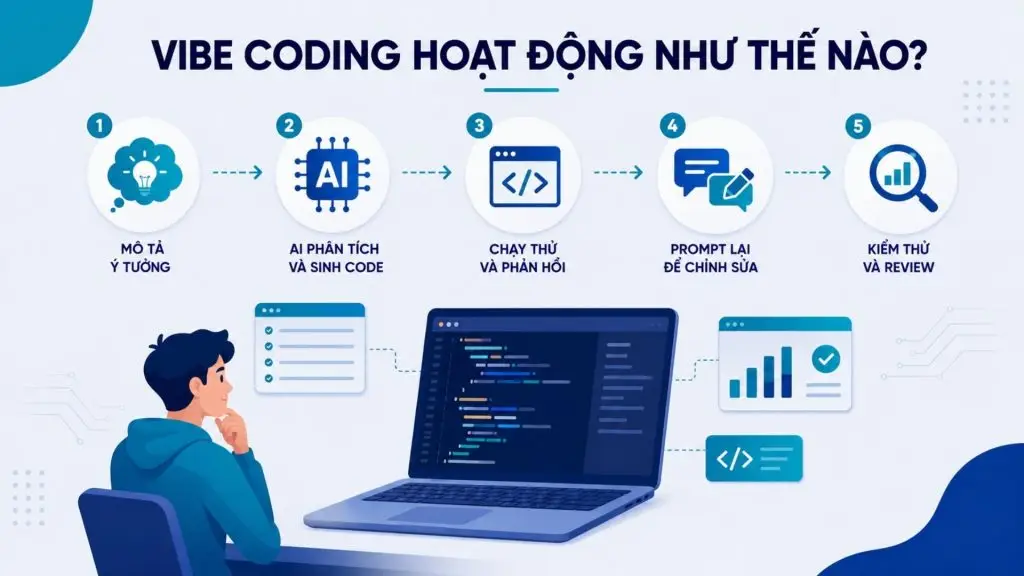
- How does Vibe Coding work? The process typically goes: describe the idea → AI generates source code → run a test → give feedback → ask the AI to make changes → test and review the source code.
- How is Vibe Coding different from traditional programming? Vibe Coding shifts the focus from writing code line by line to describing intent, orchestrating the AI and evaluating the output.
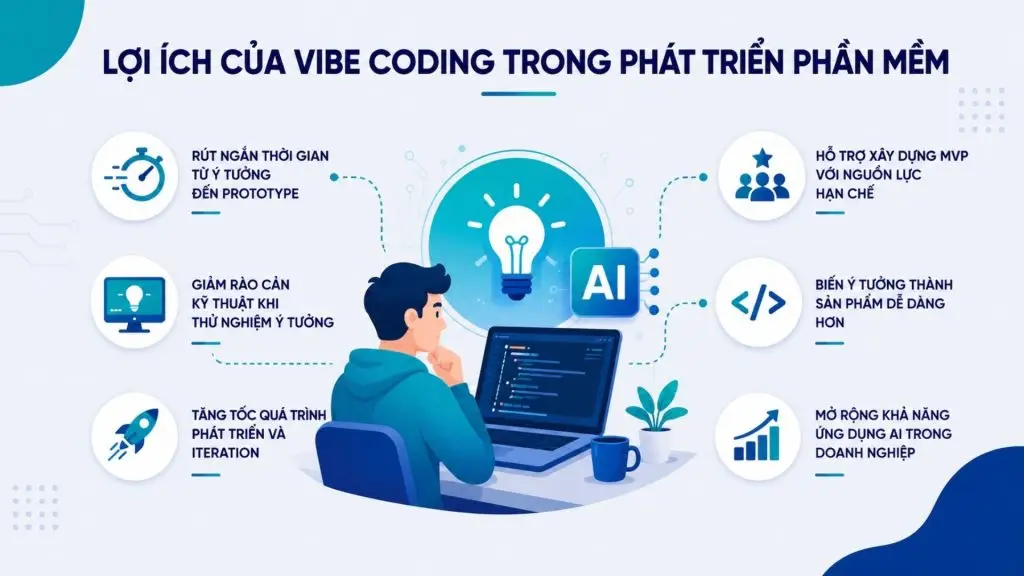
- Main benefits: It shortens the time from idea to prototype, lowers technical barriers, speeds up improvement cycles and supports building an MVP with limited resources.
- Risks to watch: AI-generated source code may contain bugs, security vulnerabilities, technical debt, logic errors or inaccurate information; relying too heavily on AI can also erode technical skills.
- When should you use it? It suits prototypes, MVPs, PoCs, internal tools, automation, landing pages, simple dashboards, R&D, hackathons and personal tools.
- Will Vibe Coding replace developers? No. The developer’s role is gradually shifting from writing source code to problem solving, architecture design, AI orchestration, code review, testing, security and optimization.
What is Vibe Coding?
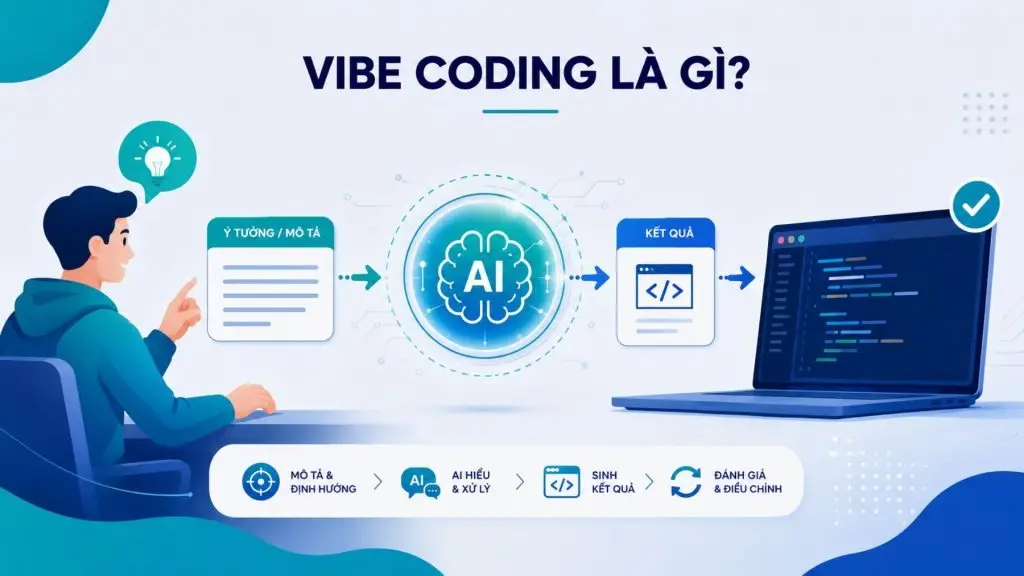
Vibe Coding (programming by inspiration) is a style of software development in which a person describes what they want in natural language, while a large language model (LLM) handles generating the corresponding source code. The person doesn’t write each statement directly but focuses on the intent and the output, then evaluates the result and gives feedback so the AI can keep adjusting. This approach places the human role at the “describe and direct” layer, while most of the syntax-writing work is handed over to the AI.
In Vietnamese, vibe coding can be rendered as “programming by inspiration” or “programming by description,” emphasizing that the user pursues the idea and the product experience rather than worrying about every technical detail. The term was introduced by Andrej Karpathy, an influential AI researcher, in February 2025. The core idea he described is to let the AI lead the coding process, while the user mainly converses with it, observes the results and keeps requesting changes. Technology organizations such as IBM and Google Cloud later offered similar definitions when discussing the concept.
It’s worth clarifying that Vibe Coding is not the same as AI helping to write a few isolated snippets of code. Here, the AI handles most of the process of building functionality from a description, while the human orchestrates through prompts and evaluates the overall result. It is precisely this shift that makes vibe coding a distinct way of working compared with conventional programming, rather than just an autocomplete feature. To understand that boundary more clearly, the next section describes how vibe coding works in practice.
>>> See more:
- How to build AI apps with vibe coding on Google AI Studio the simple way
- Vibe design with Stitch: Designing UI with Google’s AI
How does Vibe Coding work?
Vibe Coding works as a loop: a person describes the requirement, the AI generates code, the product is test-run, the person gives feedback and the AI keeps adjusting until the desired result is reached. That is why how to use Vibe Coding is not just a matter of writing a single prompt to generate code; it is a continuous process of defining the goal → generating code → running a test → giving feedback → refining → reviewing.
Step 1 – Describe the idea in natural language
The process begins when the user describes the application or feature they want to build in natural language instead of writing programming syntax directly. The clearer the prompt is about the goal, the users, the functionality, the interface and the technical constraints, the easier it is to keep what the AI produces under control.
For example, instead of writing every component of a dashboard by hand, the user can ask: “Create a revenue management dashboard for a store, with a monthly revenue chart, a date range filter and a table listing orders.” From this request, the AI can propose an application structure and start generating code.
Step 2 – The AI analyzes and generates code
At this step, the AI model analyzes the prompt, infers a suitable structure and generates the corresponding source code. Depending on the scope of the request, the AI can create various components of an application:
- Frontend: the user interface, layout and display components.
- Backend: the server-side processing logic.
- Database schema: the table structure and data relationships.
- API: the communication points between client and server.
- Components: reusable functional blocks.
- Configuration: config files, environment variables and project run settings.
This breadth of code generation is what sets vibe coding apart from merely suggesting a single line of code. Developers still need to define or control key decisions such as the architecture, the framework, authentication and how the system handles data.
Step 3 – Run a test and give feedback
Once the code is ready, the user runs it to see how the product behaves in practice. The observation focuses on a few aspects: whether the user interface (UI) displays correctly, whether each function works as expected, whether the processing logic makes sense, whether any errors occur and whether performance is acceptable. The test-run results become the input for the user’s next round of feedback, rather than reading every line of code closely on the first pass.
Step 4 – Prompt again to make changes
Based on the test-run results, the user keeps giving the AI feedback, such as: “The date filter doesn’t update the chart yet; fix the logic and keep the current interface as it is.” The AI analyzes the new context and produces the next version of the code.
This process forms an iterative feedback loop – a cycle of continuous feedback. It is a defining characteristic of Vibe Coding: instead of expecting a single prompt to produce a finished product from the start, the user continuously refines the output by interacting with the AI.
Step 5 – Test and review
The final step is rigorous testing and review. This is the stage that lifts vibe coding from a “quick experiment” to a “usable product.” People need to reread the AI-generated code, check the business logic, review security, assess maintainability and run the necessary tests. For experimental products or personal tools, the review can be lighter, but for software going into production, this step is mandatory to control quality and risk. It is the review stage that ties vibe coding to engineering discipline rather than simply chasing speed.
>>> Read more:
- AI image recognition: What it is, algorithms & applications
- AI-assisted programming: how does it affect coding skills?
How is Vibe Coding different from traditional programming and AI-assisted coding?
Vibe Coding shares a common aim with traditional programming and AI-assisted coding, namely building software, but they differ in the human role, the degree of AI involvement and the way code is produced. Clearly distinguishing these models helps businesses choose the right approach instead of treating every instance of “using AI to write code” as Vibe Coding.
Vibe Coding vs traditional programming
The biggest difference lies in who writes the code and how much detail people control. In traditional programming, developers directly translate requirements into architecture, logic and source code. With Vibe Coding, developers mainly describe the intent and the desired outcome, and the AI then takes on most of the work of generating and editing code.
| Criteria | Traditional programming | Vibe Coding |
|---|---|---|
| How code is created | Developers write each line directly | The user describes the idea, the AI generates the code |
| Skills required | Proficiency in programming languages and frameworks | Knowing how to describe requirements and evaluate results |
| Prototyping speed | Slower, depends on coding productivity | Fast, with continuous iteration on ideas |
| Level of detailed control | High, with a firm grasp of every part | Depends on prompt quality and the review stage |
| Role of developers | Analysis, design, implementation and testing | Direction, verification, review and refinement |
| Risks | Human error and resource constraints | Hallucination, logic errors, security, technical debt |
>>> See more:
- TOP 20 AI tools for online sales: the best free options
- A guide to implementing AI in mobile apps, made simple
Vibe Coding vs AI-assisted coding
Vibe Coding is often seen as a form of software development with deep AI involvement, but not all AI-assisted coding is Vibe Coding. The difference lies in how deeply the AI takes part in the development process: AI-assisted coding usually supports developers task by task, while Vibe Coding can let the AI take on a large part of the implementation based on intent.
| Criteria | AI-assisted coding | Vibe Coding |
|---|---|---|
| Human role | Actively writes code, with the AI suggesting and assisting | Describes intent, the AI generates most of the code |
| Level of code comprehension | Reads and controls each section | Prioritizes results, may not read every line closely at first |
| Role of the AI | Supports developers on individual tasks | Generates and edits most of the code on request |
| Best fit | Boosting developer productivity | Quickly building out ideas, prototypes, MVPs |
In other words, AI-assisted coding is the broader concept, while Vibe Coding emphasizes interaction based on natural language and intent. The line between the two models is not always clear-cut, especially as AI tools for coding increasingly build in agentic capabilities.
Vibe Coding vs No-code/Low-code
Vibe Coding and No-code/Low-code both help lower technical barriers, but they work in different ways. No-code/Low-code mainly relies on visual interfaces, components and predefined workflows; Vibe Coding uses AI to generate or edit source code based on requirements written in natural language.
| Criteria | No-code/Low-code | Vibe Coding |
|---|---|---|
| How you build | Drag-and-drop interface, configure prebuilt blocks | Describe in natural language, the AI generates code |
| Output | An application running inside the platform | Real source code that can be customized more deeply |
| Customization limits | Constrained by the platform’s features | More flexible but requires technical review |
| Coding requirements | Almost no need to touch code | Still requires understanding and controlling the code before it goes into production |
| Scalability | Depends on the platform | Depends on the architecture and code quality |
The summary table below places the four approaches side by side to show where vibe coding sits in the bigger picture.
| Criteria | Traditional programming | AI-assisted coding | Vibe Coding | No-code/Low-code |
|---|---|---|---|---|
| How the product is built | Code written by hand | Code written with AI assistance | Describe, the AI generates code | Drag-and-drop, configuration |
| Primary driver | Developers | Developers | The person describing the requirements | Business users |
| Coding skill required | High | Medium – high | Low – medium in the early stages | Low |
| Source code output | Yes, written by people | Yes, written and reviewed by people | Yes, generated by AI | Limited or hidden |
| Prototyping speed | Slower | Faster than traditional | Very fast | Fast |
| Quality control | Comprehensive, hands-on | Hands-on, section by section | Concentrated in the review stage | Limited by the platform |
| Main risks | Human error, time and cost | Errors from both AI and humans | AI hallucination, security, technical debt | Dependence on the vendor or platform |
| Best suited for | Complex, long-term systems | Professional development teams | Prototypes, MVPs, experiments | Simple business applications |
>>> Learn more:
- How to build an app with Low Code: the simplest, most effective guide
- TOP 15 low-code platforms: the best picks
- Low-Code vs No-Code: Key differences & real-world applications
Benefits of Vibe Coding in software development
The benefits of vibe coding go beyond being “fast and easy”; they show up for developers and businesses alike: shortening the time it takes to bring ideas to life, lowering technical barriers and broadening how AI can be applied. Below are the most notable benefits.
Shortening the time from idea to prototype
Vibe coding helps turn an idea into a working test version in significantly less time than writing code by hand. Instead of scaffolding the project and configuring the environment before writing any features, the user can describe the requirements and get back a prototype to interact with right away. This is very useful when you need to present an idea to your team or clients, or to check feasibility before committing major resources to the full development phase.
Lowering technical barriers when testing ideas
With vibe coding, people who have an idea but are not yet proficient in programming can still build a usable version to test. Barriers around syntax, configuration and tooling are largely handled by the AI, allowing product managers, business analysts and founders to focus on the problem they need to solve. As a result, the gap between “thinking it up” and “trying it out” narrows, encouraging more experiments for less spend.
Accelerating development and iteration
The describe – generate code – feedback loop allows for rapid repetition, so adjustments and improvements happen continuously. Each change can be tested almost instantly instead of waiting through multiple manual stages. For development teams, a high iteration speed means being able to respond quickly to user feedback and market conditions, while reducing the wait time between versions.
Supporting MVP development with limited resources
For startups or businesses with small technical teams, Vibe Coding can help create an MVP with limited resources. The AI can take on part of the implementation work for the frontend, backend, APIs or common components, allowing developers to focus on the parts that set the product apart.
A mini use case can be described as follows:
Idea → Prototype → User feedback → Adjustment → MVP
For example, a business wants to build an internal dashboard to track sales performance. Instead of investing right away in a complete system, the team can use Vibe Coding to create a prototype, let the sales team try it out, collect feedback on the dashboard and workflow, and then make adjustments before building the official MVP.
Expanding AI adoption in businesses
At the enterprise level, Vibe Coding can also become a capability within an AI-assisted software development strategy. Teams can apply AI not only to coding but also to prototyping, automation, internal tools and R&D.
In Vietnam, interest in Vibe Coding is also growing alongside the trend of using AI in software development. However, the lasting value lies not in replacing developers with AI but in combining AI code generation, developer expertise, testing and governance to strengthen product delivery capabilities.
>>> Read more:
- AI in UI/UX design: A tool or a rival for designers?
- A guide on how to use Google AI Studio quickly and effectively
- AI data labeling: Trends, tools and workflows
Risks and limitations of Vibe Coding
Alongside its benefits, vibe coding comes with many risks that need to be taken seriously, especially when a product moves beyond the experimental stage. The five limitations below are areas businesses need to control proactively.
AI-generated code can contain bugs
AI-generated code is not guaranteed to always be correct or to fully meet technical requirements. LLMs can produce code that works in some cases yet still contains edge-case bugs, unsuitable dependencies, incomplete input handling or insecure configurations. VnExpress cites experts who say that AI-generated code is not flawless and may contain logic errors, security vulnerabilities or insecure default settings.
For example, the AI might create a login API that works fine during a demo but lacks rate limiting or input validation. If developers only check that it “runs” without a thorough review, the flaw can go straight into production.
Security risks and data leaks
One of the most significant limitations of Vibe Coding concerns the security of data and source code. Developers may put API keys, customer information, system configurations or internal code into prompts without fully understanding the AI tool’s data storage and processing policies.
VnExpress reports concerns among Vietnamese businesses about the risk of data being collected or source code leaking outside the company. For example, if a team uses real data to ask the AI to debug a payment module, putting sensitive information into an AI environment that the business has not approved can create legal and security risks.
Technical debt and poor maintainability
Vibe Coding can optimize prototyping speed, but it easily creates technical debt if developers keep asking the AI to add features without a consistent architecture and coding standards. The code can quickly become complex, duplicated or reliant on temporary workarounds.
For example, an MVP built through a long chain of prompts may end up with numerous components handling the same logic in different ways. As the product scales, developers have to do significant refactoring to unify the architecture, dependencies and data flow. At that point, the time saved early on can turn into maintenance costs later.
AI hallucinations and logic errors
AI can produce information, APIs, libraries or implementations that don’t exist, yet present them in a very convincing way. In Vibe Coding, this risk deserves attention because users may focus on the output instead of checking every line of code.
For instance, AI might suggest a library that doesn’t exist or misuse an API while still producing code with a plausible structure. If developers lack the foundational knowledge to verify it, the error may only surface when the system runs into a real-world situation. VnExpress also warns that over-reliance on AI can leave developers struggling when a model “hallucinates” or returns incorrect results.
Over-reliance on AI
Vibe Coding can erode programming skills if developers gradually shift from understanding the problem and designing a solution to simply writing prompts and accepting the output. When that happens, their ability to read code, debug, design architecture and assess security may decline.
This risk is especially clear for people who are new to programming: they may be able to build an application quickly without understanding why the system works or how to deal with the errors AI introduces. That is why the right principle for businesses is that AI supports implementation, while humans own the thinking and the technical decisions. All important code should be reviewed and tested by developers before it is used in production.
>>> Learn more:
- How to create a Landing Page with AI that converts well, no code required
- The 10 best AI website design tools with a detailed comparison
- Standout GitHub repos: AI agents dominate every field
When should and shouldn’t you use Vibe Coding?
Vibe Coding works best when the goal is to validate an idea, build an experimental product or speed up tasks with a clearly defined scope. Conversely, systems with high requirements for security, compliance, stability or scalability should not rely entirely on AI-generated code. For businesses, a more effective approach is to define which layer of the software development process AI is allowed to take part in.
Cases where you should use it
Vibe coding delivers value when the goal is speed and experimentation, for products that don’t yet demand absolute reliability. Suitable situations include:
- Prototypes and proofs of concept to validate ideas.
- MVPs with limited resources.
- Internal tools and automation scripts.
- Landing pages or simple dashboards.
- R&D activities, hackathons and personal tools.
In these cases, the cost of mistakes is low and the speed benefits far outweigh the risks.
For example, a startup could use Vibe Coding to build a prototype of an expense management app, hand it to a group of users to try and gather feedback before investing in a production architecture. In this case, how quickly the team learns from the prototype matters more than optimizing the code from the start.
Cases where you shouldn’t rely on Vibe Coding alone
For critical, sensitive or legally regulated systems, you should not rely entirely on vibe coding. Contexts that call for caution include:
- Banking/FinTech and financial systems.
- Healthcare and medical data.
- Enterprise ERP and core business systems.
- Systems that hold sensitive or mission-critical data.
- Software that requires high scalability and strict compliance/security.
Here, vibe coding can be used during the experimental phase, but the final product must still go through a full engineering process.
A fitting model for businesses
In practice, businesses shouldn’t frame the issue simply as “Vibe Coding or no Vibe Coding”. The more important question is: “Which layer of the software development process should Vibe Coding sit in?”
A practical model can be implemented as the following chain:
AI → Prototype → Developer Review → Architecture → Security → QA → Production
In this model, AI is used heavily at the prototyping and experimentation stage, while developers are responsible for evaluating the code and turning the valuable parts into an implementation that meets production standards. Architecture, security and QA continue to act as control layers before the system is deployed.
This approach lets businesses harness the speed of Vibe Coding without sacrificing the core principles of software engineering. In other words, Vibe Coding should be seen as a complementary capability within the SDLC, not a process that replaces the entire SDLC.
>>> See more:
- TOP 18 largest software companies in Vietnam
- 9+ free, easy-to-use mobile app design tools
- 15+ free, easy-to-use Android app design software
How to apply Vibe Coding effectively in businesses
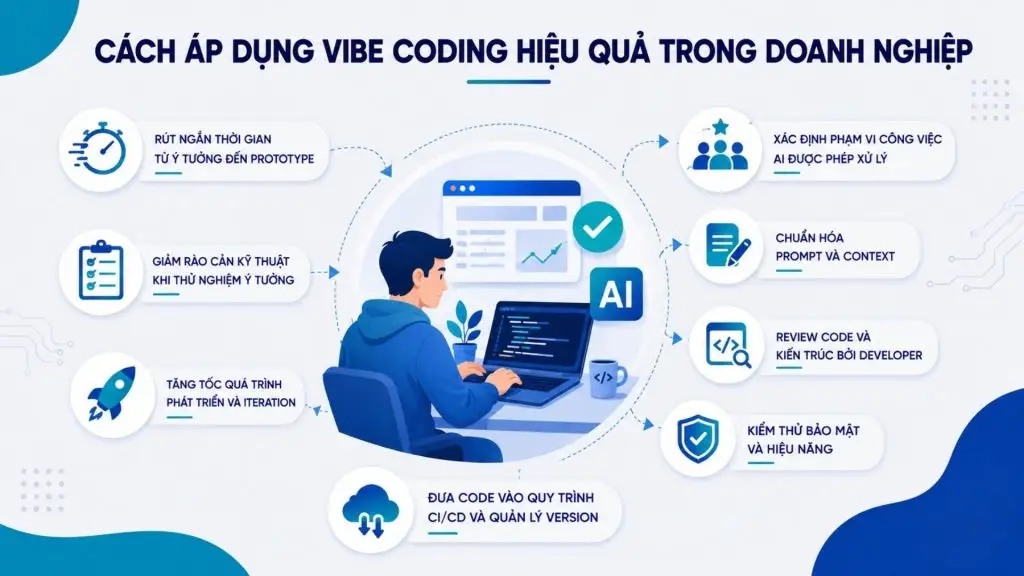
In an enterprise environment, Vibe Coding should not be seen as a replacement for the existing software engineering process. It is a capability within AI-assisted software development that speeds up certain layers of work, but it still needs to sit within a framework for architecture, security, testing and software management. To get real value from it, businesses need to clearly define the scope in which AI is allowed to take part and the mechanisms for controlling its output.
Define the scope of work AI is allowed to handle
Not every task is suitable to hand over to AI. Businesses should classify work by risk level and let Vibe Coding prioritize activities such as prototypes, PoCs, UI components, automation, test generation or internal tools.
For authentication, payments, sensitive data processing or critical business logic, AI should only play a supporting role under developer control. Setting clear permissions from the start helps prevent AI-generated code from being pushed straight into production without a technical review.
Standardize prompts and context
Output quality depends significantly on the context the AI receives. Teams should establish prompt standards that cover business requirements, technical constraints, coding standards, system architecture, dependencies and acceptance criteria.
Instead of giving AI a generic request such as “build a login API”, an enterprise prompt should specify the framework, the authentication mechanism, data validation rules, error handling and the relevant security constraints. Consistent context also helps reduce inconsistent output across team members.
Code and architecture review by developers
AI-generated code should be treated as input to the engineering process, not as the final result. Developers need to review both the implementation and the architectural decisions behind it, including data flow, dependencies, error handling, scalability and maintainability.
In particular, code that affects business logic or security should not be approved simply because the application “works correctly” in a test environment.
Security and performance testing
Beyond unit tests and integration tests, businesses need to check for risks specific to AI-generated source code, such as insecure configurations, vulnerabilities in dependencies, injection flaws, flaws in authentication mechanisms and data leaks. Performance should also be evaluated under loads close to real-world conditions.
The goal is to ensure the source code not only works correctly but also meets security, reliability and scalability requirements before it is deployed to production.
Bring the code into CI/CD and version management
Vibe Coding should not create a “separate code stream” outside the engineering process. AI-generated code needs to be managed through source control, pull requests, code review, automated testing and CI/CD, just like any other code.
Businesses should also keep a record of the change history, the reviewers and the checks performed to improve traceability. This way, AI becomes a component of the SDLC rather than a parallel development channel.
Ultimately, the effective model is not AI replacing developers, but AI helping developers work faster and more effectively: AI assists with generating code and iterating on development, while humans remain responsible for architecture, security, quality and the final technical decisions.
>>> See more:
- Top 35 time management apps that are the best and most effective
- Top 5 home design apps: free, high-quality and the best
Popular Vibe Coding tools today
The Vibe Coding market now spans many categories of tools, from AI code editors for developers to platforms that build full-stack applications from prompts. Cursor, GitHub Copilot and Claude Code are better suited to professional development workflows, while Google AI Studio, Replit, Lovable and Bolt focus heavily on turning ideas into prototypes or applications through natural language.
| Tool | Highlights | Best-fit users | Main use cases |
|---|---|---|---|
| Cursor | AI-integrated editor with chat and an agent mode within the project | Developers | Feature development, refactoring, debugging, large codebases |
| GitHub Copilot | Deep integration with GitHub and IDEs; supports code completion, agent mode, code review and a coding agent | Developers and enterprise development teams | Speeding up coding, completing features |
| Claude Code | A coding agent that runs in the terminal and can read the project, edit files, run commands and continue tasks based on context | Developers comfortable with the command line, and development teams | Coding agent, debugging, refactoring, automation |
| Google AI Studio | Build Mode lets you create full-stack web or Android apps from prompts, with live preview and the ability to iterate | Experimenters and developers | Prototypes, AI apps, full-stack web apps, Android apps |
| Replit | A browser-based coding environment with a feature for building apps from a description | Beginners and small teams | Building and running apps directly for MVPs, web apps, mobile apps, prototypes and deployment |
| Windsurf | An AI-integrated IDE with an agent mode that supports generating and editing code | Developers | Software development with context-aware AI support |
| Lovable | A platform for creating web applications from natural language descriptions | Product people, non-coders | MVPs, dashboards, landing pages, internal tools, web apps |
| Bolt | A tool for creating full-stack web apps directly in the browser from prompts | Founders, rapid product builders | Full-stack prototypes, web apps, MVPs and rapid iteration |
When it comes to choosing, no single Vibe Coding tool fits every project. Cursor, GitHub Copilot, Claude Code and Windsurf are better suited to developers who need control over the codebase and the software development process, while Google AI Studio, Replit, Lovable and Bolt are more convenient for quickly turning ideas into prototypes or applications that can be test-run.
For businesses, selection criteria should not stop at code generation capabilities; they should also take into account source code management, security, integration capabilities, testing, governance and compatibility with the current software development process.
>>> See more:
- Integrating Claude Code with Figma: Turning source code into designs
- 19 effective task organization apps for planning and managing schedules
Will Vibe Coding replace developers?
No. Vibe Coding changes the way developers work more than it eliminates their role. When AI can generate source code from natural language, the time spent writing code by hand line by line may decrease, but the need for technical thinking, decision-making and accountability for the system remains fully intact. In fact, as software grows more complex, these capabilities become even more important.
In the traditional development model, developers spend much of their time writing source code, implementing functions, components and application programming interfaces, and handling technical tasks. With Vibe Coding, the focus of the work tends to shift toward a chain of capabilities: problem solving, architecture design, AI orchestration, code review, testing, security and optimization.
In the move from writing code to solving problems, AI can help implement a solution faster, but humans still need to correctly identify the problem to be solved first. Developers must understand the business requirements, identify the constraints and translate them into requirements that AI can handle accurately.
System architecture also becomes more important. When AI can generate hundreds of lines of code in a short time, the key question is no longer just “does the code run?” but “does this code fit the system architecture?”. Developers remain responsible for choosing the architecture, the database, the API design, the dependencies and how the components of the system connect to each other.
Developers increasingly act as AI orchestrators by defining tasks, providing context, breaking problems down, evaluating the output and asking AI to refine it. Code review then becomes an important control layer for catching logic errors, security issues or technical debt that AI may introduce.
Code that is generated quickly does not mean the system is ready to run in a real-world environment. Developers still have to design and carry out testing, assess security, check performance and optimize the system for real workloads. These are aspects that require an understanding of the entire system, not just the ability to generate code.
For that reason, the biggest impact of Vibe Coding may lie in how it reshapes the structure of developers’ work. Developers are not disappearing; their role is shifting from directly carrying out all of the implementation work to solving problems, designing systems, orchestrating AI and taking responsibility for software quality. For businesses, this is why Vibe Coding should be seen as a capability within AI-assisted software development rather than a technology meant to replace software engineering.
>>> See more:
- Will AI replace web development? How to adapt effectively
- Build apps for Android/iOS easily, no programming knowledge needed
Conclusion
Hopefully this article has given you a clear understanding of what Vibe Coding is. Vibe Coding is not simply about using AI to generate source code; it is a software development method built on describing ideas and requirements and continuously interacting with AI to refine the product. This method shortens the time it takes to build prototypes, speeds up experimentation and helps businesses use their resources more efficiently.
However, Vibe Coding cannot replace technical thinking, architecture design, testing or security requirements. To make it effective, businesses should treat it as a tool that supports developers and integrate it into a controlled software development process.
Frequently asked questions
What is Vibe Coding?
Vibe Coding is a style of programming with AI in which the user describes an idea in natural language and an AI model generates the source code to build software. The developer focuses on intent and outcomes rather than writing each line of syntax, then continuously gives feedback so the AI can make adjustments in a loop. The term was coined by Andrej Karpathy in February 2025 and quickly became a notable trend in the software industry.
Will Vibe Coding replace developers?
No. Vibe Coding changes how developers work rather than eliminating them. As AI takes on most of the code-writing, the developer’s role shifts toward problem solving, architecture design, AI orchestration, code review, testing, security and optimization. These capabilities become even more important as code generation speeds up, because products need people to control quality and risk. Human technical capability therefore remains the deciding factor.
Is Vibe Coding programming without knowing how to code?
Not exactly. Vibe Coding lowers the technical barrier because users describe requirements in natural language instead of writing syntax, so people who aren’t yet fluent in programming can still build an experimental product. However, to put a product into operation, understanding and controlling the code is still necessary to review it for bugs, security and maintainability. That is why vibe coding is a good fit for prototypes and MVPs, while critical systems still require genuine technical capability.
What are the popular Vibe Coding tools today?
Some popular tools include Cursor, GitHub Copilot, Claude Code, Google AI Studio, Replit, Windsurf, Lovable and Bolt. AI-integrated editors and assistants such as Cursor, GitHub Copilot, Claude Code and Windsurf are aimed at developers. Platforms that build apps from a description, such as Replit, Lovable and Bolt, suit people who want to build products quickly. The right tool depends on your goals, the level of code control you want and your team’s process.
Should businesses use Vibe Coding?
Yes, but vibe coding needs to be placed within a controlled process. Businesses can use vibe coding to quickly build prototypes, MVPs and internal tools, and to test ideas at low cost. For sensitive systems such as finance, healthcare or core ERP, the product must still go through developer review, security and performance testing, and a CI/CD process. The sensible approach is to treat vibe coding as an acceleration layer that works alongside the control layers of software engineering.