
What is a prompt? A prompt is the command, question, or request that a user enters into an AI system to guide the model toward a specific task. A good prompt largely determines the quality of what the AI returns — whether you are writing content, analyzing data, or programming. In this article, TOT explains what a prompt is, how a prompt works, its structure, the different types of prompts, key Prompt Engineering techniques, and how to write effective prompts to get the most out of artificial intelligence.
Quick summary
- What is a prompt? A prompt is a question, command, instruction, or input data that helps AI understand a task and produce the result you want.
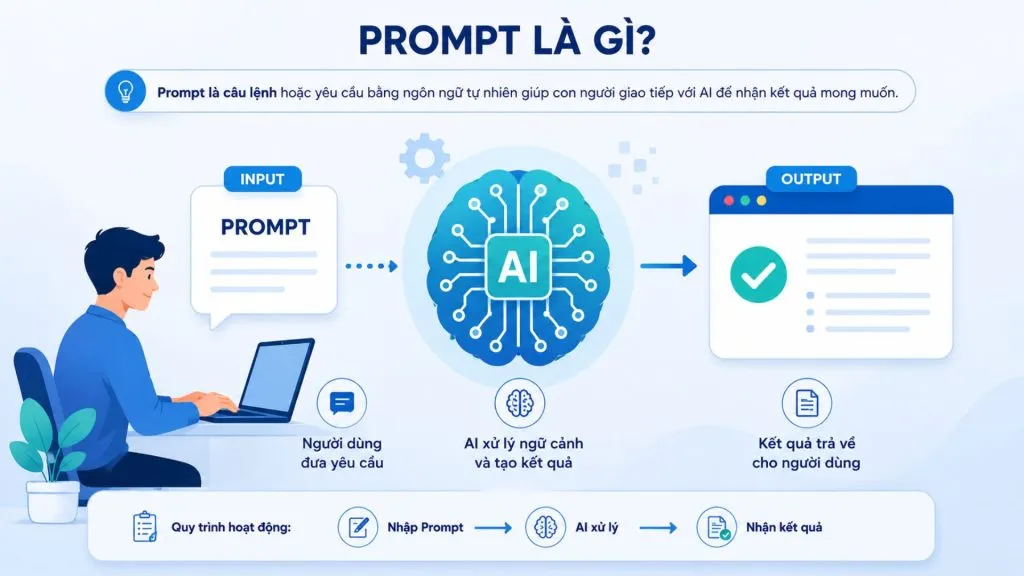
- How does a prompt work? The basic flow is Input/Prompt → AI processes the context → the model generates Output.
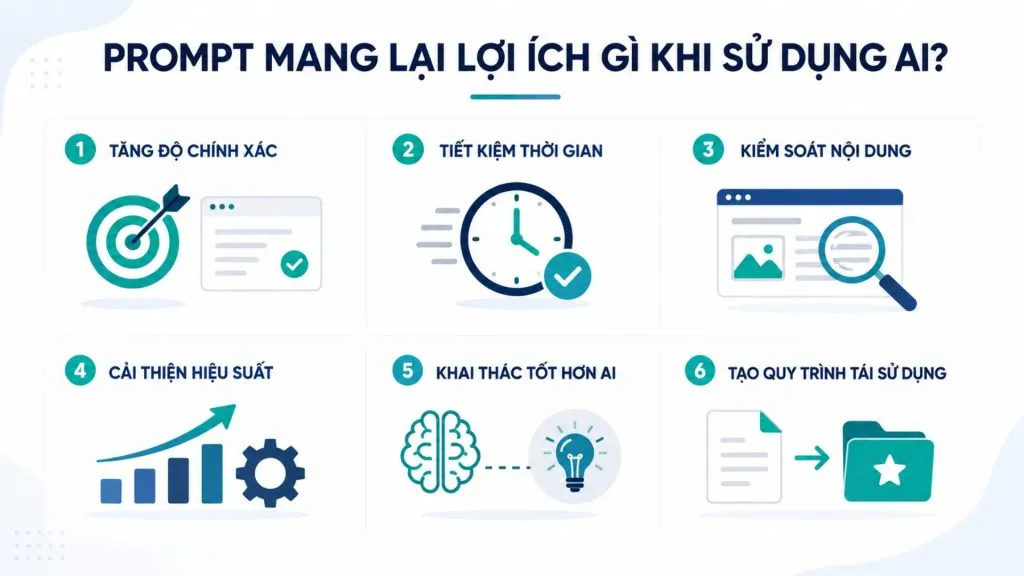
- What benefits does a prompt provide? A clear prompt improves accuracy, saves time, gives you control over the output, and taps into AI capabilities more effectively.
- The structure of an effective prompt: You can combine five components — Role, Context, Task, Constraints, and Format.
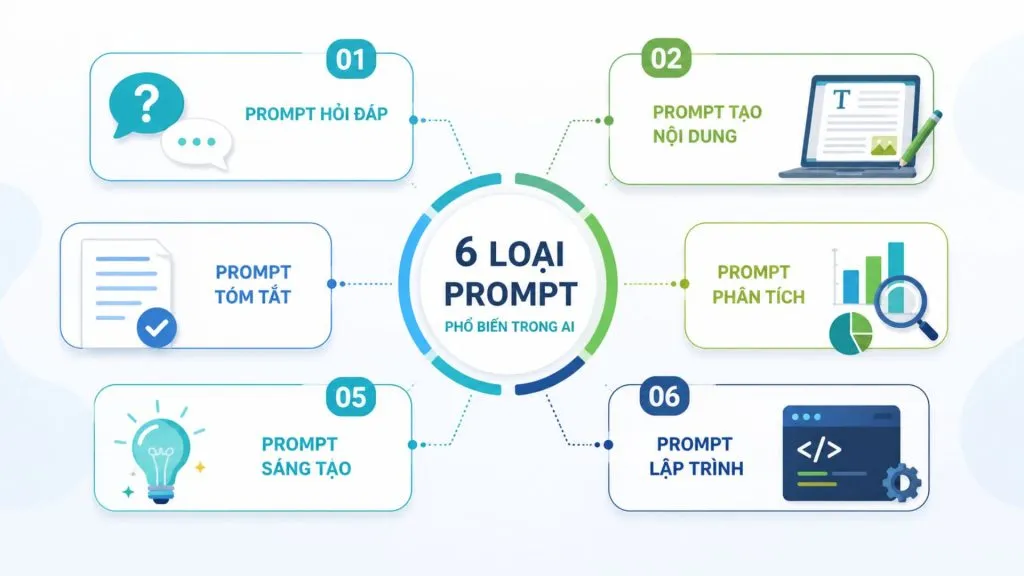
- Common types of prompts: These include question-and-answer, content creation, summarization, analysis, creative, and programming prompts.
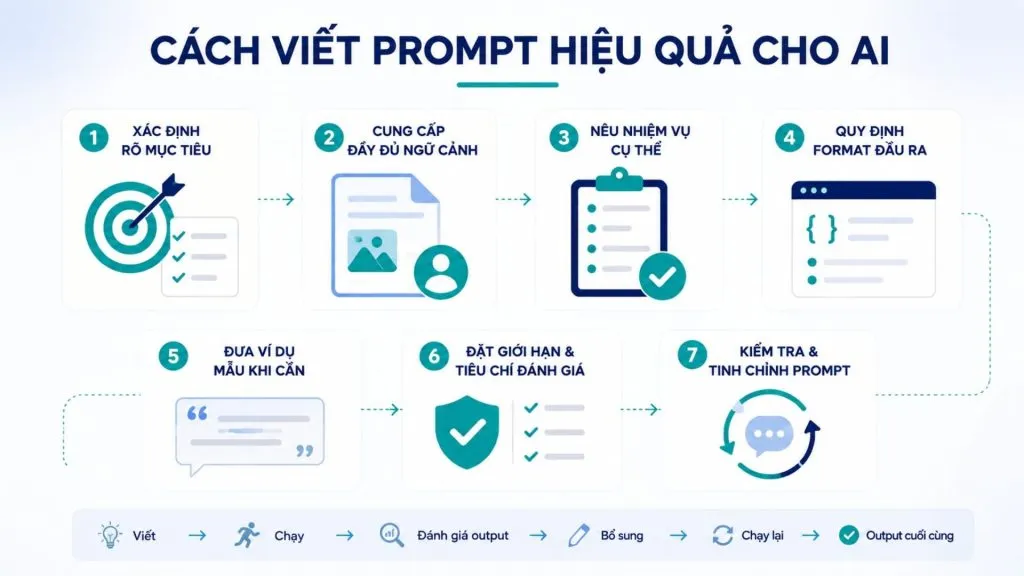
- How to write effective prompts: Define the goal, provide context, use specific verbs, specify the format, give sample examples, set constraints, and keep refining.
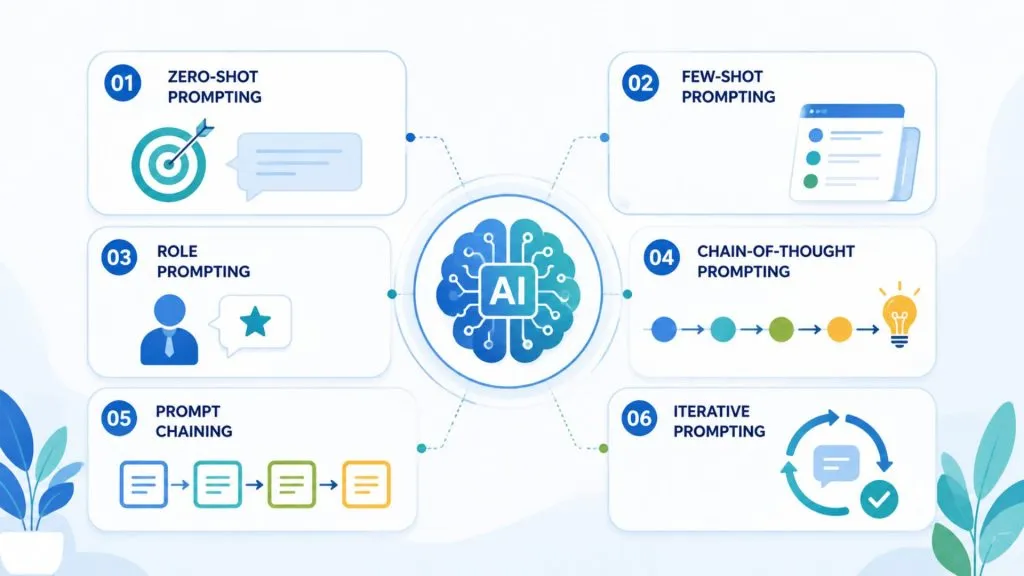
- Prompt Engineering: Some common techniques include Zero-shot, Few-shot, Role Prompting, Chain-of-Thought, Prompt Chaining, and Iterative Prompting.
- Mistakes to avoid: Do not write requests that are too generic, lack context, pile on too many unstructured requirements, or skip reviewing the AI’s output.
- Real-world applications: Prompts can support SEO, content marketing, research, data analysis, programming, task management, creative work, and many business processes.
What is a prompt?
A prompt is the natural-language input that lets people instruct AI without writing code. It is the bridge between the user’s intent and the model’s processing power, and it is the easiest lever to control when you want to improve the quality of the result. The section below clarifies the standard definition and describes how a prompt is processed.
What exactly is a prompt?
A prompt is the input text a user provides to an AI model to describe a request and steer the output. The word “prompt” itself means a hint, cue, or request. The term has long been familiar in computing — the classic example being the “command prompt,” where users type commands to interact with the operating system.
As artificial intelligence has advanced, the prompt has become the common way humans and AI communicate. In particular, with large language models (LLMs), users can express their requests in natural language. The AI then uses that information to analyze the request and generate an appropriate response.
A prompt is not simply a “question for the AI,” as many people assume. A prompt can be a question, a command, detailed instructions, or input data. It can also contain multiple requests that the AI must carry out step by step. How clear the prompt is directly affects the quality and accuracy of the result.
For example, instead of asking it to “Write about marketing,” you can make a more specific request, such as: “Write an 800-word blog outline on marketing trends for retail businesses in 2026.” The prompt can ask for the content to be split into five sections and written in a professional tone. The more context and detail you provide, the more accurately you help the AI pin down the goal.
How does an AI prompt work?
An AI prompt works through three main stages: receiving the input, processing the context, and generating the result. First, the user provides a prompt describing a specific request for the AI. For example: “Summarize the following passage into three main points.”
Next, the model analyzes the prompt and any related information to determine the request. The AI can identify the goal, context, format, and tone being asked for. This process draws on the parameters and knowledge the model learned during training.
Finally, the model generates the output based on the request and the context it has processed. In the example above, the result might be three bullet points summarizing the key content.
The process can be summarized as follows: Input/Prompt → AI processes the context → the model generates Output. Because the prompt provides the information the model needs to define the task, the clearer your request, the more closely the result will match your goal.
>>> See also:
- ChatGPT-5’s vision capabilities: How to prompt accurately
- How to build an app with AI — free, detailed, and simple
What benefits does a prompt bring when using AI?
A prompt is the most direct tool for improving quality and controlling AI output. When written correctly, a prompt turns a “versatile but generic” model into an assistant that stays focused on the goal of the task. Here are the standout benefits:
- Improves the accuracy of AI results
A clear prompt helps the AI understand the request correctly, reduces guesswork, and produces output that is closer to the goal. When users spell out the audience, purpose, and scope, the model has enough to work with to select relevant information instead of rambling.
- Saves time
A good prompt cuts down on how often you have to edit or ask the AI to redo the work. Instead of asking again and again, you describe everything fully from the start and get a usable result sooner, substantially shortening the time it takes to complete a task.
- Controls the output content
Through the prompt, you can specify the length, tone, structure, and format of the result. As a result, AI output slots easily into existing workflows and stays consistent in style and layout across different runs.
- Boosts work performance
Prompts support a wide range of tasks, such as writing content, analyzing data, programming, and research. A well-designed prompt lets you handle a larger volume of work in the same amount of time, especially for tasks you repeat frequently.
- Taps into AI capabilities more effectively
A structured prompt helps you make the most of the model’s capabilities. When combined with different AI tools, the same strong prompt-writing skill can be applied flexibly to solve many specialized problems.
- Creates reusable workflows
An effective prompt can be saved as a template and reused for many similar tasks. This helps individuals and teams standardize how they use AI, reduces reliance on individual experience, and keeps quality stable over time.
>>> Read more:
- The TOP 15 best AI code-writing tools
- Top 20+ best free AI image design software
What components make up an effective prompt structure?
An effective prompt usually includes five components: Role, Context, Task, Constraints, and Format. Not every prompt needs all five, but the more of these elements you provide, the more the model has to work with to produce a result that matches your intent. This is a mental framework that helps you turn a vague request into a clear command.
Role
Role defines which role or perspective the AI should adopt when responding. Assigning a role helps the model choose the tone, depth, and presentation that fit the context. For example, opening a prompt with “You are an SEO expert with 10 years of experience” makes the answer lean toward an SEO expert’s perspective — very different from asking the AI to answer like a teacher explaining to a beginner.
Context
Context provides the background information the AI needs to understand the situation correctly before carrying out the request. Context can be the project goal, product characteristics, target readers, or relevant data. When context is missing, the model is forced to guess and can easily produce unsuitable results. Providing clear context is the fastest way to narrow the scope and increase the relevance of the answer.
For example, instead of asking it to “Write a service introduction,” you can add: “The company provides custom software development services for small and medium-sized companies in Vietnam; the main audience is CEOs and CTOs.”
Task
Task states exactly what the AI needs to do. This is the core of the prompt and should be expressed with specific action verbs such as write, summarize, compare, analyze, or recommend. A clear task lets the model know precisely what result it needs to produce.
For example: “Analyze the three competitors below and compare them on these criteria: features, price, target customers, and points of differentiation.” This phrasing helps the AI clearly define the scope of work to be done.
Constraints
Constraints set the boundaries that control the scope and quality of the output. Common constraints include length, target readers, information scope, and content to avoid. For example, you might require “no more than 500 words,” “write for a non-technical audience,” or “use only the information in the provided document.” Clear constraints keep the result on target and ready to use right away.
Format
Format specifies how the result should be presented. You can request output as a table, a bulleted list, H2/H3 headings, JSON, an email, or a paragraph. Specifying the format makes the result ready for the next step in your workflow with little editing needed.
For example: “Present the result as a table with four columns: Criterion, Competitor A, Competitor B, and Comments.” When the format is defined in advance, the output is usually easier to read, easier to check, and ready to use as is.
>>> Learn more:
- How to build an app with AI — free, detailed, and simple
- TOP 20+ leading AI design tools that support designers today

Common types of prompts in AI
Prompts can be categorized by purpose, most commonly into six groups: question-and-answer, content creation, summarization, analysis, creative, and programming. Understanding each type helps you choose the right phrasing and make the most of the model’s strengths for each task.
Question-and-answer prompts
Question-and-answer prompts are used to ask a question and receive an answer that explains a concept, fact, or process. This is the most familiar type of prompt, typically used when you want a quick lookup or to learn a new topic. The quality of the answer depends on whether the question specifies the level of detail and the intended audience.
For example, instead of asking “What is Machine Learning?”, you could write: “What is Machine Learning? Explain it for a beginner using simple language, in about 300 words, and give two real-world application examples.” This prompt clearly defines the topic, audience, length, and style of explanation. As a result, the AI has a basis for producing an easy-to-understand answer and avoids diving too deep into technical algorithms.
Content creation prompts
Content creation prompts ask the AI to write a complete piece of text, such as a blog post, email, social media post, or script. This type of prompt works best when you clearly provide the topic, audience, tone, and length. The more guiding information you give, the more the generated content matches your needs and the less editing it requires afterward.
For example: “You are a content marketing expert. Write a 150-word social post introducing a mobile app development service, aimed at owners of large businesses. Use a professional but easy-to-understand tone, focus on business benefits, and end with a CTA to contact for a consultation.” This prompt lets the AI control the content, audience, brand, tone, and conversion goal all at once.
Summarization prompts
Summarization prompts ask the AI to condense a long document, report, or article into its main points. This type of prompt is useful when you need to quickly grasp the core content without reading the entire text. The result is better when you specify the number of points to summarize, the desired length, and the angle to focus on.
For example: “Summarize the following report into five bullet points, each no more than 25 words, focusing on business results and recommended actions.” By specifying the structure and focus, the prompt helps the AI filter out the important information, drop minor details, and present a tidy result that is easy to use for decision-making.
Analysis prompts
Analysis prompts ask the AI to process information in order to evaluate, compare, or find causes. This type of prompt is typically applied to data, customer feedback, or options that need to be weighed. To get useful results, you should provide complete input data and clearly state the analysis criteria, so the model does not make unwanted assumptions.
For example: “Analyze the revenue data for the four quarters below. Identify the growth trend, the quarter with unusual fluctuations, and the factors that may have had an impact. Then compare the performance of each quarter in a table and recommend three ways to improve for the next quarter. Use only the provided data.” This prompt turns an analysis request into a clear, verifiable process.
Creative prompts
Creative prompts are used when you want the AI to generate ideas or creative outputs such as content ideas, brand concepts, stories, scripts, images, or videos. This type of prompt usually needs a clear description of the topic, style, audience, and desired mood, while still leaving the AI some room to suggest new directions.
For example: “Suggest 10 short-video ideas about applying AI in business for LinkedIn. Each idea should include a title, a key message, and a hook in the first 10 seconds. The style should be modern and professional, aimed at CEOs and business managers. Prioritize ideas that are practical and distinctive, and avoid overly common AI topics.”
Programming prompts
Programming prompts serve software development tasks such as writing code, explaining code, debugging, optimizing performance, converting between programming languages, or proposing technical solutions. For AI to support programming more accurately, the prompt should provide the language, framework, version, relevant code, the error encountered, and the desired result.
For example: “You are a Python developer. Check the code below to find why the API returns a timeout error. Explain the cause, point out the code that needs fixing, and provide an optimized version. Keep the current functionality unchanged and do not add external libraries. Finally, list three ways to test that the bug has been fixed.” With this type of prompt, providing the full code and technical context helps the AI offer a more practical solution.
>>> See also:
- How is AI applied in software development?
- A guide to using Google AI Studio effectively and quickly
How to write effective prompts for AI
Writing an effective prompt is the process of describing a request clearly enough that the AI understands it correctly and produces an on-target result from the very first attempt. The seven principles below help you move from a vague idea to a tight command that you can reuse and gradually improve over time.
1. Clearly define the goal
Before writing a prompt, define exactly what result the AI needs to produce and what that result will be used for. If the goal is too generic, the AI has to guess at the request, and the output may ramble, lack focus, or fail to match your actual needs.
For example, a prompt before optimization: “Write me an article about SEO.” This request does not indicate who the article is for, whether the goal is to provide knowledge or sell a service, how long it should be, or how it should be presented.
The prompt after optimization: “Write a 1,500-word article explaining SEO for small business owners who are just starting to learn about Digital Marketing. The goal is to help readers understand what SEO is, its benefits, and the basic steps to get started. Use easy-to-understand language, include H2/H3 headings, and give real-world examples.” The clearer the goal, the easier it is for the AI to produce output that is on the right track.
2. Provide full context
The fuller the context, the easier it is for the AI to produce a result that fits your needs. You should clearly state the target readers, the industry or field, the intended use, the input data, and the situation in which it will be applied.
For instance, instead of asking it to “Write an email introducing an AI service,” add: “The email is sent to the CEO of a retail business who does not have much AI knowledge. The goal is to introduce a customer-service automation solution and propose a 30-minute consultation.” This information helps the AI adjust the content, tone, and level of expertise to suit the recipient.
3. State the task with specific verbs
An effective prompt should clearly state which action the AI must take. Instead of vague requests like “handle,” “help me with,” or “give an opinion,” use specific verbs such as analyze, compare, summarize, write, recommend, classify, extract, check, or evaluate.
For example: “Analyze the five pieces of customer feedback below, classify them into issue groups, and recommend a solution for each group.” is clearer than “Take a look at this feedback for me.” Specific verbs help the AI identify the type of task to perform and reduce the chance of answers that fall outside the intended scope.
4. Specify the output format
Specifying the format makes the result ready to use immediately. You should clearly state whether you want the result as a table, a list, a paragraph, hierarchical headings, or JSON. For example, “present the result as a table with three columns: criterion, option A, option B” produces structured output that is easy to read and easy to drop into a document. Specifying the format also keeps things consistent when you create many similar pieces of content.
5. Give sample examples when needed
Providing examples helps the AI mimic the exact style and structure you want. This technique is often called Few-shot Prompting, meaning you provide one or a few examples in the prompt for the model to follow as a template.
For example: “Classify customer feedback following this pattern: ‘Slow delivery service’ → Shipping; ‘The app crashes frequently’ → Product. Classify the following feedback using the same rule.” If the format or criteria are hard to describe in words, a few concrete examples can help the AI understand the request better.
6. Set constraints and evaluation criteria
Clear constraints help control the quality and scope of the result. You can set limits such as “no more than 500 words,” “do not use technical jargon,” or “use only information from the provided source.” Adding a criterion such as “if data is missing, say so clearly instead of guessing” is especially helpful in reducing the risk of the AI providing inaccurate information. These criteria turn a prompt into a request with clear acceptance standards.
7. Test and refine the prompt
A prompt does not have to be perfect on the first try. In practice, prompt quality usually improves through a process of testing and evaluating the output. If the result does not meet your requirements, identify what is off, then add to or adjust the prompt rather than rewriting it from scratch.
You can apply a simple process:
Write → Run → Evaluate the output → Add details → Run again → Final output
For example, if the AI writes too long, you can add a word limit; if the content is too technical, redefine the audience as beginners; if the structure is hard to use, ask for a more specific format. This iterative approach makes the prompt increasingly fit the goal, and it can be standardized into a template for repeated use.
>>> Read more:
- How to create prompts for LLMs in computer vision to improve accuracy
- AI in UI/UX design: a tool or a rival for designers?
Great prompt examples for common needs
The examples below illustrate how to apply the principles above to common needs. Each example briefly states the need, a sample prompt, and the desired result, so you can easily picture it and adapt it to your own situation.
Content writing and creative prompts
Need: Write an SEO blog post introducing a service.
Sample prompt:
“You are an SEO Content expert. Write a 1,500-word blog post about website development services for small and medium-sized businesses. The readers are CEOs and business owners without much technical knowledge. The content should explain the benefits, the implementation process, and the criteria for choosing a website development provider. Use a professional, easy-to-understand tone, with clear H2/H3 headings and real-world examples.”
Desired result: An article with a clear structure, the right audience, and a focus on the SEO goal. In real use, you should add keywords, search intent, and brand information so the output matches your requirements more closely.
Research and information synthesis prompts
Need: Research a topic and synthesize it into a short report.
Sample prompt:
“Research the trends in applying Generative AI in business in 2026. Summarize five notable trends, and for each state the real-world applications, benefits, limitations, and impact on small and medium-sized businesses. Present it as a table. For each important claim, cite the source and clearly distinguish verified data from forecast-based assertions.”
Desired result: Information that is well organized, easy to cross-check, and useful for research. For topics that need up-to-date data, you should ask the AI to use reliable sources and verify the information before drawing conclusions.
Data analysis prompts
Need: Analyze business data to find notable trends and issues.
Sample prompt:
“Analyze the monthly revenue data table below. Identify the growth trend, the month with unusual fluctuations, the product group with the highest performance, and the points to watch. Present the result in four parts: Overview, Key Findings, Possible Causes, and Recommended Actions. Use only the provided data and state clearly if the data is not enough to draw a conclusion.”
Desired result: Output that focuses on insights rather than just repeating the numbers. For important data, you should double-check the calculations and conclusions before using them to make decisions.
Programming and technical prompts
Need: Debug and optimize a piece of code.
Sample prompt:
“You are a senior Python developer. Check the code below to identify the cause of the
TimeoutError. Explain the cause, point out the relevant lines of code, and provide a fixed version. Do not change the business logic and do not add new libraries. Then suggest three testing approaches to confirm the bug has been fixed.”
Desired result: The AI provides the cause, the fixed code, and specific testing methods. You should provide the full code, error messages, runtime environment, and framework versions where possible to improve accuracy.
AI image generation prompts
Need: Create an illustration for an article or a marketing campaign.
Sample prompt:
“Create a 16:9 hero banner image on the theme of AI Transformation in business. The setting is a modern office with a team working with an AI system and a data dashboard. The style is high-tech but professional, in blue and white, with natural lighting and a composition that leaves empty space on the left for a headline, with no watermark.”
Desired result: An image that fits its intended use, with a clear subject, style, layout, and aspect ratio. For commercial images, you should specify the brand identity, dimensions, and any required or forbidden elements in detail.
Planning and work-organization prompts
Need: Build a travel plan broken down by stages.
Sample prompt:
“Build a 5-day travel plan for a trip to Da Nang – Hoi An. Break it down day by day, including the sightseeing schedule, meals, transportation, and rest time. For each activity, state the time, location, estimated cost, and reason for choosing it. Present it as a table.”
Desired result: A plan you can use as a detailed itinerary for the trip, easy to follow and adjust to your budget or personal preferences. You should add information such as the number of travelers, the planned budget, and the travel style (budget, experiential, or relaxation) so the AI can create an itinerary that fits your needs more closely.
>>> Read more:
- How to build an AI app with Vibe Coding on Google AI Studio, made simple
- Build an e-commerce website with AI — free, SEO-friendly, and highly effective
Common Prompt Engineering techniques
Prompt Engineering is the field that studies how to design prompts to use AI models more effectively. Beyond the basic principles, the techniques below help you tackle complex problems and raise the quality of results well above what you get from ordinary use.
Zero-shot Prompting
Zero-shot Prompting is a way of asking the AI to perform a task without providing any examples. You simply describe the request and let the model rely entirely on what it has learned to answer. This technique suits common, simple tasks where the model already has enough foundational understanding to handle them without a template. It is also how most people interact with AI every day.
Example: “Classify the customer feedback below into three groups: positive, negative, and neutral.” You do not need to provide any classification examples first; the AI uses the request and the input content to perform the task.
Few-shot Prompting
Few-shot prompting is a technique that provides a few examples so the AI mimics the exact pattern you want. By including a few sample input-and-output pairs right in the prompt, you steer the model’s style, format, and way of thinking. This technique is especially useful when you need results that are consistent in form — for example, classifying customer feedback according to a fixed set of labels or writing descriptions to a common template.
Example: “‘Fast product delivery’ → Positive; ‘The app crashes frequently’ → Negative; ‘The product price is average’ → Neutral. Classify the following feedback using the same rule.” The AI uses the examples as a reference to apply to new data.
Role Prompting
Role Prompting is a technique that assigns the AI a specific role or perspective. When asked to answer as an expert in a particular field, the model adjusts its tone, depth, and reasoning to match. For example, for the same finance question, an answer “as an advisor for beginners” will differ from an answer “as an expert analyst,” helping you get content that fits your needs.
Example: “You are a B2B SEO expert. Evaluate the structure of the article below and suggest ways to improve the headings, search intent, and topic coverage.” Setting the role this way helps the AI focus on SEO-related criteria instead of giving generic comments.
Chain-of-Thought Prompting
Chain-of-Thought Prompting is a technique that guides the model to solve multi-step problems in a reasoned sequence. Conceptually, instead of asking for an immediate answer, you encourage the model to work through the problem in logical stages, which improves accuracy on tasks that require reasoning such as math, logic, or situational analysis. This technique focuses on breaking the problem down, not on forcing the model to expose its internal reasoning.
Example: For a problem with many conditions, you can ask: “Solve the problem below and present brief explanatory steps, then double-check the result before giving the final answer.” This guides the AI toward a verified processing approach without asking it to reveal its internal reasoning.
Prompt Chaining
Prompt Chaining is a technique that breaks a large task into several smaller prompts linked together. The result of the previous step becomes the input for the next, allowing complex processes to be handled in a controlled way. For example, a writing process can be split into steps: outline, write each section, then edit the whole thing. This approach reduces errors and lets you intervene and adjust at each stage.
Example: Instead of asking the AI to research and write a complete report all at once, you can split it into: Prompt 1: define the topic and data sources → Prompt 2: synthesize the information → Prompt 3: analyze the key findings → Prompt 4: write the report from the processed results. Breaking it down makes each stage easier to control.
Iterative Prompting
Iterative Prompting is a technique of continuously evaluating and refining the prompt based on the output received. After each run, you analyze where the result falls short and adjust the request for the next attempt. This technique is tied closely to real work, because a prompt rarely produces a perfect result on the first try. Deliberate iteration makes the prompt increasingly accurate and helps form reusable templates.
You can apply this process: Write the prompt → Run → Evaluate the output → Add or edit details → Run again. For example, if the AI generates content that is too long, you can add a word limit; if the output does not match the audience, add information about the readers. Through several rounds of refinement, the prompt can be standardized into a reusable template.
>>> See also:
- A simple guide to deploying AI in mobile apps
- The TOP 20 most effective AI tools that support online selling today
Common mistakes when writing prompts
Writing an unclear prompt can cause the AI to misread the goal, produce rambling output, or include unsuitable information. Below are common mistakes you should recognize in order to improve prompt quality and spend less time fixing results.
Writing requests that are too generic
Requests that are too generic are the most common mistake that makes the AI ramble. Prompts like “Write an article about AI,” “Analyze this data,” or “Give me marketing ideas” lack a specific goal and scope. Without enough information, the AI has to guess what you want, leading to output that may be broad, generic, or off-target. Clearly define the task, audience, purpose, and desired result.
Lacking context
Even when the task is clearly stated, the AI can still produce an unsuitable result if it lacks context. For example, “Write an email introducing a service” does not indicate who the recipient is, which industry they are in, the email’s goal, or the desired tone. Adding information about the audience, field, situation, and input data helps the AI understand the request more accurately.
Piling on too many unstructured requests
A prompt that contains too many tasks without clear separation can cause the AI to miss one or more requirements. Instead of writing everything in one long paragraph, group the content by goal, task, constraints, and format. For complex work, you can split it into several smaller prompts or use prompt chaining to keep it under control.
Not specifying the output format
If you do not specify how the result should be presented, the AI may return content that is correct but hard to use. For instance, when you need to compare several products, ask for a table instead of just saying “compare them.” For content you plan to use directly, you can request a format such as bullet points, H2/H3 headings, an email, or JSON.
Not providing the necessary data or sources
The AI cannot deliver an accurate analysis if it lacks important data. For document-based tasks, provide the source content and clearly state the scope of information it is allowed to use. If you are asking for research, specify which types of sources to prioritize and require the AI to distinguish between verified information and assertions or inferences.
Trusting AI results unconditionally
AI can produce information that is wrong, lacks context, or does not reflect real data, even when the prompt is well written. So you should not assume every output is accurate. For important matters such as figures or legal, financial, medical, or business decisions, you need to check sources, cross-reference data, and evaluate the result before using it.
>>> Learn more:
- 18 high-impact ways to apply AI to e-commerce
- How to build a WordPress website with AI: a detailed A-to-Z guide
What kinds of work can prompts be applied to?
Prompts can be used in almost any work that requires processing information, creating content, analyzing data, or supporting decisions. When you know how to build a suitable prompt, you are not just asking the AI questions — you can turn it into an assistant for each specific task.
- Marketing and SEO
Prompts support topic research, building content briefs, writing SEO articles, creating titles, meta descriptions, social posts, and suggesting content ideas. You can specify keywords, search intent, target audience, and tone so the output fits better.
- Research and information processing
AI can help summarize reports, synthesize documents, extract information, compare options, or organize large amounts of data. For tasks that require high accuracy, you should provide specific sources and instruct the AI not to guess when data is missing.
- Analysis and business
Prompts can support analyzing sales data, evaluating performance, identifying trends, classifying customer feedback, and recommending improvements. AI can help turn raw data into easy-to-understand insights, but the results still need to be checked before being used for important decisions.
- Programming and software development
Developers can use prompts to write code, explain algorithms, debug, create test cases, optimize code, convert code between languages, or help write technical documentation. Providing the code, framework, version, and error messages helps the AI offer more practical support.
- Operations and task management
Prompts can be used to plan projects, build checklists, break down tasks, draft emails, prepare for meetings, or compile minutes. For repetitive processes, a good prompt can be standardized into a template to save time.
- Creative work
From video ideas, scripts, and stories to images and advertising concepts, prompts help you guide the AI on the topic, style, audience, layout, and desired message.
Overall, prompts can be applied from simple everyday tasks to complex specialized processes. The value of a prompt lies not in writing at great length but in the ability to convey the right goal, context, and criteria so the AI produces a result you can actually use in practice.
>>> Learn more:
- The 10 best AI website design tools, with a detailed comparison
- The TOP 15+ large, reputable software companies in Vietnam
Conclusion
As this article shows, “what is a prompt” is no longer an unfamiliar question but has become foundational knowledge for anyone who wants to work effectively with AI. A prompt is the command, question, or request that a user enters into an AI system to steer the result, and its quality largely determines the value you get back. Mastering the Role, Context, Task, Constraints, and Format structure, along with the types of prompts, Prompt Engineering techniques, and the seven-step process, will help you use AI proactively, accurately, and in a reusable way.
For businesses that want to put AI into real operations, understanding prompts and standardizing how they are used is an important first step. TOT accompanies businesses on their journey to apply AI, design websites, mobile apps, and custom software to optimize work efficiency.
Frequently asked questions
What is a prompt in AI?
An AI prompt is the input text a user provides to an artificial intelligence model to describe a request and steer the result. A prompt can be a question, a command, instructions, input data, or a request with multiple steps. It is the main way humans communicate with AI in natural language instead of programming with code. The clearer and more context-rich the prompt, the easier it is for the model to understand your intent correctly and produce output that is on target and higher quality.
What is a ChatGPT prompt?
A ChatGPT prompt is the command, question, or instruction a user enters into ChatGPT to ask the model to perform a specific task. A prompt can be used to ask for information, write content, summarize, analyze data, program, or create. OpenAI recommends that prompts be clear, specific, and provide enough context for ChatGPT to understand the goal and produce a suitable response. Prompts can also be refined over several iterations based on the results received.
What is Prompt Engineering?
Prompt Engineering is the field of studying and practicing how to design prompts to use AI models more effectively. This work includes choosing how to phrase the request, providing context, adding examples, and applying techniques such as Zero-shot, Few-shot, Role Prompting, or Chain-of-Thought. The goal is to help the model understand the request correctly and produce more accurate, stable results. Prompt Engineering is becoming increasingly important as AI is applied more deeply in work and software products.
What is a prompt in Gemini?
A prompt in Gemini is the request or input data used to guide Gemini models to produce results that match the user’s goal. Google provides prompting strategies for Gemini, including giving instructions, context, examples, and specifying the output format. Prompts can be used for many tasks such as question-and-answer, analysis, content creation, data processing, or working with other content types the model supports.
Do prompts need to be written in English?
Prompts do not have to be written in English. Today’s large language models support many languages, including Vietnamese, so you can absolutely write prompts in Vietnamese and receive Vietnamese results. What determines quality is the clarity, sufficient context, and logical structure of the prompt, not the language used. In some specialized fields with many English terms, keeping those terms in English can help the model understand more accurately.
Are longer prompts better than shorter ones?
A long prompt is not automatically better than a short one; what matters is how clear it is and how well it fits the task. A short, concise prompt is still effective for simple tasks, while complex tasks need enough context, constraints, and examples, so the prompt will be longer. However, a long prompt that rambles, contains redundant information, or is self-contradictory can easily lead the AI astray. The principle is to provide just enough of the necessary information for the model to do exactly what you ask — no more, no less.