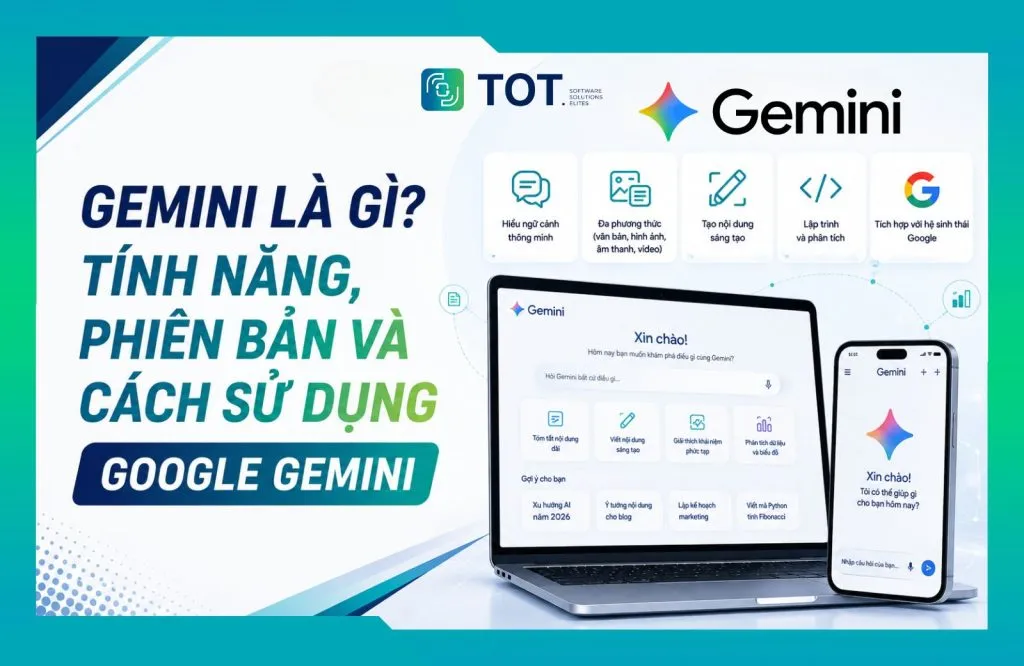
What is Gemini is a question many people ask as artificial intelligence becomes ever more widely applied in learning, work, and software development. Gemini is a family of multimodal AI models developed by Google and Google DeepMind that can understand and process text, images, audio, video, and documents within a single system. In this article, TOT will help you grasp what Gemini really is, its standout features, the versions available, usage costs, and how to get started with the tool. If your business is exploring how to apply AI to operations, you can also review the solutions at TOT.
Quick summary
- What it is: Gemini is Google’s family of multimodal AI models, able to handle text, images, audio, video, PDFs, and source code.
- Origins: Gemini succeeds the Bard chatbot, was renamed in February 2024, and has become the AI foundation for many Google products.
- Versions: The ecosystem currently includes Gemini 3.6 Flash, 3.5 Flash-Lite, 3.1 Pro, and 3.1 Deep Think, along with specialized models for images, audio, video, robotics, and embeddings.
- Cost: Gemini offers a free tier and three paid plans — Google AI Plus, Google AI Pro, and Google AI Ultra — with progressively higher limits.
- Use cases: Learning, office work, marketing, programming, and process-automation problems inside businesses.
What is Gemini?
Gemini is a line of multimodal artificial intelligence (AI) models developed by Google DeepMind, designed to understand and process many types of data — text, images, audio, video, and PDF documents — within a single system.
Google built Gemini to be natively multimodal, meaning multimodal processing is integrated right from the model’s development and training rather than merely bolting together separate processors for each data type. As a result, Gemini can perform tasks such as reading charts, analyzing images, understanding video content, or handling source code and text within a single workflow.
Google first introduced Gemini in December 2023 as a foundation model built from the ground up for multimodal capability. The name Gemini now covers two layers: the Gemini app for end users, and the Gemini model family for developers through Google AI Studio and the Gemini API. The Gemini app works as a personal AI assistant, while the underlying foundation models can be integrated into applications and software systems.
According to Google DeepMind’s current model information, Gemini 3.1 Pro accepts input including text, images, video, audio, and PDF, with a limit of 1,048,576 input tokens and 65,536 output tokens. Its long-context capability makes Gemini well suited to tasks that require analyzing and synthesizing large volumes of information.
The name Gemini refers to two things at once: the AI assistant app for end users at gemini.google.com, and the underlying family of foundation models made available to developers through Google AI Studio and the Gemini API. According to Google DeepMind’s model page, current versions such as Gemini 3.6 Flash and Gemini 3.1 Pro support a context window of up to 1 million input tokens and 64,000 output tokens — equivalent to reading and synthesizing thousands of pages of documents in a single working session. This is also why Gemini is often placed in the foundation model category — a base model that can be customized for many different problems rather than serving a single fixed task.
Is Gemini the same as Google Bard?
Yes. Gemini is the successor to Bard, not a second, parallel tool. Google introduced Bard in March 2023 as an experimental chatbot running on earlier-generation language models. In February 2024, Google renamed Bard to Gemini to unify the naming of the chat app and the AI model family behind it. From that point on, Bard no longer existed as a separate brand.
Google says Gemini represents a “family” of more capable AI models, while also expanding from a chatbot experience into an AI ecosystem that includes apps, developer models, and many features such as Gemini Live, Deep Research, image generation, video generation, and Gems.
| Criteria | Google Bard | Gemini |
|---|---|---|
| Launch timing | Launched in 2023 | Officially replaced Bard from February 2024 |
| Product positioning | Experimental chatbot focused on text conversation | Multimodal AI assistant and, at the same time, a family of foundation models |
| AI model | Initially used LaMDA, then moved to PaLM 2 and Gemini | Uses models from the Gemini ecosystem |
| Processing capability | Mainly text, with basic image support | Text, images, audio, video, PDF, source code |
| Advanced features | Limited; no in-depth research or custom assistants | Deep Research, Gemini Live, Gems, image and video generation |
| Ecosystem connectivity | Experimented with a few Google services | Integrates Gmail, Docs, Drive, Search, YouTube, Android |
| For developers | No official API under the Bard name | Available through Google AI Studio and the Gemini API |
So when exploring what Gemini is, think of it simply as the Bard experience carried forward and expanded into a more comprehensive AI ecosystem. The rename reflects a change in the very nature of the product: from a standalone chatbot to an AI foundation layer running throughout Google’s services.
How does Gemini work?
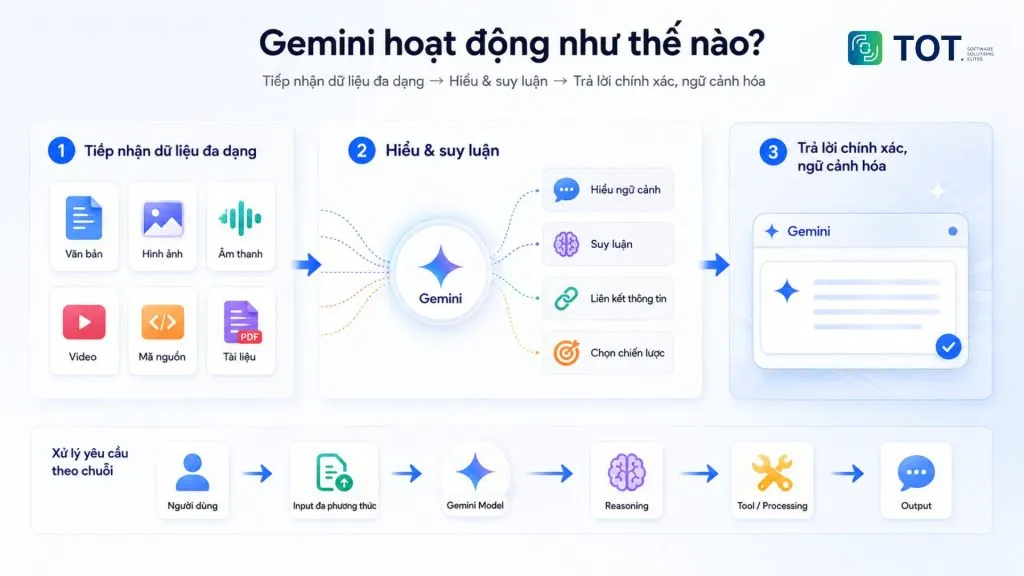
Gemini works as a chain: it takes in input data in many formats, converts them into a shared representation space, performs reasoning across the entire context, and then generates an answer. Users don’t need to choose an “image mode” or “text mode” — the model handles a mix of data within a single conversational turn.
Gemini uses multimodal AI models
When a user sends a request, Gemini can take it in through the flow: Text → Image → Audio → Video → Source code → Gemini → Response. This data is converted into representations the model can process, then analyzed within the same context — rather than the user having to switch between several separate tools.
For example, you can upload a financial report as a PDF along with a photo of a chart and ask Gemini to reconcile the figures between the two sources. With Gemini 3.1 Pro, Google confirms the model directly supports text, image, video, audio, and PDF; this model’s output is text, while some specialized models in the Gemini ecosystem can produce outputs such as images or audio.
Gemini can reason and handle context
What matters about Gemini is not only its ability to “read” many formats, but also its reasoning over large amounts of context. With a context window of up to 1 million tokens, the model can process large volumes of documents, multimodal data, or an entire source-code repository in a single working session. This lets Gemini connect information located in different parts of a document, analyze the relationships between facts, and handle multi-step requests.
At the application level, Gemini also supports function calling, search, and code execution on the corresponding models/platforms. This allows the AI to use external tools or execute code when needed to help complete a task. So instead of only answering isolated questions, Gemini can handle complex requests as a chain: User → Multimodal input → Gemini Model → Reasoning → Tool/Processing → Output.
Standout features of Gemini (updated August 2026)
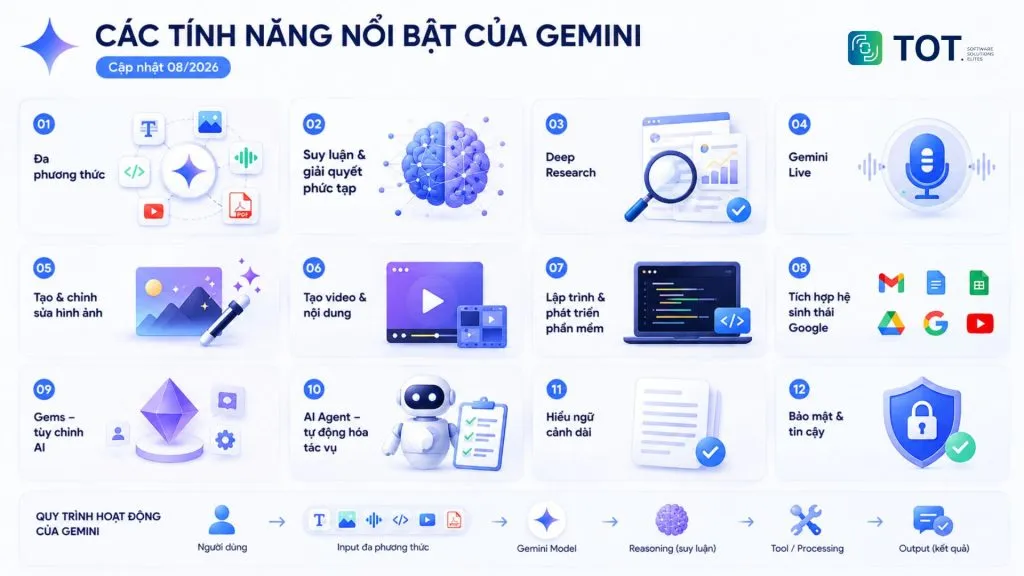
No overview of what Gemini is would be complete without a look at its features. Gemini has grown from a question-and-answer chatbot into an AI ecosystem capable of processing multimodal data, reasoning, researching, creating content, and helping carry out tasks. According to Google DeepMind, current Gemini models are oriented toward multimodal understanding, advanced reasoning, agentic coding, and tool use.
Below are the most notable features as of August 2026.
Multimodal processing (text, images, audio, video, source code)
Gemini is built to be natively multimodal, allowing current models to take in and combine text, images, audio, video, source code, and PDFs. This capability lets the AI not only “read” each format separately but also analyze the relationships between them within a single task. Gemini 3.6 Flash currently supports text, image, video, audio, and PDF input, along with a 1-million-token context window.
Real-world example: A salesperson photographs a partner’s handwritten price list, uploads it together with the company’s quotation Excel file, and asks Gemini to build a table comparing the difference for each product line. The whole process happens within a single conversation, with no need to re-enter data manually.
Support for reasoning and solving complex tasks
The newer Gemini models are designed to handle tasks that require reasoning, multi-step analysis, and working with large amounts of information. Google DeepMind currently positions Gemini 3.6 Flash for advanced reasoning, long-context understanding, agentic coding, and multimodal tasks. This broadens the scope of use from solving math problems and analyzing data to programming and research.
Real-world example: Instead of just asking the AI to solve a single problem, a user can provide an entire project brief, the input data, and the constraints, then ask Gemini to analyze the problem, propose options, and lay out each implementation step.
Deep Research – in-depth research
Deep Research lets Gemini plan a piece of research, search multiple sources, and synthesize them into a structured report. Data sources include Google Search, files and images uploaded by the user, Gmail and Drive when connected to Google Workspace, and notebooks in NotebookLM. A report typically takes about 5–10 minutes to complete and can be exported to Google Docs. With Google AI Ultra, a report can also contain charts, diagrams, and interactive simulations in supported cases.
Real-world example: A marketer can ask Gemini to research the AI market in Vietnam, combining web data with internal reports in Drive and documents from NotebookLM to produce a report covering trends, competitors, opportunities, and references.
Gemini Live – real-time voice conversation
Gemini Live is a low-latency voice conversation mode that lets you interrupt and change topics as naturally as talking to a real person. The feature also supports camera sharing and screen sharing on Android and iOS, so users can discuss directly what they are looking at.
Real-world example: When hitting an error in a piece of software, the user can open Gemini Live, share their screen, and ask how to fix it. Gemini can observe the interface being displayed and guide the user step by step, rather than the user having to take a screenshot and then describe the problem.
Image generation and editing
Gemini’s image generation comes from the Gemini Image model group, commonly known as Nano Banana. This group includes Nano Banana Pro for high-quality needs, Nano Banana 2 for speed, and Nano Banana 2 Lite optimized for cost. These models support generating and editing images with natural language, and can also take in reference images to maintain a character, object, or style across multiple edits.
Real-world example: A business can upload product photos to Gemini and ask it to create several versions of advertising imagery for a website, social media, or banners, then continue adjusting the colors, layout, and style with follow-up prompts.
Video and multimedia content creation
Gemini Omni is the model dedicated to video, positioned by Google with the message “create anything from anything.” This model takes text, images, audio, video, or sketches as input, then generates and edits video. Users can refine through conversation, transfer motion from one video to another, or replace characters and objects while keeping the scene consistent. Gemini Omni is currently available in the Gemini app, Google Flow, YouTube Shorts, Google Vids, Google AI Studio, and the Gemini API.
Real-world example: A marketing team can start from a product brief, use Gemini to build the concept and prompts, then generate the video with Gemini Omni or edit it flexibly right within the system. The result is short videos in a 9:16 ratio for YouTube Shorts or social media, produced quickly without building traditional film sets from scratch.
Support for programming and software development
For developers, Gemini can assist with many software development tasks such as writing code, debugging, explaining source code, refactoring, and handling tasks across a code repository. Google positions Gemini 3.6 Flash as the optimal choice for token efficiency in coding work, while Gemini 3.1 Pro targets agentic tasks and complex algorithm development.
Real-world example: When taking over an old project with no documentation, a developer can ask Gemini to read the source code, describe the main business flow, and point out places at risk of bugs. TOT also applies this approach in applying AI to software development.
Google ecosystem integration
Gemini is integrated into familiar Google products including Gmail, Docs, Sheets, Slides, Drive, Search, YouTube, and Android. Google also provides the Gemini API and Google AI Studio for developers to build AI applications. For business users, this is an important factor because work data often already lives inside this ecosystem.
Real-world example: A manager can ask Gemini in Drive to synthesize project reports, emails, and related documents to identify the three biggest risks, then create a tracking table of actions to take.
Gems – create custom AI assistants
Gems lets users create a version of Gemini with its own set of instructions, suited to repetitive work or specialized needs. Users can define the role, task, context, and response format, and can also add files as a knowledge source for a Gem in supported cases.
Real-world example: A content marketer can create a Gem specialized in writing SEO content with fixed rules about brand voice, heading structure, search intent, and keyword usage. Each time they need to write a new article, the user only has to provide the topic instead of repeating the entire set of instructions.
Task automation and AI Agent capability
Google is developing Gemini toward agentic AI — not just answering but also planning, using tools, and carrying out chains of actions. Current models support function calling, using search as a tool, and can even operate directly on a computer (computer use) in versions such as Flash-Lite. This is the foundation for businesses to build virtual assistants that handle entire processes rather than simply answering questions.
Real-world example: A warranty process can be handed to an AI agent. The system reads the customer’s email on its own, classifies the issue, looks up purchase history, and creates an intake ticket — reducing manual work, speeding up processing, and limiting errors.
The current Gemini versions
The Gemini ecosystem includes three main model lines — Flash, Flash-Lite, and Pro — optimized for different needs in speed, processing power, and cost. In addition, Google provides specialized models for reasoning, cybersecurity, images, audio, video, robotics, and data search. Choosing the right model helps optimize quality, speed, and deployment cost all at once.
Gemini 3.6 Flash
Gemini 3.6 Flash is the flagship model focused on speed, efficiency, and the ability to handle complex tasks at large scale. Google DeepMind positions this model for everyday work, programming, advanced reasoning, multimodal processing, and tasks requiring long context. The model supports text, images, video, audio, and PDF, with up to 1 million input tokens and 64,000 output tokens.
Standout features:
- Advanced reasoning at high speed.
- Processes text, images, video, audio, and PDF.
- Supports programming and multi-step tasks.
- Able to use tools such as search, function calling, and computer use.
- Suitable for applications that need speed and large-scale processing.
Best for: everyday tasks, agentic coding, advanced reasoning, long-context understanding.
Available on: the Gemini app, Google AI Studio, the Gemini API, Google Antigravity, and enterprise platforms.
Gemini 3.5 Flash-Lite
Gemini 3.5 Flash-Lite is the version aimed at high speed, optimized cost, and handling large numbers of tasks. According to the Artificial Analysis Index, the model reaches roughly 350 output tokens per second; the reference price is USD 0.30 per million input tokens and USD 2.50 per million output tokens without caching enabled.
Standout features:
- High response speed.
- Supports text, images, video, audio, and PDF.
- Handles large volumes of repetitive tasks well.
- Supports function calling, search, and computer use.
- Suitable for applications that need low latency.
Best for: high-volume agentic tasks, classification, data extraction, batch processing.
Available on: the Gemini app, Google AI Studio, the Gemini API, Gemini Enterprise Agent Platform.
Gemini 3.1 Pro
Gemini 3.1 Pro is the most powerful line among the general-purpose models, currently in Preview. The model is positioned for complex tasks that require deep reasoning, advanced programming, and processing large amounts of information. It supports text, images, video, audio, and PDF, with a context window of 1 million input tokens and 64,000 output tokens.
Standout features:
- Advanced reasoning for complex tasks.
- Supports programming and algorithm development.
- Handles long context and multimodal data.
- Supports function calling, search, and code execution.
- Suitable for research, engineering, and software development.
Best for: hard problems that require multi-step reasoning or processing large document sets.
Note: Google says a Gemini 3.5 Pro version is being prepared for release.
The models in the Gemini ecosystem
Alongside the three main lines, Google develops a group of specialized models for each domain:
- Gemini 3.1 Deep Think
Gemini 3.1 Deep Think is an in-depth reasoning mode built on Gemini 3.1. Google DeepMind describes it as its most intelligent model, intended for scientific, research, and engineering problems. The model has achieved results at international Olympiads in mathematics, physics, and chemistry.
Standout features: in-depth reasoning; solving scientific problems; supporting research; handling complex engineering problems.
- Gemini 3.5 Flash Cyber
Gemini 3.5 Flash Cyber is a model specialized in cybersecurity, fine-tuned to quickly detect, test, and help patch software vulnerabilities. The model suits security teams, developers, and systems that need to automate source-code review.
Standout features: vulnerability detection; vulnerability testing; suggesting and helping with fixes; suited to software security workflows.
- Gemini Omni
Gemini Omni focuses on the ability to generate and edit video from many types of input. Users can provide images, text, video, or audio as references and edit the video through natural conversation.
Standout features: video generation; step-by-step video editing; combining multiple input sources; maintaining content consistency.
- Gemini Image (Nano Banana)
Gemini Image, notable for its Nano Banana line, is a group of models specialized in generating and editing images. The newer versions focus on image quality, natural-language editing, and processing speed.
Standout features: image generation; image editing; handling reference images; maintaining characters and details across multiple edits.
- Gemini Audio
Gemini Audio includes 3.1 Flash Live for real-time conversation, 3.5 Live Translate for speech-to-speech translation in more than 70 languages, and 3.1 Flash TTS for text-to-speech.
Standout features: voice conversation; real-time speech translation; voice generation; adjusting intonation and speed.
- Gemini Robotics
Gemini Robotics includes Gemini Robotics 2, Gemini Robotics ER 2, and Gemini Robotics On-Device 2, bringing vision–language–action capabilities to robot control.
Standout features: environment awareness; multi-step planning; tool use; action control; adapting to many types of robots.
- Gemini Embedding 2
Gemini Embedding 2 is a multimodal embedding model supporting 8,192 input tokens, customizable vector dimensions from 128 to 3,072, and more than 100 languages, serving semantic search, classification, and RAG systems.
Standout features: multimodal data search; classification; data clustering; content recommendation; connecting information across many formats.
| Model | Standout features | Best-suited audience |
|---|---|---|
| Gemini 3.6 Flash | Balanced quality and cost, high token efficiency, 1-million-token context | General users, developers, businesses for everyday use |
| Gemini 3.5 Flash-Lite | High speed, optimized cost, high-volume processing | Businesses, developers |
| Gemini 3.1 Pro | Complex reasoning, advanced programming, long context | Experts, researchers, developers |
| Gemini 3.1 Deep Think | In-depth reasoning for science, research, engineering | Researchers, engineers, R&D teams |
| Gemini 3.5 Flash Cyber | Detecting, validating, and patching security vulnerabilities | Security teams, cybersecurity engineers |
| Gemini Omni | Generating and editing video from text, images, audio, video | Creators, marketing, studios |
| Gemini Image (Nano Banana) | Generating and editing images at several quality levels | Designers, marketers, content creators |
| Gemini Audio | Real-time conversation, speech translation, text-to-speech | Customer support, training, audio content production |
| Gemini Robotics | Vision–language–action for robots, able to run on-device | Automation businesses, robotics startups, research institutes |
| Gemini Embedding 2 | Multimodal, multilingual embeddings with flexible dimensions | Data teams, search and RAG systems |
What are the real-world applications of Google Gemini?
Gemini is most commonly applied in five areas: learning, office work, marketing and content creation, programming, and business operations. Thanks to its ability to process text, images, audio, video, and documents, Gemini can take on both simple tasks and work that requires multi-step analysis.
Using Gemini for learning
In learning, Gemini can help users summarize documents, explain difficult concepts, support research, and practice foreign languages. Learners can upload documents to ask for chapter-by-chapter summaries, have a concept explained in plain language, or ask questions based on what they’ve studied. Gemini can also create multiple-choice questions and exercises, and play a conversational role to practice language skills.
Real-world example: A student can upload a research paper as a PDF to Gemini and ask it to summarize the main arguments, explain specialized terminology, then create 10 knowledge-check questions based on the document.
Using Gemini at work
In office work, Gemini helps draft emails, write and standardize documents, brainstorm ideas, analyze data tables, summarize meetings, and plan work. Thanks to its built-in integration in Gmail and Docs, most actions happen right in the tools employees already use every day.
Real-world example: A manager can give Gemini meeting notes and ask it to summarize them into key decisions, a task list, owners, and deadlines. The AI can then continue to help build an implementation plan.
Using Gemini in marketing and content creation
For marketing, Gemini can help throughout the process — from keyword research, finding content ideas, and building outlines to writing and analyzing content. Users can also combine Gemini with the image- and video-generation tools in the Google ecosystem to develop media assets for a website, social media, or an advertising campaign.
Real-world example: A marketer can ask Gemini to analyze the topic “AI in business,” suggest keyword groups and article ideas, build an SEO outline, then develop the content and propose illustration ideas for each section.
Using Gemini in programming
Gemini can support developers across many stages of software development, from writing code, finding and fixing bugs, refactoring code, and explaining source code to creating technical documentation. With its ability to work with large amounts of source code, Gemini can also help analyze a code repository to find relationships between files or determine the root cause of a bug.
Real-world example: A developer can provide a source-code repository and ask Gemini to find why an API is responding slowly. The AI can analyze the relevant files, explain the problem, suggest optimizations, and help write tests for the changed code.
Using Gemini in business
At the enterprise level, Gemini is used as an internal AI assistant, a data-analysis tool, a process-automation platform, and support for software development, knowledge management, and building AI agents. Through the Gemini API, a business can embed AI capabilities into its own CRM, ERP, or internal software already in operation.
Real-world example: A business can build an internal AI assistant connected to its document repository and business processes. When an employee asks a question, the system finds the relevant information, synthesizes an answer, and guides the next steps. For suitable processes, an AI agent can go further and perform actions such as classifying requests, creating tickets, and passing information to the responsible department.
Is Gemini free? The current Gemini plans
Gemini has a free tier and three paid plans with progressively higher limits. According to Google’s official sign-up page in Vietnam, the current options are Free, Google AI Plus, Google AI Pro, and Google AI Ultra. Users only need a Google account to get started, then upgrade when their needs exceed the free tier’s limits.
Does Gemini have a free version?
Yes. With a Google account, you can use Gemini 3.6 Flash, limited access to Gemini 3.1 Pro, image generation, Deep Research, Gemini Live, Canvas, and Gems, plus 15 GB of storage shared with Gmail, Drive, and Photos. The free version is enough for moderate learning and personal work needs.
What’s different about paid Gemini?
The paid plans mainly provide higher usage limits, broader access to the more powerful models, advanced content-creation features, and more storage. In Vietnam, Google currently lists the plans as follows:
| Plan | Reference price (VND/month) | Highlights | Storage |
|---|---|---|---|
| Free | 0 | Gemini 3.6 Flash, limited access to 3.1 Pro, image generation, Deep Research, Gemini Live, Canvas, Gems | 15 GB |
| Google AI Plus | 132,000 | 2× the free tier’s limits, video generation, 200 Google Flow credits, Gemini Notebook, Gmail and Docs integration | 400 GB |
| Google AI Pro | 489,000 | 4× the limits, full access to 3.1 Pro, Deep Search, 1,000 Google Flow credits, Google Antigravity, YouTube Premium Lite | 5 TB |
| Google AI Ultra | 2,250,000 or 5,500,000 | Highest limits (5× or 20×), early access to Deep Think and Gemini Spark, 10,000–25,000 Flow credits, Project Genie | From 20 TB |
The prices above are referenced from the Gemini subscription plans page for the Vietnamese market as of August 2026 and may change according to Google’s policy.
Should businesses use Gemini?
Gemini is a good fit for a business when AI can clearly solve a need in the work or operating process. Before rolling it out, a business should assess six factors:
- How necessary AI is
- Security and data-storage requirements
- Ability to integrate with existing systems
- Number of users
- Need to use the Gemini API
- Governance mechanisms
If a business only needs an AI assistant for employees or support with everyday work, a suitable Gemini plan will do. Conversely, if it wants to bring AI into internal software, automate processes, or build a dedicated product, the Gemini API is a better fit because it lets you integrate AI directly into the system.
On security, a business needs to review data policy, access rights, and governance capability before using it. Google provides mechanisms to manage users and Gemini access within the Workspace environment.
How to use Google Gemini
Google Gemini has a fairly intuitive interface, so beginners can start using it in just a few steps. You can access Gemini in a browser, choose a suitable model, enter a request, upload documents or images for analysis, and keep the conversation with the AI going within the same chat.
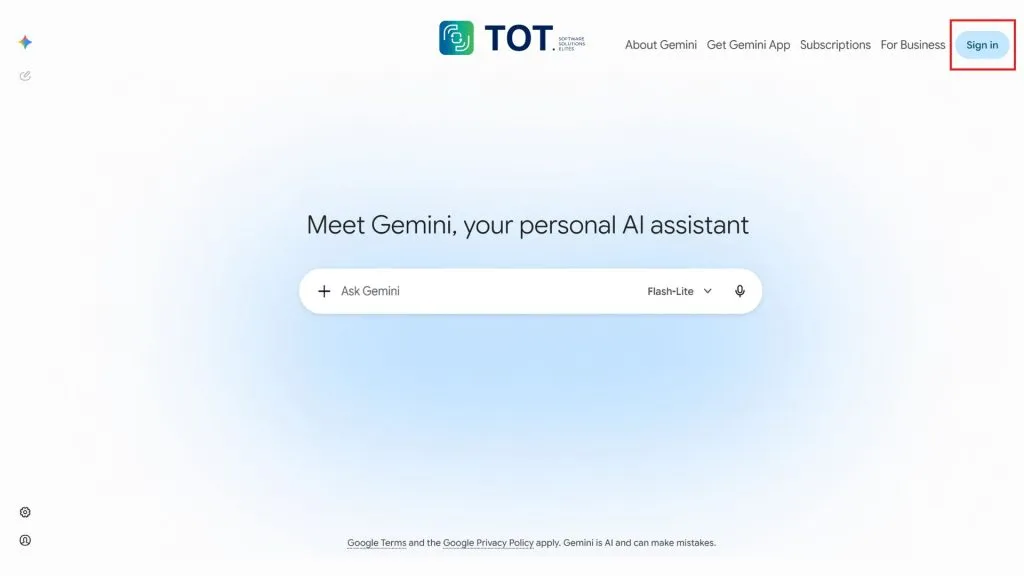
Step 1: Access and sign in to Google Gemini
Go to Google Gemini in a browser or install the Gemini app on Android and iOS. Sign in with a personal Google account or your company’s Google Workspace account. If you use a company account, some features may depend on the configuration your administrator has enabled.
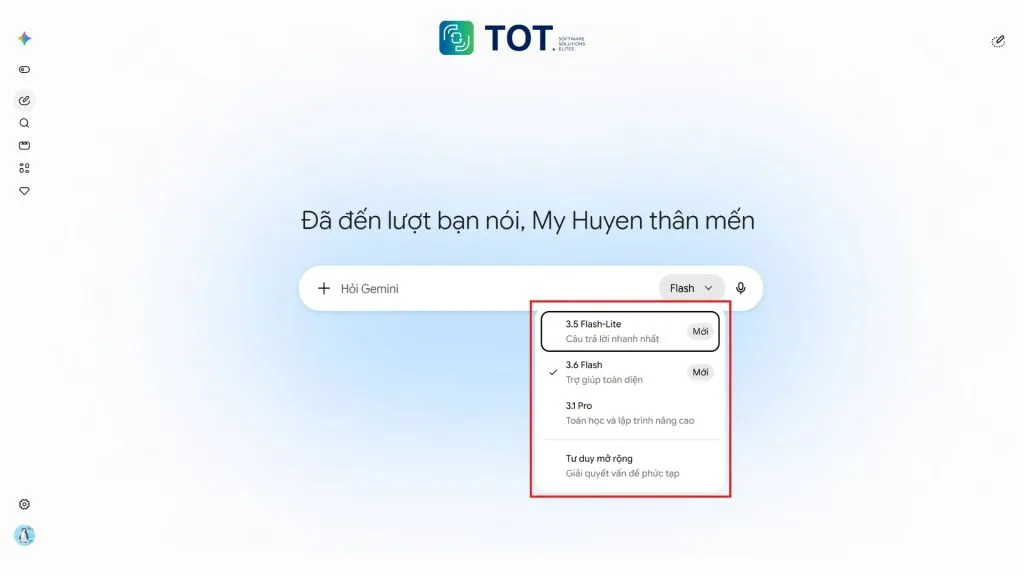
Step 2: Choose the right Gemini model
In the request-input area, select the model name to open the list of available Gemini models. For everyday needs such as summarizing, writing content, or brainstorming, prioritize fast models like Gemini Flash to save time and resources.
For complex problems, research, or programming, choose more powerful models like Gemini Pro (if your account supports it) for better reasoning.
Step 3: Enter a prompt and send the request
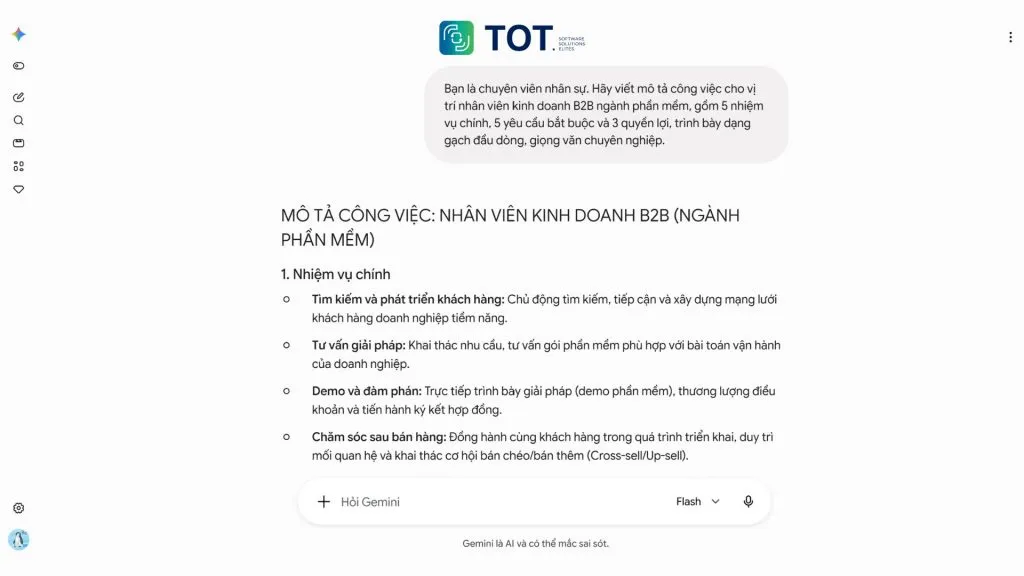
The quality of the answer depends heavily on how you write the prompt. A good prompt should clearly state the role, context, request, and desired output format.
An example you can apply right away: “You are an HR specialist. Write a job description for a B2B sales representative in the software industry, with 5 main responsibilities, 5 mandatory requirements, and 3 benefits, presented as bullet points in a professional tone.”
You can find more on how to write effective prompts in the article what is a prompt.
Step 4: Upload documents or images for Gemini to analyze
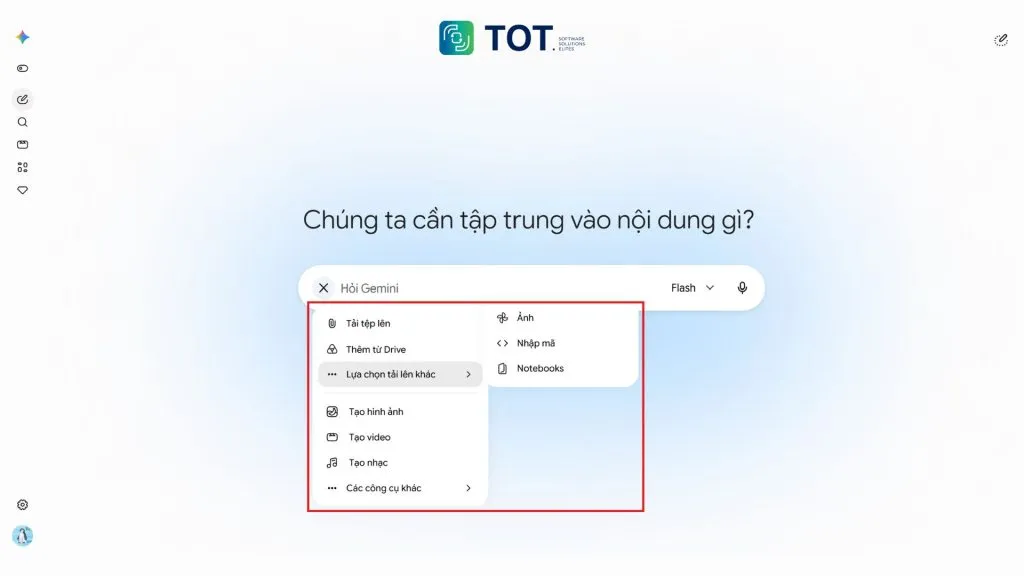
To have Gemini analyze specific content, enter your request and then click the “+” (Add files) icon to upload documents, images, video, or supported data. You can also pull files from Google Drive in cases where you have been granted access. Gemini lets you upload several file types in a single request, but the number and size limits depend on the file type, account, and plan.
Step 5: Review, edit, and continue the conversation
After receiving the result, double-check the important figures and information. You should not use Gemini’s output right away without checking it, especially for specialized information, figures, or important content.
Verify the facts, then ask the AI to fix any parts that aren’t quite right, shorten them, add examples, or re-present them for your intended use. Continuing the conversation helps Gemini maintain context and handle the request step by step, without making you re-enter all the information.
Step 6: Use the advanced features
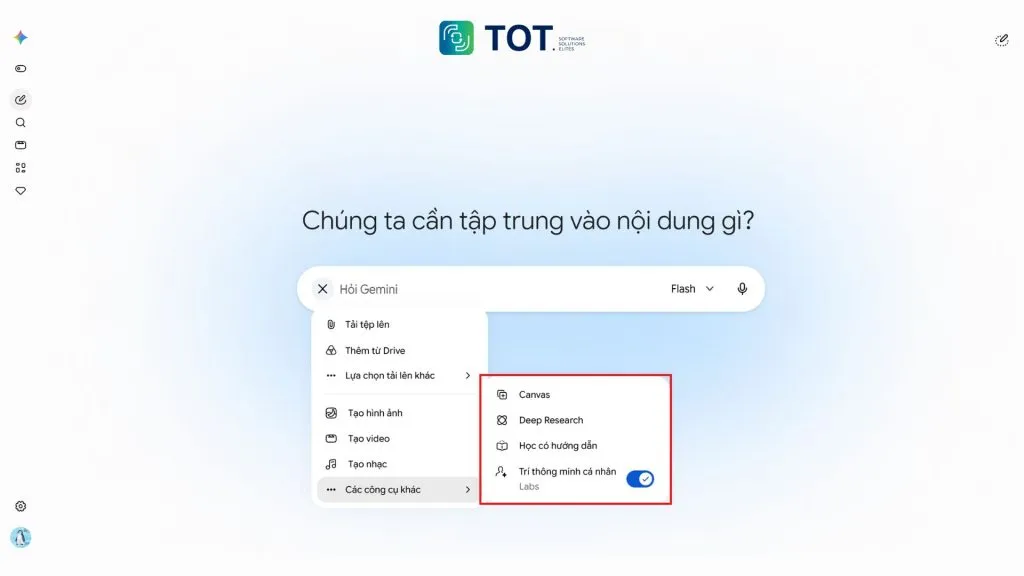
Once you’re comfortable, make use of Deep Research for reports that need many sources, Gemini Live when you need to converse by voice, Canvas to draft and edit long-form content, and Gems to create dedicated assistants for each repetitive task. For developers, Google AI Studio and the Gemini API are where you experiment and bring the model into real products.
Gemini’s drawbacks
Despite its many strong capabilities, Gemini still has limitations that users need to understand clearly before applying it to learning, work, or business. AI can help process and synthesize information quickly, but it does not always produce accurate results or ones that fit every situation.
- It can produce inaccurate information
Gemini can sometimes produce information that is wrong, lacks context, or is out of date, especially on fast-changing topics. The AI may present an answer very convincingly even when some facts are inaccurate. So for figures, legal, financial, or medical information, or important content, users should verify the source before use.
- Quality depends on the model
Not every version of Gemini has the same capabilities. The models are optimized differently for speed, reasoning, context handling, and cost. A fast, economical model may be fine for simple tasks but won’t necessarily give the best results for in-depth research or complex programming. Choosing the right model for each task is an important factor in ensuring output quality.
- Some features depend on the plan and region
What you can do with Gemini may vary by subscription plan, country, language, device, and account. Some advanced features or more powerful models may require a paid plan or may not yet be available in every region. Therefore, users should check the terms of use before choosing Gemini for a long-term process.
- AI does not fully replace human verification
Gemini should be seen as a support tool, not an absolute source of information. Users still need to evaluate, cross-check, and take responsibility for the final content, especially when the results are used in business decisions or work that directly affects customers. Combining AI with human verification helps you take advantage of Gemini’s speed while limiting the risk of misinformation.
Comparing Gemini with ChatGPT and Claude AI
Gemini, ChatGPT, and Claude are all powerful AI assistants, but each has different strengths:
- Gemini stands out for its multimodal capability and Google ecosystem integration
- ChatGPT has a broad app ecosystem and a large user community
- Claude is highly regarded for working with long text and writing code.
The table below compares them along the criteria businesses commonly weigh.
| Criteria | Gemini | ChatGPT | Claude |
|---|---|---|---|
| Developer | Google & Google DeepMind | OpenAI | Anthropic |
| Multimodal processing | Very strong: text, images, audio, video, PDF within a single model | Strong: text, images, voice, attachments | Strong with text, images, and documents |
| Writing and content creation | Good, and can be combined with image and video generation within the same ecosystem | Good, with many options to customize the tone | Good, often praised for its natural writing style |
| Programming | Good, optimized for token efficiency and supports agentic coding | Good, with a rich ecosystem of tools | Good, strong at understanding large-scale source code |
| Document and data analysis | Context up to 1 million tokens, can read many files at once | Supports file uploads and data analysis | Handles long documents well, stays close to the source content |
| In-depth research | Has Deep Research, connects to Search, Drive, Gmail, NotebookLM | Has an in-depth research mode | Able to research and synthesize multiple sources |
| Ecosystem integration | Deepest with Gmail, Docs, Drive, Search, YouTube, Android | A diverse store of apps and third-party integrations | Integrates via API and enterprise platforms |
| AI Agent capability | Supports function calling and computer use, with a clear agentic direction | Supports agents and extended tools | Supports agents, strong at multi-step tasks |
| Free / paid | Has a free tier; AI Plus, AI Pro, AI Ultra plans | Has a free tier and paid plans | Has Free, Pro, Max, Team, and Enterprise |
| Best-suited audience | Users and businesses already inside the Google ecosystem | Users who need a general-purpose tool with many extensions | Teams that work heavily with long documents and source code |
Rather than looking for the answer to “which tool is best?”, you should choose based on your real needs:
Businesses: They can use several tools in parallel, assigning each platform to the group of work it fits rather than depending on a single tool.
- Gemini: A good fit if your data and workflows mostly live in Google Workspace such as Gmail, Docs, Sheets, and Drive.
- ChatGPT: A good fit if you need a versatile AI assistant that supports many kinds of work and has an extensive tool ecosystem.
- Claude: Worth considering if your work centers on long documents, in-depth analysis, and source code.
Businesses can use several tools in parallel, assigning each platform to the group of work it fits rather than depending on a single tool.
The future of Gemini and AI development trends
Google is developing Gemini to go beyond the role of a question-and-answer chatbot. In the coming years, the focus may shift toward the ability to understand context, use tools, carry out tasks, and support users in real-world processes.
These changes also reflect the broader trend in AI, as models are increasingly integrated deeply into work and daily life.
- AI Agents and automation
Gemini is gradually shifting from a model that answers requests to one that can plan and carry out chains of tasks. Instead of only telling users how to do something, the AI can use tools, access information, and perform some of the assigned steps. This is the foundation for AI agents capable of handling a process from start to finish under human supervision.
Example: An AI agent in a business can take in a request from an email, find the relevant information, classify the request, and create a task for the responsible department.
- Multimodal AI
The ability to understand and generate content keeps expanding to images, audio, video, and real-time data. The emergence of specialized models for video, audio, and robotics shows that Google is building an ecosystem of models that work together rather than a single, standalone model.
- Context-personalized AI
Gemini has an advantage when connected to the Google ecosystem, from Gmail, Drive, and Docs to other services. The next trend is AI that can better understand each user’s context and needs, and thus give more suitable answers rather than responding based on a single isolated question. However, personalization also requires clear access-control and data-protection mechanisms.
- AI integrated into work
Rather than being a separate tab, AI is becoming a layer running in the background within Workspace, programming tools, data-analysis systems, and business processes. For organizations in Vietnam, the biggest opportunity lies not in trying out tools but in bringing AI to the right bottlenecks in existing processes — an area where TOT supports businesses through its custom software development service.
Conclusion
As this article shows, the answer to the question what is Gemini doesn’t stop at “a Google chatbot.” Gemini is a family of multimodal AI models underpinning both the assistant app for end users and the solutions for developers and businesses, with many versions serving different needs in speed, cost, and problem difficulty. For individual users, the free version is enough for most learning and work needs. For businesses, the real value comes when AI is attached to the right process and internal data — that’s when the question shifts from “which tool to use” to “how to build the solution.”
Frequently asked questions
What is Gemini?
Gemini is a family of multimodal artificial intelligence models developed by Google and Google DeepMind that can take in text, images, audio, video, and PDF documents within a single model and return results as text, images, or video depending on the version. Gemini is both an AI assistant app for end users at gemini.google.com and a model platform for developers and businesses to build applications through Google AI Studio and the Gemini API.
Is Gemini the same as Google Bard?
Gemini is the successor to Bard. Google launched Bard in March 2023 as an experimental chatbot, then renamed it to Gemini in February 2024 to unify the naming of the assistant app and the AI model family behind it. As a result, Bard no longer exists as a separate product; the entire chat, content-creation, and advanced-feature experience is now provided in the Gemini app.
Is Gemini free?
Gemini has a free version. Users only need a Google account to use the Gemini 3.6 Flash model, generate images, and use Deep Research, Gemini Live, Canvas, and Gems within certain limits. If you need higher limits, full access to the Pro model, video generation, and more storage, you can upgrade to the paid plans Google AI Plus, Google AI Pro, or Google AI Ultra.
Does Gemini support Vietnamese?
Gemini supports Vietnamese for both entering prompts and receiving answers. Users can ask questions, request document summaries, translate, or write content in Vietnamese and get results in Vietnamese. The Gemini app interface and the subscription-plans information page also have Vietnamese versions. For specialized content, users should still verify the terminology and figures before official use.
Can Gemini generate images?
Gemini can generate and edit images through the Gemini Image model group, commonly known as Nano Banana. This group includes Nano Banana Pro for high-quality needs, Nano Banana 2 for fast speed, and Nano Banana 2 Lite optimized for cost. Users can describe the image they want to create, upload an existing image to edit, and refine the result through multi-turn conversation right in the Gemini app or via the Gemini API.