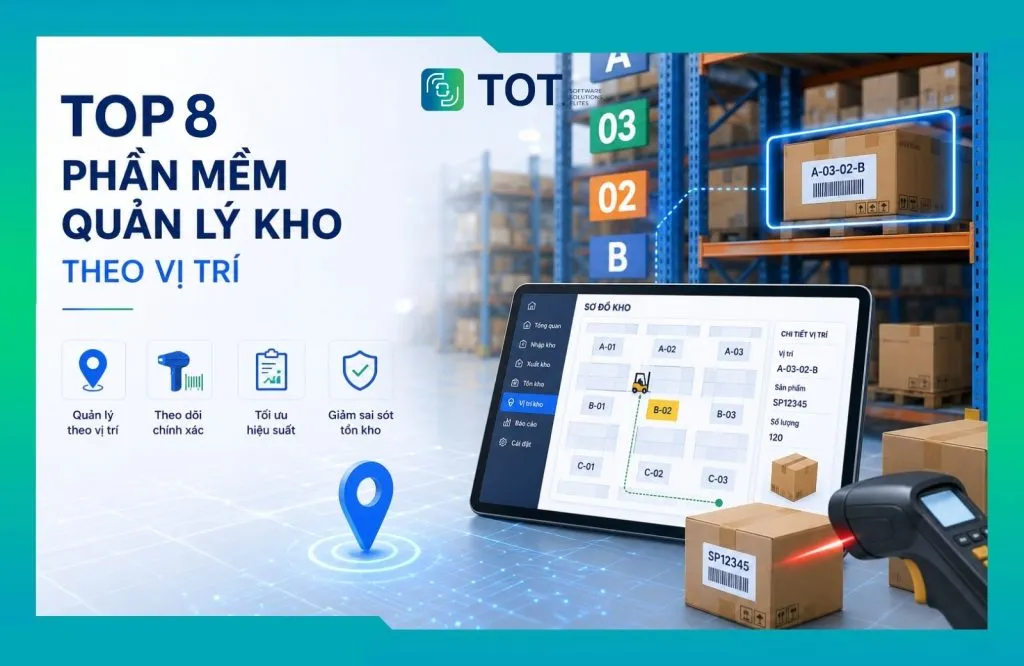
As the number of SKUs and storage locations keeps growing, controlling goods is no longer just about answering “how much stock is left” but also pinpointing exactly “where the stock is.” Location-based warehouse management software lets businesses tie each item code to a specific storage location in the warehouse — from zone, aisle and rack down to level or bin. Data is updated across receiving, issuing, transfer and stocktaking operations, helping staff find goods faster and reducing errors during operations. In this article, TOT rounds up 8 software solutions worth considering, along with the key criteria a business needs to choose a solution that fits its warehouse size and model.
>>> See also:
- Top 15 free and effective production warehouse management software in 2026
- What is CRM for car showrooms? A complete customer management solution
- Top 15 popular car garage management software
Quick overview of 8 location-based warehouse management software
Each solution supports location management to a different degree, from tracking inventory at each warehouse/zone to detailed management by location or bin. The table below focuses on the features directly related to identifying, storing, picking and transferring goods by location.
| Software | Key location-management features | Best suited for |
| 1. Odoo Inventory | Multi-level storage location management, putaway rules, picking and transfers between locations | Small and medium businesses that need warehouse management and plan to expand into ERP |
| 2. Zoho Inventory | Inventory tracking by warehouse and storage zones, transfer management, barcode support for receiving and issuing | Commercial, multichannel and e-commerce businesses |
| 3. KiotViet | Inventory management by warehouse/branch, transfers, stocktaking and stock lookup at each location | Retail stores, store chains and small businesses |
| 4. MISA AMIS Warehouse | Multi-warehouse management, receiving/issuing, transfers, stocktaking and goods tracking across storage locations | Vietnamese businesses that need to link warehouse data with accounting and management |
| 5. SAP EWM | Warehouse bin management, putaway, picking, transfers and stocktaking by location | Large enterprises, factories and distribution centers with complex warehouse operations |
| 6. Oracle Warehouse Management | Location management, inventory by location, putaway, picking and optimization of goods flow in the warehouse | Large enterprises with a warehouse network and complex supply chains |
| 7. Epicor Prophet 21 WMS | Bin management, picking, cycle counting and location-based goods handling | Distribution and wholesale businesses with large product catalogs |
| 8. Weaver WMS | Storage location management, location-based receiving/issuing, transfers and stocktaking | Businesses that need to standardize warehouse storage structure and processes |
>>> Learn more:
- A guide to using Google AI Studio effectively and quickly
- Mobile app design cost: how much to build and maintain a new app in 2026?
What is location-based warehouse management software?
Location-based warehouse management software is a system that lets businesses know exactly where goods are stored in the warehouse — from zone, aisle, rack and level down to each individual bin. This is a key function of a Warehouse Management System (WMS), and it is especially useful for businesses with many product codes and many storage locations.
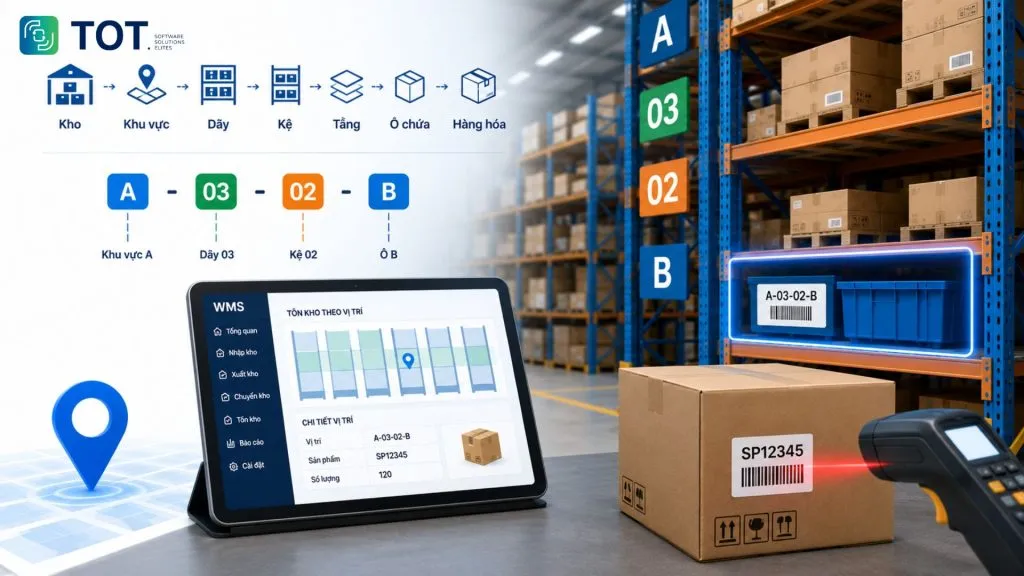
A warehouse is typically divided into several levels following this structure: Warehouse → Zone → Aisle → Rack → Level → Bin → Goods. Each location can be given its own code so staff can easily recognize it and the system records exactly where goods are stored.
For example, a location coded A-03-02-B can be read as zone A → aisle 03 → rack 02 → bin B. When receiving goods, staff can scan the product code and the location code to record that the goods have been placed in the right spot. When goods are issued or moved to another location, the quantity and location in the system are updated accordingly.
How does location-based warehouse management differ from multi-warehouse management?
Multi-warehouse management tells you which warehouse the goods are in, while location-based management tells you where the goods are inside that warehouse. The two approaches can be used together but differ in their level of detail.
For example, a business has warehouses in Hanoi and Ho Chi Minh City. A multi-warehouse system can tell you that product A has 500 units left in the Ho Chi Minh City warehouse. A location-based system, however, can give more detail: Ho Chi Minh City warehouse → zone A → aisle 03 → rack 02 → level 04 → bin B05 → 120 units. With this information, staff don’t have to search the entire warehouse and can go straight to the right zone, rack or bin to pick the goods.
An example of location-based goods management
Suppose a distribution business has 4,000 product codes and hundreds of storage locations. If it only manages inventory by warehouse, staff might know that product A has 300 units left in the Ho Chi Minh City warehouse but not where those goods actually are.
With location-based management, the system can record:
- 120 units: Ho Chi Minh City warehouse → zone A → aisle 03 → rack 02 → level 04 → bin B05.
- 180 units: Ho Chi Minh City warehouse → zone B → aisle 01 → rack 05 → level 02 → bin A03.
When an order requires product A, staff can immediately check the location in the system and go straight to the right place to pick the goods. After picking, the stock quantity at that location is updated.
This approach also supports other tasks such as putting goods away, picking, transferring goods between locations and stocktaking, helping businesses keep control of their goods throughout warehouse operations.
>>> See also:
- Top 15 production management software for businesses
- Top 20+ best free AI image design software
Benefits of deploying location-based warehouse management software
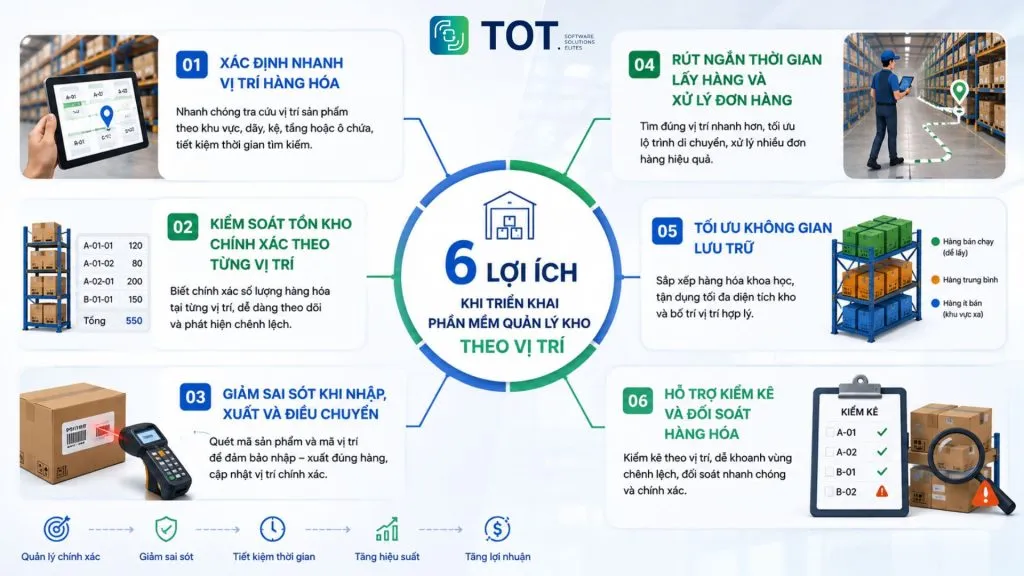
Managing goods by location helps businesses know where goods are, how much is left and where to handle them. When information is updated in a single system, staff can find goods faster, reduce mix-ups and support more accurate warehouse control. Here are 6 standout benefits that location-based warehouse management software brings to businesses:
Quickly locate goods
The software helps staff quickly see which zone, aisle, rack, level or bin a product is stored in. Instead of memorizing the warehouse layout or searching rack by rack, staff simply look up the product code in the system to identify the location they need to go to.
This is especially useful for warehouses with many product codes or goods stored across many different locations. When new staff come on board, the location information in the system also helps them get familiar with the warehouse faster.
Accurate inventory control at each location
The software not only shows total stock but also how much of each product is at each location. For example, if a product code has 500 units in total split across 3 different bins, the system can record the specific quantity in each bin.
As a result, businesses can easily spot goods spread across too many locations, stock sitting in one zone for too long, or discrepancies between the actual quantity and the system’s figures.
Fewer errors in receiving, issuing and transfers
Location-based management helps staff identify the right place to store goods and the right place to pick them, and then accurately update the location after goods are moved. Combined with barcodes or QR codes, staff can scan the product code and location code to reduce data-entry errors.
For example, when two products with similar names or packaging are placed on different racks, clear location information helps staff reduce the risk of picking the wrong item. When goods are moved to another bin, the system also records the new location so whoever processes the next order can find the right goods.
Shorter picking and order-processing times
Knowing the exact location of goods helps staff reduce search and travel time in the warehouse when processing orders. Instead of checking each zone, staff can rely on the location list provided by the system to go to the right place and pick the goods.
For large warehouses or many simultaneous orders, the software can help arrange a sensible picking sequence, helping staff avoid returning to the same zone multiple times.
Optimized storage space
Data on locations and quantities helps businesses arrange goods more sensibly and make better use of warehouse space. For instance, frequently issued products can be placed in easy-to-reach locations, while rarely issued goods can be moved to more suitable areas.
Businesses can also track which locations are empty, in use or low on stock in order to proactively reorganize the warehouse. This helps avoid situations where one zone is overcrowded while many other locations are underused.
Support for stocktaking and reconciliation
The software lets businesses take stock by zone or location, making it easier to pinpoint where discrepancies arise. Staff can check each zone in turn, record the actual quantity and compare it with the system’s figures.
If shortages or surpluses are found, businesses can quickly narrow down the location to check instead of reviewing the entire warehouse. This makes stocktaking and finding the cause of discrepancies more convenient.
>>> Learn more:
- How to integrate a chatbot into your website for free and sell effectively
- Build an app for Android/iOS easily, no coding required
- A guide to creating a free online sales website professionally
Essential features of location-based warehouse management software
Location-based warehouse management software needs to fully support tasks from identifying storage locations, putting goods away, picking and transferring goods, to stocktaking and inventory tracking. When choosing a solution, businesses should check the features below to ensure the software fits how their warehouse actually operates.
Warehouse layout and storage location management
The software should let businesses divide the warehouse into smaller zones and locations to manage goods more easily. Depending on the model, a warehouse can be divided into zone → aisle → rack → level → bin, with each location having its own code.
Beyond location information, businesses may also need to manage capacity, the type of goods suited to each location, or the status of each location. For example, one zone may be reserved for fragile goods, while another is for bulky goods or goods awaiting inspection.
Identifying the location and quantity of goods
The software should help staff quickly look up where a product is and how much is at each location. Lookups should work both ways: search by product code to find where a product is, or select a location to see which products are stored there.
This information helps staff find goods quickly when processing orders, while helping managers track how goods are distributed across the warehouse.
Support for receiving and putting goods away
When new goods arrive, the software should help identify and record a suitable storage location. Staff can update the location as soon as goods are placed in the warehouse, and the system updates the corresponding stock quantity.
More advanced systems can suggest a location based on the type of goods, remaining capacity or the arrangement the business has set up. This makes putaway more consistent rather than relying entirely on each staff member’s experience.
Support for location-based picking
When processing orders, the software should clearly provide the product to pick and its corresponding location so staff can find goods faster. This information can include the product code, quantity to pick, zone, rack or bin.
For warehouses with many orders, some software can also batch multiple orders so staff can pick goods in a single pass. This reduces back-and-forth travel and improves order-processing efficiency.
Transferring goods between locations
The software needs to accurately record when goods are moved from one location to another. For example, when moving 50 units from bin A01 to bin B03, the system must reduce the quantity at A01 and update the corresponding quantity at B03.
Transfer history should also be saved so businesses can check where goods were moved from, to where and when. This is useful information when investigating the cause of inventory discrepancies.
Stocktaking by location
Location-based stocktaking helps businesses check goods by zone rather than having to check the entire warehouse at once. Staff can check each aisle, rack or bin in turn, record the actual quantity and compare it with the system’s figures.
When there is a discrepancy, the software should point out the product and location where the mismatch occurs so the business can quickly check and resolve it.
Location-based inventory lookup and reporting
Location-based reports help managers clearly see how goods are distributed across the entire warehouse. Beyond the stock quantity of each product, businesses may need to look up which locations hold goods, which are empty, the quantity in each zone, or the history of location changes.
These reports help managers identify locations that are being used inefficiently and provide additional data to reorganize goods when needed.
>>> Learn more:
- 13 best open-source chatbot platforms
- What is Claude AI? A guide to registering a free Claude AI account
- A guide to building an app with Low Code — simple and highly effective
Criteria for choosing location-based warehouse management software for your business
Businesses should evaluate software based on how their warehouse actually operates, rather than just the number of advertised features. A suitable solution needs to manage the required level of location detail, accurately track inventory, meet the warehouse’s scale and be able to connect with the systems the business already uses.
How granular can it manage locations?
First, businesses need to determine how granularly the software can manage goods in the warehouse. Some solutions only track down to the warehouse or zone level, while dedicated warehouse management systems can manage down to aisle, rack, level and each individual bin.
The level of detail needed depends on the warehouse model. For a small warehouse, managing by zone may be enough. Conversely, a warehouse with thousands of product codes and many storage racks will need more detailed management so staff can pinpoint the right location.
Ability to track inventory by location
The software needs to show how much of each product is at each location, and this information must be updated after every receipt, issue or transfer.
Beyond stock quantities, businesses should check the ability to view goods movement history. When a discrepancy occurs, managers can use this history to determine which location goods were moved from, to where, and when.
Ability to meet warehouse scale and model
The software needs to meet the current warehouse scale and be able to scale up as the number of goods, locations or warehouses grows.
Businesses should consider factors such as:
- The number of warehouses to manage.
- The number of product codes.
- The number of storage locations.
- The number of staff working on the system simultaneously.
- The number of orders and receiving/issuing transactions per day.
- The complexity of the storage and picking processes.
Software that suits a small warehouse may not perform well once a business expands into multiple warehouses with thousands of locations.
Ability to integrate with existing systems
Warehouse management software should be able to connect with the systems the business already uses to avoid entering data multiple times.
Depending on the need, businesses may want to connect with an enterprise resource planning (ERP) system, accounting, sales or e-commerce software, or barcode/QR scanners. When systems are connected, information about products, orders, receiving/issuing and inventory can be synchronized, making data more consistent.
Customization and scalability
Businesses should prioritize software that can be adjusted to their actual processes and scaled up as needs change.
For example, a business may need to change how location codes are assigned, add special storage zones, or set up a dedicated process for fragile goods or goods that need inspection before entering the warehouse. If the software offers strong customization, the business can easily adjust the system as its scale and operations change.
Cost and deployment model
Cost should be evaluated based on the total budget required throughout the entire usage period, not just the initial purchase or subscription fee.
Businesses should clarify items such as licensing or subscription fees, deployment, customization, training, maintenance and technical support. They should also weigh the two common models: using a cloud platform (Cloud) or installing on the business’s own servers (On-premise).
Avoid comparing prices between software when the deployment scope differs. Instead, businesses should request a quote based on the number of warehouses, users, locations and the features actually needed.
Support and deployment capability in Vietnam
Post-deployment support is an important factor, especially for a system used directly in daily warehouse operations.
Businesses should check whether the vendor offers Vietnamese-language support and has a technical team or implementation partner in Vietnam. They should also find out the response time when the system encounters errors, the ability to train staff, and how well the vendor understands warehouse operations in Vietnam.
>>> See also:
- AI customer recognition at showrooms solutions in 2026
- How to build an AI app with vibe coding on Google AI Studio, made simple
- What is optimizing your website with AI? How to optimize SEO and the AI tools to use
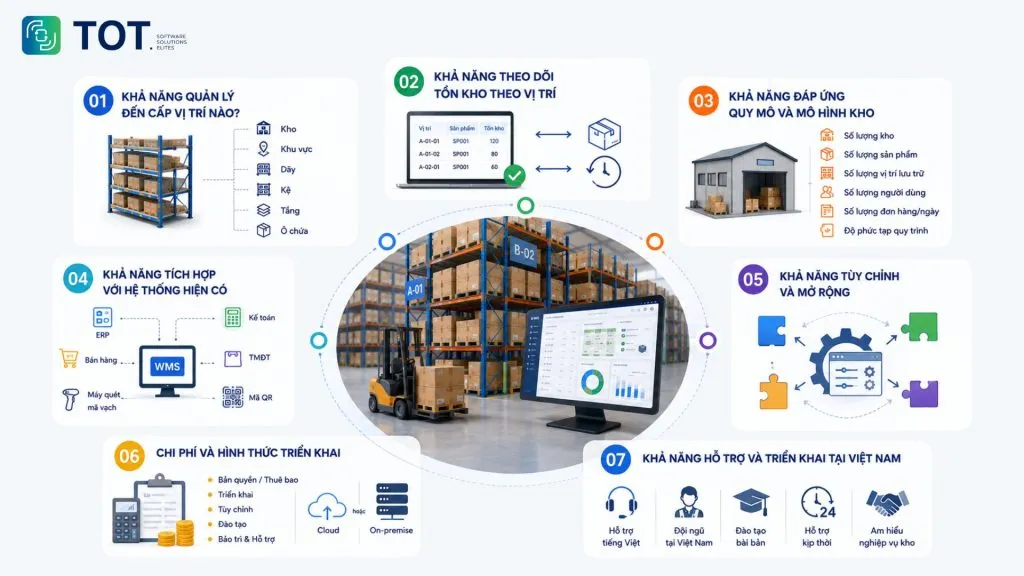
Top 8 popular and trusted location-based warehouse management software for 2026
Each tool has its own strengths and level of location management, from solutions suited to small warehouses to in-depth WMS systems for large-scale warehouses. Below are 8 software solutions worth considering, selected based on their ability to identify locations, control inventory, and receive, issue and transfer goods.
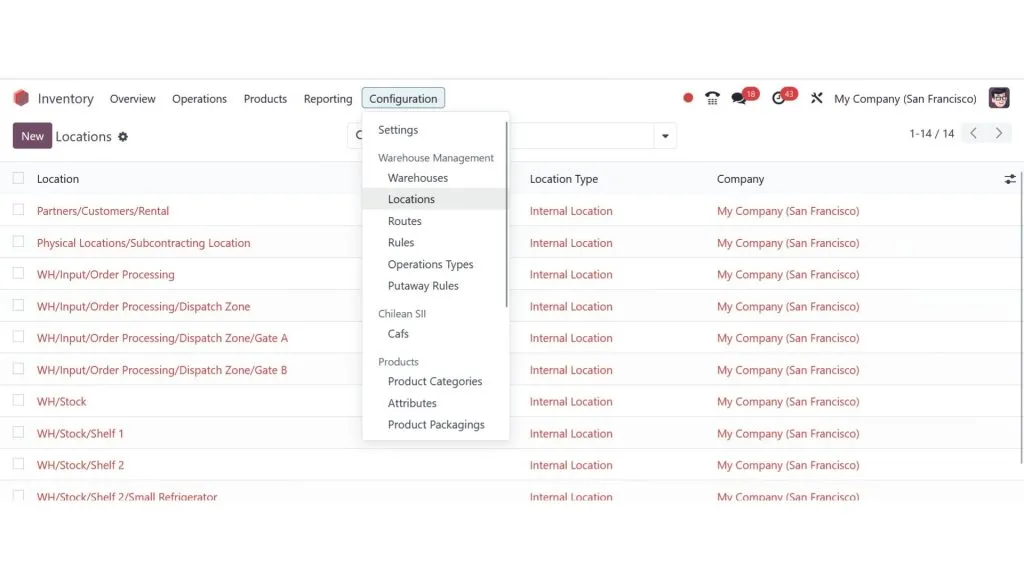
1. Odoo Inventory location-based warehouse management software
Odoo Inventory is the warehouse management software within the Odoo suite, suited to businesses that want to combine warehouse management with activities such as purchasing, sales and business management.
Key features:
- Lets you build multiple levels of storage locations in the warehouse.
- Tracks goods at each location.
- Supports rules for putting goods away in suitable locations.
- Supports location-based picking.
- Lets you transfer goods between locations and updates inventory.
- Supports lot and serial number management.
Pros:
- Rich warehouse management features.
- Can connect with other modules in the same suite.
- Scalable as the business grows.
Cons:
- Setting up the system may require experienced personnel.
- Some in-depth warehouse management needs may require additional configuration or customization.
Best suited for: Small and medium businesses that want location-based warehouse management and plan to expand into an enterprise management system.
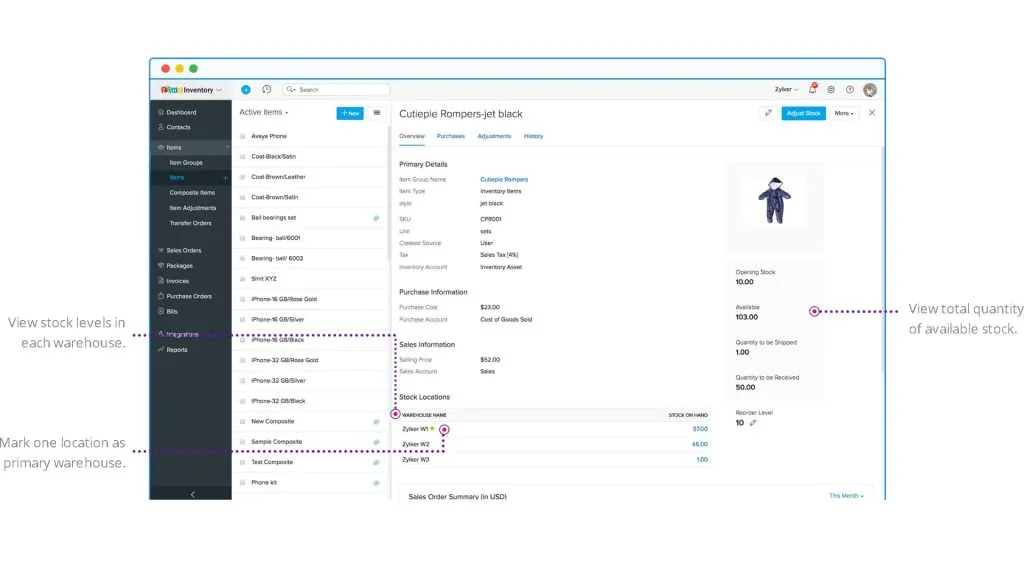
2. Zoho Inventory location-based warehouse management software
Zoho Inventory is cloud-based warehouse management software, suited to commercial and multichannel sales businesses that need to track goods across multiple locations.
Key features:
- Tracks inventory across multiple warehouses and locations.
- Manages goods by the storage zones the system supports.
- Supports barcode scanning during receiving and issuing.
- Tracks goods by lot and serial number.
- Supports transfers between warehouses.
Pros:
- Can be deployed on the cloud.
- A relatively approachable interface.
- Suited to online and multichannel sales businesses.
Cons:
- Its detailed location management may not meet the needs of warehouses with complex structures the way a dedicated WMS can.
- Some advanced operations may depend on the plan or system configuration.
Best suited for: Online shops, e-commerce businesses and multichannel sellers that need to manage inventory across multiple locations.
>>> Learn about:
- Free computer vision software: easy-to-use platforms
- What is application software? Common types of application software
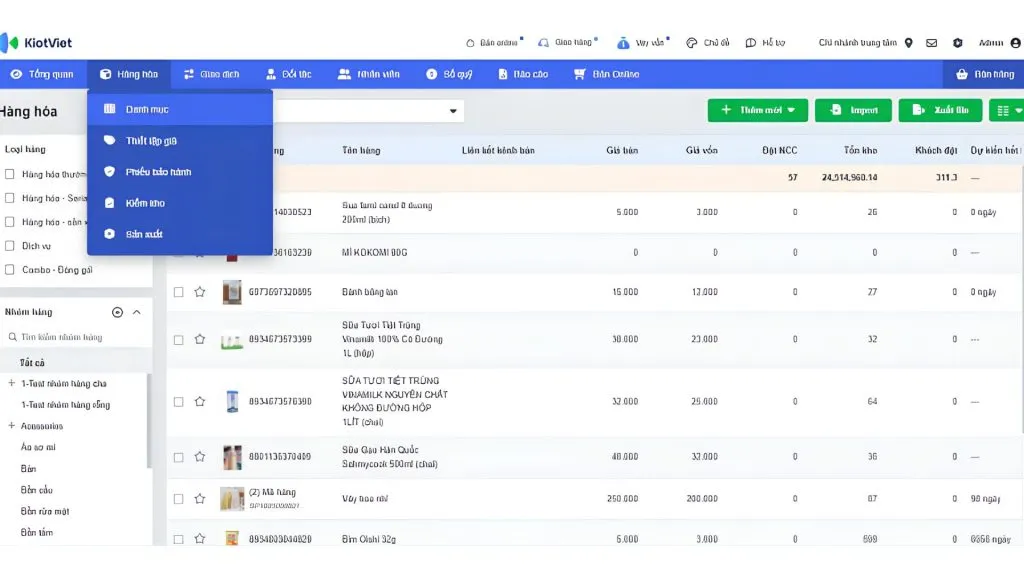
3. KiotViet location-based warehouse management software
KiotViet is sales management software with warehouse management functionality, suited to stores and retail chains that need to control goods across multiple warehouses or branches.
Key features:
- Tracks inventory at each warehouse or branch.
- Supports transfers between warehouses.
- Stocktaking and reconciliation of goods quantities.
- Manages goods with barcodes.
- Looks up stock quantities at each location.
Pros:
- Vietnamese interface that is easy to get started with.
- Suited to retail and store-chain models.
- Includes tools to support goods management and stocktaking.
Cons:
- Detailed management down to each rack, level or bin is not its main strength.
- Less suitable than a dedicated WMS for warehouses with complex location structures.
Best suited for: Retail stores, store chains and small businesses that need to manage goods by warehouse or branch.
4. MISA AMIS Warehouse location-based warehouse management software
MISA AMIS Warehouse is a warehouse management solution within the MISA AMIS ecosystem, suited to Vietnamese businesses that need to connect warehouse data with accounting and management activities.
Key features:
- Manages goods across multiple warehouses.
- Tracks receiving, issuing and transfer operations.
- Supports goods stocktaking.
- Tracks inventory quantities.
- Connects data with other modules in the MISA system.
Pros:
- Suited to businesses using the MISA ecosystem.
- Vietnamese interface and support.
- Able to link data between the warehouse and accounting.
Cons:
- Detailed location management down to each rack, level or bin is not its main strength.
- Warehouses with complex picking and arrangement processes may need a more in-depth WMS solution.
Best suited for: Small and medium Vietnamese businesses that prioritize warehouse management tied to accounting and business management.
5. SAP EWM location-based warehouse management software
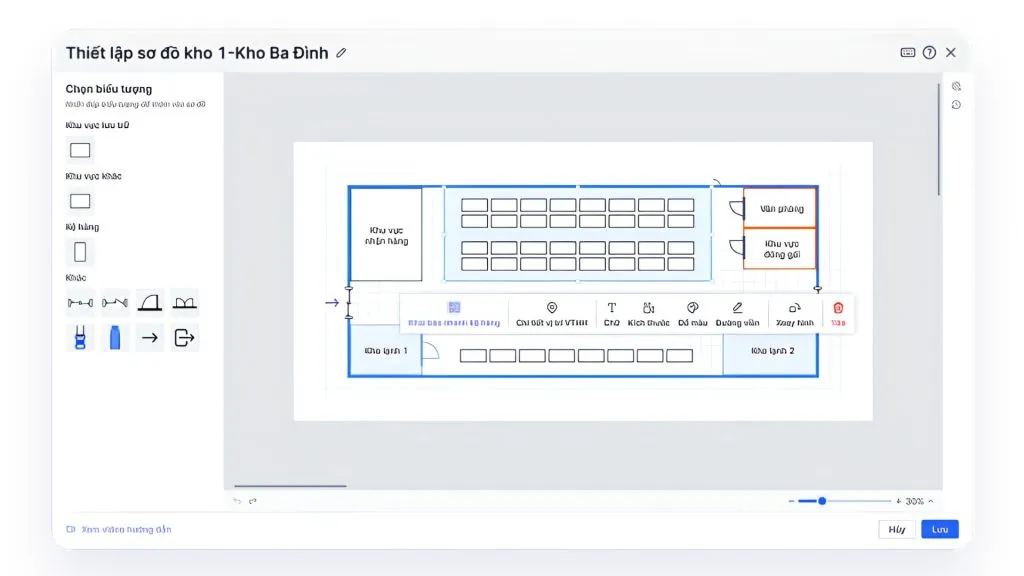
SAP Extended Warehouse Management (SAP EWM) is an in-depth warehouse management system aimed at large enterprises with complex warehouses and operations.
Key features:
- Manages goods down to each bin/storage location in the warehouse.
- Supports putting goods away in suitable locations.
- Supports identifying picking locations.
- Manages transfers of goods between locations.
- Supports location-based stocktaking.
- Can connect with automation devices and systems in the warehouse.
Pros:
- Supports many in-depth warehouse operations.
- Suited to warehouses with many zones and storage locations.
- Able to connect with the SAP ecosystem.
Cons:
- Deployment is usually more complex than basic warehouse management software.
- May require a specialized team and an experienced implementation partner.
Best suited for: Corporations, manufacturing and distribution businesses, and large-scale distribution centers.
>>> Reference:
- 18 ways to apply AI to e-commerce for high effectiveness
- Designing a professional e-commerce website with 7 details
6. Oracle Warehouse Management location-based warehouse management software
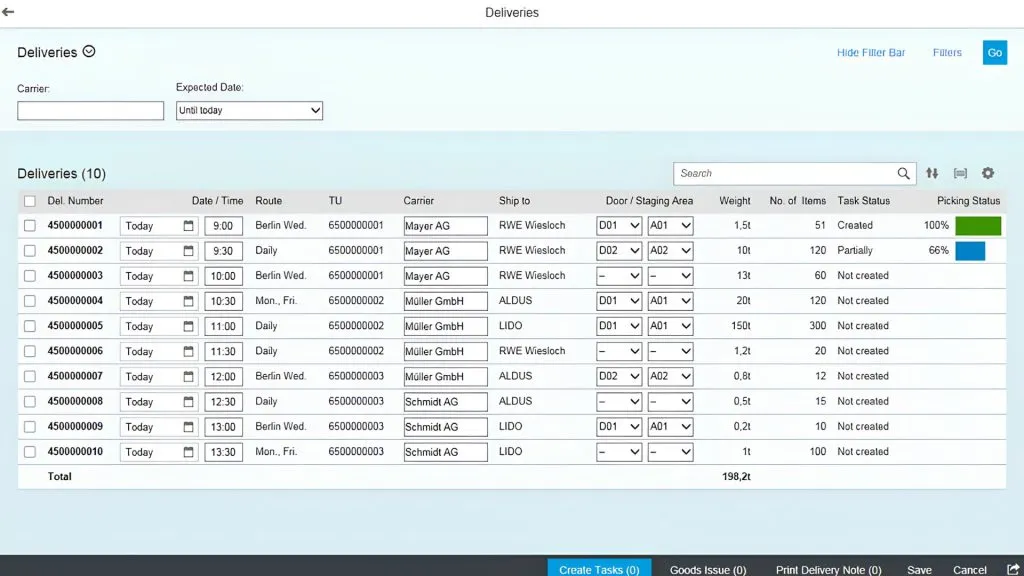
Oracle Warehouse Management is a warehouse management solution within the Oracle ecosystem, aimed at businesses with large-scale warehouse and supply chain operations.
Key features:
- Manages the structure and storage locations in the warehouse.
- Tracks goods at each location.
- Supports putting goods away and picking.
- Supports multiple picking approaches suited to each warehouse model.
- Tracks warehouse operations across multiple locations.
Pros:
- Suited to businesses with complex supply chains.
- Scalable as the number of warehouses and transactions grows.
- Can connect with other solutions in the Oracle ecosystem.
Cons:
- May require significant time and resources to deploy.
- Not a suitable choice for businesses with only simple warehouse management needs.
Best suited for: Large enterprises, corporations and businesses with many warehouses or a wide distribution network.
7. Epicor Prophet 21 WMS location-based warehouse management software
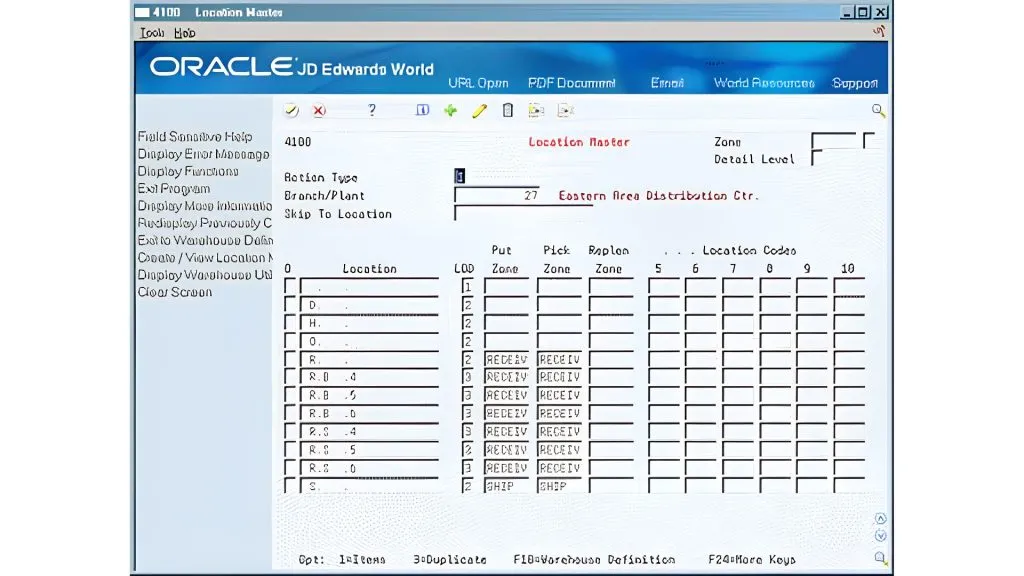
Epicor Prophet 21 is a management solution for distribution businesses, in which the warehouse management system supports location-based goods control and picking operations.
Key features:
- Manages goods by location/bin in the warehouse.
- Supports finding goods locations when processing orders.
- Supports picking with handheld devices.
- Periodic stocktaking.
- Manages goods with multiple units of measure and packaging specifications.
Pros:
- Suited to the specific needs of distribution businesses.
- Can combine warehouse management with buying and selling activities in the same system.
Cons:
- Less common in the Vietnamese market than some other solutions.
- Businesses may need to research the implementation and support provider carefully.
Best suited for: Wholesale and distribution businesses with many product codes, many orders and high receiving/issuing frequency.
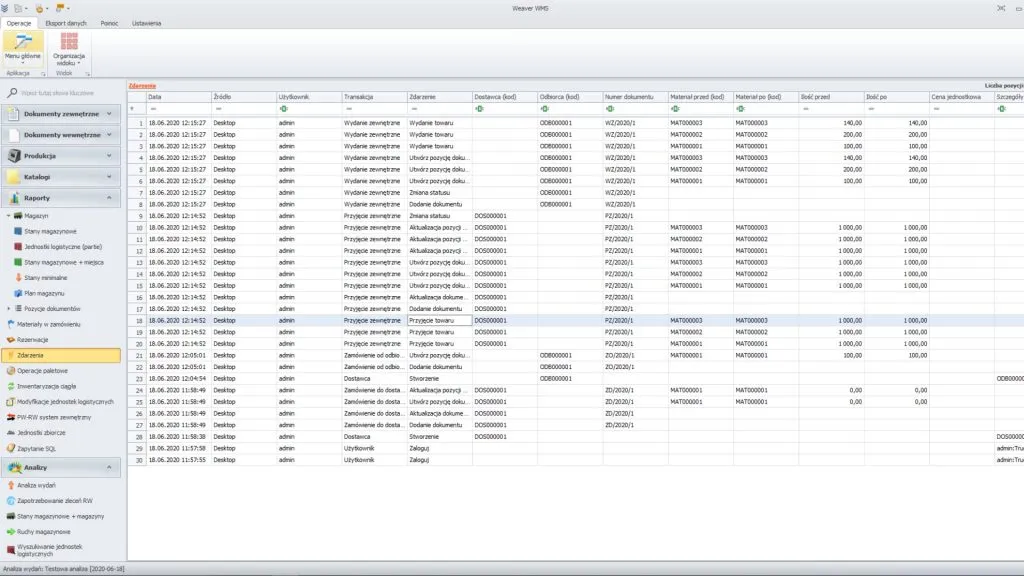
8. Weaver WMS location-based warehouse management software
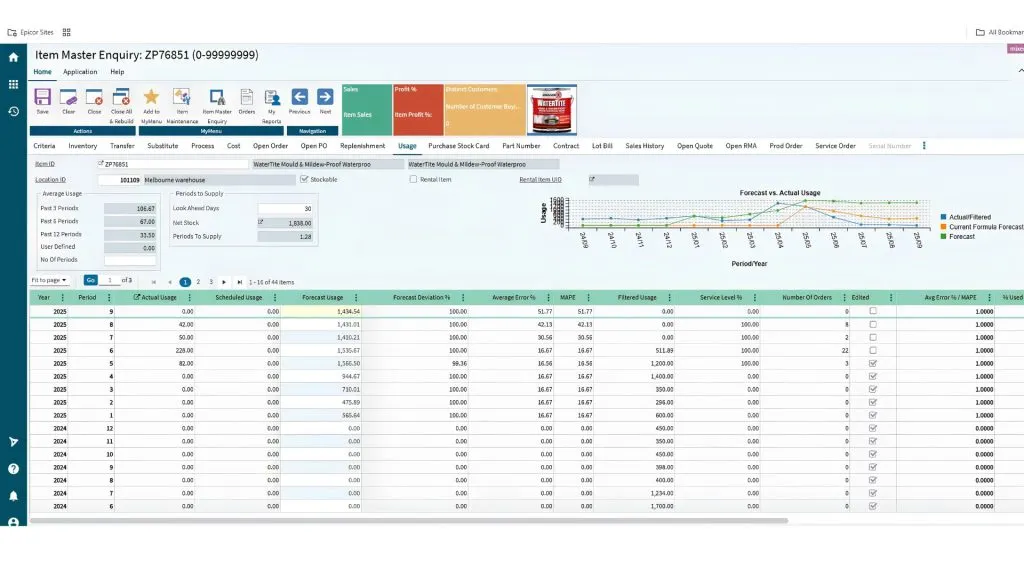
Weaver WMS is a warehouse management solution focused on organizing goods by location and helping businesses standardize their receiving, storage and picking processes.
Key features:
- Manages storage locations in the warehouse.
- Records the location when goods are received into the warehouse.
- Supports finding and picking goods by location.
- Supports transferring goods between locations.
- Stocktaking by zone or location.
Pros:
- Focused on warehouse management operations.
- May suit businesses that want to standardize how goods are arranged and stored.
Cons:
- Businesses should check its popularity and support ecosystem before deployment.
- You should ask the vendor for a live demonstration on your actual warehouse layout.
Best suited for: Businesses with mid-sized warehouses that need clearer location-based goods management.
Applying AI in location-based warehouse management software
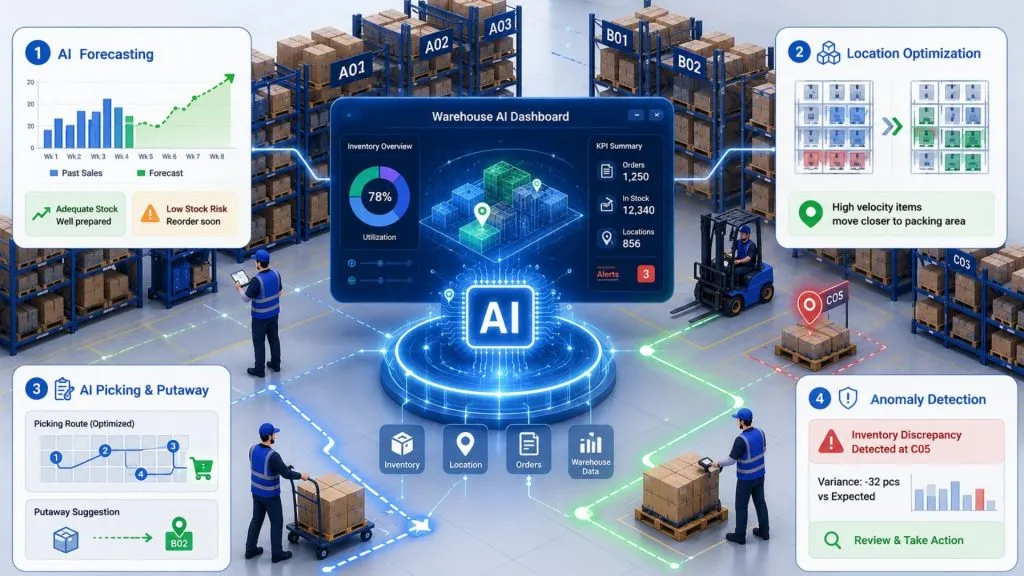
AI helps warehouse management software not only record where goods are but also analyze data to forecast, recommend and detect issues during operations. By combining inventory data, storage locations and receiving–issuing history, AI can help businesses optimize warehouse layout and improve goods-handling efficiency.
AI for analyzing and forecasting inventory demand
AI can analyze sales data and receiving–issuing history to forecast future demand for goods. The system can consider factors such as quantities already sold, consumption trends over time, seasonality, or periods of peak demand to produce forecasts.
As a result, businesses can proactively prepare the right amount of stock, avoiding shortages or excess inventory. Forecast data can also be used to plan purchasing and allocate goods between warehouses or storage zones.
AI for optimizing storage locations
AI can help determine the right location for each type of goods based on how goods are actually received and issued. For example, products with a high issuing frequency can be recommended for placement near the packing or shipping area so staff don’t have to travel too far.
Beyond receiving/issuing frequency, the system can consider size, weight, product characteristics and the capacity of each location. This gives businesses a basis to arrange goods more sensibly rather than relying solely on warehouse staff’s experience.
AI for supporting Picking and Putaway
AI can help staff choose suitable picking and put-away locations, thereby reducing travel time in the warehouse.
For picking, AI can analyze the locations of the products in an order and suggest a sensible picking sequence. If a product is stored in multiple locations, the system can also help choose the right location based on stock levels or the rules the business has set up.
For putaway (placing goods into storage), AI can suggest a location that has enough capacity and suits the product’s characteristics. This helps avoid having staff search for empty locations manually.
AI for detecting anomalies and supporting decisions
AI can analyze warehouse data to detect unusual fluctuations that managers find hard to spot when monitoring manually. For example, the system can alert when a location frequently has inventory discrepancies, a group of goods has unusual shrinkage, or issuing volume changes suddenly.
Combined with location data and transaction history, managers can quickly identify which area to check, adjust stock levels, or plan goods transfers.
When AI is properly integrated into the warehouse management system, businesses can shift from merely tracking data to proactively forecasting and optimizing operations. TOT provides consulting, development and custom AI integration services, helping businesses gradually apply AI to inventory forecasting, storage location optimization and picking–putaway support.
>>> See also:
- How to build a multichannel AI sales chatbot effectively, in detail
- 7 ways to apply AI to optimize customer experience: 2026 trends
- TOP 10 AI website design tools, free, paid and effective
Custom location-based warehouse management software development from TOT
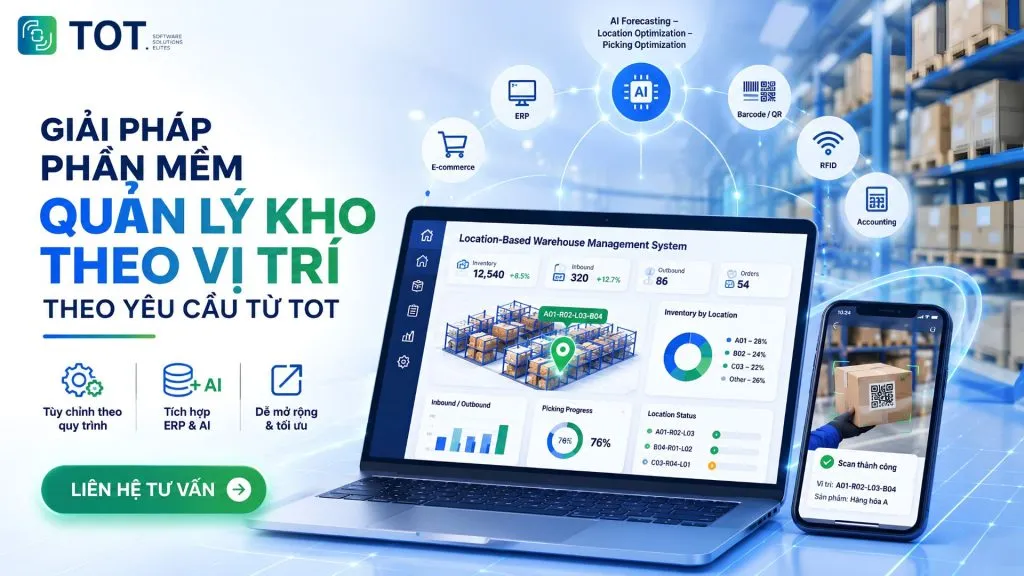
Once a business has identified its need for location-based warehouse management and wants to add AI, custom-built software can help connect all of these operations in a single system. Instead of changing processes to fit off-the-shelf software, businesses can build a solution based on their warehouse structure, operations and the systems they already use.
When should you build custom location-based warehouse management software?
Businesses should consider building custom software when off-the-shelf solutions cannot meet their warehouse management process or specific integration requirements. Common cases include:
- The warehouse has a complex location structure that needs to be managed down to each zone, aisle, rack, level or bin in a specific way.
- The business has specific receiving, issuing, transfer or stocktaking processes that cannot be easily configured in off-the-shelf software.
- You need deep integration with ERP, accounting, sales, e-commerce or existing internal systems.
- You want to integrate barcodes, QR, RFID or other warehouse operation devices into the same process.
- You need to apply AI to inventory forecasting, location optimization, picking or anomaly detection, but the current software doesn’t support it.
- The business needs dedicated control over data, permissions, approval workflows or reporting.
However, building custom software is not always necessary. If off-the-shelf software already meets most operations and can be customized at a reasonable cost, businesses should prioritize configuration or integration before building an entirely new system.
>>> See also:
- What is an ERP system in manufacturing? Benefits, features and how to use it
- TOP 5 contractor management software for construction, best in 2026
TOT’s process for deploying custom location-based warehouse management software
TOT deploys software in phases, starting from understanding how the warehouse operates through to development, testing and go-live. The process can involve 7 steps:
1. Current-state survey: Understand the warehouse structure, how location codes are assigned, the receiving – issuing – transfer – stocktaking process and the problems the business is facing.
2. Business analysis: Turn real requirements into specific processes and functions, defining how the system manages locations, goods, users and data.
3. Solution design: Build the data structure, interface and workflows suited to warehouse staff, managers and related departments.
4. Software development: Program the functions within the agreed scope, while connecting with ERP, accounting, sales or other systems if needed.
5. Testing: Test the system with real data and scenarios, especially for receiving, putaway, picking, transfer and stocktaking operations.
6. Training: Guide staff to use the system by role, from warehouse staff to managers and system administrators.
7. Operation and optimization: Put the software into use, monitor operations and keep adjusting as new needs arise in the business.
TOT’s real-world implementation experience
Besides custom software development, TOT has experience deploying solutions that combine software, AI and data-processing technology for businesses. This is the foundation for TOT to advise on and build systems capable of connecting with existing processes and technology infrastructure.
One example is the AI Computer Vision application project, in which AI technology is used to process and analyze images. This case study is used to demonstrate TOT’s technology development and integration capabilities.
For businesses that need to build their own system, TOT can accompany you from problem analysis, solution design and software development to integration and operation, depending on the actual scope and requirements.
>>> Further reading:
- Professional custom software development services in Hanoi
- Get professional, good-value custom software development in HCMC
Conclusion
In summary, location-based warehouse management software solves the biggest bottleneck for warehouses with many product codes: pinpointing where goods are and how much is at each location. When choosing a solution, businesses should focus on the level of detail the system can manage, its ability to track inventory by location, its fit with the warehouse’s scale, its ability to integrate with ERP and existing systems, and its support capability in Vietnam. For warehouses with specific processes or deep integration needs, building a custom system is the way to keep the software closely aligned with real operations and to scale sustainably over time.
Frequently asked questions about location-based warehouse management software
What is location-based warehouse management software?
Location-based warehouse management software is a system that helps businesses pinpoint exactly where goods are stored in the warehouse. Instead of only knowing how much stock an SKU has, the system can record which zone, aisle, rack, level or bin the goods are in, while updating the data after every receipt, issue and transfer.
How does location-based warehouse management differ from multi-warehouse management?
Multi-warehouse management tells you which warehouse the goods are in, while location-based management pinpoints where the goods are inside that warehouse. For example, multi-warehouse management can tell you a product is in the HCMC warehouse, while location-based management can pinpoint that the product is in zone A, aisle 03, rack 02, level 04, bin B.
Can the software manage goods down to the rack/bin level?
Yes, but the ability to manage down to the rack, level or bin varies from one solution to another. In-depth WMS systems usually allow building a multi-level location structure and assigning a unique code to each location. Businesses should check this capability directly against their actual warehouse structure before choosing.
Can location-based warehouse management software integrate with ERP?
Yes. Warehouse management software can connect with ERP to synchronize data between warehouse operations and other departments in the business. Data commonly connected includes product information, orders, receiving – issuing slips, inventory quantities and data for accounting. The specific integration capability will depend on the software and how the system is deployed.
Which businesses should use location-based warehouse management software?
This solution is especially suited to businesses with many product codes, many storage locations, or frequent receiving, issuing and transfer activities. Models that commonly need it include manufacturing, distribution, e-commerce and logistics businesses. For small warehouses with few SKUs and simple storage, a business may not yet need an in-depth location management system.
When should you build custom location-based warehouse management software?
Businesses should consider custom software development when off-the-shelf software cannot meet their processes or specific integration needs. This may be the case when a business needs to manage locations with a unique structure, integrate deeply with ERP and internal systems, or wants to integrate AI to forecast inventory, optimize locations and support operations.
TOT is a companion on your digital transformation journey, providing website design, mobile app, custom software and artificial intelligence software solutions tailored to each business need.
With practical consulting and implementation experience, TOT helps businesses build a digital transformation roadmap, apply AI and automate processes to optimize operations and create a sustainable competitive advantage.
TOT contact information:
🌐 Website: topon.tech
📞 Hotline/WhatsApp/Zalo: 0906 712 137
✉️ Email: long.bui@toponseek.com
🏢 Address: 31 Hoang Dieu Street, Xom Chieu Ward, Ho Chi Minh City, Vietnam