
What is DNS over HTTPS? It is a common question for anyone who wants to protect domain name resolution from being read or tampered with in transit. DNS over HTTPS (DoH) carries DNS queries inside an encrypted HTTPS connection, improving privacy while you browse the web. That said, DoH is not a VPN, it does not fully hide your Internet activity, and it does not replace DNSSEC.
In this article, TOT explains how DoH works, what it protects, its pros and cons, how DoH differs from DoT, DNSSEC and DNSCrypt, and how to enable Secure DNS on popular platforms.
>>> See more articles:
- What is website security? Why it matters and how to keep your website safe
- What is CSRF? Attack techniques and how to prevent CSRF effectively
- A curated list of the best DNS servers that are fast and easy to use
- What is RFI? The role of a request for information in business
- What is SQL injection? How to block and prevent SQL injection attacks effectively
What is DNS over HTTPS?
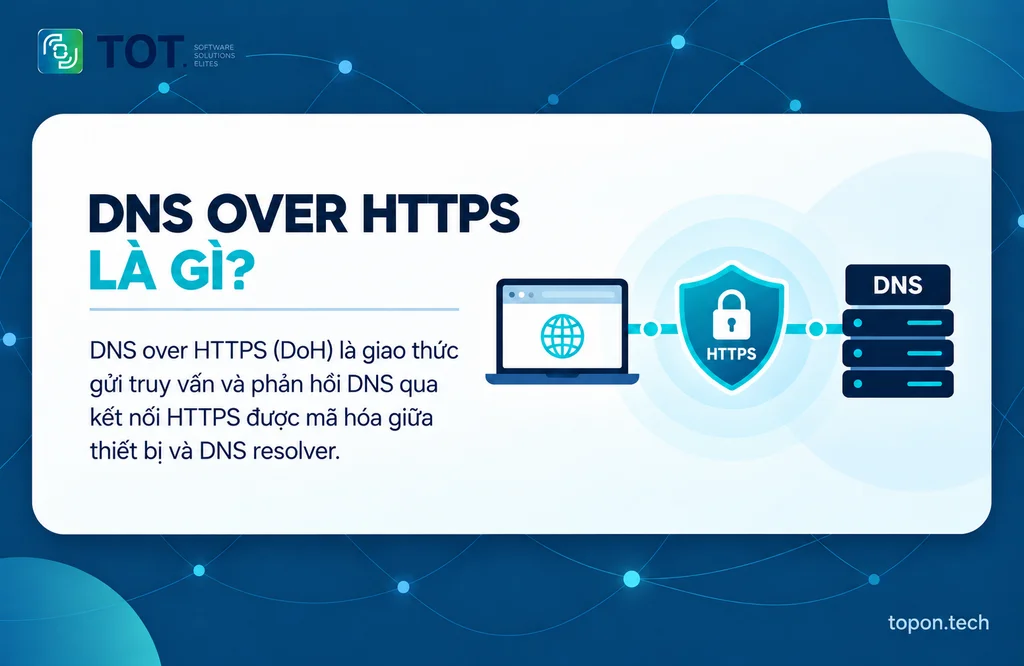
DNS over HTTPS (DoH) is a protocol that sends DNS queries and responses over HTTPS instead of transmitting them as plain text like traditional DNS. DoH was standardized by the IETF in RFC 8484, typically runs over port 443, and uses TLS to protect the data exchanged between a device or browser and a DoH-capable DNS resolver.
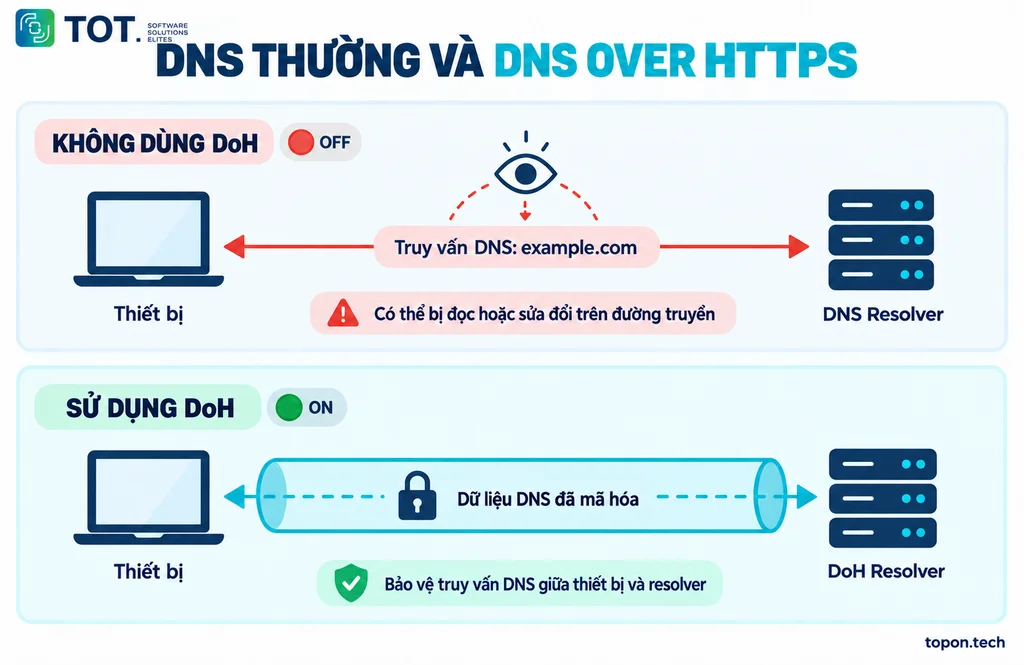
DNS is responsible for translating easy-to-remember domain names, such as topon.tech, into IP addresses that a device can use to connect. With traditional DNS, anyone observing the same network path can see or interfere with the query. DoH makes that exchange far harder to read and modify. DoH protects the hop from the DoH client to the DoH resolver. The resolver provider can still process the query, and parties on the network can still infer part of your activity from IP addresses, connection traffic or other data if additional layers of protection are not in place.
| Criteria | Traditional DNS | DNS over HTTPS |
| Query data | Usually unencrypted | Wrapped in HTTPS and protected by TLS |
| Common port | 53 (UDP/TCP) | 443 |
| Visibility on the network path | Easy to identify and inspect | Hard to separate from normal HTTPS traffic |
| Risk of modification in transit | Higher without protective mechanisms | Reduced thanks to the integrity and authentication of TLS |
| Network administration | Easy to monitor and filter | Can complicate DNS filtering, split DNS and enterprise policies |
>>> See more:
- Causes and fixes for security errors when accessing a website
- A detailed guide to the best way to secure a WordPress website
- Professional, trusted custom app design services built to your requirements
How does DNS over HTTPS work?
When a user enters a domain name, the DoH process can be described in five steps:
- The browser or operating system creates a DNS query to look up the IP address of the domain.
- The DoH client wraps the DNS message inside an HTTPS request. RFC 8484 allows it to be sent using the
- GET or POST method with the appropriate DNS media type.
- The device establishes a TLS connection to the DoH resolver and verifies the server’s certificate.
- The resolver receives the query, resolves it from cache or from the hierarchical DNS system, and then builds a response.
- The DNS response comes back over the HTTPS connection; the client decodes it and uses the IP address to connect to the website.
DoH does not change the fundamental nature of DNS resolution; the protocol mainly changes how DNS messages are transported between the client and the resolver. Reusing HTTPS connections, HTTP/2 or HTTP/3, and caching can help reduce the cost of subsequent queries, but DoH does not automatically make the Internet faster in every case. The entire DNS query is protected from outside tracking and interference.
>>> See more:
- What is an offshore development center? An optimal solution for businesses
- 25 effective ways to fix a website that cannot be accessed
- What is a vulnerability assessment? A solution for scanning and managing security vulnerabilities
What does DNS over HTTPS protect and what does it not protect?
Improved privacy for DNS queries
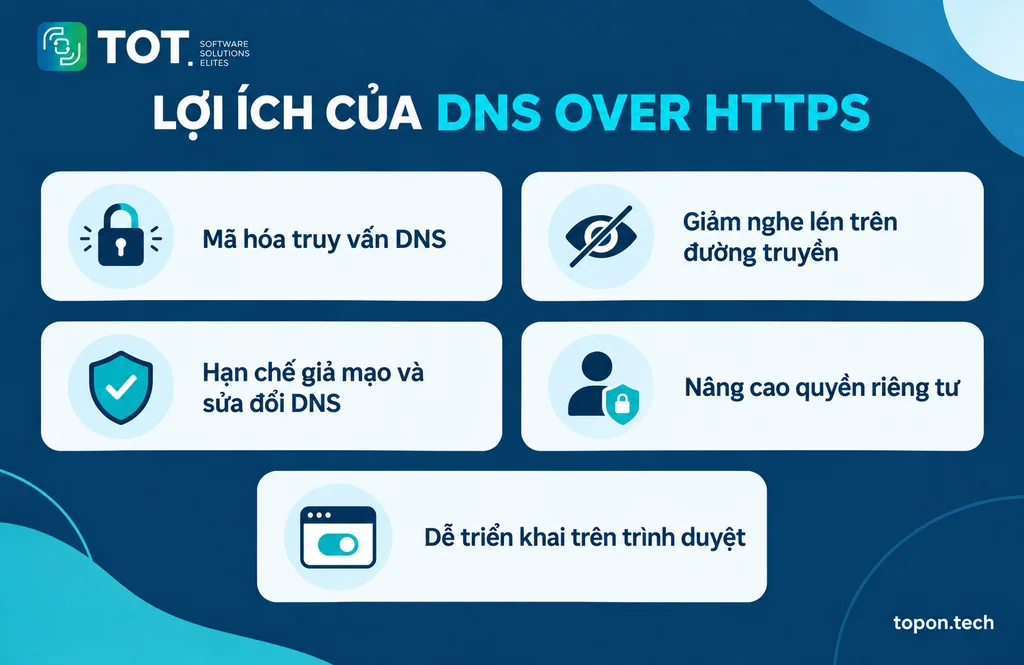
DoH prevents observers on the network path from directly reading the domain name inside a DNS query. This is the clearest benefit when you use public Wi-Fi, shared networks or a network provider you would rather not hand all of your DNS data to.
Less eavesdropping and DNS spoofing in transit
TLS provides confidentiality, integrity and server authentication. As a result, an attacker on the same network finds it harder to alter DNS responses and redirect users to spoofed addresses.
Easy to deploy at the browser level
Chrome, Firefox and Edge all offer a Secure DNS or DNS over HTTPS option. Individual users can turn the feature on without having to change their device’s entire network configuration.
Works over the common HTTPS port
DoH usually uses port 443, so it can work on many networks where a dedicated DNS port is restricted. This is both an advantage for accessibility and a challenge for administrators who need to identify DNS traffic.
Limitations and risks of using DoH
- Shifting the point of trust: the data is no longer clearly visible to your ISP on the DNS hop, but the DoH resolver still processes the query. Review the provider’s logging policy, retention period and legal jurisdiction.
- It can bypass internal DNS: browser-level DoH can break split DNS, internal domain names, parental controls or enterprise filters.
- Reduced security visibility: IT teams find it harder to detect queries to malicious domains when an application picks its own external resolver.
- No guarantee of being faster: latency depends on the distance to the resolver, caching, network quality and how it is implemented; the TLS handshake can add some upfront cost.
- It can create a central point of failure: relying on a single resolver can affect accessibility if the service has an outage.
- Not a complete layer of protection: DoH does not block phishing, malware, in-website tracking or data leaks from logged-in accounts.
>>> See more:
- What is application software? Examples, functions & commonly used software
- Get trusted, well-priced custom software development tailored to you
- What is Threat Intelligence? A new direction in the field of cybersecurity
How to enable DNS over HTTPS in your browser
To protect your information while browsing the web, you can enable DNS over HTTPS (DoH) directly in popular browsers. Here is a detailed guide:
How to enable Secure DNS in Google Chrome
To protect your information while browsing the web, you can enable DNS over HTTPS (DoH) directly in popular browsers. Here is a detailed guide:
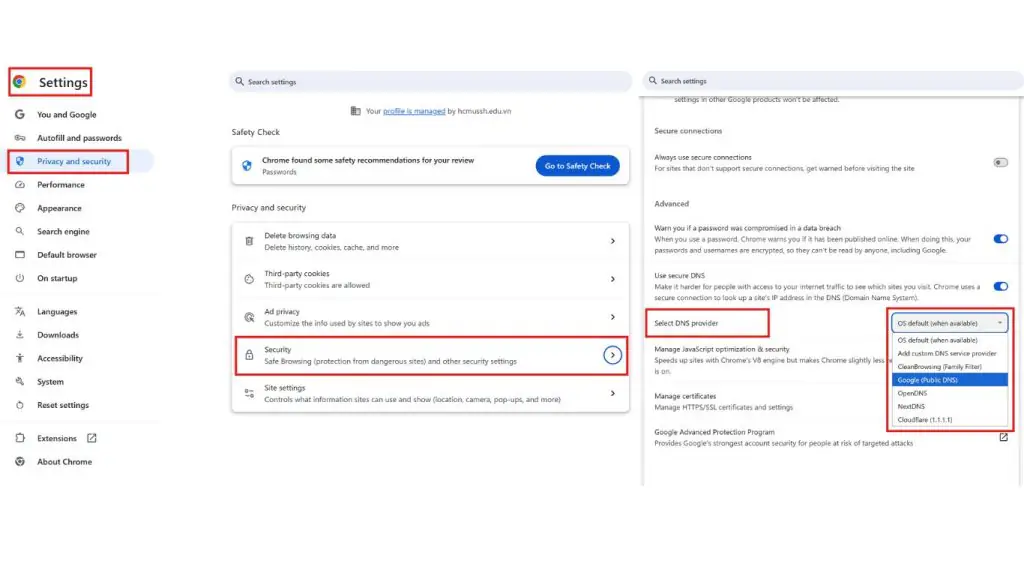
Step 1: Open Google Chrome, click the three-dot icon and choose Settings.
Step 2: Select Privacy and Security > Security.
Step 3: Scroll down to the Advanced section and turn on Use secure DNS.
Step 4: Select a DNS provider that supports DoH, such as Cloudflare, Google or OpenDNS, or enter a custom DNS.
On Chrome for Android, the common path is Settings > Privacy and security > Use secure DNS. The names and locations of these options may vary by version or device management policy.
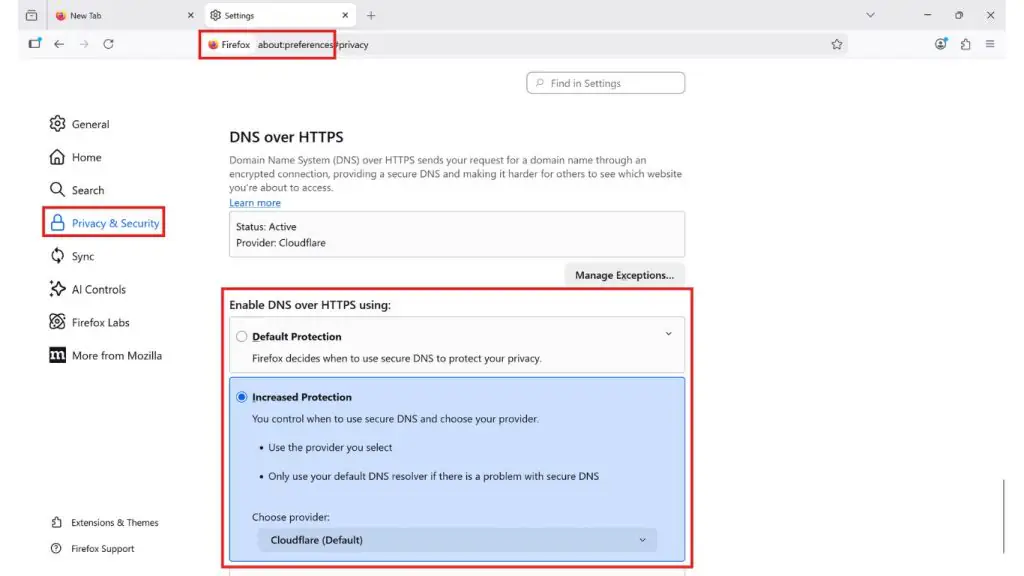
How to enable DNS over HTTPS in Mozilla Firefox
Step 1: Open Firefox and type about:preferences in the address bar.
Step 2: Select Privacy and Security.
Step 3: Scroll down to DNS over HTTPS, and under Enable DNS over HTTPS choose Increased Protection or Max Protection.
Step 4: Choose a DNS provider such as Cloudflare or NextDNS, or enter a custom server.
Firefox may automatically adjust DoH when it detects parental controls, an enterprise network, a VPN or a special DNS configuration. If DoH appears not to be working, check your browser and network policies before treating it as a bug.
How to enable Secure DNS in Microsoft Edge
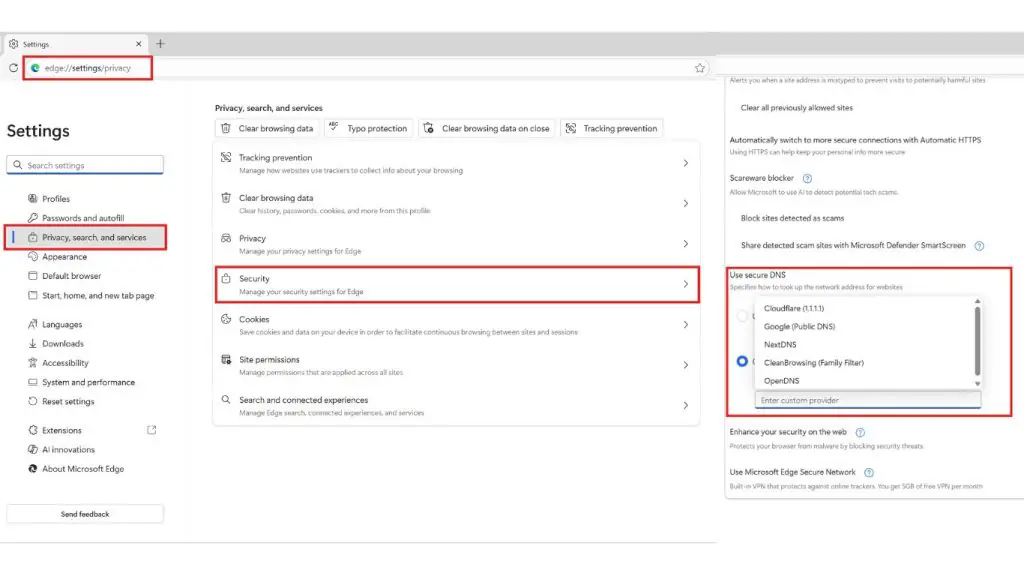
Step 1: Open Microsoft Edge and type edge://settings/privacy in the address bar.
Step 2: Select Privacy, search and services, then scroll down to the Security section.
Step 3: Turn on Use secure DNS.
Step 4: Choose a DNS provider such as Cloudflare, Google, NextDNS, CleanBrowsing or OpenDNS, or enter a custom server.
>>> See more:
- Custom software development in Ho Chi Minh City, professional design across diverse platforms
- Custom software design in Hanoi, professional and well-priced
- What is XSS? How to test for and prevent XSS attacks effectively
How to enable DNS over HTTPS on Windows 11
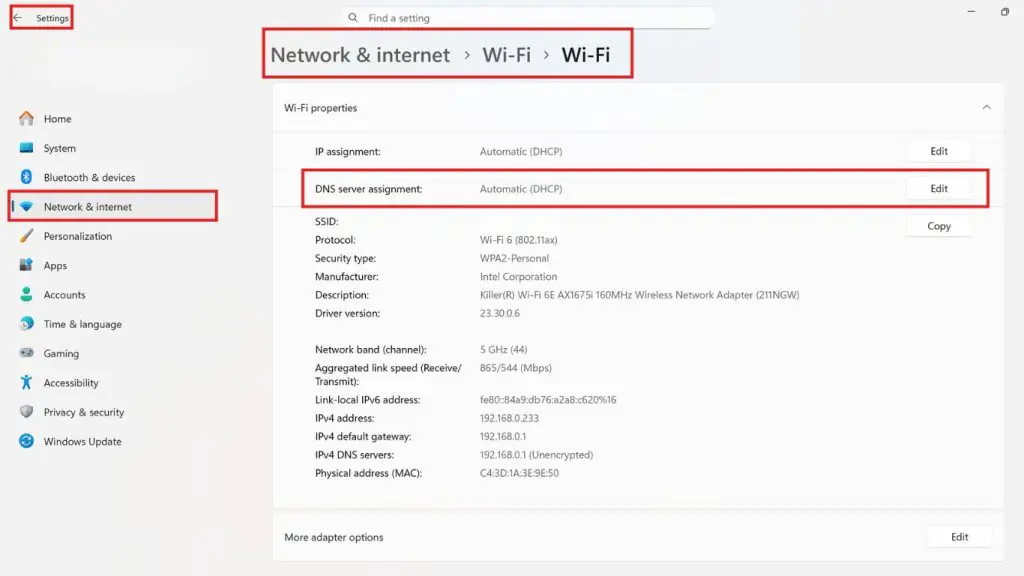
Step 1. Open Settings → choose Network & Internet.
Step 2. Select Wi-Fi or Ethernet (depending on the connection you are using).
Step 3. Click the connected network → choose Hardware properties.
Step 4. Under DNS server assignment → click Edit.
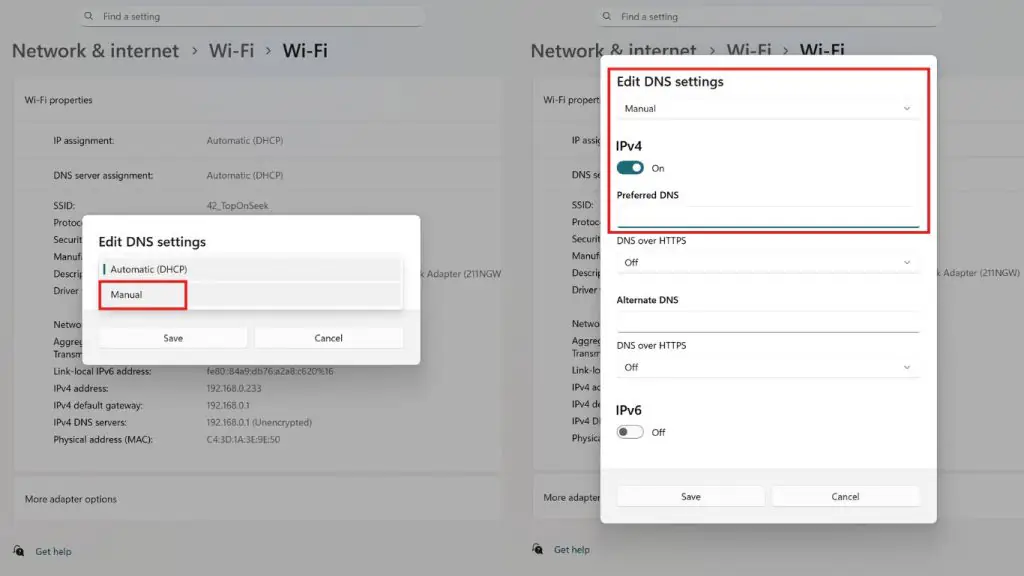
Step 5. Choose Manual → turn on IPv4 (or IPv6 if needed).
Step 6. Enter the preferred and alternate DNS addresses from a provider that supports DoH, for example:
Step 7. Under Preferred DNS encryption → choose Encrypted only (DNS over HTTPS)
Step 8. Click Save.
How to enable DNS over HTTPS on Windows 10
Note: Applies to Windows 10 version 2004+ (the interface may look slightly different)
Step 1: Open Settings → Network & Internet.
Step 2: Select Wi-Fi or Ethernet.
Step 3: Click the network you are using → choose Edit under IP settings.
Step 4: Choose Manual → turn on IPv4.
- Enter DNS (for example, Cloudflare):
- 1.1.1.1
- 1.0.0.1
Step 5: If there is a DNS encryption option → choose: Encrypted only
Step 6: Click Save.
How to enable DNS over HTTPS on macOS (MacBook)
macOS does not call it “DoH” directly in the interface; instead it uses DNS configuration (which can be combined with DoH via a profile or an app). Even so, you can still configure standard DNS + DoH indirectly.
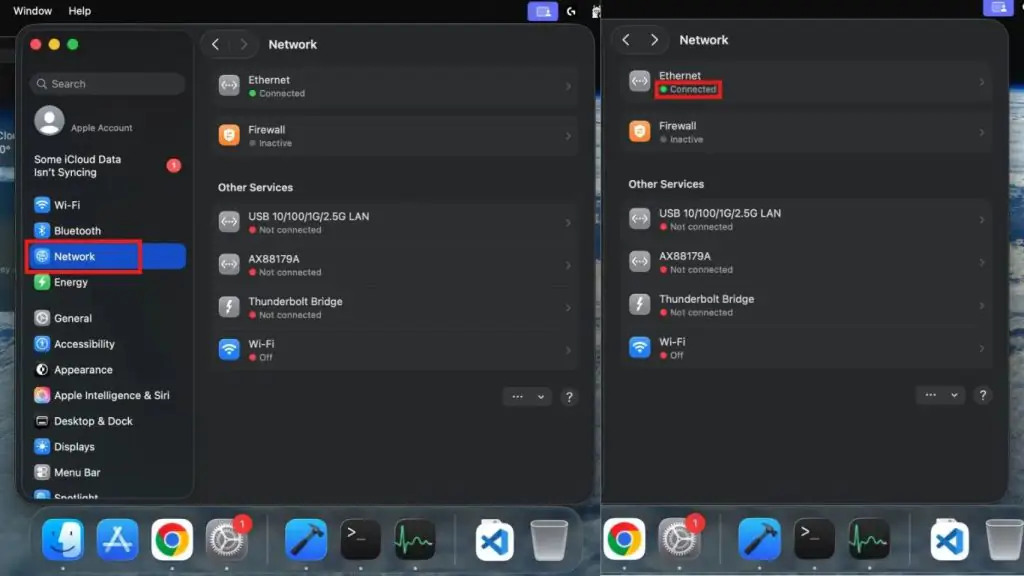
Step 1: Open System Settings.
Step 2: Select Network.
Step 3: Choose the connection you are using:
- Wi-Fi or Ethernet
Step 4: Click Details….
Step 5: Choose the DNS servers tab.
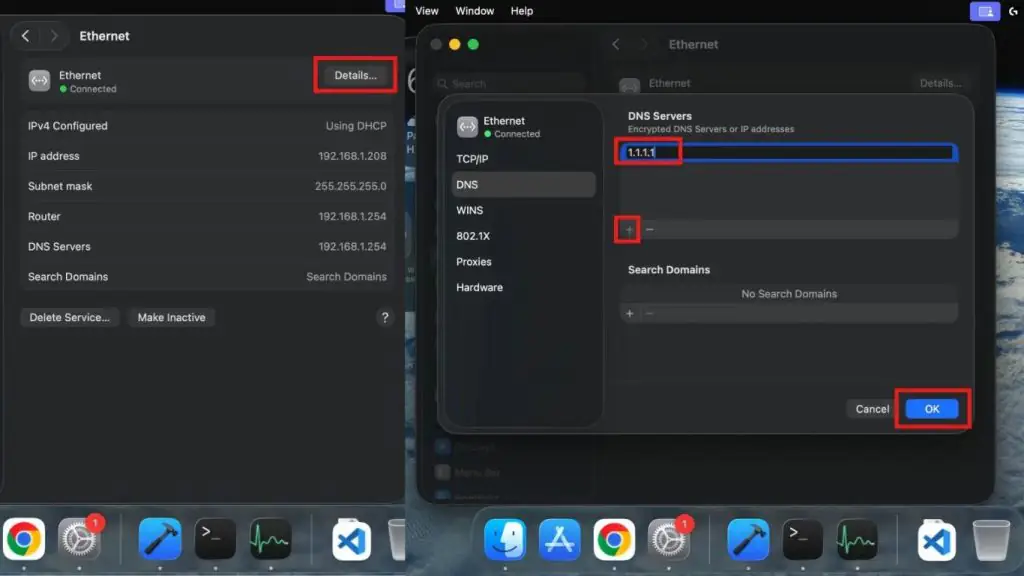
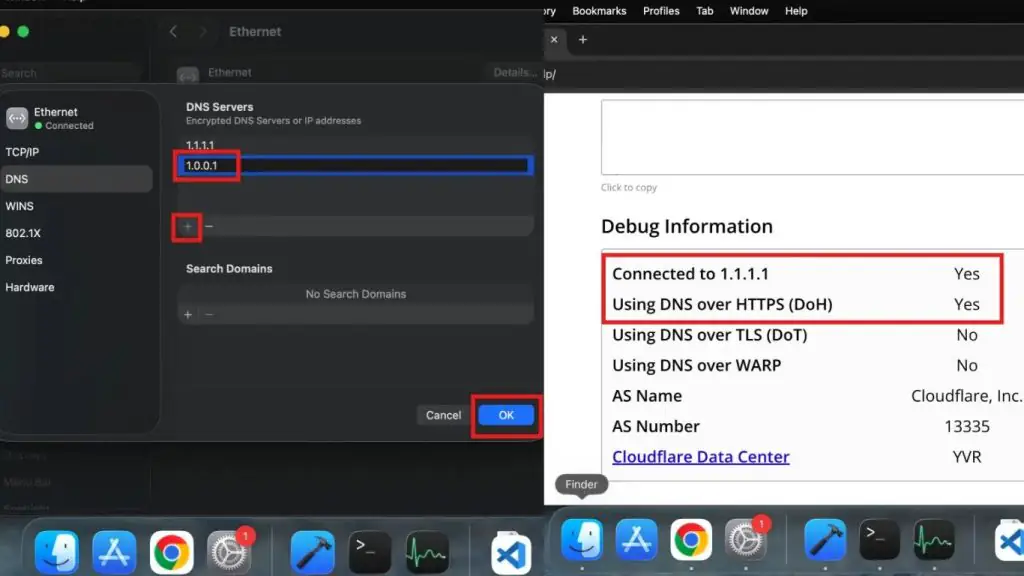
Step 6: Click the + button to add a DNS server:
- 1.1.1.1
- 1.0.0.1
Step 7: Click OK → Apply.
>>> See more:
- What is a SOC? The benefits of a Security Operations Center (SOC)
- The cost of designing an app and maintaining it on Google Play and the App Store
- What is AES? The data encryption standard and the operating modes of AES
How to check that DNS over HTTPS is working
- Use the resolver provider’s own test page and look for the DoH/secure DNS status.
- In Firefox, check the DNS over HTTPS section and the protection level currently in use; look at exceptions if only one website is failing.
- On Windows 11, open the network properties and confirm that DNS encryption shows Encrypted/DoH.
- Switch networks or restart the browser to test again; the DNS cache can cause the initial result to appear unchanged.
- If you need technical verification, an administrator can observe that the device no longer sends plain DNS queries to an unexpected resolver; avoid logging sensitive data while testing.
Comparing DoH, DoT, DNSSEC and DNSCrypt
| Technology | Primary protection | Port/transport | Key takeaway |
| DoH | Client-resolver encryption | HTTPS, usually port 443 | Hard to separate from web traffic; convenient for browsers. |
| DoT | Client-resolver encryption | TLS, usually port 853 | Easier to identify and administer, but can be blocked by port. |
| DNSSEC | Authenticates the integrity and origin of DNS data | Operates within the DNS system | Does not encrypt queries; can be used together with DoH/DoT. |
| DNSCrypt | Encrypts and authenticates client-resolver | Its own protocol | Not as widely adopted an IETF standard as DoH/DoT; requires a compatible client/resolver. |
DoH and DoT address privacy on the network path between the client and the resolver. DNSSEC addresses a different question: whether the DNS data received truly comes from an authoritative source and whether it has been altered. For that reason, DoH and DNSSEC complement each other rather than being mutually exclusive.
Troubleshooting when DNS over HTTPS is not working
| Symptom | Common cause | How to fix it |
| No Secure DNS option | An old browser or a device managed by an organization. | Update the browser; check the policy; ask your administrator if it is a company machine. |
| DoH is on but you cannot reach internal websites | DoH bypasses split DNS or the internal resolver. | Use the default/fallback mode, add an exception, or use the enterprise resolver. |
| The test page reports plain DNS | The current resolver does not support DoH or the configuration is incorrect. | Choose a supported provider, enter the correct endpoint and restart. |
| The network is slow after enabling it | A distant resolver, poor caching, or handshake/fallback. | Try a closer provider; measure at several times; avoid drawing conclusions from a single test. |
| Secure DNS is locked | Chrome/Edge policy, parental controls, antivirus or a VPN. | Check the “managed by your organization” section, your VPN configuration and your security software. |
Frequently asked questions about DNS over HTTPS
What is DNS over HTTPS?
DNS over HTTPS is a protocol that transmits DNS queries over an encrypted HTTPS connection. DoH helps protect the DNS data between a device or browser and the resolver from being read or altered in transit.
Does DNS over HTTPS make the network faster?
Not necessarily. A resolver with nearby infrastructure, good caching and reused connections can respond quickly; but TLS, server distance and fallback can also increase latency. The main benefit of DoH is privacy and integrity, not a promise of faster speeds.
Does DNS over HTTPS replace a VPN?
No. DoH only encrypts DNS traffic to the resolver. A VPN creates a tunnel for most of a device’s network traffic and hides your public IP address from the destination website in a different way.
Does DoH completely hide the website you are visiting from your ISP?
You should not claim that. Your ISP cannot read DoH DNS queries in clear text on the hop to the resolver, but it can still see the IP address you connect to and infer information from network metadata. Technologies such as ECH can reduce some additional signals, but they do not turn DoH into a fully anonymous tool.
Is DoH safer than regular DNS?
DoH is safer against eavesdropping and DNS tampering on the path to the resolver. Overall safety still depends on the resolver, its logging policy, DNSSEC, browser security, the website’s HTTPS and other layers of defense.
Should you choose DoH or DoT?
Browser users often find DoH more convenient. Enterprise networks may prefer DoT or an organization-managed DoH resolver because the traffic is easier to control. The right choice depends on your privacy requirements, administrative needs and network environment.
Does switching your DNS to 1.1.1.1 mean DoH is already enabled?
Not necessarily. 1.1.1.1 is Cloudflare’s resolver address. The connection is only DoH when the client uses a DoH HTTPS endpoint/template, or the platform upgrades the connection itself and the status check confirms it is encrypted.
Conclusion
DNS over HTTPS encrypts DNS queries between the client and the resolver, reducing eavesdropping and interference in transit. For individual users, turning on Secure DNS in the browser is the simplest way to get started. For businesses, DoH needs to be deployed under a centralized policy so that it does not break internal DNS, filtering and security monitoring.
If your business needs to assess its DNS, HTTPS and website security layers, TOT can review the current state, identify risks and propose an upgrade roadmap suited to your actual systems. Alongside other security options such as DNSSEC, DNS over TLS and DNSCrypt, users should research carefully to choose the solution that best fits their needs and circumstances.
Reference sources:
- IETF RFC 8484 – DNS Queries over HTTPS
- Mozilla Support – Firefox DNS over HTTPS
- Google Chrome Help – Manage safety and security
- Microsoft Learn – DNS over HTTPS
- Apple Platform Deployment – DNS Settings payload
- Cloudflare – DNS over TLS vs DNS over HTTPS
Are you looking for a professional, safe and secure website design solution? With a team of seasoned experts, TOT designs “Future-Proof Websites” – integrating multi-layer security and advanced technologies such as DoH, SSL, OWASP TOP 10 and international standards such as WCAG and GDPR.
TOT stands out for:
- “Future-Proof” websites – integrating new technologies such as AI, a Chatbot and PWA, ensuring your website is always ready for future trends.
- A multi-layer security system with data encryption and protection against cyberattacks, ensuring complete safety for your business.
- Standards-based UX/UI design with a clean interface and SEO best practices that help improve search rankings and retain customers.
- Flexible customization for every stage of business growth, from startups to large corporations.
TOT is a pioneer on the digital transformation journey. We deliver website design, mobile app and custom software development solutions with flexible services optimized to your business’s exact needs.
Inspired by the philosophy of “Technology for people“, TOT helps businesses operate more efficiently, elevate the customer experience and build a lasting mark for their brand.
>>> See more articles:
- What is Brute Force? Causes and how to prevent it effectively
- What is a security vulnerability? Learn about website vulnerabilities and how to prevent them effectively
- What is end-to-end encryption (End-to-end encryption)? How does E2EE work?
- What is Cyber Security? A roundup of 9 common types of cyber security today
- What is an API? How APIs work and their applications in web development