The rapid rise of DeepSeek vision models is redefining how multimodal AI systems are built, thanks to their outstanding performance and flexible customization. From understanding complex documents to detecting objects with precision, DeepSeek delivers breakthrough solutions for modern computer vision. To explore the full power of this model family and how to deploy it effectively, dive into the details with TOT in the article below.
>>> See more:
- The top no-code computer vision tools
- Inference In Computer Vision: What is inference in computer vision?
- The best vision-language models to run locally
Introduction
Open-weight AI has changed the way developers build artificial intelligence systems. In the past, using a highly capable foundation model usually meant relying on paid API access and working inside a closed system.
Today, developers can download model weights, inspect the architecture, run inference on their own hardware, and fine-tune models on their own private data.
DeepSeek has played a major role in this shift by releasing a series of foundation models built with a Mixture-of-Experts (MoE) architecture, reinforcement learning and efficient training methods.
This article focuses on the vision capabilities of DeepSeek models. These include models that can understand images, read documents, perform optical character recognition (OCR), answer visual questions, localize objects and generate images.
The sections below walk through DeepSeek’s main vision and multimodal models, explain what each one was designed for, and show how they can be used in real-world vision workflows with the Roboflow Supervision library.
>> Read more:
- What is API testing? A detailed guide to API testing for beginners
- AI image analysis: How it works & real-world applications
What Is DeepSeek?
DeepSeek is a Chinese AI research company that began operating in 2023. It has become widely known for releasing powerful open-weight foundation models that pair high performance with efficient training.
A key reason developers pay attention to DeepSeek is that its models are released openly, so anyone can study the architecture, download the weights, run inference locally and fine-tune the models for their own use cases.
DeepSeek works across three main areas:
- General language models
- Reasoning models
- Vision-language models (VLMs)
Over time, the company has released models for chat, coding, long-context reasoning, multimodal understanding, OCR, document analysis, visual grounding (phrase grounding) and image generation.
Key releases in the DeepSeek model ecosystem include DeepSeek-LLM, DeepSeek Coder, DeepSeek-V2, DeepSeek-V3, DeepSeek-R1, DeepSeek-VL, DeepSeek-VL2 and the Janus series.
DeepSeek Vision Models
Since 2024, DeepSeek has released several distinct families of vision-capable models, each designed for a different purpose, as outlined below:
1. DeepSeek-VL
DeepSeek-VL is DeepSeek’s first vision-language model, designed to understand images and text together. It focuses on real-world multimodal tasks involving documents, web pages, charts and natural images, rather than only on standard benchmark datasets.
DeepSeek-VL architecture:
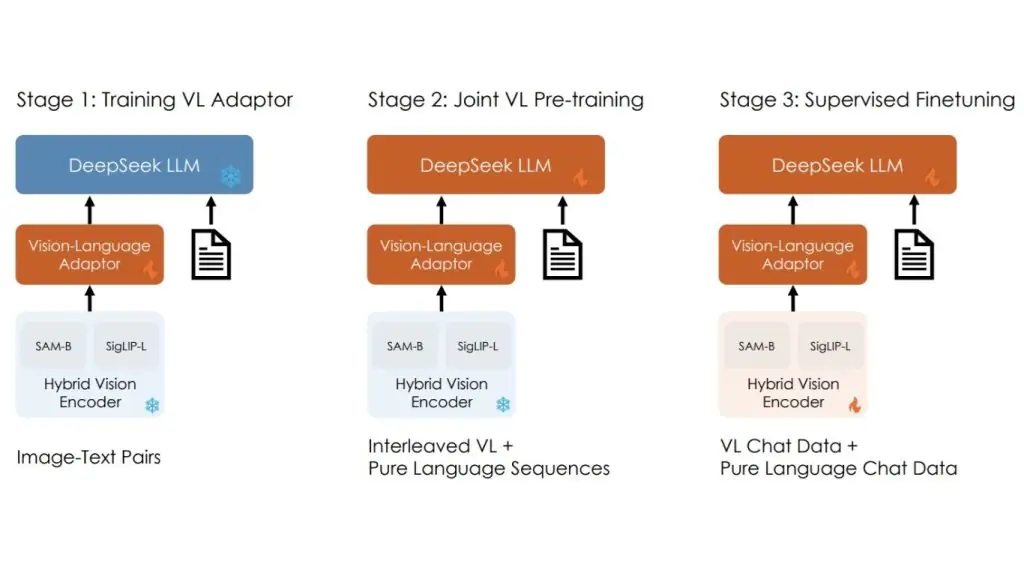
DeepSeek-VL uses a hybrid vision encoder that combines SigLIP-L for high-level semantic understanding with SAM-B for capturing fine visual detail. This allows the model to process high-resolution images while preserving both the global context and small elements such as text and structure.
The visual features are then passed through a vision-language adaptor, which projects them into the language model’s input space so the model can reason over images and text at the same time.
Key capabilities of DeepSeek-VL:
- Visual Question Answering on images and documents.
- OCR and reading text from images.
- Understanding diagrams and charts.
- Understanding web pages and screenshots.
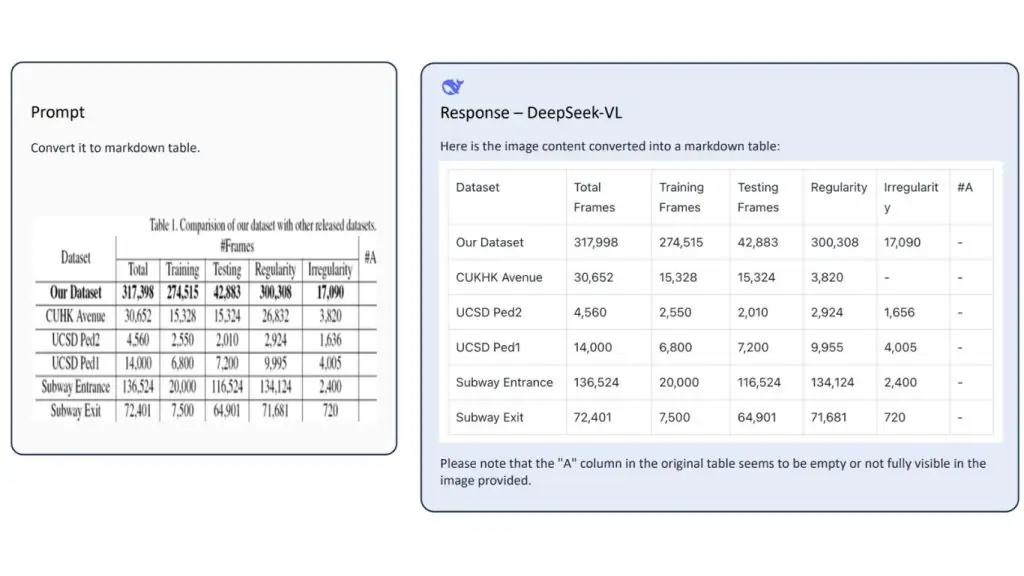
- Understanding structured content such as tables and layouts.
- Multimodal reasoning across both images and text.
>> See more:
- The 7 best open-source object tracking tools
- AI Data Labeling: A guide to labeling data for AI
2. Janus
Janus is DeepSeek’s unified vision-language model, capable of both understanding and generating images within the same architecture.
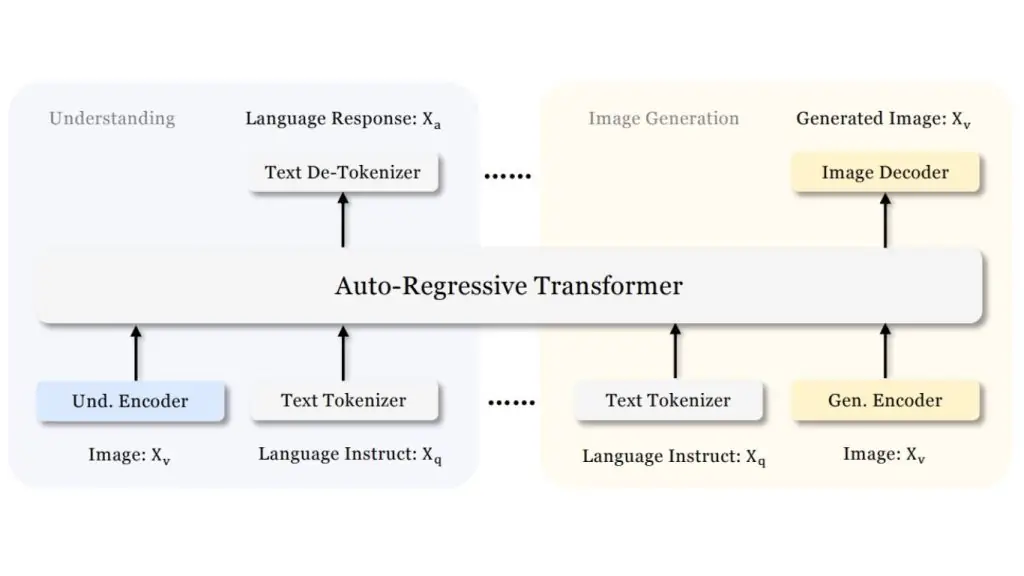
Unlike earlier models that rely on a single vision encoder for both tasks, Janus decouples visual encoding into separate pathways for understanding and generation, while routing both through a shared autoregressive transformer.
Janus architecture:
Janus uses an autoregressive framework that unifies multimodal understanding and generation within a single, uniform transformer architecture. It splits visual encoding into separate pathways for understanding and generation, while both remain connected through a shared language backbone.
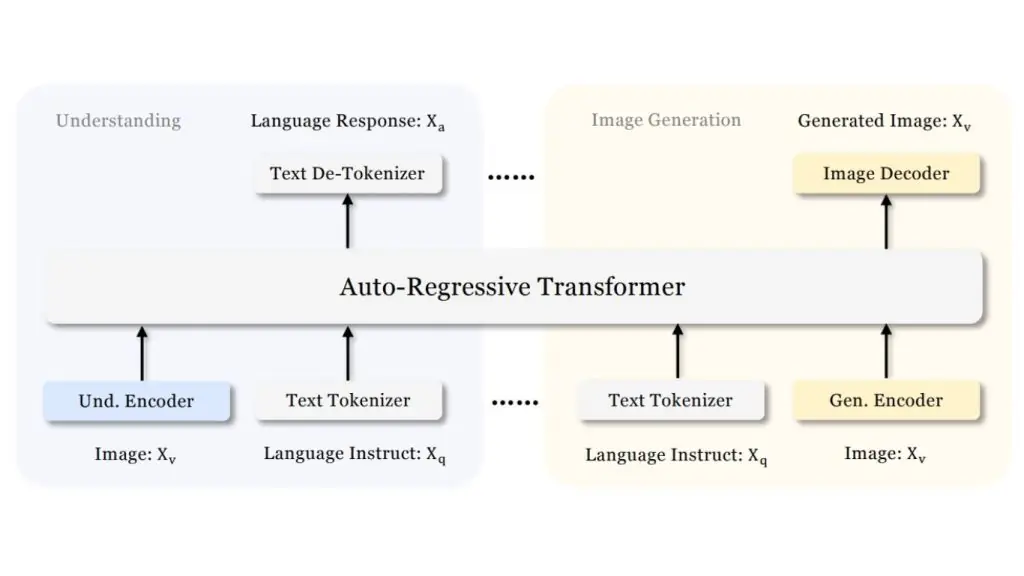
For image understanding, Janus uses a SigLIP vision encoder to extract semantic features and map them into the language model’s input space. For image generation, it uses a VQ tokenizer to convert images into discrete IDs, which the same transformer then models autoregressively to generate images from text prompts.
This design allows Janus to work in both directions:
- Image → text (understanding)
- Text → image (generation)
Key capabilities of Janus:
- Image understanding and visual question answering.
- Text-to-image generation.
- Multimodal reasoning across images and text.
- Image generation from natural-language prompts.
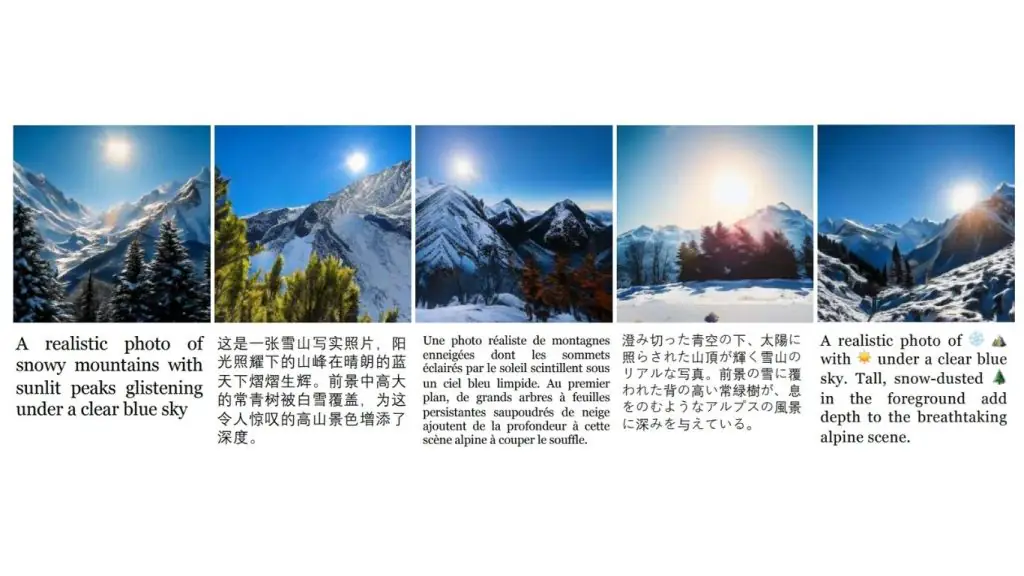
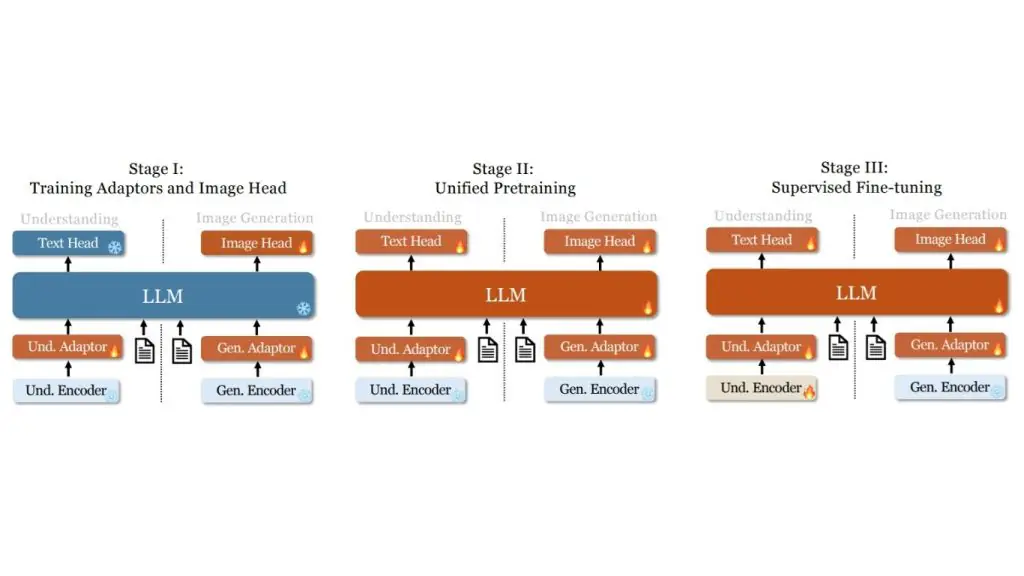
3. JanusFlow (November 2024)
JanusFlow is a unified multimodal model from DeepSeek that combines image understanding and image generation in a single framework.
Unlike approaches that use entirely separate models for each task, JanusFlow integrates both capabilities through a shared autoregressive language backbone, so perception and image generation can both be handled within the same model.
JanusFlow architecture
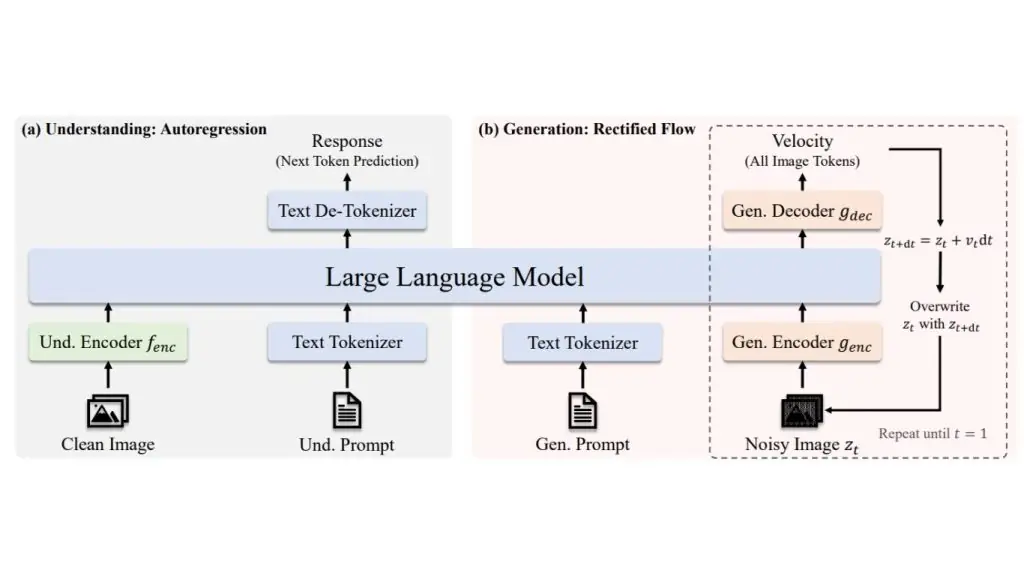
JanusFlow combines a shared autoregressive large language model (LLM) backbone, decoupled vision encoders and rectified flow-based image generation in a single model.
The shared LLM backbone serves as the core reasoning engine for both understanding and generation, while the decoupled vision encoders let each task use its own specialized visual pathway.
Instead of generating images as discrete tokens, JanusFlow integrates rectified flow into the LLM framework, making image generation more natural and efficient without requiring complex architectural changes. It is trained with representation alignment so that the understanding and generation branches stay semantically consistent and work well together.
Key capabilities:
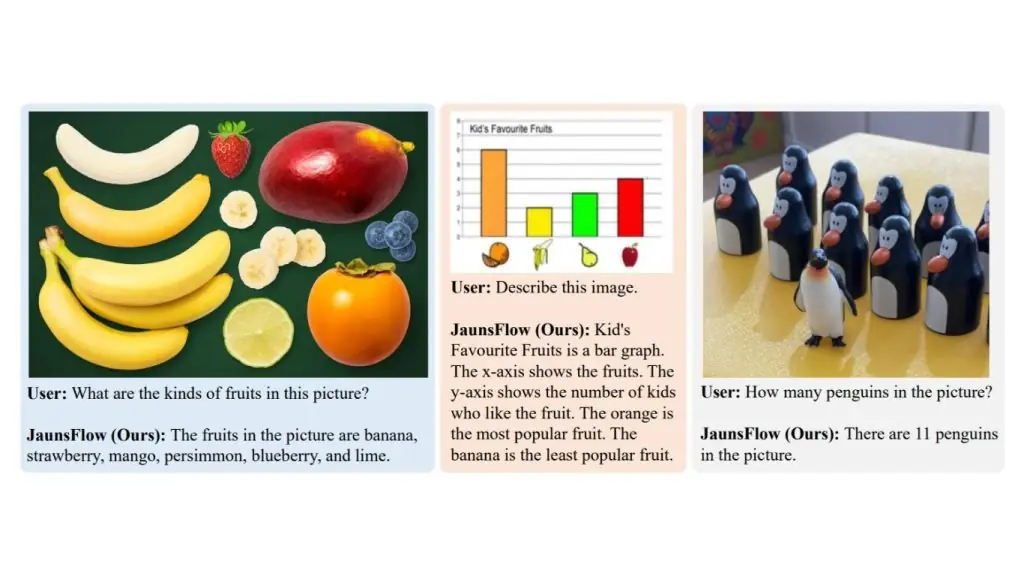
- Image understanding.
- Visual question answering.
- Text-to-image generation.
- Unified perception and image generation in a single model.
>> Read more:
- Tips for writing LLM prompts for computer vision to improve accuracy
- Object Counting with Computer Vision
4. Janus-Pro
Janus-Pro is an enhanced version of Janus built for both image understanding and image generation. It keeps the same unified multimodal design but improves the model with an optimized training strategy, expanded training data and a larger model size, resulting in stronger performance on both understanding and generation tasks.
Janus-Pro architecture
Janus-Pro retains the same unified autoregressive framework as Janus, using decoupled visual encoding so that image understanding and image generation are handled through separate visual pathways within a shared language backbone.
For image understanding, it uses SigLIP-L as its vision encoder. For image generation, it uses a VQ tokenizer to convert images into discrete tokens. This lets the model support both multimodal understanding and text-to-image generation within a single system. Janus-Pro also improves the training process in three ways:
- An optimized training strategy.
- Expanded training data for both understanding and generation.
- Scaling up to larger model sizes (1B and 7B).
Together, these changes deliver stronger multimodal understanding, better instruction-following in text-to-image generation, and more stable image generation than the original Janus.
Key capabilities of Janus-Pro
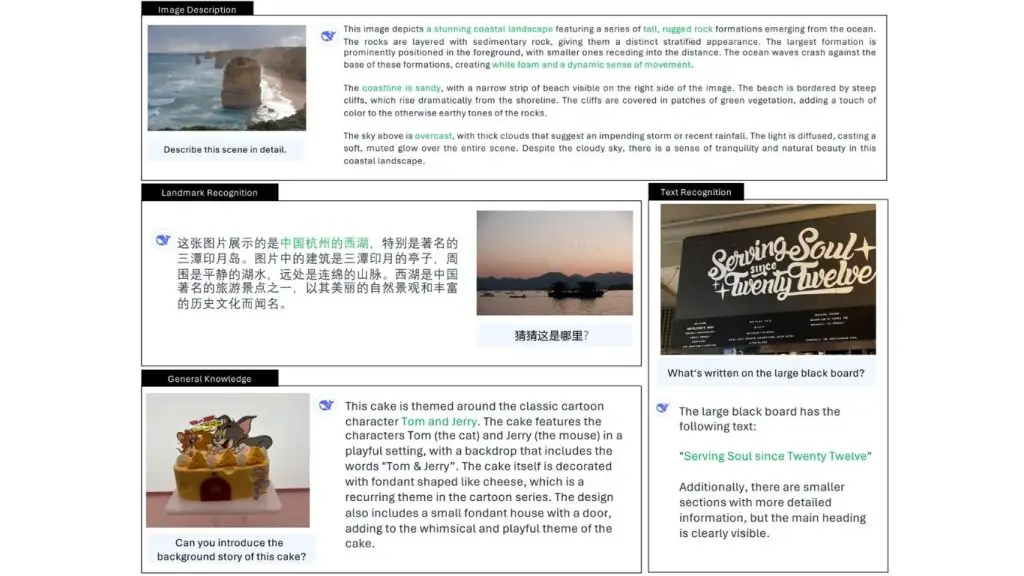
- Image understanding.
- Visual question answering.
- Text-to-image generation.
- Multimodal reasoning over images and text.
5. DeepSeek-VL2
DeepSeek-VL2 is DeepSeek’s second-generation vision-language model, built for stronger multimodal understanding. It improves on the earlier DeepSeek-VL with better handling of high-resolution images, a more efficient MoE language backbone, and stronger performance on tasks such as OCR, document understanding, chart understanding and visual reasoning.
DeepSeek-VL2 architecture
DeepSeek-VL2 uses a LLaVA-style architecture with three main components: a vision encoder, a vision-language adapter and a Mixture-of-Experts (MoE) language model.
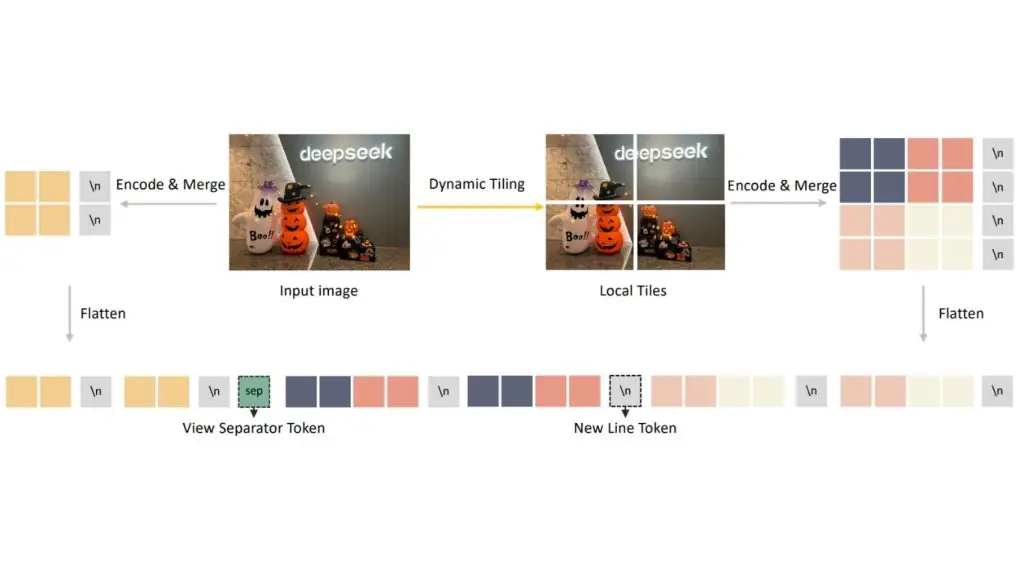
Its main architectural upgrade is dynamic tiling: a high-resolution image is resized to a suitable candidate resolution, split into multiple 384 × 384 local tiles and paired with a global thumbnail tile. All tiles are processed by a shared SigLIP-SO400M-384 vision encoder, which helps the model preserve fine details in documents, charts and dense text.
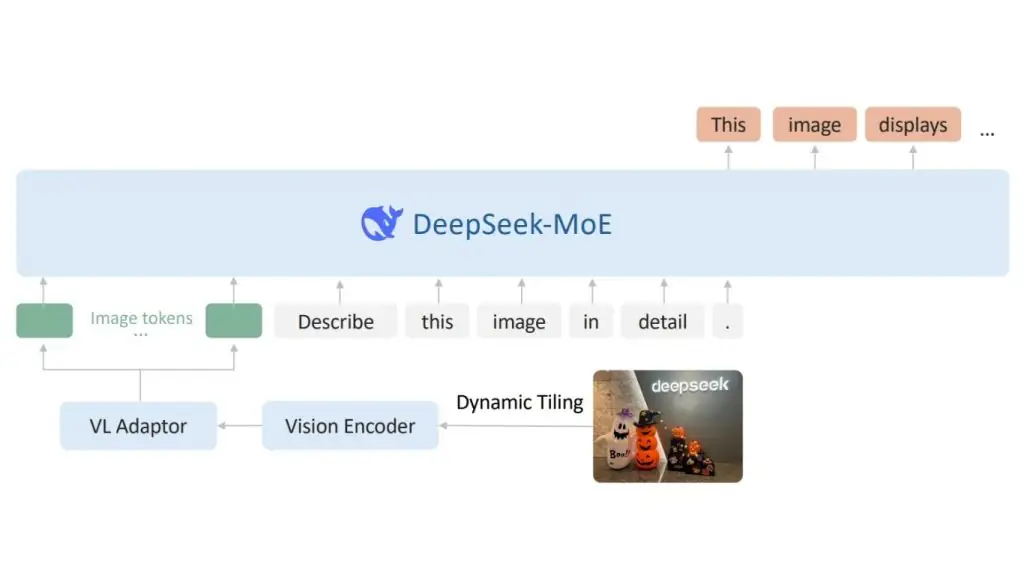
Once the visual features are extracted, the model uses a vision-language adapter to compress each tile’s vision tokens with a 2 × 2 pixel shuffle.
The complete visual sequence is then projected into the language model’s embedding space by a two-layer Multi-layer Perceptron (MLP).
On the language side, DeepSeek-VL2 uses DeepSeekMoE with Multi-head Latent Attention (MLA), which compresses the Key-Value cache into a latent vector and improves inference efficiency for long multimodal sequences.
Key capabilities of DeepSeek-VL2
- Visual question answering.
- OCR.
- Document understanding.
- Table and chart understanding.
- Visual reasoning.
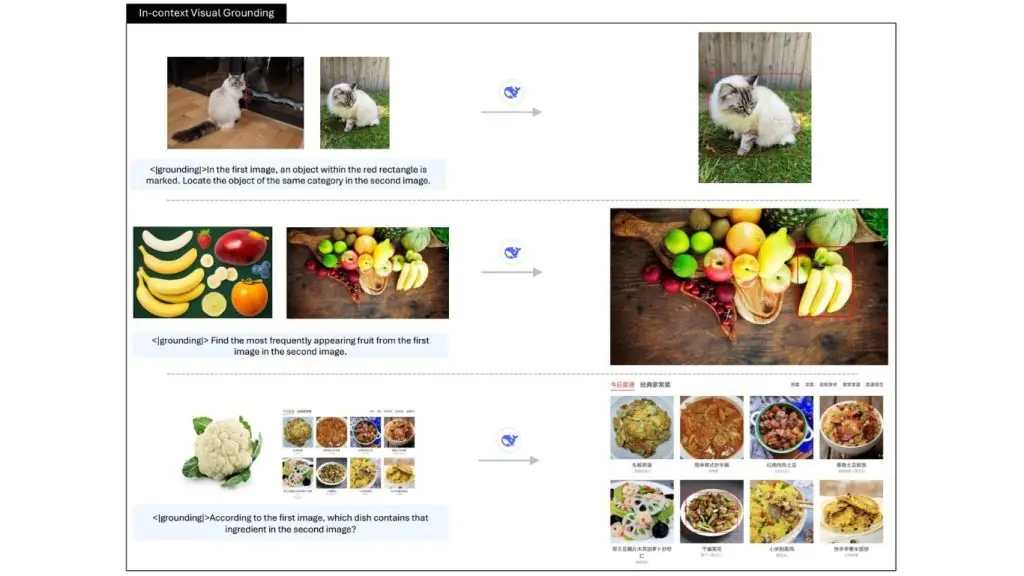
- Visual grounding.
- Multi-image understanding.
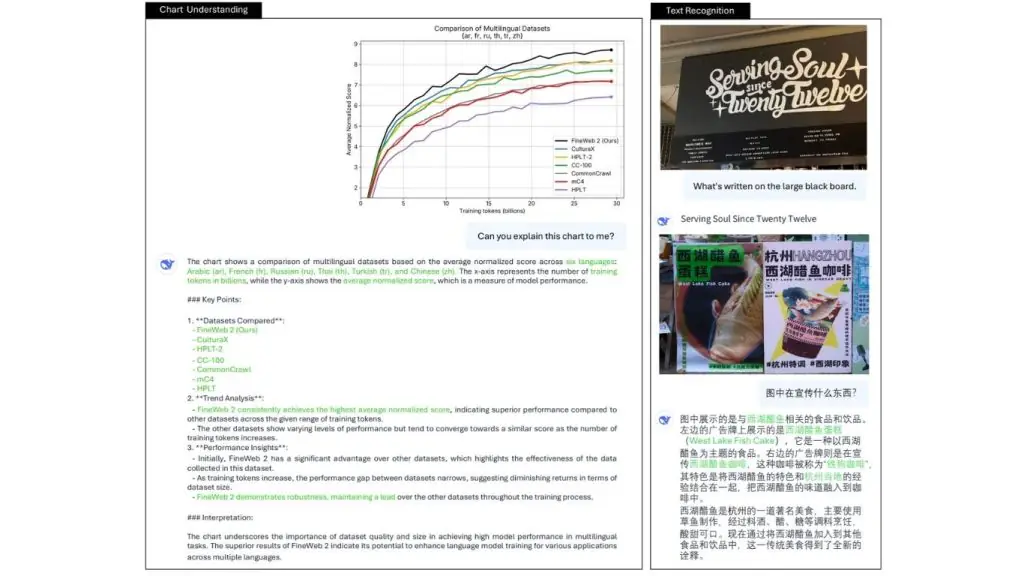
The DeepSeek-VL2 family offers multimodal understanding that scales to edge, mid-range and production deployment needs, as shown in the table below:
| Model | Total parameters | Activated parameters | Key vision capabilities | Best suited for |
| DeepSeek-VL2-Tiny | ~3B MoE | 1.0B | VQA, OCR, grounding | Edge devices, low-end GPUs |
| DeepSeek-VL2-Small | ~16B MoE | 2.8B | VQA, charts, OCR, grounding | Mid-range GPUs |
| DeepSeek-VL2 | ~27B MoE | 4.5B | All tasks, multi-image, grounding | Production |
>> Read more: What is transfer learning? How it works, with real-world examples
6. DeepSeek-OCR
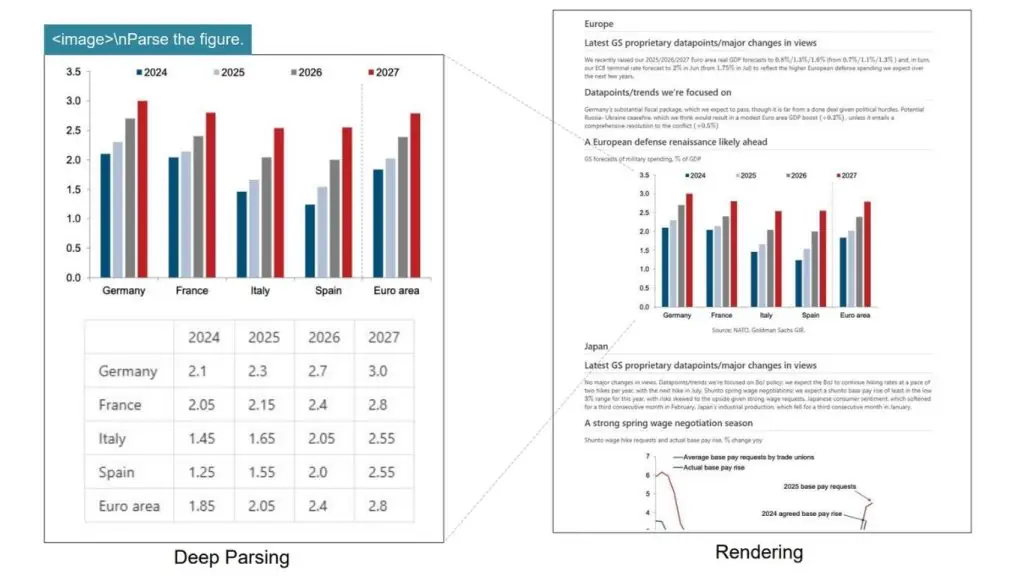
DeepSeek-OCR is a specialized vision model built specifically for optical character recognition (OCR) and long-document understanding. Its central idea is to treat document content as an image compression problem, so the model can retain the useful information on a page while using far fewer vision tokens than conventional document VLM pipelines.
The paper presents the model as an early investigation into compressing long contexts through 2D optical mapping.
DeepSeek-OCR architecture
DeepSeek-OCR has two main components:
- DeepEncoder (the encoder)
- DeepSeek3B-MoE-A570M, which serves as the decoder.
DeepEncoder is designed to keep activations low even with high-resolution input while still achieving a high compression ratio, so the final number of vision tokens stays manageable.
Put simply, the encoder tries to squeeze a large document page into a compact visual representation before the decoder reads it.
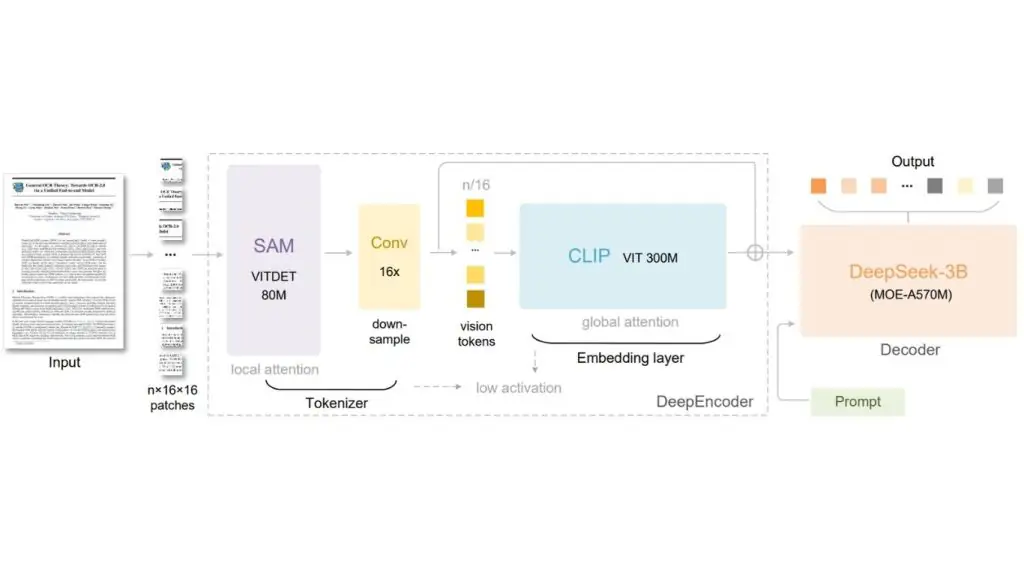
This architecture is aimed at cases where long pages and dense layouts would normally produce a large number of tokens. By compressing the visual context first, DeepSeek-OCR can process long documents more efficiently while still preserving useful OCR information. The abstract also highlights its practical efficiency for production-scale document processing.
>> Learn more:
- What is deep learning? An overview of how it works and its real-world applications
- How does AI-assisted programming affect coding skills?
Key capabilities of the DeepSeek-OCR model
- OCR on long, dense documents.
- High visual compression for page understanding.
- Efficient document parsing with fewer vision tokens.
- Large-scale training data generation for LLM and VLM pipelines.
- Strong performance on document OCR benchmarks such as OmniDocBench.
7. DeepSeek-OCR 2 (January 2026)
DeepSeek-OCR 2 is the successor to DeepSeek-OCR. It focuses on improving document understanding by changing how vision tokens are ordered before they are passed to the language model. Instead of reading an image in a fixed left-to-right, top-to-bottom order, it tries to follow a reading order that is more semantically and causally meaningful, especially for complex layouts.
DeepSeek-OCR 2 architecture
DeepSeek-OCR 2 introduces DeepEncoder V2, a new encoder designed to dynamically reorder vision tokens based on image semantics. The paper explains that most vision-language models process vision tokens in a rigid raster-scan order, whereas DeepSeek-OCR 2 changes this by letting the encoder reorganize the tokens before the language model reads them.
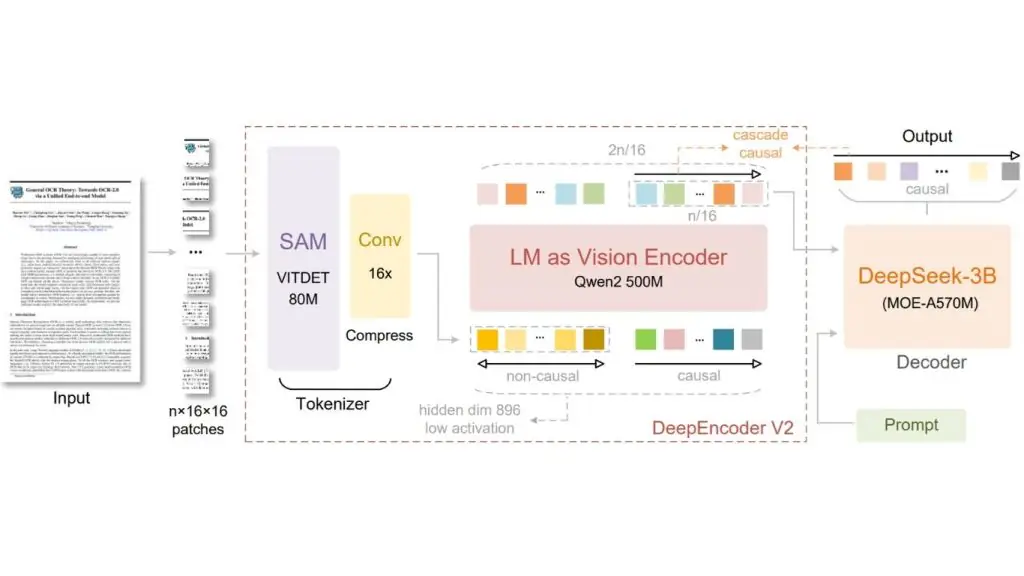
The core idea is called Visual Causal Flow. It is inspired by the way human vision follows the logical structure of a page rather than scanning everything in a fixed order.
DeepEncoder V2 is built to bring this kind of causal reasoning into the visual encoding stage, so the model can better understand structured layouts and complex document content. The work explores whether 2D image understanding can be achieved through two stacked 1D causal reasoning structures.
Key capabilities of DeepSeek-OCR 2
- OCR with layout-aware ordering of vision tokens.
- Better understanding of complex document structures.
- Semantic reordering of vision tokens before decoding.
- Stronger reasoning on pages with non-linear layouts.
- A new architecture for document-focused visual understanding.
The following table summarizes the DeepSeek model family for vision tasks.
| Model | Vision type | Key vision capabilities |
| DeepSeek-VL-1.3B / 7B | Understanding | VQA, OCR, diagrams, web screenshots |
| Janus-1.3B | Understanding + Generation | Unified multimodal understanding and text-to-image generation |
| JanusFlow-1.3B | Understanding + Generation | Janus-based model that uses rectified flow to unify image understanding and generation |
| DeepSeek-VL2-Tiny | Understanding | MoE VLM, 1.0B activated parameters, OCR, VQA, document understanding |
| DeepSeek-VL2-Small | Understanding | MoE VLM, 2.8B activated parameters, strong OCR, chart and table understanding |
| DeepSeek-VL2 | Understanding | MoE VLM, 4.5B activated parameters, OCR, grounding, multi-image reasoning |
| Janus-Pro-1B / 7B | Understanding + Generation | Improved multimodal understanding and image generation |
| DeepSeek-OCR | Specialized OCR | Optical context compression for long-document OCR |
| DeepSeek-OCR-2 | Specialized OCR | OCR model based on Visual Causal Flow |
>> See more:
- Top 5 Python libraries for computer vision
- What is Vertex AI? Google Cloud’s machine learning platform
How to Use DeepSeek-VL2 with the Roboflow Supervision Library
You can use DeepSeek-VL2 with Roboflow’s Supervision library when you want to convert the model’s text output into standard detection objects with bounding boxes and labels.
Supervision supports sv.VLM.DEEPSEEK_VL_2 inside the Detections.from_vlm() function. For DeepSeek-VL2, the required input is the model’s raw result string plus the original image resolution. Roboflow’s documentation also shows the recommended prompt style for DeepSeek-VL2 object localization and grounding.
What DeepSeek-VL2 Gives You
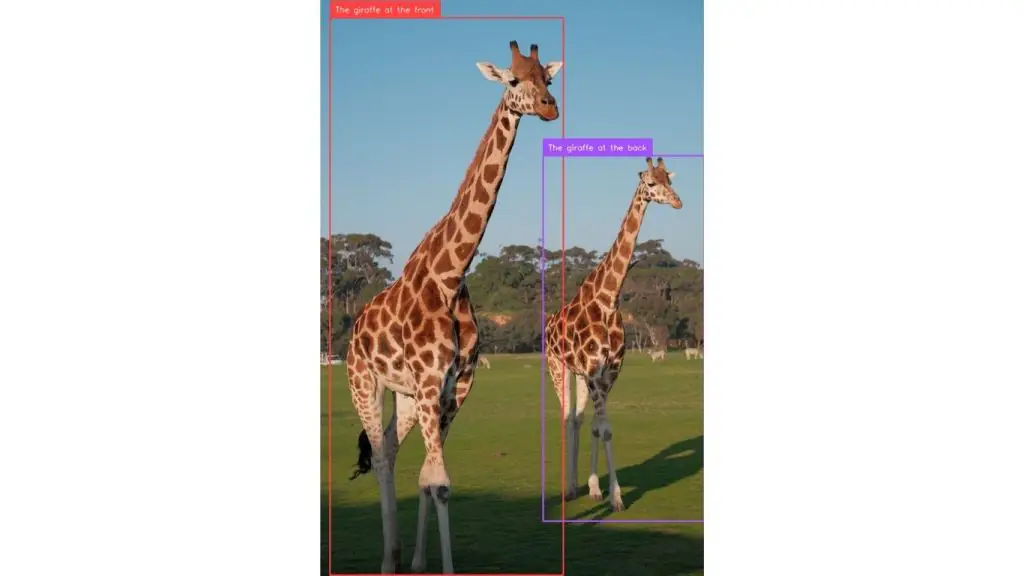
DeepSeek-VL2 is a vision-language model (VLM), so it does not return detections directly in the same format as a detector such as a YOLO model. Instead, it generates a text response. For grounding tasks, that response contains special tokens such as <|ref|> for the object phrase and <|det|> for the bounding box coordinates. The official DeepSeek-VL2 examples show outputs like this:
<|ref|>The giraffe at the back.<|/ref|><|det|>[[580, 270, 999, 900]]<|/det|>This is exactly the kind of response that Supervision can parse into boxes and labels.
>> Read more: What Is Object Detection? An Introduction to Detecting Objects
Step 1. Run DeepSeek-VL2 on an Image
First, run DeepSeek-VL2 on your image and prompt. The official quick-start guide on GitHub loads a model such as deepseek-ai/deepseek-vl2-tiny, prepares the image and the conversation, creates the image embeddings, and then calls language.generate() to get the response string.
DeepSeek’s repository also notes that <|ref|> and <|/ref|> are used for object localization, while <|grounding|> can be added for grounded captioning-style prompts.
For example, a localization prompt might look like this:
<image>
<|ref|>The giraffe at the front<|/ref|>
To ground multiple objects, Roboflow recommends a prompt such as:
<image>
<|grounding|>Detect the giraffes
These prompt styles help DeepSeek-VL2 return detection coordinates in the <|det|> format.
Step 2. Save the Raw DeepSeek-VL2 Output
Once the model responds, keep the raw output string exactly as it is. In this example, that string is:
deepseek_vl2_result = (
    "<|ref|>The giraffe at the back<|/ref|>"
    "<|det|>[[580, 270, 999, 904]]<|/det|>"
    "<|ref|>The giraffe at the front<|/ref|>"
    "<|det|>[[26, 31, 632, 998]]<|/det|>"
    "<|end▁of▁sentence|>"
)
This string contains both the object phrases and their coordinates. Supervision reads this format and extracts the detections automatically. Roboflow’s documentation uses the same idea in its DeepSeek-VL2 example.
Step 3. Convert the Result into sv.Detections
This is where Roboflow Supervision comes in handy. Pass the raw DeepSeek-VL2 output to sv.Detections.from_vlm() together with the original image size:
detections = sv.Detections.from_vlm(
    vlm=sv.VLM.DEEPSEEK_VL_2,
    result=deepseek_vl2_result,
    resolution_wh=image.size
)
Supervision then parses the <|det|> boxes and builds a standard detections object. According to the documentation, this gives you structured outputs such as detections.xyxy, detections.class_id, and detections.data[“class_name”].
Step 4. Inspect What Supervision Parsed
After parsing, your code prints:
print(detections.xyxy)
print(detections.data)
This lets you check whether the coordinates and labels were extracted correctly. Roboflow’s example shows that DeepSeek-VL2 detections become ordinary bounding box arrays, with the object names stored in class_name.
In practice, this step matters because DeepSeek-VL2 is still a vision-language model (VLM), not a dedicated detector. You should therefore confirm that the model understood your prompt correctly and returned the right grounded objects.
Step 5. Draw Boxes and Labels on the Image
Once the detections are in Supervision format, you can use the standard annotators. The code uses BoxAnnotator() and LabelAnnotator():
box_annotator = sv.BoxAnnotator()
label_annotator = sv.LabelAnnotator()
It then draws the boxes and labels on the OpenCV image and saves the result. This is an interesting part of the Roboflow workflow, because once parsed, DeepSeek-VL2 behaves like any other detection source inside Supervision. You can visualize it, track it, filter it, or pass it on to other computer vision logic downstream.
Here is the full code:
from PIL import Image
import cv2
import supervision as sv
from IPython.display import display

image_path = "giraffe.png"

# PIL for size
image = Image.open(image_path)

# OpenCV for drawing
image_cv = cv2.imread(image_path)

deepseek_vl2_result = (
    "<|ref|>The giraffe at the back<|/ref|>"
    "<|det|>[[580, 270, 999, 904]]<|/det|>"
    "<|ref|>The giraffe at the front<|/ref|>"
    "<|det|>[[26, 31, 632, 998]]<|/det|>"
    "<|end▁of▁sentence|>"
)

detections = sv.Detections.from_vlm(
    vlm=sv.VLM.DEEPSEEK_VL_2,
    result=deepseek_vl2_result,
    resolution_wh=image.size
)

print(detections.xyxy)
print(detections.data)

# labels from parsed class names
labels = detections.data["class_name"].tolist()

# annotators
box_annotator = sv.BoxAnnotator()
label_annotator = sv.LabelAnnotator()

# draw boxes
annotated = box_annotator.annotate(
    scene=image_cv.copy(),
    detections=detections
)

# draw labels
annotated = label_annotator.annotate(
    scene=annotated,
    detections=detections,
    labels=labels
)

# display in notebook
display(Image.open("giraffe_boxed.png"))
When you run the code, you should see output similar to this:
>> Read more:
- Object detection in video with RF-DETR
- Vision Inspection Systems: What is a vision inspection system?
Vision Capabilities of DeepSeek-VL2
DeepSeek-VL2 is a versatile vision-language model that can handle a wide range of vision tasks through natural-language prompts. You provide an image and describe what you want, and the model responds with text or structured output. Here are the key capabilities you can experiment with:
1. Visual Question Answering (VQA)
Visual Question Answering is DeepSeek-VL2’s most general-purpose capability. You provide an image, ask a question in natural language, and the model returns an answer in natural language. That makes it a good starting point for any new vision application. It can handle:
- Scene-level questions
- Object counting
- Relationships between objects
- Reasoning over visual context
Example:
conversation = [
    {
        "role": "<|User|>",
        "content": "<image>nWhat is happening in this image?",
        "images": ["street.jpg"],
    },
    {"role": "<|Assistant|>", "content": ""}
]
Real-world use cases:
- Retail shelf analysis.
- Quality inspection reports.
- Image-based search.
- Visual customer support.
2. Optical Character Recognition (OCR)
DeepSeek-VL2 can read and extract text from images, including documents and real-world scenes. It performs well on structured layouts where both the text and its formatting matter. It can handle:
- Printed documents and forms.
- Text in natural scenes (labels, signs).
- Dense tables and structured layouts.
- Mixed text and graphics.
Example:
conversation = [
    {
        "role": "<|User|>",
        "content": "<image>nExtract all text from this document.",
        "images": ["invoice.png"],
    },
    {"role": "<|Assistant|>", "content": ""}
]
Real-world use cases:
- Invoice processing.
- Document digitization.
- Form data extraction.
- Product label reading.
>> Read more: Top 5 Python libraries for computer vision – How they compare
3. Document, Table and Chart Understanding
Beyond reading text, DeepSeek-VL2 can interpret structured visual content such as tables, charts and reports. It can handle:
- Table understanding and querying
- Chart interpretation (line, bar, etc.)
- Key-value information extraction
- Summarization of structured documents
Example:
conversation = [
    {
        "role": "<|User|>",
        "content": "<image>nWhat trend is shown in this chart?",
        "images": ["chart.png"],
    },
    {"role": "<|Assistant|>", "content": ""}
]
Real-world use cases:
- Financial report analysis.
- Dashboard interpretation.
- Understanding scientific figures.
- Automated data extraction.
4. Visual Grounding (Language-Based Detection)
Visual grounding lets you locate objects in an image using natural language. The model returns bounding box coordinates for the object you describe. It can handle:
- Locating objects from text descriptions.
- Localizing multiple objects.
- Zero-shot detection (no prior training required).
Example:
conversation = [
    {
        "role": "<|User|>",
        "content": "<image>n<|ref|>The red fire extinguisher<|/ref|>",
        "images": ["factory.jpg"],
    },
    {"role": "<|Assistant|>", "content": ""}
]
Real-world use cases:
- Visual search systems.
- Robotics (identifying target objects).
- Auto-annotation tools.
- Zero-shot detection pipelines.
>> Read more: Object Detection Models: The best object detection models
5. Multi-image understanding
DeepSeek-VL2 can process and reason over multiple images in a single interaction. It can handle:
- Comparing images.
- Spotting differences.
- Reasoning across image sequences.
- Few-shot visual understanding.
Example:
conversation = [
    {
        "role": "<|User|>",
        "content": "<image>n<image>nWhich product has more quantity?",
        "images": ["before.png", "after.png"],
    },
    {"role": "<|Assistant|>", "content": ""}
]
Real-world use cases:
- Before/after analysis.
- Quality comparison.
- Inspection workflows.
- Visual change detection.
6. Image captioning
DeepSeek-VL2 can generate detailed natural-language descriptions of images without being asked a specific question. It can handle:
- Scene descriptions.
- Listing objects.
- Context-aware summaries.
Example:
conversation = [
    {
        "role": "<|User|>",
        "content": "<image>nDescribe this image in detail.",
        "images": ["scene.jpg"],
    },
    {"role": "<|Assistant|>", "content": ""}
]
Real-world use cases:
- Dataset captioning.
- Accessibility (alt-text generation).
- Image indexing and search.
>> See more: How to compare computer vision models visually
7. Region-level understanding
DeepSeek-VL2 can answer questions about specific parts of an image, not just the scene as a whole. It can handle:
- Localized queries.
- Reading specific regions.
- Fine-grained analysis.
Example:
conversation = [
    {
        "role": "<|User|>",
        "content": "<image>nWhat is written on the signboard in the top left corner?",
        "images": ["street.jpg"],
    },
    {"role": "<|Assistant|>", "content": ""}
]
Real-world use cases:
- UI and screen analysis.
- Industrial inspection.
- Localized text extraction.
>> Read more: AI in UI/UX design: The power of Generative AI
8. Grounded captioning
This capability combines object detection with description: the model can describe objects together with their locations. It can handle:
- Describing objects along with their bounding boxes.
- Understanding multi-object scenes.
- Generating structured output.
Example:
conversation = [
    {
        "role": "<|User|>",
        "content": "<image>n<|grounding|>Describe all objects in the image.",
        "images": ["scene.jpg"],
    },
    {"role": "<|Assistant|>", "content": ""}
]
Real-world use cases:
- Automated dataset labeling.
- Scene understanding.
- Training data generation.
>> Learn more: Data Annotation Platforms: The best data labeling platforms for computer vision
9. GUI and screen understanding
DeepSeek-VL2 can interpret structured user interface elements and screen layouts. It can handle:
- Detecting buttons, menus and layouts.
- Understanding dashboards.
- Structured UI reasoning.
Example:
conversation = [
    {
        "role": "<|User|>",
        "content": "<image>nWhat are the main sections in this dashboard?",
        "images": ["dashboard.png"],
    },
    {"role": "<|Assistant|>", "content": ""}
]
Real-world use cases:
- Robotic process automation (RPA).
- UI testing.
- Workflow automation.
10. Visual instruction following
You can give instructions based on what is in an image, and the model will carry them out. It can handle:
- Task-based reasoning.
- Instruction-guided output.
- Structured reports.
Example:
conversation = [
    {
        "role": "<|User|>",
        "content": "<image>nFind all damaged parts and list them.",
        "images": ["machine.jpg"],
    },
    {"role": "<|Assistant|>", "content": ""}
]
Real-world use cases:
- Manufacturing inspection.
- Quality control.
- Automated reporting.
11. Few-shot visual reasoning
DeepSeek-VL2 can use example images to guide its reasoning on new inputs. It can handle:
- Pattern matching.
- Example-based reasoning.
- Visual similarity tasks.
Example:
conversation = [
    {
        "role": "<|User|>",
        "content": "<image>n<image>nFind objects similar to the first image in the second image.",
        "images": ["example.jpg", "target.jpg"],
    },
    {"role": "<|Assistant|>", "content": ""}
]
Real-world use cases:
- Visual search.
- Defect detection.
- Pattern recognition.
12. Spatial and scene reasoning
The model can understand spatial relationships and the logical structure within an image. It can handle:
- Reasoning about distance and proximity.
- Relationships between objects.
- Scene-level logic.
Example:
conversation = [
    {
        "role": "<|User|>",
        "content": "<image>nWhich object is closest to the door?",
        "images": ["room.jpg"],
    },
    {"role": "<|Assistant|>", "content": ""}
]
Real-world use cases:
- Robotics and navigation.
- Smart assistants.
- Scene analysis.
DeepSeek-VL2 is not limited to a single task such as OCR or object detection. It is a unified multimodal system that supports a wide range of vision tasks through natural-language interaction. That makes it exceptionally flexible for real-world applications where requirements change over time.
>>> See more:
- Comparing vision-language models and object detection
- The best code editors for computer vision
- The best computer vision tools
Conclusion: DeepSeek vision models
DeepSeek’s integration with Roboflow Supervision is especially useful for developers and teams building production-ready computer vision systems, as it lets users apply these models to advanced vision-language tasks.
It makes it easy to turn raw model responses into structured detection results, annotated outputs and real-world application pipelines.
>>> Explore how different models perform on OCR, object detection and more in Roboflow Playground.
>>> Source: DeepSeek Vision Models
TOT is a pioneer in digital transformation, offering website design, mobile app and custom software development solutions through flexible services tailored precisely to each business’s needs.
Inspired by the philosophy of “Technology for People”, TOT helps businesses operate more efficiently, elevate their customer experience and build a lasting brand legacy.