What is Cursor? Cursor is a code editor built with artificial intelligence at its core. Instead of simply adding suggestions to an existing editor, Cursor lets developers converse with the AI, request edits across multiple files at once and work from the context of the entire codebase, all inside the development environment.
Who makes Cursor?
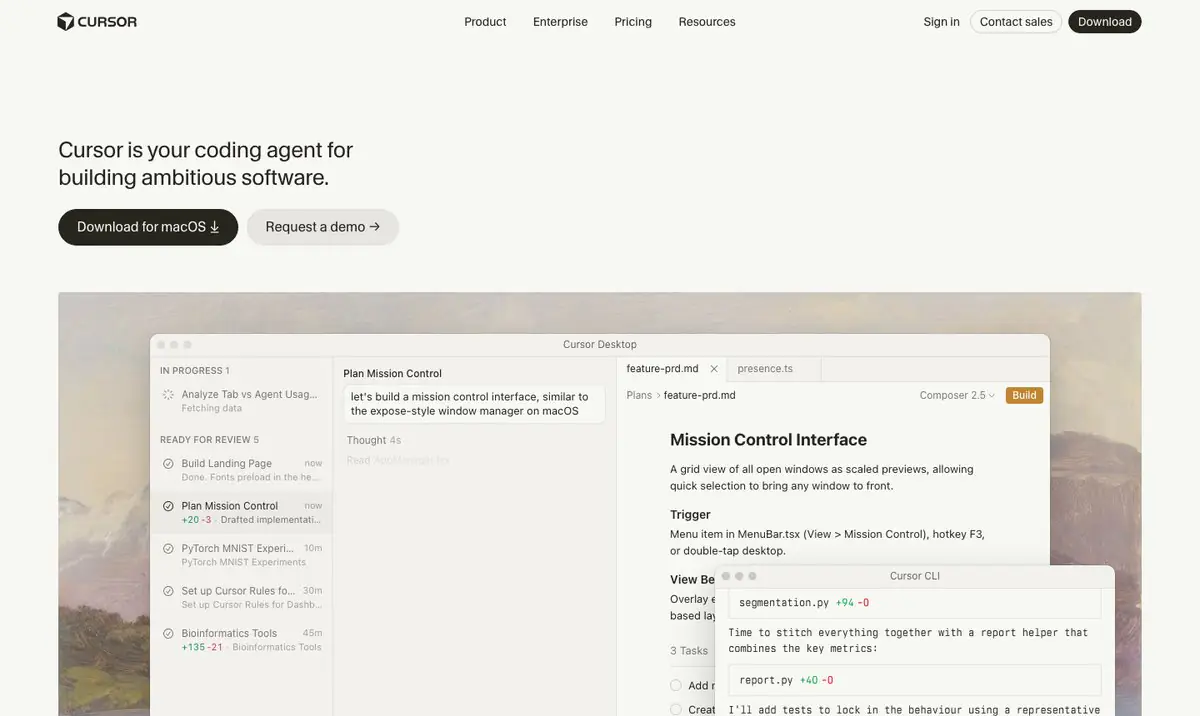
Cursor is developed by Anysphere, a company focused on building a new generation of AI-powered coding tools. Cursor is built on top of a popular open-source code editor, preserving the familiar interface and extensions while adding deep AI capabilities to the coding workflow.
Key features
Cursor’s core features put AI at the center of the coding process. Developers can chat with the AI inside the editor, request edits across multiple files at once, let the AI reference the whole codebase, and still receive completion suggestions as they type. The main capabilities include:
- Chat with the AI inside the editor to ask, generate and edit code in the project’s context.
- Edit multiple files at once based on a single natural-language request.
- The ability to reference and explore the whole codebase to make suitable changes.
- Code completion and suggestions as you type.
- An extension ecosystem inherited from the underlying editor platform.
Pros
Cursor’s standout advantage is the ability to work across an entire project rather than isolated lines, while keeping the familiar interface of a popular editor. That lowers the barrier to switching while still unlocking the power of AI. The key benefits include:
- The ability to work across the entire project rather than isolated lines of code.
- Multi-file editing saves time on changes that span the codebase.
- A familiar interface that lowers the barrier when migrating from a popular editor.
- Chat and coding integrated in a single environment.
Cons
As a separate, AI-centered IDE, Cursor comes with a few trade-offs worth noting. Users need time to adjust their habits, some advanced features sit behind a paid plan, and AI results still require review. The points to weigh include:
- Because it is a separate IDE, users need time to adjust their habits.
- Advanced features are typically part of a paid plan.
- AI results need to be reviewed to ensure correct logic and safety.
- Results depend on how clearly the user describes each request.
How it compares to competitors
Compared with GitHub Copilot, which acts as an assistant augmenting an existing editor, Cursor is a complete development environment centered on AI and is stronger at operating across the whole codebase. Cursor and Windsurf both take an AI-first direction but differ in philosophy and user experience. Compared with conversational models like Claude or ChatGPT, Cursor integrates AI capabilities directly into the editor, reducing the need to copy code back and forth between windows.
When to use it
Cursor suits developers and teams who want an AI-centered environment, especially when work frequently requires edits spanning many files and needs the AI to understand the project’s context. If you are ready to switch to a new IDE in exchange for deeper AI collaboration, Cursor is worth considering.
If your business is weighing the cost of AI tools for its development team, see TOT’s article on the cost of applying AI to software for small and medium enterprises.
Frequently asked questions
Is Cursor free?
Cursor usually offers a limited free tier and paid plans with more features. This is reference information and may change, so check the official page directly.
How is Cursor different from a regular code editor?
The biggest difference is that AI is placed at the center of the experience, enabling conversation, multi-file editing and work based on the whole codebase context rather than just line-by-line suggestions.
Do I have to abandon my current editor to use Cursor?
Cursor is a separate IDE, so you will work within its environment. However, because it builds on a popular editor platform, the transition is usually not too unfamiliar.
Which programming languages does Cursor support?
Because it builds on a popular editor and integrates AI models, Cursor works with many common programming languages. Support quality is usually higher for languages and libraries that have a large amount of public source code.
Is Cursor suitable for large projects?
Cursor is designed to reference and work across the whole codebase, so it suits projects that need edits spanning many files. Results improve when the code is well organized and requests are described clearly.
Should I consider code security when using Cursor?
Yes. When working with sensitive code, review Cursor’s data-handling policy and settings, and follow your organization’s security guidelines before connecting a project.
This article is for reference and summarizes information available at the time of writing. The tool’s features, pricing and capabilities may change; please verify against the official page before making a decision.
About TOT
TOT is a pioneer in end-to-end digital transformation, delivering website design, application development, and optimized management systems for businesses. Guided by the philosophy “Technology for people,” TOT combines technical excellence with meaningful connections between brands and their users.
Book a consultation and get a free website audit at topon.tech/en/contact/.
>>> See also:
- What Is GitHub Copilot? The AI Coding Assistant Explained
- What Is Claude? An Overview of Anthropic’s AI Assistant
- What Is ChatGPT? An Overview of OpenAI’s Conversational AI
- 6 best AI coding tools in 2026: Copilot, Cursor, Devin Desktop and more
- Windsurf is now Devin Desktop: what changed and how it compares